
1. はじめに
This manual provides essential instructions for the safe and efficient operation of your Sharp CD-DH950P 240W Mini-Component System. This system features a 5-disc CD changer, a cassette deck, an iPod/iPhone docking station, a USB host for digital audio playback, and an AM/FM tuner. Please read this manual thoroughly before using the system and retain it for future reference.
2. 安全情報
- 電源: 指定された電圧のACコンセントにのみ接続してください。tage.
- 換気: 十分な換気を確保してください。通気口を塞がないでください。
- 水と湿気: ユニットを雨、湿気、または滴り落ちる液体やはねた液体にさらさないでください。
- 熱: ユニットをラジエーター、暖房送風口、ストーブ、その他の熱を発生する装置などの熱源から遠ざけてください。
- クリーニング: 清掃する前に、本製品を壁のコンセントから抜いてください。柔らかく乾いた布を使用してください。
- サービス: この製品を自分で修理しようとしないでください。 すべてのサービスを資格のあるサービス担当者に依頼してください。
3. パッケージ内容
パッケージに次のアイテムが含まれていることを確認してください。
- Main Unit (CD-DH950P)
- 左スピーカー
- 右スピーカー
- 電池付きリモコン
- AMループアンテナ
- FMワイヤーアンテナ
- 電源コード
4. セットアップ
4.1 スピーカーの接続
Connect the speaker wires from the main unit to the corresponding terminals on the back of each speaker. Ensure correct polarity (red to red, black to black) for optimal sound quality. The left speaker connects to the left speaker output, and the right speaker to the right speaker output.
4.2 アンテナの接続
- FMアンテナ: Connect the supplied FM wire antenna to the FM antenna terminal on the rear of the main unit. Extend the wire for better reception.
- AMアンテナ: Connect the supplied AM loop antenna to the AM antenna terminals on the rear of the main unit. Position the antenna for best reception.
4.3電源接続
Plug the power cord into the AC IN jack on the rear of the main unit, then plug the other end into a standard AC wall outlet.
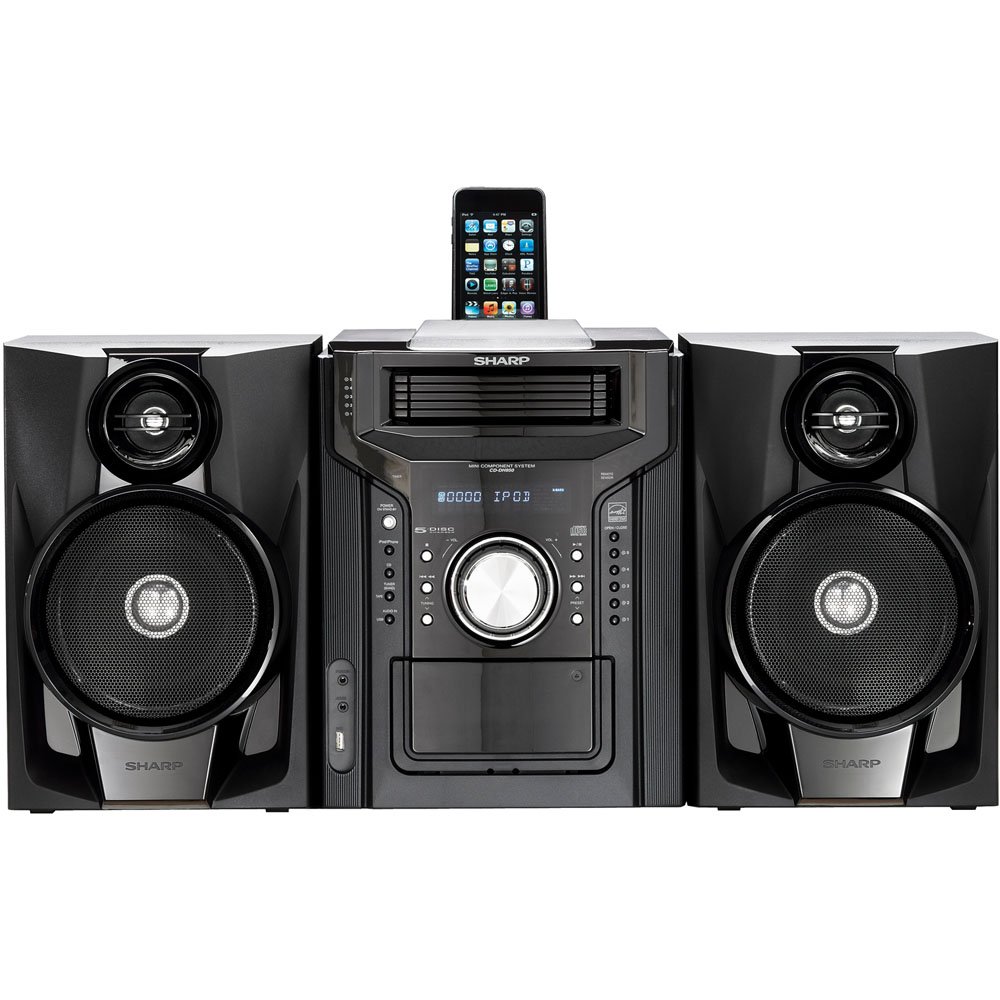
図 4.3.1: 全体 view of the Sharp CD-DH950P Mini-Component System, showing the main unit flanked by two speakers, with an iPhone docked on top of the main unit.
5. 操作手順
5.1 電源のオン/オフと音量調節
- を押す 力 前面パネルまたはリモコンのボタンを押して、ユニットの電源をオンまたはオフにします。
- 回転する 音量 フロントパネルのノブまたは ボリューム +/- リモコンのボタンを使って音量を調整します。
5.2 CD再生
This system features a 5-disc CD changer.
- を押す 開く/閉じる ボタンをクリックしてCDトレイを開きます。
- Place up to five CDs on the disc trays, label side up.
- プレス 開く/閉じる もう一度トレイを閉じます。
- を押す CD CD機能を選択するボタンです。
- を押す 再生/一時停止 ボタンをクリックして再生を開始します。
- 使用 スキップ buttons to navigate between tracks or discs.
5.3 カセットデッキの操作
- を押す TAPE OPEN/CLOSE カセットデッキを開くボタン。
- カセットテープを入れます。
- を押す テープ カセット機能を選択するボタン。
- プレス 遊ぶ 再生を開始します。
- To record, ensure the source is selected (e.g., CD, Tuner) and press the 記録 カセットデッキのボタン。
5.4 iPod/iPhone Docking
The system includes a top-mounted docking slot for compatible iPod and iPhone devices (30-pin connector).
- Carefully place your iPod or iPhone into the docking slot.
- The system will automatically switch to iPod/iPhone mode or you may need to press the iPod / iPhone ボタン。
- Use the system's controls or your device's controls to play music. The device will also charge while docked.
5.5 USB Host Playback
Connect a USB storage device containing MP3 or WMA audio fileフロントパネルの USB ポートに接続します。
- USBデバイスをUSBポートに挿入します。
- を押す USB button to select the USB function.
- 再生コントロールを使用してナビゲートして再生します files.
5.6 AM/FMチューナー
- を押す チューナー button to select AM or FM radio.
- 使用 チューニング +/- 手動で放送局を選局するためのボタン。
- 自動スキャンするには、 チューニング +/- ボタン。
- To store a preset, tune to the desired station, then press メモリ プリセット番号が続きます。
5.7オーディオ入力
Connect an external audio device (e.g., MP3 player, smartphone) to the AUDIO IN jack on the front panel using a 3.5mm stereo cable.
- Connect your device to the AUDIO IN jack.
- を押す 音声入力 button to select this source.
- 接続されたデバイスから再生を制御します。
6. メンテナンス
6.1 ユニットのクリーニング
Wipe the exterior of the unit with a soft, dry cloth. Do not use abrasive cleaners, waxes, or solvents. Ensure the unit is unplugged before cleaning.
6.2 CDとカセットのお手入れ
- Handle CDs by their edges to avoid fingerprints and scratches. Clean discs with a soft, lint-free cloth from the center outwards.
- Store cassette tapes away from strong magnetic fields and direct sunlight.
7。 トラブルシューティング
| 問題 | 考えられる原因 | 解決 |
|---|---|---|
| 電源なし | 電源コードが接続されていない、電源コンセントに障害がある | 電源コードがしっかりと差し込まれていることを確認してください。別のコンセントを試してください。 |
| 音が出ない | 音量が低すぎる、スピーカーが接続されていない、ソースが正しく選択されていない | 音量を上げる; スピーカーの接続を確認する; 正しい入力ソースを選択する |
| CDが再生されない | Disc inserted incorrectly; Disc is dirty or scratched | Insert disc correctly (label side up); Clean or replace disc |
| ラジオの受信状態が悪い | Antenna not positioned correctly; Weak signal | Adjust position of AM/FM antennas; Try auto-tuning or manual fine-tuning |
| iPod/iPhone not charging/playing | Device not properly docked; Device not compatible (e.g., newer connector) | Re-dock the device; Note that this system uses a 30-pin connector, newer devices may require an adapter (not included) |
8. 仕様
- ブランド: シャープ
- モデル: CD-DH950P
- 総出力電力: 240 Watts RMS (85W/ch FTC)
- スピーカー構成: 2.1チャンネル
- サポートされているオーディオ形式: CD、MP3、WMA
- 信号対雑音比: 100デシベル
- 対応デバイス: MP3 Player, Smartphone (via 30-pin dock or USB/Audio In)
- 寸法(長さ×幅×高さ): 27.6 x 13.6 x 13.5インチ
- 商品の重量: 24.4 ポンド
- 国際コード: 074000369863、074000369290
9. 保証情報
This product is covered by a 1-year limited warranty from the date of purchase. Please refer to the warranty card included with your product for full terms and conditions, or contact Sharp customer service for details.
10. サポート
For further assistance, technical support, or service inquiries, please contact Sharp customer service. Contact information can typically be found on the Sharp official webサイトまたは製品に付属のドキュメントをご覧ください。