
導入
This manual provides detailed instructions for the proper use and maintenance of your Casio Wave Ceptor LCW-M100DSE men's watch. Please read this manual thoroughly to ensure optimal performance and longevity of your timepiece. Keep this manual for future reference.
製品終了view
The Casio Wave Ceptor LCW-M100DSE is a sophisticated men's watch featuring both analog and digital displays. It is equipped with advanced functionalities including solar power, radio-controlled time synchronization, world time, and a chronograph. The watch is designed for durability with a stainless steel band and sapphire crystal dial window.

Image: The Casio Wave Ceptor LCW-M100DSE watch worn on a wrist, highlighting its blue dial and stainless steel bracelet.
- LED照明: A light-emitting diode (LED) illuminates the watch dial for visibility in low light conditions.
- 太陽光発電: A solar cell provides power for the watch's operation, eliminating the need for regular battery replacement.
- ワールドタイム: 世界中の主要都市および特定の地域の現在の時刻を表示します。
- バッテリレベルインジケータ: An indicator shows the current battery charge level.
設定
初期充電
Upon first use or after prolonged storage in darkness, expose the watch face to light to charge the internal battery. The watch is powered by solar energy and requires sufficient light exposure to function correctly. A full charge ensures stable operation.
無線制御による時間同期
This watch automatically receives time calibration signals to maintain accurate time. For optimal reception, place the watch near a window at night. Avoid placing it near electronic devices that may interfere with the signal. The watch will attempt to synchronize several times a day.
Setting Home City and Time Zone
To ensure correct time display and radio signal reception, set your home city (time zone). Refer to the detailed instructions in the included user manual for specific button operations to adjust your home city and daylight saving time settings.
ブレスレットの調整
The metal bracelet may require adjustment for a comfortable fit. This process involves removing or adding links. It is recommended to have this adjustment performed by a qualified jeweler or watch technician to prevent damage to the bracelet or watch.
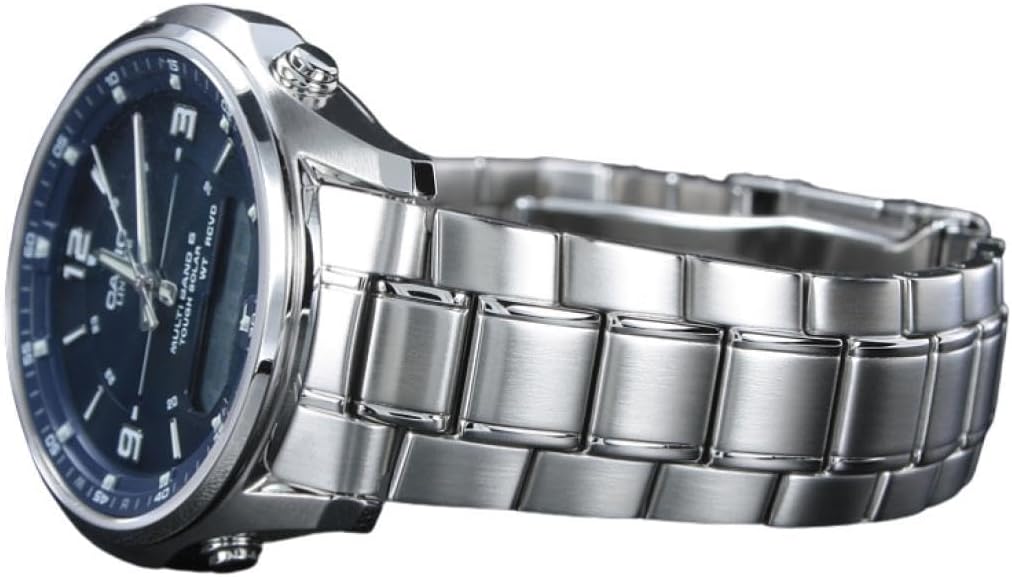
画像: サイド view of the Casio Wave Ceptor LCW-M100DSE watch, illustrating the watch profile, crown, and control buttons.
操作手順
基本的な時間管理
The watch displays time both analogically (hands) and digitally. The digital display can show the date, day of the week, or other information depending on the mode. Use the mode button (usually located on the left side) to cycle through different functions.
LED照明
Press the light button (typically on the upper right) to illuminate the watch face. The illumination duration is preset and designed for quick readability in dark environments.
ワールドタイム機能
ワールドタイムモードにアクセスして view the current time in various cities worldwide. Use the adjustment buttons to scroll through different city codes. This feature is useful for travelers or those communicating across time zones.
クロノグラフ(ストップウォッチ)
The built-in chronograph allows for precise time measurement. Enter the chronograph mode and use the designated buttons to start, stop, and reset the stopwatch function. It can measure time with accuracy up to 1/100th of a second.
アラーム機能
Set daily alarms to remind you of important events. The watch typically includes multiple alarm settings and an hourly time signal option. Ensure the alarm sound is enabled if you wish to use this feature.
バッテリー残量インジケーター
The digital display includes an indicator for the battery charge level. If the level is low, expose the watch to bright light for charging. Prolonged low battery can affect watch functions.
メンテナンス
クリーニング
Regularly wipe the watch case and band with a soft, dry cloth to remove dirt and moisture. For metal bands, a soft brush with mild soapy water can be used, followed by thorough rinsing and drying. Avoid using chemical cleaners.
耐水性
This watch has a water resistance rating of 50 meters (5 ATM), making it suitable for swimming and showering. However, it is not recommended for diving or prolonged submersion. Do not operate buttons while the watch is wet or submerged.
電源管理
To maintain optimal battery charge, expose the watch to light regularly. When not in use, store the watch in a location where it can receive light. The watch features a power-saving function that automatically enters a sleep state when left in darkness for an extended period, conserving energy.
環境への配慮
Avoid exposing the watch to extreme temperatures, direct sunlight for very long periods (which can cause overheating), or strong magnetic fields. Strong magnetic fields can interfere with the watch's timekeeping accuracy and radio signal reception.
トラブルシューティング
時刻同期の問題
- 信号受信不良: Ensure the watch is placed in an open area, away from buildings, electronic devices, or metal objects that might block the signal. Try placing it near a window.
- Manual Synchronization: If automatic synchronization fails, attempt a manual time calibration. Refer to your detailed user manual for instructions on initiating manual reception.
時刻表示が正しくない
- 居住都市の設定: Verify that your home city (time zone) is correctly set.
- 磁気干渉: If the watch has been exposed to strong magnetic fields, the hands might become misaligned. Perform a hand home position correction. Consult the full manual for this procedure.
Functions Not Working
- バッテリー残量低下: Check the battery level indicator. If low, expose the watch to bright light for several hours to charge.
- リセット: In some cases, a full reset of the watch may resolve issues. This typically involves holding down specific buttons. Refer to your detailed manual for reset procedures.
仕様
| 特徴 | 詳細 |
|---|---|
| モデル番号 | LCW-M100DSE-2AER |
| ブランド | カシオ |
| 表示タイプ | Analog - Digital |
| 移動タイプ | 石英 |
| 特集 | Chronograph, Solar Powered, World Time, Radio Controlled |
| 電源 | 太陽光発電 |
| 耐水深度 | 50メートル(5気圧) |
| ケース素材 | アクリル |
| 文字盤窓素材タイプ | サファイア |
| バンド素材タイプ | ステンレス鋼 |
| バンドカラー | 銀 |
| 文字盤カラー | 青 |
| ケース直径 | 40ミリメートル |
| ケースの厚さ | 9ミリメートル |
| アイテム重量 | 115.5グラム |
| 含まれるコンポーネント | ユーザーマニュアル、保証書 |
保証とサポート
保証情報
Your Casio Wave Ceptor LCW-M100DSE watch comes with a limited warranty. Please refer to the included warranty card for specific terms, conditions, and duration of coverage. Retain your proof of purchase for warranty claims.
カスタマーサポート
For any technical assistance, repairs, or inquiries not covered in this manual, please contact Casio customer service. Contact information can typically be found on the warranty card or the official Casio website for your region. When contacting support, please have your watch model number (LCW-M100DSE-2AER) and purchase details available.


