
導入
The ADATA S102PRO is a high-performance USB 3.0 flash drive designed for fast and reliable data storage and transfer. Its durable design and high-speed interface make it ideal for everyday use, allowing you to carry important files, documents, photos, and videos with ease.
設定
Follow these steps to begin using your ADATA S102PRO USB Flash Drive:
- USB ポートを識別します。 Locate an available USB port on your computer. For optimal performance, use a USB 3.0 port (often colored blue internally). The ADATA S102PRO is backward compatible with USB 2.0 ports, but data transfer speeds will be limited to USB 2.0 rates.
- キャップを外す: Carefully remove the protective cap from the USB flash drive to expose the USB connector.
- ドライブを挿入します: Insert the USB connector firmly into the USB port on your computer. Ensure it is inserted correctly; do not force it.
- システム認識: Your operating system (Windows, macOS, Linux) should automatically detect and install the necessary drivers. A notification may appear indicating that the device is ready for use. The drive will typically appear as a removable disk or volume in your file エクスプローラ。
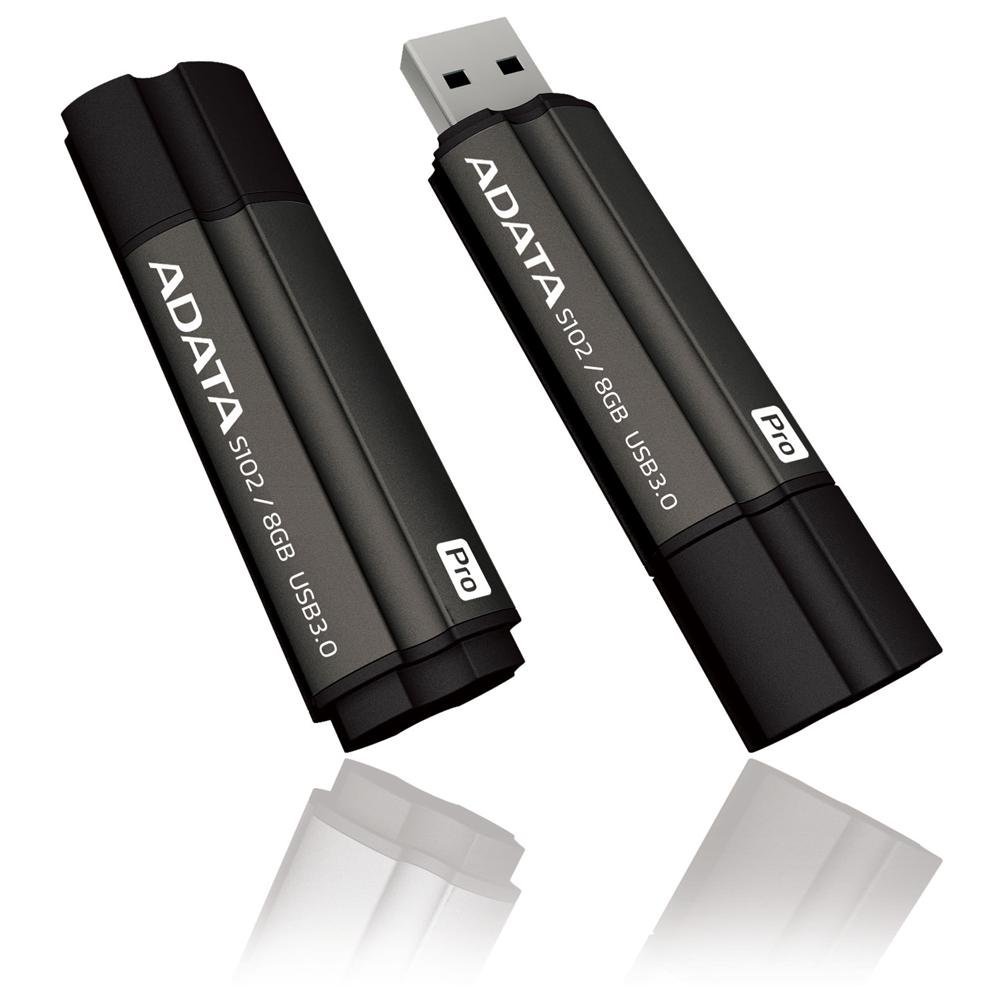
Image: The ADATA S102PRO USB Flash Drive shown with its protective cap on and with the cap removed, revealing the USB 3.0 connector. This illustrates the physical appearance and how to prepare the drive for insertion.
オペレーティング
Once the ADATA S102PRO is recognized by your computer, you can begin transferring files:
- ドライブへのアクセス:
- ウィンドウズ: Open "This PC" or "My Computer" and locate the drive listed under "Devices and drives" (e.g., "Removable Disk" or a drive letter like E:).
- MacOSの: The drive icon will appear on your desktop or in the Finder sidebar under "Locations."
- 転送中 Files:
- コピーするには files に the flash drive, drag and drop them from your computer's folders into the flash drive's window.
- コピーするには files から the flash drive, drag and drop them from the flash drive's window to a folder on your computer.
- You can also use the standard copy (Ctrl+C / Command+C) and paste (Ctrl+V / Command+V) functions.
- ドライブを安全に取り外す: It is crucial to safely eject the flash drive before physically removing it to prevent data corruption.
- ウィンドウズ: Click the "Safely Remove Hardware and Eject Media" icon in the system tray (bottom-right corner), then select your flash drive and click "Eject." Wait for the "Safe to Remove Hardware" message.
- MacOSの: Drag the drive icon from the desktop to the Trash, or click the Eject button next to the drive name in the Finder sidebar. Wait for the icon to disappear before removing the drive.
メンテナンス
Proper care will help ensure the longevity and reliability of your ADATA S102PRO USB Flash Drive:
- コネクタを保護する: Always keep the protective cap on the USB connector when the drive is not in use to prevent dust, dirt, and physical damage.
- 極端な状況を避ける: Do not expose the drive to extreme temperatures, direct sunlight, high humidity, or strong magnetic fields.
- 取り扱いにはご注意ください: ドライブを落としたり、強い衝撃を与えたりしないでください。
- Do Not Remove During Transfer: Never unplug the drive while data is being read from or written to it. Always follow the safe removal procedure.
- 定期的なバックアップ: While flash drives are reliable, it is always recommended to back up critical data to another storage device or cloud service.
トラブルシューティング
If you encounter issues with your ADATA S102PRO, try the following solutions:
- ドライブが認識されません:
- ドライブが USB ポートに完全に挿入されていることを確認します。
- コンピュータの別のUSBポートを試してください。
- コンピュータ固有の問題を排除するために、別のコンピュータでドライブをテストします。
- ドライブがリストに表示されていない場合でも、コンピュータのデバイスマネージャー(Windows)またはシステム情報(macOS)でドライブがリストされているかどうかを確認してください。 File エクスプローラー/ファインダー。
- 転送速度が遅い:
- Ensure you are connected to a USB 3.0 port for optimal performance. USB 2.0 ports will limit speeds.
- 多くの小さな filesは、いくつかの大きなデータを転送するよりも遅くなることがあります files.
- システム リソースを使用しているか、ディスク操作を実行している可能性のある他のアプリケーションを閉じます。
- 書き込みできません Fileドライブへ:
- ドライブがいっぱいになっていないか確認してください。不要なものを削除してください。 fileまたは別の場所に転送します。
- 確実に file system (e.g., FAT32, NTFS, exFAT) is compatible with your operating system and allows writing. If formatted as NTFS on macOS, you may only have read access without third-party software.
- Check for any software-based write protection or permissions issues on your computer.
仕様
| ブランド | アデータ |
| モデル名 | S102プロ |
| モデル番号 | AT806-4G-CPK |
| メモリストレージ容量 | 4ギガバイト |
| ハードウェアインターフェイス | USB 3.0(USB 2.0との下位互換性あり) |
| メーカー | A-DATA TECHNOLOGY (USA) CO. L |
| 欧州連合 | 842243005080 |
| ASIN | B004AVOGW8 |
保証とサポート
For detailed warranty information, product registration, and technical support, please visit the official ADATA webサイト。通常、サポート リソース、FAQ、カスタマー サービスの連絡先情報がここにあります。
ADATA公式 Webサイト: www.adata.com