
1. はじめに
The Antec TruePower TPQ-1200 is a high-performance 1200-watt power supply designed for demanding computer systems. It features an 80 PLUS Silver certification, indicating high energy efficiency, and provides stable power delivery through its six +12V rails. This manual provides essential information for the safe installation, operation, and maintenance of your TPQ-1200 power supply.
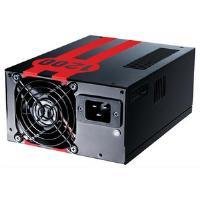
Image 1.1: The Antec TruePower TPQ-1200 Power Supply unit, showcasing its design and modular connectors.
2. 安全情報
Please read and understand all safety instructions before installing or operating the power supply. Failure to do so may result in personal injury or damage to your equipment.
- Always disconnect the power cord from the wall outlet before installing, removing, or cleaning the power supply.
- この電源装置はパソコン専用です。他の用途には使用しないでください。
- 電源を開けないでください。asing. 高ボラティリティtag内部には部品が備わっており、ユーザーが修理できる部品はありません。asing の場合、保証は無効になります。
- コンピュータ システムが適切に接地されていることを確認してください。
- 高湿度または極端な温度環境で電源装置を操作しないでください。
- Keep the power supply away from liquids and sources of heat.
3. パッケージ内容
パッケージに次のアイテムが含まれていることを確認してください。
- Antec TruePower TPQ-1200 Power Supply Unit
- Modular Cable Set (PCIe, SATA, Molex, Floppy)
- AC電源コード
- 取り付けネジ
- ユーザーマニュアル(このドキュメント)
If any items are missing or damaged, please contact your retailer or Antec customer support.
4. 特徴
The Antec TruePower TPQ-1200 power supply offers advanced features for reliable and efficient performance:
- 1200ワットの連続電力: 提供する ample power for high-end gaming and workstation systems.
- 80 PLUS Silver Certified: Achieves up to 88% efficiency, reducing heat generation and operating costs.
- Six +12V Rails: Delivers stable and clean power to critical components.
- 高度なケーブル管理: Semi-modular design allows for cleaner builds and improved airflow.
- PowerCache High Performance Capacitors: Enhances stability and transient response.
- Ultra-Quiet Pulse Width Modulation (PWM) Fan: Provides efficient cooling with minimal noise.
- Industrial Grade Protection Circuitry: 過電流保護(OCP)、過電圧保護(V)を含むtage Protection(OVP)、Under Voltage Protection (UVP), Short Circuit Protection (SCP), Over Power Protection (OPP), and Over Temperature Protection (OTP).
5. セットアップとインストール
Follow these steps carefully to install your Antec TruePower TPQ-1200 power supply.
5.1インストール前のチェックリスト
- Ensure your computer case supports an ATX power supply.
- 必要なツールを用意します: プラスドライバー。
- Unplug your computer from the wall outlet and discharge any residual power by pressing the power button.
5.2 電源の取り付け
- Carefully place the power supply into the designated PSU bay in your computer case. Ensure the fan is oriented correctly (typically facing down for bottom-mounted PSUs, or according to case design for top-mounted).
- 電源装置のネジ穴をケースのネジ穴に合わせます。
- Secure the power supply using the provided mounting screws. Do not overtighten.
5.3電源ケーブルの接続
Connect the necessary cables to your motherboard and components. The TPQ-1200 features both fixed and modular cables.
- 24-Pin ATX Motherboard Power: Connect the main 24-pin connector to the corresponding port on your motherboard. Ensure it clicks into place.
- 8-Pin EPS12V (CPU) Power: Connect the 8-pin (or 4+4 pin) EPS12V connector to the CPU power port on your motherboard.
- PCIe (Graphics Card) Power: For graphics cards requiring additional power, connect the appropriate 6-pin or 6+2 pin PCIe modular cables from the power supply to your graphics card(s).
- SATA電源: Connect SATA modular cables to your SATA hard drives, SSDs, and optical drives.
- Molex (Peripheral) Power: Use Molex modular cables for older peripherals or case fans that require this connector type.
- ケーブル管理 ケーブルをマザーボード トレイの後ろやケース内の他の指定された場所にきちんと配線して、空気の流れと美観を向上させます。
5.4 初回電源投入
- すべての接続が安全であることを確認します。
- AC 電源コードを電源に接続し、次にアースされた壁のコンセントに接続します。
- 電源装置の背面にある電源スイッチを「ON」(I) の位置に切り替えます。
- コンピュータの電源を入れます。
6. 操作手順
The Antec TruePower TPQ-1200 is designed for continuous operation within its specified limits. Ensure adequate ventilation around your computer case to prevent overheating. The intelligent PWM fan will adjust its speed based on the power supply's temperature to maintain optimal cooling and noise levels.
Always shut down your computer properly through the operating system before turning off the power supply switch or unplugging the AC cord.
7. メンテナンス
定期的なメンテナンスを行うことで、電源装置の寿命が長くなり、最適なパフォーマンスが確保されます。
- ダストクリーニング: Periodically (e.g., every 6-12 months), disconnect the power supply from the wall outlet and use compressed air to gently clean dust from the fan grille and ventilation openings. Do not open the power supply casing.
- ケーブル検査: 定期的にすべての電源ケーブルの接続を確認し、安全で損傷がないことを確認してください。
8。 トラブルシューティング
電源に問題が発生した場合は、次のトラブルシューティング ガイドを参照してください。
| 問題 | 考えられる原因 | 解決 |
|---|---|---|
| コンピュータの電源が入りません。 | AC power cord not connected or loose. Power supply switch is OFF. Faulty power supply. | Ensure AC cord is firmly connected. Flip PSU switch to 'ON' (I). Test with another power supply if possible. |
| システムは電源が入りますが、すぐにシャットダウンします。 | Overload, short circuit, or overheating. | Check for short circuits (e.g., loose screws). Ensure adequate ventilation. Disconnect non-essential components to check for overload. |
| システムが不安定になったり、突然再起動したりします。 | Insufficient power, faulty component, or power supply issue. | Verify all power connectors are secure. Ensure total system wattage does not exceed PSU capacity. Test components individually if possible. |
| PSU からのファンの騒音が大きい。 | Dust accumulation, fan malfunction, or high load. | Clean dust from the fan grille. If noise persists and is excessive, contact support. |
If troubleshooting steps do not resolve the issue, contact Antec customer support for further assistance.
9. 仕様
Detailed technical specifications for the Antec TruePower TPQ-1200 power supply:
- モデル名: TruePower TPQ-1200
- 出力ワットtage: 1200ワット
- フォームファクター: AT12V ...
- コネクタタイプ: ATTX
- 効率: 80 PLUS Silver Certified
- 冷却方法: Air (PWM Fan)
- ファン数: 1
- 対応デバイス: パソコン
- 商品の重量: 4.96ポンド(2.25kg)
- パッケージ寸法: 12.91 x 9.84 x 5.59 インチ (32.8 x 25 x 14.2 cm)
- 発売日: 17年2012月XNUMX日
10. 保証とサポート
保証情報および技術サポートについては、Antecの公式ウェブサイトをご覧ください。 web公式サイトをご覧いただくか、カスタマーサービスに直接お問い合わせください。保証条件は地域や購入日によって異なる場合があります。
アンテック公式 Webサイト: www.antec.com