
1. はじめに
This manual provides comprehensive instructions for the safe and effective operation, maintenance, and troubleshooting of your Midtronics EXP-1000-HD-AMP Battery and Electrical System Analyzer. This device is designed for testing 6V and 12V batteries, including conventional automotive, Group 31, other commercial batteries, AGM, and Gel types. It also tests 12V and 24V starting and charging systems, making it suitable for heavy-duty and fleet applications.
2. 安全情報
Always observe the following safety precautions to prevent injury or damage to the analyzer or vehicle:
- Wear appropriate eye protection and protective clothing when working with batteries.
- Ensure proper ventilation in the work area to disperse any battery gases.
- Avoid sparks or open flames near batteries, as they can produce explosive gases.
- 通電中の電気部品には触れないでください。
- Keep the analyzer dry and clean. Do not expose it to rain or moisture.
- Refer to the vehicle manufacturer's service manual for specific safety procedures related to the vehicle's electrical system.
3.製品オーバーview
The Midtronics EXP-1000-HD-AMP is a robust diagnostic platform equipped with an inductive amp-clamp for heavy-duty applications. It features a clear display and intuitive controls for efficient testing.
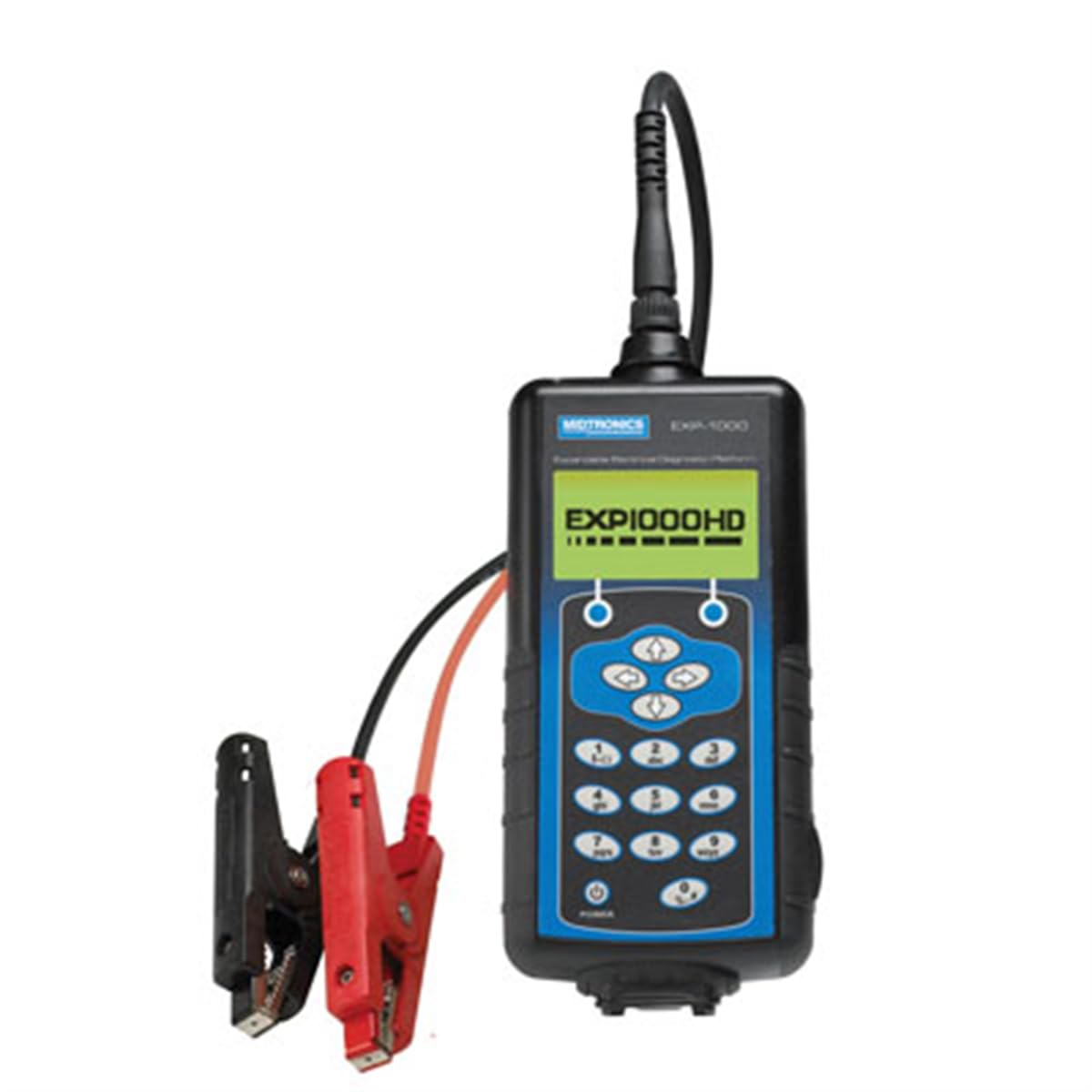
Figure 1: Midtronics EXP-1000-HD-AMP Battery and Electrical System Analyzer. The device features a digital display, control buttons, and attached cables with red and black clampバッテリー端子に接続するためのものです。
4. セットアップ
Before operating the analyzer, ensure it is properly prepared for use.
- Inspect the Analyzer: Check the analyzer and its cables for any signs of damage. Do not use if damaged.
- バッテリー端子を清掃する: Ensure battery terminals are clean and free of corrosion for accurate readings.
- Clを接続しますamps:
- 接続する 赤陽性(+)clamp バッテリーのプラス端子に接続します。
- 接続する 黒マイナス(-)clamp バッテリーのマイナス端子へ。
- 電源オン: The analyzer will typically power on automatically once connected to a battery.
5. 操作手順
The EXP-1000-HD-AMP offers various testing capabilities for batteries and electrical systems.
5.1. Battery Test Routine
This routine is designed for multiple-battery vehicles, allowing you to pack-test up to 6 batteries in parallel without disconnection.
- Select Battery Test: From the main menu, use the navigation buttons to select the 'Battery Test' option and press Enter.
- バッテリータイプを選択: Choose the appropriate battery type (e.g., Conventional, AGM, Gel) from the options displayed.
- Enter Battery Rating: Input the battery's Cold Cranking Amps (CCA) or other specified rating as indicated on the battery label.
- 画面上の指示に従ってください: The analyzer will guide you through the testing process, providing instructions for each step.
- Review 結果: The display will show the battery's condition (e.g., Good, Recharge, Replace) and other relevant parameters.
5.2. Electrical System Test (Starting and Charging)
This test evaluates the vehicle's starting and charging systems (12V and 24V).
- Select System Test: From the main menu, select 'System Test' and press Enter.
- Starting System Test: Follow prompts to crank the engine. The analyzer will measure cranking voltage と現在。
- 充電システムテスト: Follow prompts to run the engine at specified RPMs. The analyzer will measure alternator output, ripple, and voltage規制。
- Review 結果: The analyzer will provide a diagnosis of the starting and charging system performance.
5.3. Cable-Drop Test
This test simultaneously calculates the voltage drop across the positive and negative sides of any circuit and the total circuit drop without requiring the engine to run.
- Select Cable-Drop Test: Navigate to and select the 'Cable-Drop Test' option.
- 回路に接続: Follow the on-screen instructions to connect the analyzer's clamps to the specific circuit points you wish to test.
- テストの開始: Press the designated button to start the measurement.
- 結果を解釈する: The display will show voltage drop values for both positive and negative sides, as well as the total drop, helping to identify resistance issues in the wiring.
6. メンテナンス
Proper maintenance ensures the longevity and accuracy of your analyzer.
- クリーニング: Wipe the analyzer's casingを柔らかく、damp 布で拭いてください。研磨剤や溶剤は使用しないでください。
- ケーブル検査: ケーブルとクランプを定期的に点検するamps for cuts, fraying, or corrosion. Replace damaged components immediately.
- ストレージ: Store the analyzer in a clean, dry environment away from extreme temperatures and direct sunlight.
- 較正: Refer to Midtronics support for information on recommended calibration intervals.
7。 トラブルシューティング
If you encounter issues with your analyzer, refer to the table below for common problems and solutions.
| 問題 | 考えられる原因 | 解決 |
|---|---|---|
| アナライザーの電源が入りません。 | Poor connection to battery; battery completely discharged. | clを確認してくださいampしっかりと接続されています。バッテリーの容量を確認してください。tage with a voltmeter; if extremely low, charge battery before testing. |
| 不正確なテスト結果。 | Corroded battery terminals; incorrect battery type/rating entered. | Clean battery terminals. Verify correct battery type and rating input. |
| エラーメッセージが表示されます。 | 特定のエラー状態。 | Refer to the analyzer's on-screen help or contact Midtronics support with the specific error code. |
8. 仕様
- 電池のタイプ: 6V and 12V (Conventional Automotive, Group 31, Commercial, AGM, Gel)
- システム巻tage: 12V and 24V starting and charging systems
- 寸法: 19.5 x 16.5 x 6.8インチ
- 商品の重量: 1.6 ounces (Note: Product description states 12.75 pounds for overall product weight, 1.6 ounces for item weight. Please verify actual device weight.)
- メーカー: Midtronics
- モデル番号: EXP-1000-HD-AMP
9. 保証情報
The Midtronics EXP-1000-HD-AMP Battery and Electrical System Analyzer typically comes with a limited warranty covering repairs for up to one year from the date of purchase. This warranty generally covers defects in materials and workmanship under normal use. For specific terms, conditions, and to initiate a warranty claim, please retain your proof of purchase and contact Midtronics customer support.
10. サポート
For technical assistance, service, or questions regarding your Midtronics EXP-1000-HD-AMP analyzer, please visit the official Midtronics website or contact their customer support department. Ensure you have your model number and any relevant purchase information available when seeking support.
Midtronics Official Webサイト: www.midtronics.com