1. הקדמה
This manual provides detailed instructions for the setup, operation, maintenance, and troubleshooting of your ATTACK SHARK X66 Gasket Wireless Mechanical Keyboard. Please read this manual thoroughly before using the product to ensure optimal performance and longevity.

תמונה: מלמעלה למטה view of the ATTACK SHARK X66 Gasket Wireless Mechanical Keyboard, showcasinהפריסה הקומפקטית ועיצוב המקשים שלה.
2. המוצר נגמרview
2.1 תכונות עיקריות
- עיצוב קומפקטי של 60%: Features 66 keys and a volume knob, optimizing desktop space while maintaining portability.
- Upgraded Gasket Mount: Incorporates 5 layers of sound insulation (PORON Sandwich Foam, Foamed IXPE Under Shaft Pads, PET Acoustic Premium Pads, Shaft Seat Sound Deadening Foam, Customized Bottom Foams) for reduced noise and a smooth typing experience.
- קישוריות משולשת: תומך ב-Bluetooth, אלחוטי 2.4GHz וחיבורים קוויים USB-C.
- Multi-Device Tasking: Three Bluetooth channels (FN+Q/FN+W/FN+E) for efficient switching between devices.
- סוללה עמידה לאורך זמן: Equipped with a 3000mAh large-capacity rechargeable battery.
- Hot Swappable Switches: Full hot-swappable design compatible with 3-pin/5-pin switches, featuring pre-lubed Strawberry switches for a creamy sound and smooth keystroke.
- תאורת RGB דינמית: Offers 9 backlight colors and 18 lighting effects with 16 million LED colors, customizable via software.
- כיסויי מפתח עמידים: Features side-printed gradient PBT keycaps that are resistant to oiling, non-slip, and wear-resistant.

תמונה: מעלview of the X66 keyboard highlighting key features such as RGB Backlight, Triple Mode Connectivity, Hot Swappable switches, PBT Keycaps, 60% Layout, 3000mAh Battery, and Gasket Structure.
2.2 תכולת החבילה
- ATTACK SHARK X66 Mechanical Keyboard
- USB-C Cable (1.5 meters)
- 2-in-1 Key Puller and Switch Puller
- Additional Strawberry Switches (2 pieces)
- מדריך למשתמש
3. התקנה
3.1 מצבי קישוריות
The X66 keyboard supports three connection modes: 2.4GHz wireless, Bluetooth, and USB-C wired.

Image: Diagram illustrating the three connectivity modes: Bluetooth 5.0, 2.4GHz Wireless with a USB dongle, and Type-C Wired connection.
- חיבור אלחוטי 2.4GHz:
- אתר את מקלט ה-USB 2.4GHz.
- חבר את המקלט ליציאת USB זמינה במחשב שלך.
- On the keyboard, slide the mode switch to the '2.4G' position. The keyboard will automatically connect.
- חיבור Bluetooth:
- במקלדת, הסט את מתג המצבים למצב 'BT'.
- כדי להיכנס למצב התאמה, לחץ והחזק FN + Q, FN + W., או FN + E. for 3-5 seconds until the corresponding key's backlight flashes rapidly.
- On your device (PC, Mac, Tablet), search for Bluetooth devices and select 'ATTACK SHARK X66' to pair.
- Once paired, the key's backlight will stop flashing and remain steadily lit. You can pair up to three Bluetooth devices and switch between them using FN + Q/W/E.
- חיבור חוטי USB-C:
- חבר את כבל ה-USB-C המצורף ליציאת ה-USB-C של המקלדת.
- חבר את הקצה השני של הכבל ליציאת USB זמינה במחשב שלך.
- המקלדת תעבור אוטומטית למצב קווי ותתחיל להיטען.
3.2 מתג מערכת הפעלה
The keyboard features a dedicated switch for Windows and Mac operating systems.
- Locate the 'Win/Mac' switch on the side or back of the keyboard.
- Slide the switch to the appropriate operating system setting for optimal key mapping.
4. הוראות הפעלה
4.1 פונקציונליות כפתור עוצמת הקול
The aluminum CNC metal knob provides convenient control over audio.
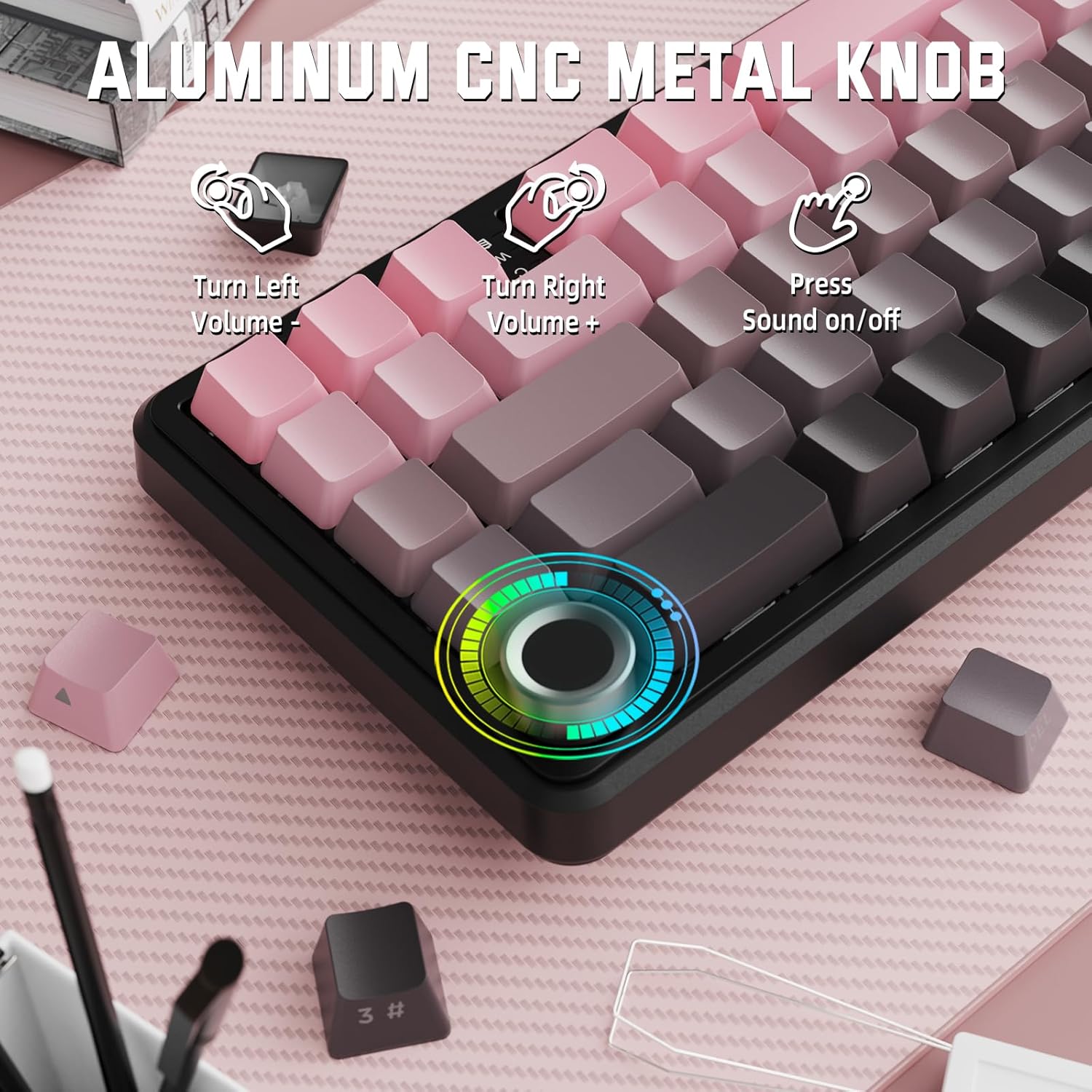
Image: Close-up of the volume knob with icons indicating its functions: Turn Left (Volume -), Turn Right (Volume +), Press (Sound on/off).
- פונה שמאלה: הורד נפח.
- פנה ימינה: הגדל את הווליום.
- לִלְחוֹץ: השתקה/ביטול השתקה של אודיו.
4.2 Function Key Combinations (FN Key)
Due to the compact 60% layout, some functions are accessed via the FN key.
| קוֹמבִּינַצִיָה | פוּנקצִיָה |
|---|---|
| FN + Q/W/E | Switch between Bluetooth devices 1, 2, and 3 |
| FN + Backspace | בדוק את קיבולת הסוללה |
| FN + 1-0 (top row) | F1-F10 functions (e.g., FN+1 for F1) |
| FN + -/= | F11/F12 functions |
| FN + \| | לִמְחוֹק |
| FN + P | מסך הדפסה |
| FN + [ { | בַּיִת |
| FN + ] } | סוֹף |
| FN + ; : | עמוד למעלה |
| FN + ' " | עמוד למטה |
| FN + מקשי חצים | Navigation (e.g., FN+Up Arrow for Page Up) |
5. התאמה אישית
5.1 הגדרות תאורת RGB אחורית
The keyboard features dynamic RGB backlighting with multiple effects and colors.

Image: Visual representation of RGB backlight controls including turning on/off, changing lighting mode, speed, direction, brightness, and color, often in combination with the FN key.
- Turn on/off Lighting / Power Saving Mode: Specific key combination (refer to keyboard legends or software).
- מצב תאורה: Cycle through 18 lighting effects.
- מהירות תאורה: כוונן את מהירות אפקטי התאורה הדינמיים.
- כיוון תאורה: Change the direction of certain lighting effects.
- בהירות תאורה: כוונן את עוצמת התאורה האחורית.
- צבע תאורה: Select from 9 preset backlight colors or customize via software.
5.2 תכנות תוכנה
For advanced customization of RGB modes, macros, and key remapping, dedicated software is available.
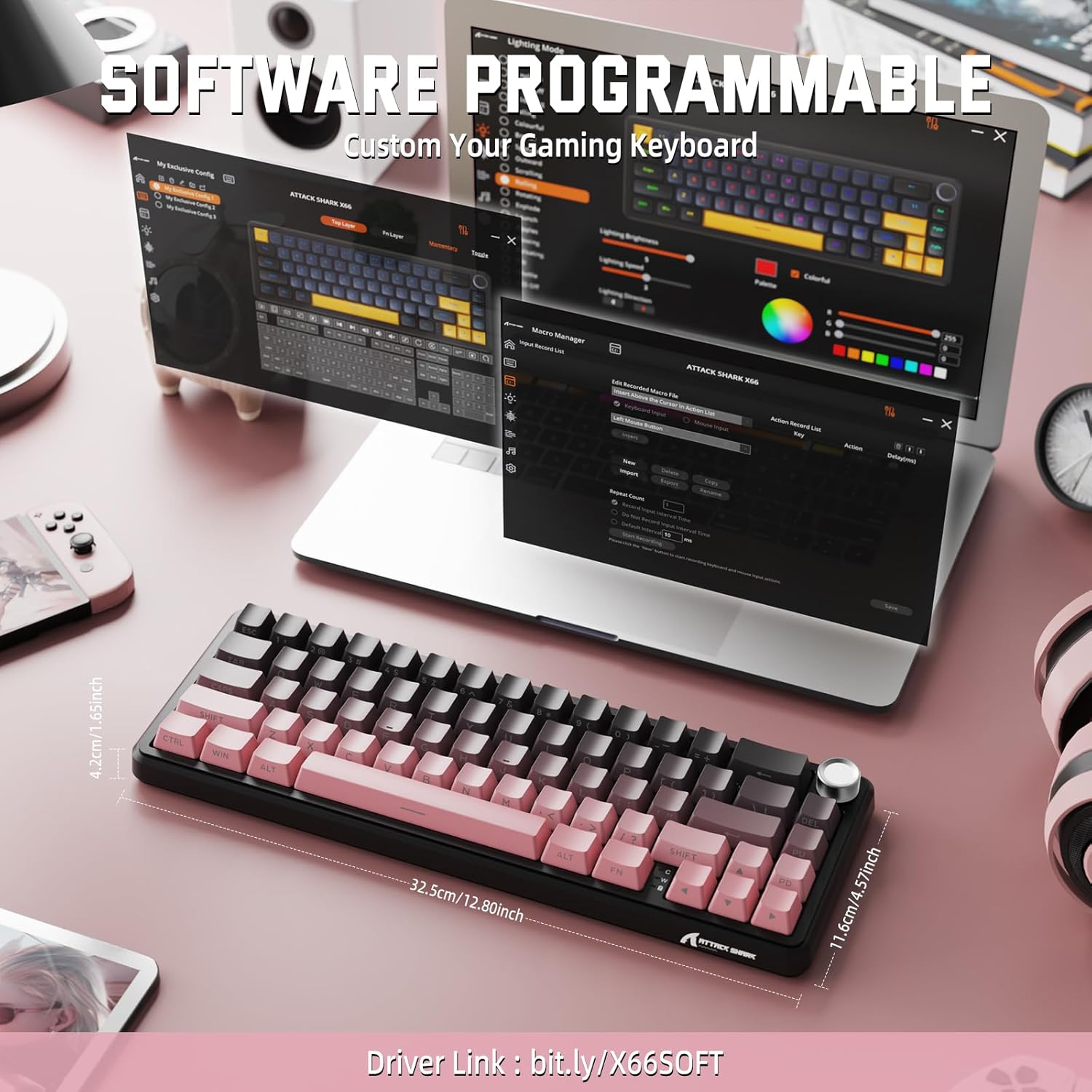
Image: Screenshot of the keyboard's software interface, showing options for custom key assignments, macro recording, and RGB lighting customization. A driver link is provided for download.
Download the official software from the manufacturer's webאתר. התוכנה מאפשרת לך:
- התאמה אישית של אפקטים וצבעי תאורת RGB.
- Program macros for complex key sequences.
- מיפוי מחדש של מקשים בודדים לפונקציות שונות.
- צור ושמור מספר רב של מקצועניםfileעבור יישומים או משחקים שונים.
6. תחזוקה
6.1 ניקוי המקלדת
- נתק את המקלדת מכל מקורות החשמל לפני ניקויה.
- השתמש במטלית רכה נטולת מוך מעט דampנגב את מכסי המקשים והמארז במים או בתמיסת ניקוי עדינה.
- עבור אבק ופסולת בין המקשים, השתמש באוויר דחוס.
- הימנעו משימוש בכימיקלים חזקים, חומרים שוחקים או ממסים.
6.2 Hot Swappable Switch Replacement
The keyboard's hot-swappable design allows for easy switch replacement without soldering.

Image: Illustration showing how to remove and insert mechanical switches on the X66 keyboard, highlighting compatibility with 3-pin and 5-pin switches.
- השתמש במושך מכסה המקשים המצורף כדי להסיר בעדינות את מכסה המקשים הרצוי.
- השתמש במשיכת המתג המצורפת כדי לאחוז בזהירות בקליפסים העליונים והתחתונים של המתג ולמשוך אותו ישר למעלה.
- יישר את הפינים של המתג החדש עם החורים במעגל המודפס. ודא שהפינים ישרים כדי למנוע כיפוף.
- לחץ בעדינות את המתג החדש למקומו עד שיישמע נקישה מאובטחת.
- חבר מחדש את מכסה המקשים.
6.3 ניהול סוללה
The keyboard is equipped with a 3000mAh rechargeable battery.

Image: Visual guide on how to check the battery capacity using FN + Backspace, showing different battery level indicators (30%, 50%, 100%) with corresponding key light patterns.
- טְעִינָה: Connect the keyboard via the USB-C cable to a computer or a USB power adapter. The charging indicator will show the charging status.
- בדיקת רמת הסוללה: לִלְחוֹץ FN + Backspace to display the current battery capacity via the key backlights.
- חיי סוללה: A full charge provides long-lasting usage, but actual duration varies based on RGB lighting usage and connection mode.
7. פתרון תקלות
| בְּעָיָה | סיבה אפשרית | פִּתָרוֹן |
|---|---|---|
| המקלדת לא מגיבה | Low battery, incorrect connection mode, driver issue. | Charge the keyboard. Ensure the mode switch is set correctly (2.4G, BT, or Wired). Reconnect the USB receiver/cable. Re-pair Bluetooth. Try a different USB port. |
| חיבור בלוטות' לא יציב | הפרעות, מרחק, סוללה חלשה. | Ensure no strong interference sources nearby. Move closer to the device. Charge the keyboard. Re-pair the Bluetooth connection. |
| אלחוטי 2.4GHz לא מתחבר | Receiver not plugged in, incorrect mode, interference. | Ensure the 2.4GHz receiver is securely plugged in. Set the keyboard mode switch to '2.4G'. Try a different USB port for the receiver. |
| תאורת RGB לא עובדת או שגויה | Lighting settings, software issue. | Check lighting control key combinations (FN + lighting keys). Ensure software is installed and updated. Reset lighting settings via software. |
| מפתחות לא נרשמים או מקלידים פעמיים | מתג פגום, לכלוך מתחת למכסה המקשים. | Remove keycap and clean around the switch. If issue persists, replace the switch using the provided switch puller and spare switches. |
| כפתור עוצמת הקול לא מתפקד | Software conflict, physical obstruction. | Ensure no software is overriding media controls. Check for any physical debris around the knob. Restart the computer. |
8. מפרטים
| תכונה | פְּרָט |
|---|---|
| מספר דגם | X66 |
| מַעֲרָך | 66 Keys, 60% Compact QWERTY |
| קישוריות | Bluetooth (5.0), 2.4GHz Wireless, USB-C Wired |
| מתגים | Hot Swappable (3-pin/5-pin compatible), Pre-lubed Strawberry Mechanical Switches |
| מפתחות מפתחות | Side-printed Gradient PBT |
| תאורה אחורית | RGB (16+ Million Colors, 9 preset colors, 18 effects) |
| קיבולת סוללה | 3000mAh |
| מכשירים תואמים | Windows, Mac OS, Laptop, PC, Tablet |
| חוֹמֶר | Polybutylene Terephthalate, Polycarbonate |
| משקל פריט | 2 פאונד (כ-0.91 ק"ג) |
| מידות חבילה | 14.02 x 6.54 x 2.05 אינץ' (כ-35.6 x 16.6 x 5.2 ס"מ) |
| יַצרָן | לתקוף כריש |
9. אחריות ותמיכה
למידע על אחריות ותמיכה טכנית, אנא עיינו באתר הרשמי של ATTACK SHARK. webאתר או צור קשר עם הקמעונאי שלך. שמור את קבלת הרכישה שלך לצורך תביעות אחריות.
יַצרָן: לתקוף כריש
מוֹכֵר: MAGIC-REFINER US
10. סרטון מוצר
סרטון: סרטון רשמי של מוצרasing the features and design of the ATTACK SHARK X66 Gasket Wireless Mechanical Keyboard, including its compact size, RGB lighting, hot-swappable switches, and multi-mode connectivity. The video highlights the keyboard's aesthetic appeal and functional aspects.