
1. הקדמה
This manual provides essential information for the safe and efficient operation of your Cantonape 1500W/3000W (Peak) DC 24V to 110V/120V AC Power Inverter. Please read all instructions carefully before use and retain this manual for future reference.
מידע בטיחות חשוב:
- ודא אוורור נאות סביב המהפך.
- Do not expose the inverter to water or excessive moisture.
- Avoid operating the inverter near flammable materials.
- חבר תמיד את הממיר למקור מתח של 24 וולט DC.
- נתק את הממיר ממקור החשמל כאשר אינו בשימוש.
2. תכונות מוצר
- פלט רב עוצמה: Converts DC 24V to AC 110V/120V 60Hz. Provides 1500 Watts continuous modified sine wave power and 3000 Watts peak power.
- טעינה רב-תכליתית: Features 2 AC outlets and 2 USB ports (Dual 3.1A) for multi-purpose charging.
- יעילות גבוהה: Conversion efficiency greater than 90%.
- תצוגת LED חכמה: מציג עוצמת קלט/פלטtage and output power in normal operation. Shows error codes during abnormal states.
- מיגון רב: Includes 6 types of protection: Overload, Short Circuit, Overheat, Reverse Polarity, Under Voltage, and Over Voltage.
- עיצוב עמיד: Features a durable aluminum body for advanced protection and efficient cooling. Built-in temperature control cooling fan. Isolated Ground Neutral.
- יישום רחב: Ideal for charging laptops, fans, refrigerators, game consoles, Kindles, TVs, Christmas lights, breast pumps. Suitable for vacations, work trips, home use, outdoor activities, and camping.
3. תכולת החבילה
- Cantonape 1500W/3000W (Peak) DC 24V to 110V/120V AC Power Inverter
- כבלי סוללה (אדום ושחור)
- מדריך הוראות
4. התקנה
Follow these steps to properly set up your power inverter:
- הכן את הממיר: Place the inverter on a stable, dry, and well-ventilated surface. Ensure there is sufficient space around it for proper airflow to the cooling fan.
- חיבור כבלי סוללה:
- Identify the positive (+) and negative (-) terminals on the inverter and your 24V DC battery.
- Connect the red battery cable to the positive (+) terminal of the inverter and then to the positive (+) terminal of the battery.
- Connect the black battery cable to the negative (-) terminal of the inverter and then to the negative (-) terminal of the battery.
- Ensure all connections are tight and secure to prevent arcing or overheating.
- הפעלה: Once the battery cables are securely connected, switch the inverter's power button to the 'ON' position. The LED display should illuminate, showing the input voltage ומצב פלט.

תמונה: מפורט view of the Cantonape 1500W Power Inverter, highlighting the positive and negative ports, cooling fan, AC sockets, power switch, LED indicator, and dual USB ports.
Video: This video demonstrates the process of installing alligator clips to a battery, which is a common method for connecting power inverters to a 12V battery source. While this inverter is 24V, the principle of secure terminal connection is similar.
5. הוראות הפעלה
Once the inverter is powered on, you can begin connecting your AC and USB devices.
- חיבור מכשירי AC: Plug your 110V/120V AC appliances into the dual AC outlets on the inverter. Ensure the total wattage of your devices does not exceed the inverter's continuous power rating of 1500W.
- חבר התקני USB: Plug your USB-powered devices into the dual 3.1A USB ports for charging.
- עקוב אחר תצוגת LED: The smart LED display provides real-time information:
- סוללה כרךtage: Shows the current DC input voltagמהסוללה שלך.
- פלט כרךtage: מציג את עוצמת הפלט של ACtage המסופק על ידי הממיר.
- כוח פלט: Indicates the current power consumption of connected devices.
- כיבוי: To turn off the inverter, first disconnect all connected devices, then switch the power button to the 'OFF' position. Finally, disconnect the battery cables from the battery terminals.
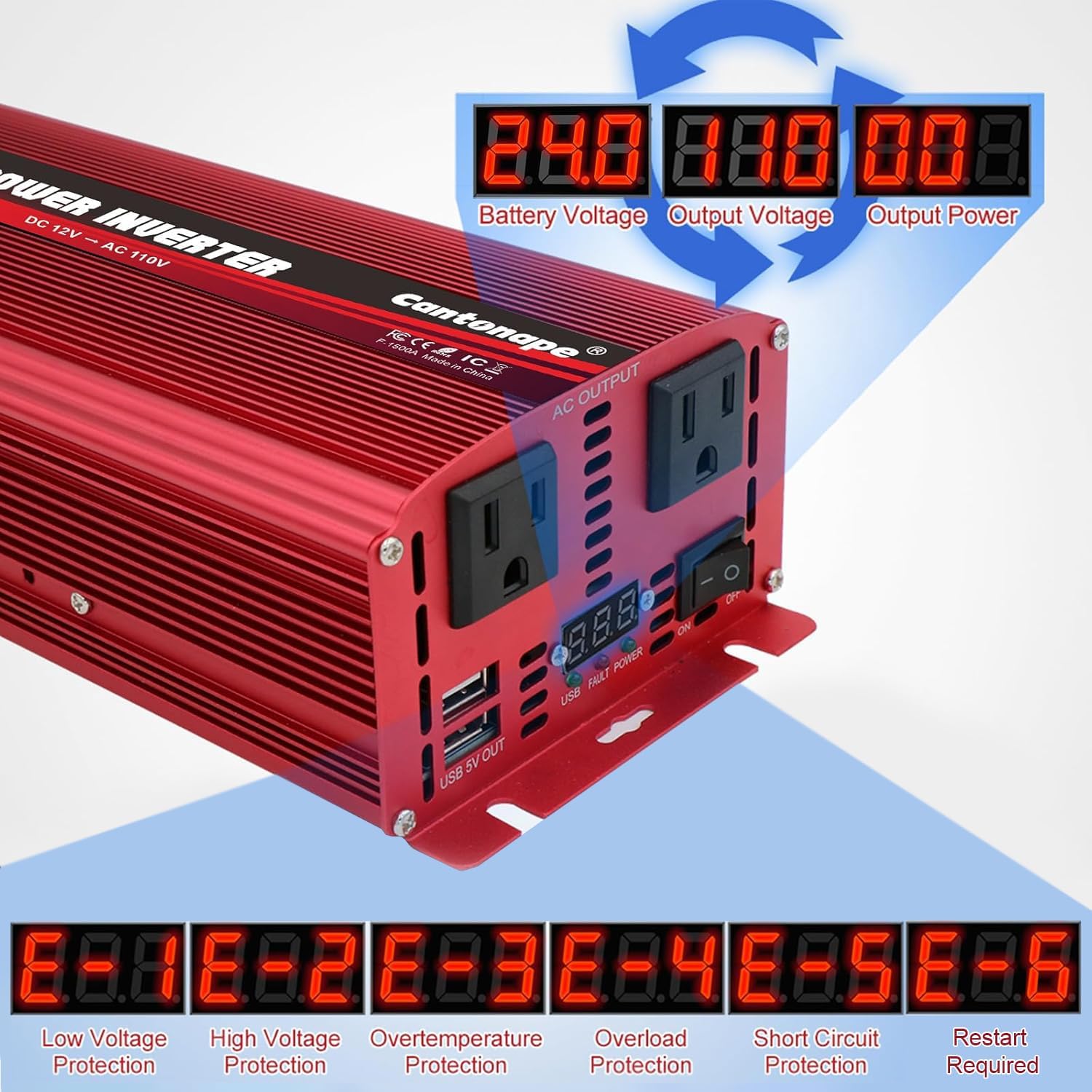
Image: The LED display of the Cantonape 1500W Power Inverter, illustrating how it shows battery voltagה, פלט כרךtage, and output power during operation.

Image: A diagram illustrating three ways to connect the power inverter: with a solar panel and 24V battery, directly with a 24V battery, and with a cigarette lighter plug (for lower wattage models or specific applications).
6. תחזוקה
תחזוקה שוטפת מבטיחה את אורך החיים והביצועים האופטימליים של הממיר שלכם.
- שמור על ניקיון: יש לנקות מעת לעת את החלק החיצוני של הממיר בעזרת מטלית יבשה. יש לוודא שפתחי האוורור של מאוורר הקירור נקיים מאבק ופסולת.
- בדוק חיבורים: Regularly inspect battery cable connections for tightness and corrosion. Loose connections can lead to power loss or overheating.
- אוורור: Always ensure the inverter is placed in a well-ventilated area to prevent overheating. The built-in cooling fan will activate automatically when needed.
- אִחסוּן: When storing the inverter for extended periods, disconnect it from the battery and store it in a cool, dry place.

תמונה: פיצוץ view of the Cantonape 1500W Power Inverter, highlighting its durable construction, temperature control, and smart, quiet cooling fan designed to prevent overheating.
7. פתרון תקלות
The smart LED display provides error codes to help diagnose issues:
| קוד שגיאה | תֵאוּר | פתרון אפשרי |
|---|---|---|
| E-1 | כרך נמוךtage הגנה | Recharge or replace the battery. Check battery connections. |
| E-2 | כרך גבוהtage הגנה | בדוק את נפח הסוללהtage; ensure it's within the specified range (24V). |
| E-3 | הגנה מפני טמפרטורת יתר | Allow the inverter to cool down. Ensure proper ventilation and clear any obstructions from the fan. |
| E-4 | הגנת עומס יתר | Reduce the total load connected to the inverter. Disconnect high-power devices. |
| E-5 | הגנה מפני קצר חשמלי | Check connected devices and cables for any short circuits. Disconnect faulty devices. |
| E-6 | Repeated Faults Shutdown, Restart Required | Address the underlying fault (E-1 to E-5), then turn the inverter off and on again. |

Image: The LED display of the Cantonape 1500W Power Inverter, illustrating how it shows various error codes (E-1 to E-6) and their corresponding protection types, such as low voltagה, כרך גבוהtage, overtemperature, overload, short circuit, and repeated faults.
8. מפרטים
| תכונה | פְּרָט |
|---|---|
| שם הדגם | 1500W-24V |
| רציף וואטtage | 1500 וואט |
| שיא וואטtage | 3000 וואט |
| קלט כרךtage | DC 24V |
| פלט כרךtage | AC 110V/120V |
| תדר פלט | 60 הרץ |
| יציאות USB | כפול 3.1A |
| יעילות המרה | > 90% |
| משקל פריט | 3.94 פאונד |
| מידות חבילה | 12.28 x 6.77 x 2.91 אינץ' |

Image: The Cantonape 1500W Power Inverter with its physical dimensions (length, width, height) and the length of the included battery cables clearly labeled.
9. אחריות ותמיכה
Your Cantonape 1500W/3000W (Peak) DC 24V to 110V/120V AC Power Inverter comes with a 12-month warranty, ensuring peace of mind regarding product quality and performance.
For any questions, troubleshooting assistance, or warranty claims, please contact Cantonape customer support. Our dedicated team is committed to providing reliable and trustworthy after-sales service to ensure your satisfaction.
You can find more information and contact details by visiting the official Cantonape store: Cantonape Store on Amazon.