מָבוֹא
Thank you for choosing the YOVDA W2 4-Channel Dash Cam. This manual provides detailed instructions for the proper installation, operation, and maintenance of your device. Please read this manual thoroughly before use to ensure optimal performance and safety.
The YOVDA W2 dash cam is designed to enhance driving safety by providing comprehensive 360-degree video surveillance around and inside your vehicle. It features four 1080P cameras, advanced night vision, GPS tracking, Wi-Fi connectivity, and a 24-hour parking monitoring system.
המוצר נגמרview
תכונות מפתח
- הקלטה ב-4 ערוצים: Simultaneously records front, rear, left, and right views in 1080P resolution.
- 360° Adjustable Cameras: All four cameras can be rotated to capture desired angles.
- ראיית לילה מעולה: F1.8 aperture, 170° ultra-wide angle, 4 infrared lights, and WDR technology for clear recordings in low-light conditions.
- GPS מובנה: Records real-time speed, time, and route location, viewable on Google Maps via the GPS player.
- Wi-Fi מובנה ובקרת אפליקציה: Connect to your smartphone via Wi-Fi to view, manage, and download recorded videos.
- חיישן G: Automatically detects collisions and locks current video files to prevent overwriting.
- הקלטת לולאה: דורס את הישן ביותר שאינו נעול files when the memory card is full, ensuring continuous recording. Supports up to 128GB Micro SD card (64GB card included).
- צג חניה 24 שעות ביממה: Provides continuous surveillance when the vehicle is parked (requires optional hardwire kit).
- קבל סופר: Enhances durability and extends the device's lifespan.

תמונה זו מספקת תמונה נוספתview of the YOVDA W2 dash cam, highlighting its four cameras for comprehensive 360-degree coverage and the built-in G-Sensor feature.
מה יש בקופסה
- 1 x YOVDA W2 4-Channel Dash Cam
- 1 x 64GB כרטיס מיקרו SD
- כבל חשמל (מטען לרכב)
- Mounting Bracket (Suction Cup)
Note: A hardwire kit for the 24-hour parking monitor is sold separately.
הגדרה
1. הכנסת כרטיס ה-Micro SD
Before inserting or removing the Micro SD card, ensure the dash cam is powered off. The device supports Micro SD cards up to 128GB. For optimal performance, use a U3 or higher speed card.
After inserting the card, it is recommended to format it directly within the dash cam's settings menu. This ensures compatibility and prepares the card for recording.
2. הרכבת מצלמת הדאש
The YOVDA W2 dash cam typically uses a suction cup mount for installation on the windshield. Choose a location that does not obstruct your view של הכביש.
- Clean the windshield surface where you intend to mount the dash cam.
- חבר את תושבת כוס היניקה למצלמת הרכב.
- Press the suction cup firmly onto the windshield, ensuring it is in a flat position and securely attached.
- Adjust the angle of the dash cam and its individual cameras to cover the desired viewing areas (front, rear, left, right, and interior).
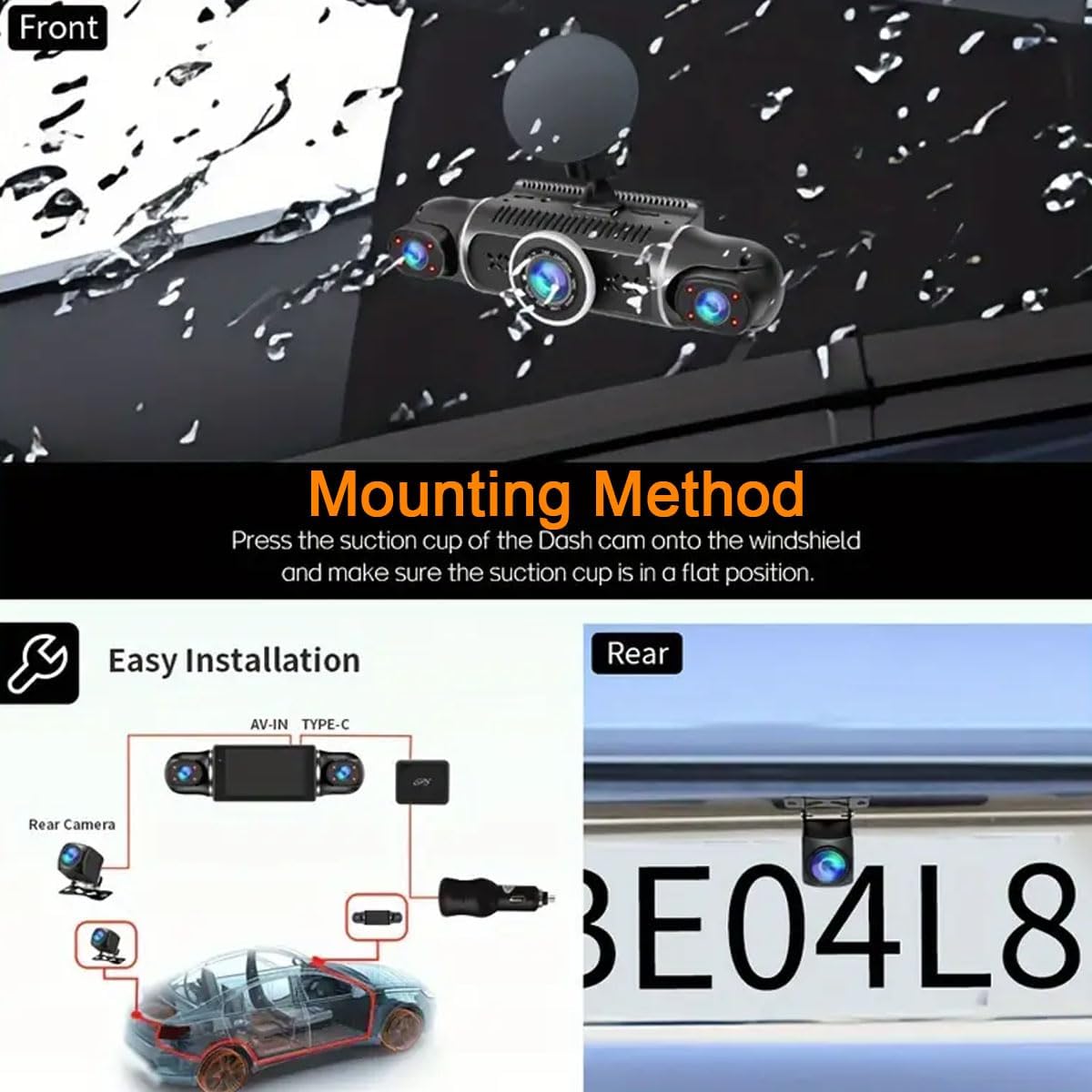
This image illustrates the suction cup mounting method for the dash cam on the windshield and a wiring diagram for connecting the front and rear cameras, along with the power source.
3. חיבור חשמל
Connect the provided power cable to the dash cam and plug the other end into your vehicle's 12V power outlet (cigarette lighter socket). The dash cam will typically power on automatically when the vehicle starts and power off when the engine is turned off.
הוראות הפעלה
פעולה בסיסית
- הפעלה/כיבוי: The dash cam powers on automatically with vehicle ignition and powers off when the engine is off. Manual power buttons may also be present for specific functions.
- הַקלָטָה: לאחר ההפעלה, מצלמת הרכב מתחילה באופן אוטומטי להקליט בלולאה.
- לְהַצִיג: The 3.0-inch IPS screen displays live views from the cameras. You can switch between camera views through the device's menu.
תכונות מתקדמות
הקלטת לולאה
The dash cam continuously records video in segments. When the Micro SD card reaches its maximum capacity, the oldest unlocked video files are automatically overwritten to make space for new recordings. This ensures uninterrupted recording.
חיישן G (זיהוי התנגשויות)
In the event of a sudden impact or collision, the built-in G-Sensor automatically detects the event and locks the current video fileזה מונע מהאוכלtage מפני החלפה על ידי הקלטת לולאה, תוך שמירה על ראיות קריטיות.

This image illustrates the G-Sensor feature, which locks video footage during a collision, and the loop recording function, which continuously records over older files.
24-Hour Parking Monitor
To activate the 24-hour parking monitoring feature, an optional hardwire kit (not included) is required. This kit provides continuous power to the dash cam, allowing it to record events even when the vehicle is parked and the engine is off. The system typically uses motion detection or G-sensor triggers to record parking incidents.
ראיית לילה
The dash cam is equipped with advanced night vision capabilities, including an F1.8 large aperture, 4 infrared lights, and WDR (Wide Dynamic Range) technology. This allows for clear video recording in low-light conditions, both inside and outside the vehicle.

This image highlights the dash cam's excellent night vision, showing a clear view of a city street at night, contrasting with typical low-light and dark conditions.
GPS מובנה
The integrated GPS module records your vehicle's speed, time, and geographical location. This data can be viewed on a map using a dedicated GPS player software on your computer, providing a detailed record of your routes.
Built-in Wi-Fi and App Control
Connect your smartphone to the dash cam via Wi-Fi using the dedicated mobile application. This allows you to:
- View פו חיtage מהמצלמות.
- Manage recorded videos.
- Download videos directly to your smartphone for easy sharing or backup.
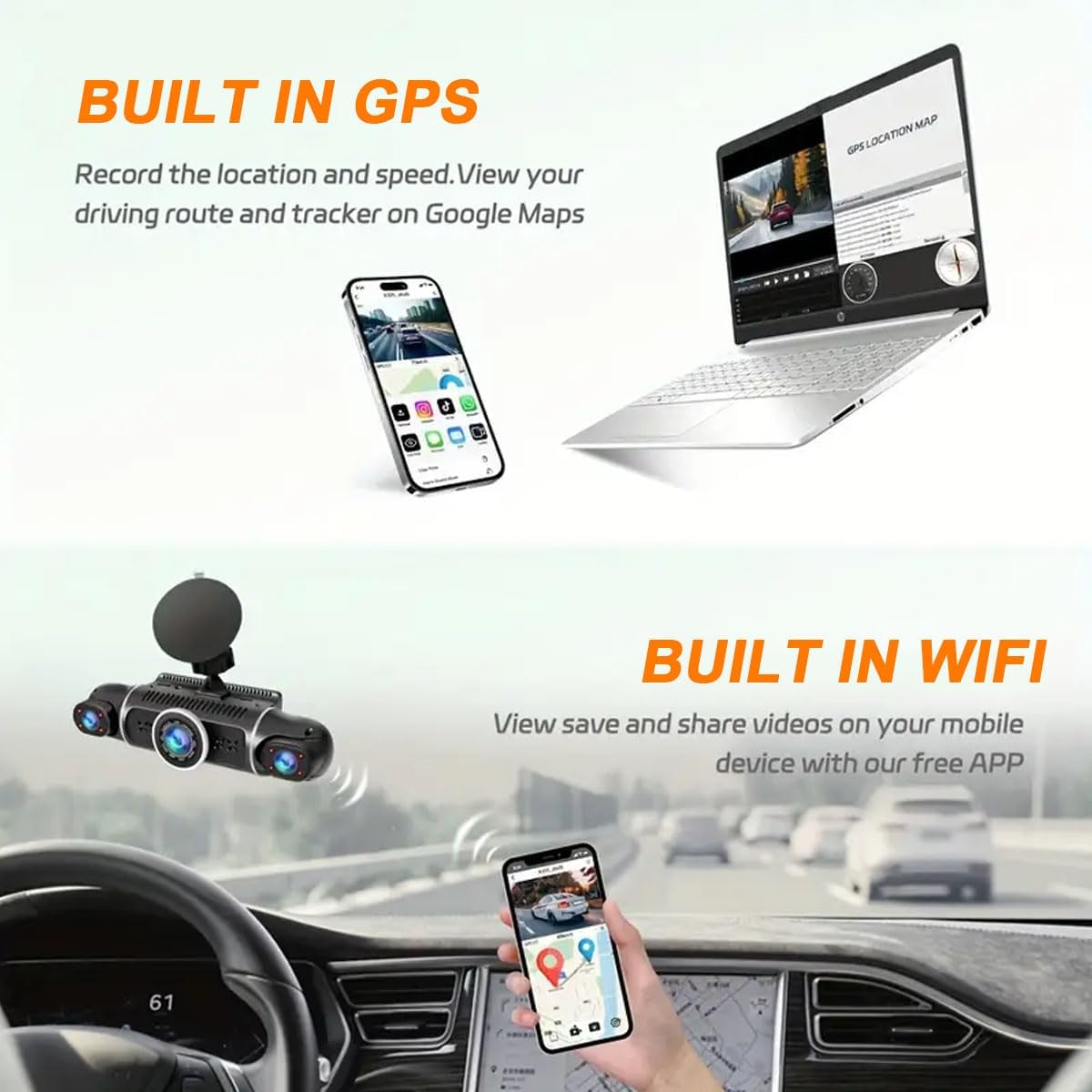
This image illustrates the built-in GPS feature, showing a map with a driving route on a laptop, and the built-in Wi-Fi feature, showing the dash cam app interface on a smartphone.
Refer to the app's instructions for detailed connection and usage procedures. Ensure the app is updated for best performance.
תַחזוּקָה
- עיצוב כרטיס SD: Regularly format the Micro SD card (e.g., once a month) within the dash cam's settings to maintain optimal recording performance and prevent data corruption. Back up any important files לפני העיצוב.
- ניקוי: השתמשו במטלית רכה ויבשה כדי לנקות את העדשה והמסך של מצלמת הרכב. הימנעו משימוש בחומרי ניקוי שוחקים או ממסים.
- טֶמפֶּרָטוּרָה: Operate the dash cam within the specified temperature range of -20℃ to 65℃. Extreme temperatures can affect performance and lifespan.
- עדכוני קושחה: בדוק את זה של היצרן website or app for available firmware updates to ensure your dash cam has the latest features and bug fixes.
פתרון בעיות
| בְּעָיָה | סיבה אפשרית | פִּתָרוֹן |
|---|---|---|
| מצלמת הדאשבוקס לא נדלקת. | אין ספק כוח; כבל חשמל פגום; שקע 12V של הרכב אינו פועל. | Check power cable connection. Test the 12V outlet with another device. Ensure vehicle ignition is on. |
| ההקלטה נעצרת או קופאת. | SD card is full; SD card error; incompatible SD card; faulty SD card. | Format the SD card. Replace with a new, high-speed (U3 or higher) Micro SD card (max 128GB). |
| איכות וידאו ירודה בלילה. | Lens is dirty; extreme low light conditions. | Clean the camera lenses. Ensure WDR is enabled in settings. |
| בעיות חיבור Wi-Fi. | Incorrect app usage; interference; outdated app. | Ensure Wi-Fi is enabled on the dash cam and your phone. Restart both devices. Update the mobile app. |
| צג חניה לא עובד. | Hardwire kit not installed; incorrect settings. | Install the optional hardwire kit. Check parking monitor settings in the dash cam menu. |
מפרטים
| תכונה | פְּרָט |
|---|---|
| מספר דגם | W2 |
| רזולוציית לכידת וידאו | 4 x 1080P (Front, Rear, Left, Right) |
| גודל תצוגה | 3.0 אינץ IPS מסך |
| שדה של View | 170° (Front/Rear), 140° (Left/Right Interior) |
| קישוריות | אינטרנט אלחוטי, GPS |
| תכונות מיוחדות | 360° View, Loop Recording, WDR, Night Vision, Motion Detection, G-Sensor, Parking Mode, App Control |
| אִחסוּן | Supports Micro SD card up to 128GB (U3 or higher recommended, 64GB included) |
| טמפרטורת הפעלה | -20℃ עד 65℃ (-4°F עד 149°F) |
| מקור כוח | 1 Lithium Ion battery (included), Vehicle 12V power outlet |
| מידות המוצר | 6.9 x 1.6 x 1.9 אינץ' |
| משקל פריט | 15.8 אונקיות |
| סוג הרכבה | הר גביע יניקה |
אחריות ותמיכה
For warranty information and technical support, please refer to the official YOVDA website or contact YOVDA customer service directly. Contact details are typically provided on the product packaging or within the mobile application.
You can also reach out to the seller through the platform where the product was purchased for assistance.