
מָבוֹא
Thank you for choosing the R-MUSIC KARADUO Complete Karaoke Pack. This manual provides detailed instructions for the safe and efficient use of your new karaoke system, which includes a portable RGB speaker and two wireless microphones. Please read this manual thoroughly before operation and retain it for future reference.
תוכן החבילה
ודא שכל הפריטים נמצאים ובמצב תקין בעת הוצאת המזוודה:
- 1 x R-MUSIC KARADUO Portable RGB Speaker
- 2 x מיקרופונים אלחוטיים
- כבל טעינה 1 x USB-C
- מדריך למשתמש אחד (מסמך זה)

Image: The R-MUSIC KARADUO portable RGB speaker and two wireless microphones, as included in the package.
המוצר נגמרview
רכיבי רמקולים ובקרות

תמונה: למעלה view of the R-MUSIC KARADUO speaker, showing the control buttons.
- LED Animation Button: Press to cycle through 5 different LED light animations.
- כפתור עוצמת קול + / השיר הבא: Short press to increase volume. Long press to skip to the next song.
- ON / OFF / Pause / Play Button: Long press to power the speaker on or off. Short press to play or pause music.
- כפתור עוצמת קול / שיר קודם: Short press to decrease volume. Long press to go to the previous song.
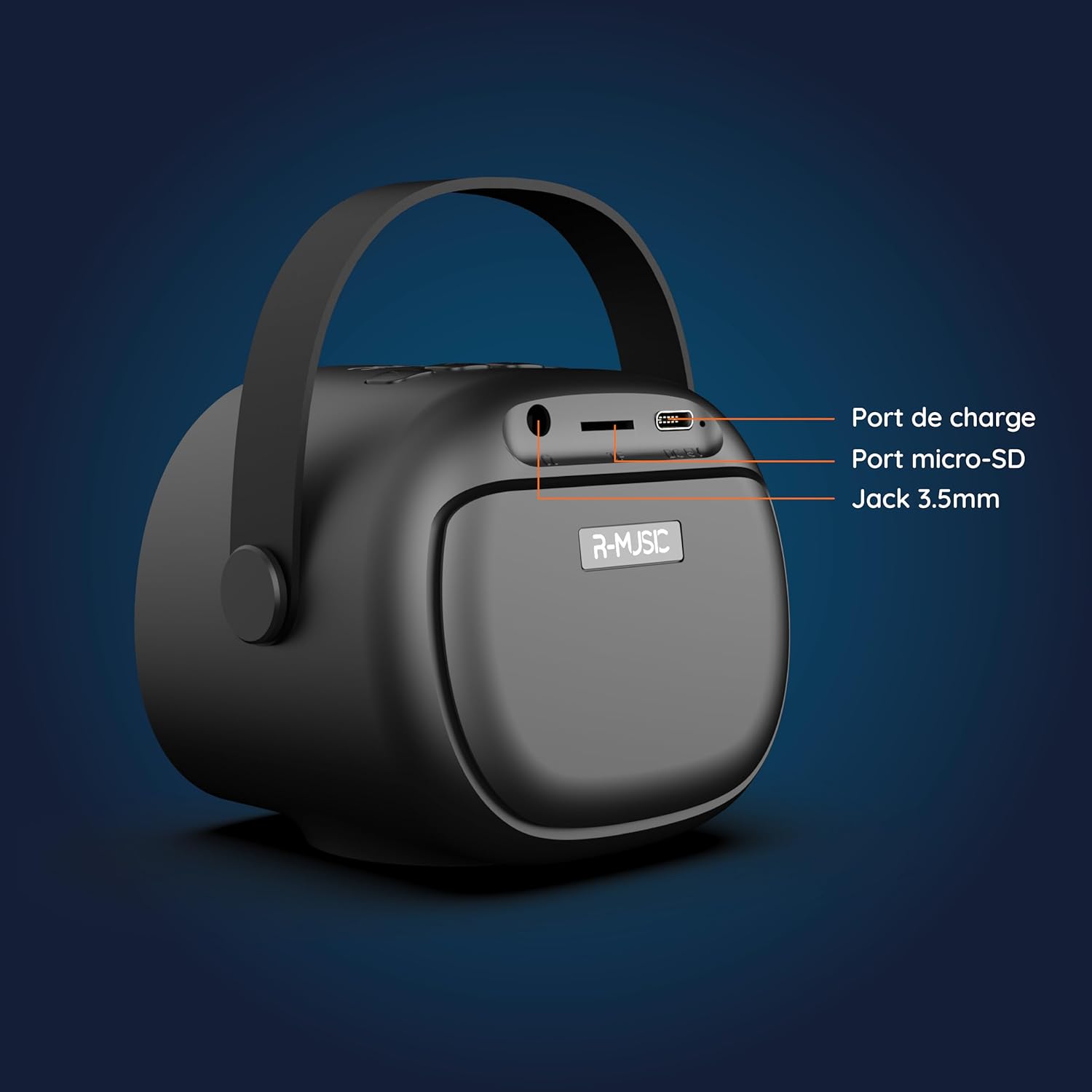
תמונה: גב view of the R-MUSIC KARADUO speaker, highlighting the charging port, Micro-SD card slot, and 3.5mm Jack port.
- יציאת טעינה (USB-C): Connect the provided USB-C cable for charging.
- חריץ כרטיס מיקרו SD: הכנס כרטיס Micro-SD להשמעת מוזיקה ישירה.
- יציאת AUX 3.5 מ"מ: חברו התקני שמע חיצוניים באמצעות כבל שמע 3.5 מ"מ (לא כלול).
פקדי מיקרופון

Image: Close-up of the R-MUSIC wireless microphones, illustrating the power, volume, and mode buttons.
- לחצן הפעלה: Long press to power the microphone on or off.
- לחצן עוצמת הקול + הגבר את עוצמת המיקרופון.
- כפתור עוצמת קול: הורד את עוצמת המיקרופון.
- לחצן מצב (M): Short press to cycle through 5 voice deformation effects and 3 karaoke modes.
הגדרה
1. טעינת הרמקול והמיקרופונים
Before first use, fully charge the speaker and both microphones.
- רַמקוֹל: Connect the provided USB-C charging cable to the speaker's charging port and a compatible USB power adapter (not included). The charging indicator will show the charging status.
- מיקרופונים: Each microphone has its own charging port (usually Micro-USB, check the microphone itself). Connect them to a USB power source using appropriate cables (not included, or check if included with microphones).
A full charge provides approximately 14 hours of speaker playback without LED lights, or 7 hours with LED lights activated.
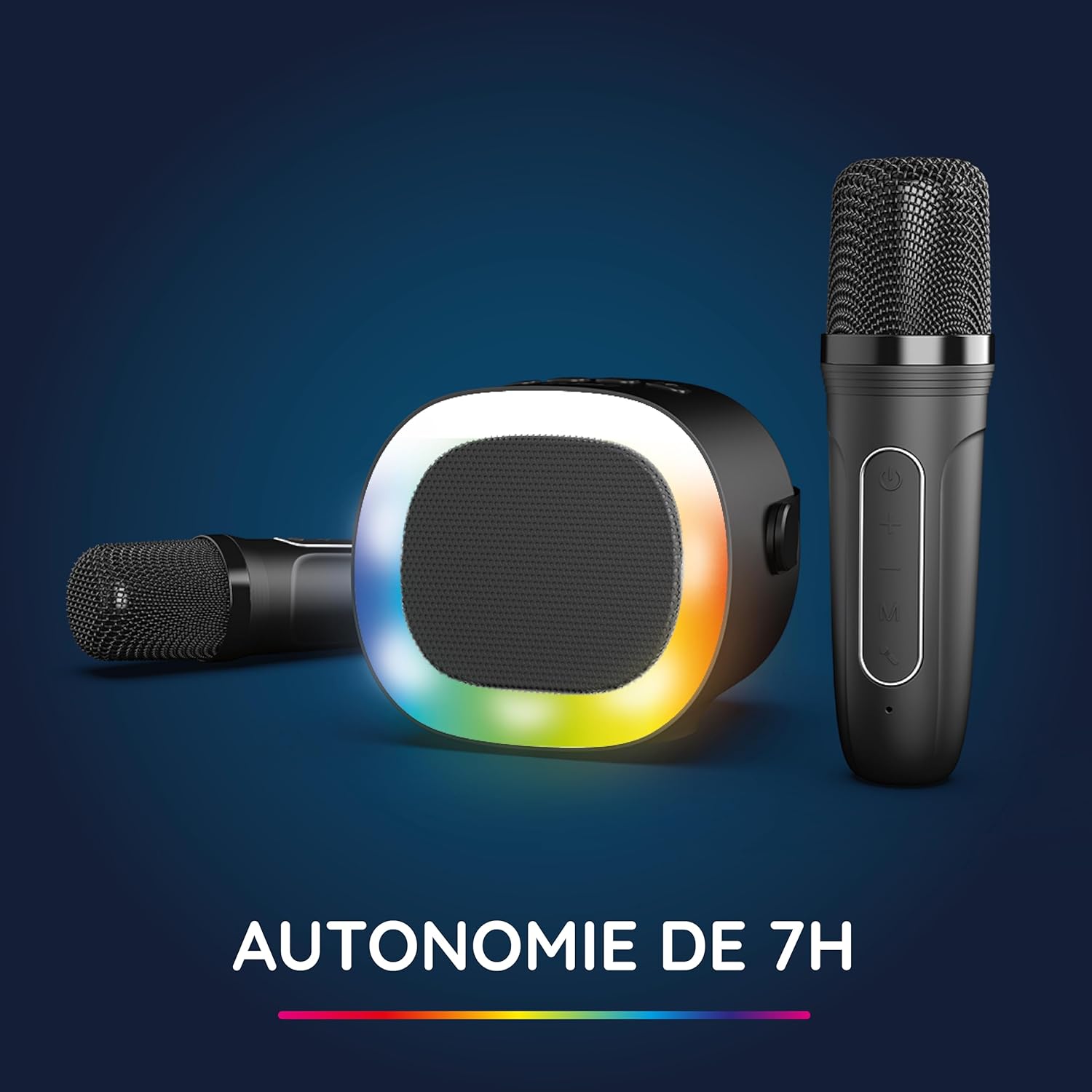
Image: The R-MUSIC speaker and microphones, illustrating the battery life with LED lights active.
2. הפעלה וצימוד מיקרופונים
- הפעלת הרמקול: Long press the ON/OFF button on the speaker until it powers on.
- מיקרופונים להפעלת מתח: Long press the Power button on each microphone until they power on.
- The microphones should automatically pair with the speaker. If not, ensure they are within close proximity and try powering them off and on again.
הוראות הפעלה
1. חיבור למקורות שמע
The KARADUO speaker offers multiple connectivity options:
- Bluetooth 5.0:
- ודא שהרמקול מופעל.
- Activate Bluetooth on your smartphone, tablet, PC, or other compatible device.
- חפש "KARADUO" in your device's Bluetooth settings and select it to pair. A confirmation sound will indicate a successful connection.
- The Bluetooth 5.0 technology ensures optimal sound quality and a stable connection up to 10 meters.
- כניסת AUX:
- Connect a 3.5mm audio cable (not included) from your audio device's headphone jack to the speaker's 3.5mm AUX port.
- הרמקול יעבור אוטומטית למצב AUX.
- Micro-SD Card Playback:
- Insert a Micro-SD card containing MP3 audio files into the Micro-SD card slot on the back of the speaker.
- The speaker will automatically detect the card and begin playing music.
2. Speaker Operation
- הפעל/השהה: Short press the ON/OFF/Pause/Play button.
- התאמת עוצמת הקול: Short press the Volume + or Volume - buttons.
- הרצועה הבאה / הקודמת: Long press the Volume + (next) or Volume - (previous) buttons.
- מצבי אור LED: Press the LED Animation button to cycle through 5 different LED light animations.

Image: The R-MUSIC speaker showcasing its dynamic LED light animations.
3. Microphone Operation
- עוצמת הקול של המיקרופון: Use the Volume + and Volume - buttons on the microphone to adjust your vocal volume.
- Voice Deformation Effects: Short press the 'M' (Mode) button on the microphone to cycle through 5 different voice deformation effects.
- מצבי קריוקי: Continue pressing the 'M' button to cycle through 3 distinct karaoke modes.
תַחזוּקָה
To ensure the longevity and optimal performance of your R-MUSIC KARADUO system, follow these maintenance guidelines:
- ניקוי: Use a soft, dry cloth to clean the speaker and microphones. Do not use abrasive cleaners, solvents, or harsh chemicals.
- אִחסוּן: יש לאחסן את המכשיר במקום קריר ויבש, הרחק מאור שמש ישיר וטמפרטורות קיצוניות, כאשר אינו בשימוש.
- חשיפה למים: This product is not waterproof. Avoid exposure to water or excessive moisture.
- טְעִינָה: Only use the provided charging cable and a compatible USB power adapter. Do not overcharge the device.
פתרון בעיות
If you encounter issues with your KARADUO system, please refer to the following common problems and solutions:
| בְּעָיָה | סיבה אפשרית | פִּתָרוֹן |
|---|---|---|
| אין כוח | סוללה חלשה או שהמכשיר כבוי. | Charge the speaker/microphones. Long press the power button to turn on. |
| אין קול מהרמקול | עוצמת קול נמוכה מדי, מצב קלט שגוי או שהמכשיר לא מחובר. | Increase speaker volume. Ensure correct input (Bluetooth, AUX, Micro-SD). Reconnect Bluetooth or check AUX cable. |
| מיקרופונים לא עובדים | Microphones off, low battery, or not paired. | Ensure microphones are charged and powered on. They should automatically pair with the speaker. If not, power cycle them. |
| ניתוק Bluetooth | Device out of range, interference, or low battery. | Move the connected device closer to the speaker (within 10m). Ensure no major obstacles. Recharge the speaker. |
If the problem persists after trying these solutions, please contact R-MUSIC customer support.
מפרטים
| תכונה | פְּרָט |
|---|---|
| מותג | R-MUSIC |
| מספר דגם | RM484437 |
| צֶבַע | שָׁחוֹר |
| טכנולוגיית קישוריות | בלוטות' 5.0 |
| יציאות חיבור | 3.5mm Jack, USB Type-C (charging), Micro-SD Card Slot |
| תכונות מיוחדות | 2 Wireless Microphones, Universal Connectivity, 5 Voice Deformation Effects, LED Lights |
| מכשירים תואמים | PC, Smartphone, Tablet, TV (via AUX) |
| מקור כוח | מופעל על סוללה |
| חיי סוללה של הרמקול | Up to 14 hours (without LED), 7 hours (with LED) |
| טווח בלוטות' | עד 10 מטר |

Image: Technical dimensions of the R-MUSIC KARADUO speaker, showing its height, width, and depth.
אחריות ותמיכה
Information regarding specific warranty terms and conditions for the R-MUSIC KARADUO Complete Karaoke Pack is not available in this document. Please refer to the product packaging or the retailer's webאתר לפרטי אחריות.
For technical support or further assistance, please contact R-MUSIC customer service through their official webהאתר או פרטי הקשר שסופקו עם הרכישה.