
Baseus B0CHM2WTP7
Baseus 15W Wireless MagSafe Car Mount Charger Instruction Manual
Model: B0CHM2WTP7
המוצר נגמרview
The Baseus 15W Wireless MagSafe Car Mount Charger provides a secure and efficient charging solution for compatible smartphones in your vehicle. Featuring a strong magnetic attraction and a flexible design, it offers versatile mounting options and fast wireless charging capabilities for a seamless in-car experience.
תוכן החבילה
- Baseus 15W Wireless MagSafe Car Mount Charger
- 3M Tape with Hook-and-Loop Fastener (pre-attached to mount)
- Metal Ring Sticker (for non-MagSafe compatible phones)
- כבל טעינה USB-C
- מדריך למשתמש (מסמך זה)
מדריך התקנה
הכנת משטח ההרכבה
Ensure the chosen dashboard or windshield surface is clean and dry. Use an alcohol wipe if necessary and allow it to dry completely before proceeding.
הצמדת ההר
The mount features a non-marking 3M tape with a hook-and-loop fastener on its backing plate. Peel off the protective film from the adhesive.
Press the mount firmly onto the desired clean surface. Apply consistent pressure for at least 30 seconds to ensure strong adhesion. For optimal adhesion and stability, allow the adhesive to cure for 24-48 hours before attaching your phone or applying significant weight.
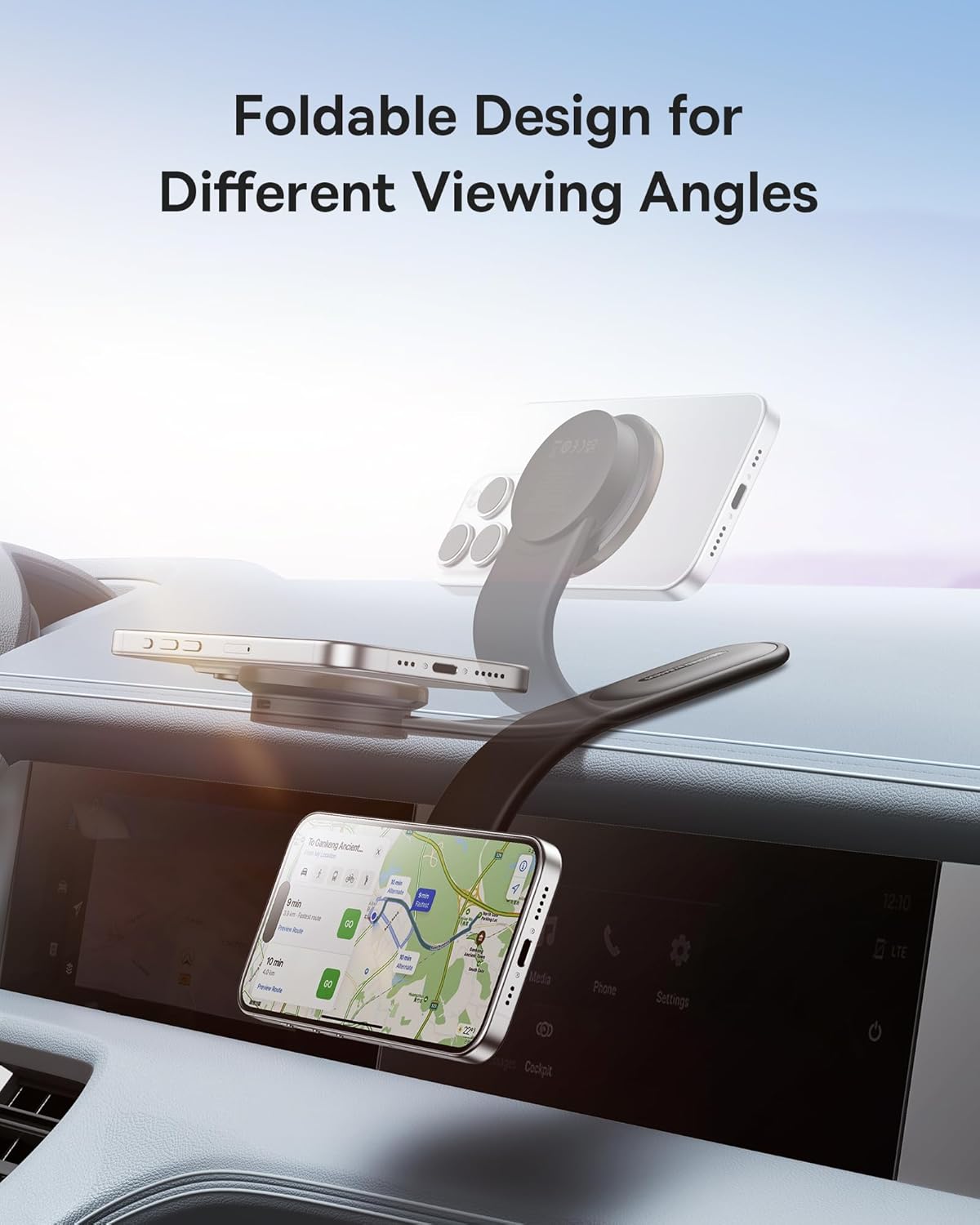
The bendable memory titanium alloy allows you to contour the mount to your dashboard's shape for a custom and secure fit.


For Non-MagSafe Compatible Phones
If your phone is not MagSafe compatible, use the provided metal ring sticker. Apply the sticker to the back of your phone or phone case, ensuring it is centered over the wireless charging coil. This will enable magnetic attachment to the car mount.
הוראות הפעלה
חיבור הטלפון שלך
Simply place your MagSafe-compatible smartphone (or phone with the metal ring sticker) onto the magnetic charging pad of the mount. The strong magnets will securely hold your device.

טעינה אלחוטית
Connect the USB-C charging cable to the car mount and plug the other end into a compatible car charger adapter (not included). The mount supports 15W wireless fast charging.
Charging time from 0% to 100% is approximately 3.5 hours, depending on the phone model and battery capacity.

מתכוונן Viewזווית
The mount's flexible design allows for 360° adjustment. Rotate your phone to landscape or portrait mode with one hand for optimal viewing without distraction while driving.
טיפול ותחזוקה
- Keep the magnetic charging surface clean and free from dust or debris to ensure efficient charging.
- Avoid exposing the mount to extreme temperatures or direct sunlight for prolonged periods.
- If the adhesive loses its stickiness, clean the surface and the adhesive pad with water and allow it to air dry. It is reusable after washing.
- אל תנסה לפרק או לתקן את המכשיר בעצמך. צור קשר עם תמיכת הלקוחות לקבלת סיוע.
מדריך פתרון בעיות
הטלפון לא נטען
- Ensure the USB-C cable is securely connected to both the mount and the car charger adapter.
- Verify that your car charger adapter is functioning correctly and provides sufficient power (at least 15W output recommended for fast charging).
- Check if your phone is properly aligned on the magnetic charging pad.
- If using a non-MagSafe phone, ensure the metal ring sticker is correctly placed and aligned.
- הסירו את כל הכיסויים העבים לטלפון שעלולים להפריע לטעינה האלחוטית.
Mount Not Sticking Securely
- Re-clean the mounting surface thoroughly and ensure it is completely dry before re-applying the adhesive.
- Apply firm pressure for an extended period (e.g., 30 seconds) during installation.
- Allow the adhesive to cure for the recommended 24-48 hours before placing the phone on the mount.
- Ensure the surface is flat and smooth for optimal adhesion.
Phone Stability Issues
- Ensure the mount is securely attached to the dashboard or windshield.
- Verify that the phone is correctly aligned and magnetically attached to the charging pad.
- The bendable arm should be adjusted to provide stable support for your phone's weight.
מפרט מוצר
| תכונה | פְּרָט |
|---|---|
| מותג | Baseus |
| מספר דגם | B0CHM2WTP7 |
| פלט טעינה אלחוטי | 15W (מקסימום) |
| משיכה מגנטית | עד 25N |
| סוג הרכבה | Vehicle Mount (Adhesive) |
| תכונות מיוחדות | MagSafe Compatible, Bendable Memory Titanium Alloy, 360° Adjustable Design |
| צֶבַע | אָפוֹר |
| משקל פריט | 11.3 אונקיות |
| מידות חבילה | 9.8 x 4.17 x 1.77 אינץ' |
אחריות ותמיכת לקוחות
למידע על אחריות או תמיכה טכנית, אנא עיינו באתר הרשמי של Baseus webאתר או צור קשר עם הקמעונאי שלך. שמור את קבלת הרכישה שלך לצורך תביעות אחריות.
מסמכים קשורים - B0CHM2WTP7
 |
מדריך למשתמש של מחזיק רכב לטעינה אלחוטית של Baseus Fast 15W מדריך למשתמש עבור תושבת הרכב Baseus Fast 15W לטעינה אלחוטית, המפרטת את מפרטי המוצר, פרטי האריזה, תכונות הגנה חכמות, התקנה, שימוש ואמצעי בטיחות. |
 |
מתקן טעינה אלחוטי מגנטי לרכב Baseus MagPro - מדריך למשתמש BS-CW04 מדריך למשתמש רשמי עבור מתקן הרכב לטעינה אלחוטית מגנטית מסדרת Baseus MagPro (דגם BS-CW04). התכונות כוללות טעינה אלחוטית QI2 15W, תאימות MagSafe ומאוורר קירור משולב. למד על התקנה ושימוש. |
 |
מדריך למשתמש של Baseus Gravity Air Vent Stand ומטען אלחוטי QI מדריך למשתמש מקיף עבור תושבת הרכב Baseus Gravity לפתחי אוורור, הכוללת טכנולוגיית טעינה אלחוטית QI. מדריך זה מספק מפרטים מפורטים, הוראות התקנה שלב אחר שלב והערות שימוש חיוניות לביצועים אופטימליים. |
 |
מחזיק טלפון מגנטי לרכב Baseus C02 - מדריך למשתמש ומפרטים מדריך למשתמש ומפרטים רשמיים עבור תושבת הטלפון המגנטית לרכב Baseus C02. למד על פרטי המוצר, התקנה ואמצעי בטיחות עבור אביזר רכב זה. |
 |
תושבת טלפון לרכב Baseus Milky Way Pro Series 15W - מדריך למשתמש מדריך למשתמש רשמי עבור תושבת הטלפון החשמלית לרכב Baseus Milky Way Pro Series 15W אלחוטית (דגם BS-CM023). כולל מפרט מוצר, מדריך התקנה, תכולת האריזה, טיפים למשתמש, אזהרות FCC והצהרת חומרים מסוכנים. |
 |
מדריך למשתמש של Baseus Magnetic Mini Air Power Bank 6000mAh 20W מדריך למשתמש רשמי עבור מטען הכוח Baseus Magnetic Mini Air (דגם PPCXM06A). למד על מפרטים, תכונות, אזהרות והוראות הפעלה עבור מטען נייד אלחוטי וקווי זה בהספק 6000mAh ו-20W. |
Ask a question about this manual
Ask about setup, troubleshooting, compatibility, parts, safety, or missing instructions. Manuals+ will review the question and use this page’s manual context to help answer it.