
1. הקדמה
This manual provides detailed instructions for the assembly, operation, and maintenance of your Devoko Electric Standing Desk. Please read this manual thoroughly before assembly and use to ensure proper function and safety. Keep this manual for future reference.
The Devoko Electric Standing Desk is designed to offer a flexible workspace, allowing users to switch between sitting and standing positions. It features an adjustable height range, memory presets, a USB-C charging port, and an anti-collision system for enhanced safety.
2. תכולת החבילה
לפני תחילת ההרכבה, יש לוודא שכל הרכיבים המפורטים להלן קיימים ולא ניזוקו. אם חסרים או ניזוקו חלקים כלשהם, אנא צרו קשר עם תמיכת הלקוחות.
- Right Table Leg (1)
- Left Table Leg (1)
- Leg Base (2)
- Transmission Rod (1)
- לוח בקרה (1)
- Side Plate (2)
- Left Crossbar (1)
- Right Crossbar (1)
- מחבר (1)
- Tabletop Sections (4)
- מגש לניהול כבלים (1)
- Headphone Hanger (1)
- Various Screws (A, B, C, D, E)
- Wood Tips (F)
- Tabletop Connectors (J, M)
- Cable Hole Covers (L)
תמונה: פיצוץ view של כל רכיבי שולחן העבודה והחומרה.
3. הוראות הרכבה
Assembly requires two people. Please follow the steps carefully. All mounting holes are pre-drilled for quick installation.
Step 1: Attach Right Crossbar to Right Table Leg
- Secure the Right Crossbar (9) to the Right Table Leg (1) using screws (A).
Step 2: Attach Side Plate to Right Assembly
- Attach a Side Plate (7) to the assembled Right Table Leg and Crossbar using screws (C).
Step 3: Attach Left Crossbar to Left Table Leg
- Secure the Left Crossbar (8) to the Left Table Leg (2) using screws (A).
Step 4: Attach Side Plate to Left Assembly
- Attach the remaining Side Plate (7) to the assembled Left Table Leg and Crossbar using screws (C).
Step 5: Connect the Crossbars
- Join the two crossbar assemblies using the Connector (10) and screws (A).
Step 6: Assemble Tabletop Sections
- Insert Wood Tips (F) into the pre-drilled holes of Tabletop sections (12) and (13) to join them.
Step 7: Secure Tabletop Connectors
- Attach Tabletop Connectors (J and M) to the underside of the tabletop sections (11 and 14) using screws (E).
שלב 8: חברו את הרגליים לשולחן
- Carefully place the assembled leg frame onto the underside of the tabletop. Align the holes and secure the legs to the tabletop using screws (E).
שלב 9: התקן מוט הילוכים
- Insert the Transmission Rod (4) into the designated slots, ensuring it connects both leg mechanisms.
Step 10: Mount Cable Management Tray
- Attach the Cable Management Tray (15) to the underside of the desk using screws (D).

Image: The cable management tray helps keep your workspace tidy.
Step 11: Attach Leg Bases
- Secure the Leg Bases (3) to the bottom of each table leg using screws (B).
Step 12: Install Control Panel
- Mount the Control Panel (5) to the underside of the desk in the designated area using screws (E). Connect the necessary cables.
Step 13: Attach Headphone Hanger
- Attach the Headphone Hanger (K) to the underside of the desk using screws (E).
Your Devoko Electric Standing Desk is now assembled.

Image: The desk features pre-drilled holes for quick and easy assembly.
4. הוראות הפעלה
Familiarize yourself with the control panel to effectively use your electric standing desk.
פונקציות לוח הבקרה
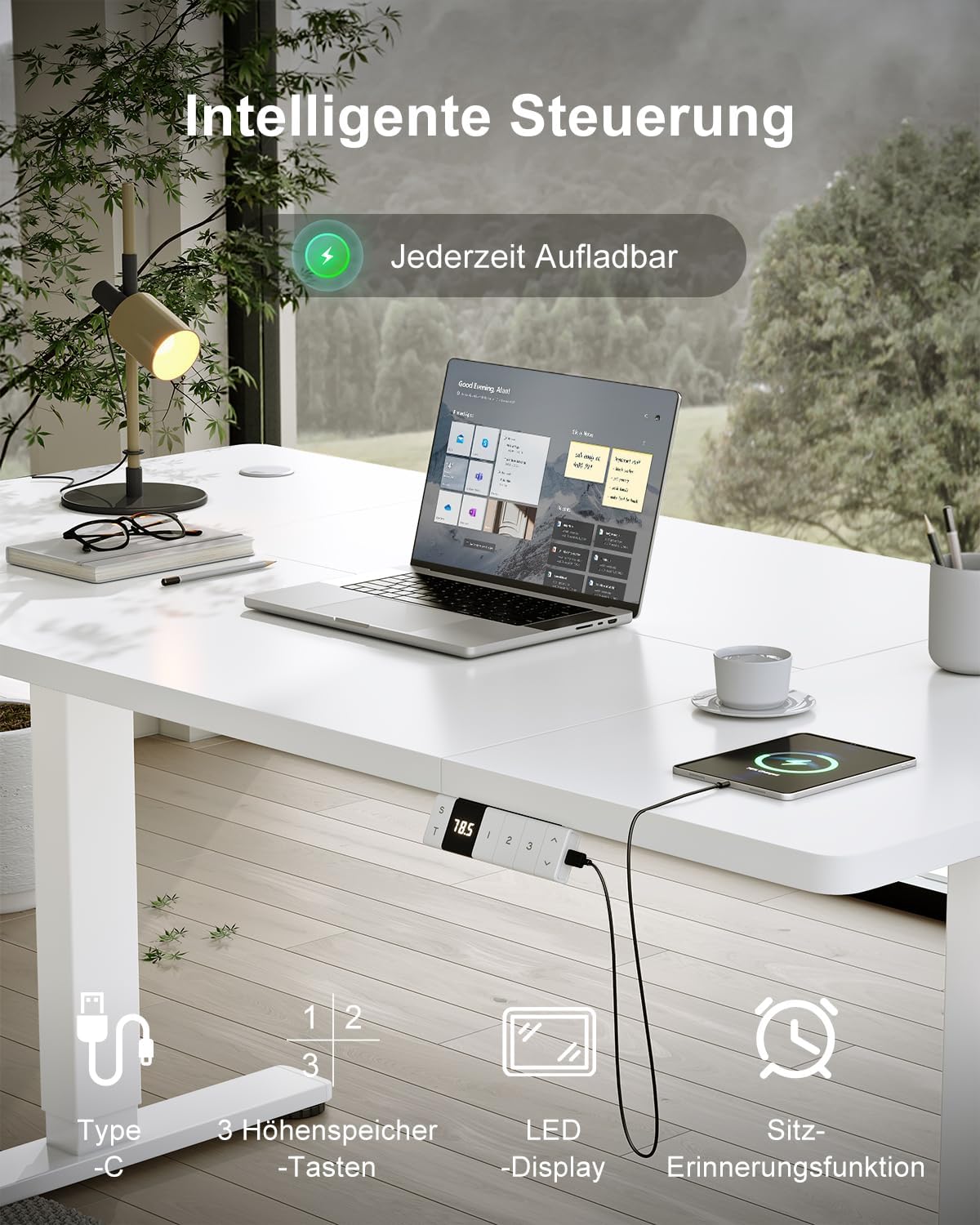
Image: The intelligent control panel features an LED display, memory buttons, and a USB-C charging port.
- חצים למעלה/למטה: Press and hold to adjust the desk height manually. Release to stop at the desired height.
- הגדרות זיכרון קבועות מראש (1, 2, 3): Save your preferred sitting and standing heights. To set a memory position: Adjust the desk to the desired height, then press the 'S' button followed by the desired number (1, 2, or 3). The height will be saved. To recall a saved height, simply press the corresponding number button.
- יציאת טעינה USB-C: Located on the control panel, this port allows convenient charging of your devices directly from the desk.

Image: Convenient USB-C charging integrated into the desk control panel.
התאמת גובה
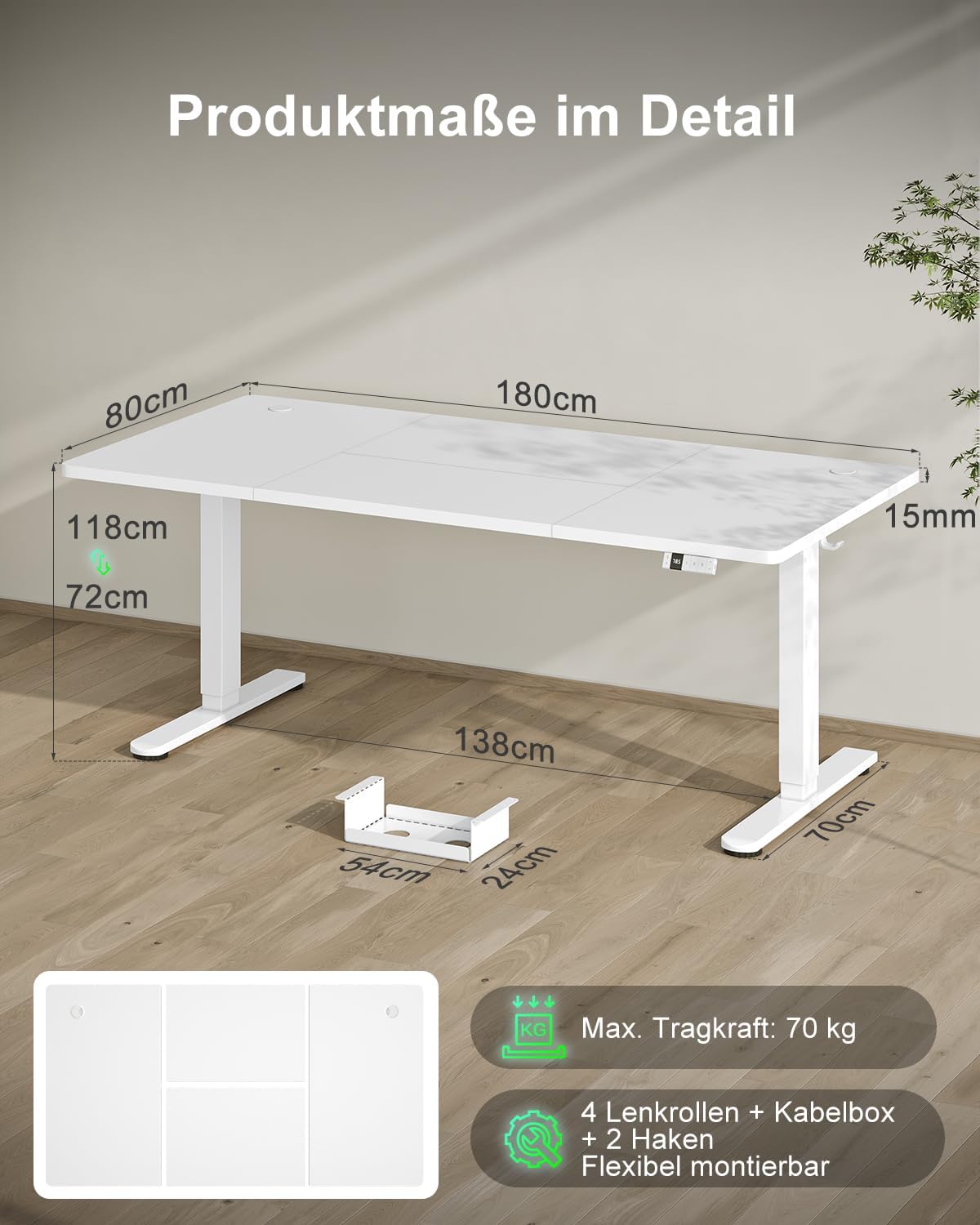
The desk offers an adjustable height range from 72 cm (minimum) to 118 cm (maximum), accommodating various user heights and preferences.

Image: The desk's flexible height adjustment allows users to easily switch between sitting and standing positions.
מערכת נגד התנגשויות
The desk is equipped with an anti-collision feature. If the desk encounters an obstruction while adjusting height, it will stop and slightly reverse direction to prevent damage to objects or injury to users. This feature enhances safety for children, pets, and surrounding furniture.

Image: The anti-collision system ensures safety by stopping and reversing if an obstruction is detected.
תזכורת בישיבה
The desk includes a sedentary reminder function to encourage regular changes in posture. This feature can be programmed to alert you when it's time to switch from sitting to standing, promoting a healthier work routine.

Image: The sedentary reminder helps users maintain a healthy balance between sitting and standing.
מנעול בטיחות לילדים
The control panel features a child safety lock to prevent accidental adjustments. Refer to the control panel instructions for activation and deactivation.
5. תחזוקה
To maintain the appearance and functionality of your Devoko Electric Standing Desk, follow these simple care instructions:
- ניקוי: נגבו את משטחי השולחן עם מודעהamp מטלית. הימנעו מכימיקלים חזקים או חומרי ניקוי שוחקים שעלולים לפגוע בגימור.
- בְּדִיקָה: בדקו מעת לעת את כל הברגים והחיבורים כדי לוודא שהם מהודקים היטב. הדקו מחדש במידת הצורך.
- טיפול מוטורי: Avoid contact with the mechanical components of the desk. The motor is designed for long-term use and requires no special maintenance.
6. פתרון תקלות
If you encounter any issues with your Devoko Electric Standing Desk, please refer to the following common solutions:
- שולחן לא זז: Check if the power cable is securely connected to both the desk and the power outlet. Ensure the child safety lock is not activated.
- תנועה לא אחידה: Perform a reset by holding down the 'Down' arrow button until the desk reaches its lowest position, then release and press again until it slightly moves up. This recalibrates the system.
- קודי שגיאה בתצוגה: If an error code appears, try unplugging the desk for 10 minutes and then plugging it back in. If the error persists, contact customer support.
- רעש במהלך הפעולה: A low noise level (≤45dB) is normal during height adjustment. If you notice unusual or loud noises, ensure all screws are tightened.
For problems not listed here, or if solutions do not resolve the issue, please contact Devoko customer support.
7. מפרטים
Detailed technical specifications for the Devoko Electric Standing Desk (Model: 0077-1822).
| תכונה | מִפרָט |
|---|---|
| מותג | דבוקו |
| מספר דגם | 0077-1822 |
| מידות (L x W x H) | 180 x 80 x (72-118) ס"מ |
| גובה מינימלי | 72 ס"מ |
| גובה מקסימלי | 118 ס"מ |
| עובי משטח השולחן | 1.5 ס"מ |
| צֶבַע | לָבָן |
| חומר (מסגרת) | SPCC Steel |
| Material (Tabletop) | עץ מהונדס |
| מקסימום קיבולת עומס | 80 ק"ג |
| Motor Test Cycles | 20,000+ |
| רמת רעש הפעלה | ≤45dB |
| תכונות מיוחדות | Electric, Height Adjustable, Built-in USB-C Output, Anti-collision, 3 Memory Functions, Child Safety Lock, Sedentary Reminder |
| נדרשת הרכבה | Yes (Recommended 2 persons) |
| רכיבים כלולים | Integrated USB-C Port, Cable Management Tray, Headphone Hanger |

Image: The desk offers a generous workspace and robust construction.

Image: The motor has been tested for over 10,000 cycles, ensuring long-term durability.

Image: The desk's robust construction supports a load capacity of up to 80 kg.
8. אחריות ותמיכה
Your Devoko Electric Standing Desk comes with a limited warranty. Please refer to the warranty documentation included with your purchase for specific terms and conditions regarding parts and labor.
For technical assistance, troubleshooting, or warranty claims, please contact Devoko customer support through the retailer where you purchased the product or visit the official Devoko webאֲתַר.