
ONKRON TS1571-B
ONKRON Mobile TV Stand User Manual
Model: TS1571-B | Brand: ONKRON
1. הקדמה
Thank you for choosing the ONKRON Mobile TV Stand TS1571-B. This versatile and robust TV stand is designed to provide a portable and stable solution for your television, suitable for various environments including homes, offices, and commercial spaces. Its adjustable features and sturdy construction ensure a reliable and convenient viewניסיון.
This manual provides essential information for the safe and proper assembly, operation, and maintenance of your new TV stand. Please read it thoroughly before beginning assembly and keep it for future reference.
2. מידע בטיחות
Always prioritize safety during assembly and use. Failure to follow these instructions may result in property damage or personal injury.
- קיבולת משקל: אין לחרוג מקיבולת העומס המרבית של 132 פאונד (60 ק"ג) for the TV mount and 11 פאונד (5 ק"ג) for the media shelf.
- גודל טלוויזיה: This stand is designed for TVs between 32 ו-75 אינץ'. Ensure your TV's size and weight are within these limits.
- תאימות VESA: Verify your TV's VESA mounting pattern is compatible (200x200 מ"מ עד 600x400 מ"מ).
- משטח יציב: Always place the stand on a flat, stable, and level surface.
- נעילת גלגלים: Engage the wheel locking mechanism when the stand is stationary to prevent accidental movement.
- ילדים וחיות מחמד: Keep children and pets away from the stand during assembly and ensure the TV is securely mounted to prevent tipping.
- סיוע מקצועי: If you are unsure about any part of the assembly or installation, seek professional assistance.
3. תכולת החבילה
Before assembly, ensure all parts are present and undamaged. Refer to the image below for a visual representation of the included components and hardware.

איור 3.1: מֵעַלview of all parts and hardware for the ONKRON Mobile TV Stand TS1571-B. This includes the base legs, vertical columns, TV mounting bracket, media shelf, wheels, and various screws, washers, and tools for assembly.
החבילה כוללת בדרך כלל:
- Base Legs (2 pcs)
- Vertical Columns (2 pcs)
- תושבת הרכבה לטלוויזיה
- מדף מדיה
- Lockable Caster Wheels (4 pcs)
- Hardware Kit (various screws, washers, spacers, and wrenches)
- מדריך הוראות (מסמך זה)
4. התקנה והרכבה
Assembly of the ONKRON Mobile TV Stand is straightforward. Follow the steps carefully. It is recommended to have two people for assembly, especially when mounting the TV.
שלבי ההרכבה מעלview:
- Attach the base legs to the main column structure.
- Install the lockable caster wheels onto the base.
- Assemble the TV mounting bracket and attach it to the vertical columns.
- Install the media shelf at your desired height.
- Attach the TV mounting arms to the back of your television.
- Carefully lift and hang the TV onto the stand's mounting bracket, securing it with the provided safety screws.

איור 4.1: The ONKRON Mobile TV Stand supporting a large television, highlighting its compatibility with 32-75 inch TVs and a maximum load capacity of 132 lbs. The image also illustrates the VESA mounting range.
מדריך הרכבה חזותי:
For a detailed visual guide on assembly and features, please watch the official product video below:
הווידאו 4.1: Official ONKRON TS1571-B promotional video demonstrating key features, assembly steps, and various applications of the mobile TV stand. The video highlights its stability, adjustability, and ease of movement.
5. הוראות הפעלה
התאמת גובה:
The TV mount height can be adjusted to suit your viewing needs. The stand offers a height range from 100 ס"מ (39.3 אינץ') עד 146.5 ס"מ (57.6 אינץ'). To adjust, loosen the securing bolts on the vertical columns, slide the TV mount to the desired height, and re-tighten the bolts securely. Ensure both sides are adjusted evenly.

איור 5.1: A child demonstrating the height adjustability of the media shelf on the ONKRON Mobile TV Stand. The shelf can be positioned at various heights along the main columns to accommodate different devices and user preferences.
הזזת המעמד:
The stand is equipped with reinforced smooth-running wheels for easy mobility. To move the stand, ensure all four wheels are unlocked. Gently push or pull the stand to its new location. Always move the stand slowly and carefully, especially with a TV mounted.
נעילת הגלגלים:
Once the stand is in its desired position, engage the locking mechanism on each wheel by pressing down the lever. This will prevent the stand from moving accidentally, ensuring stability and safety.
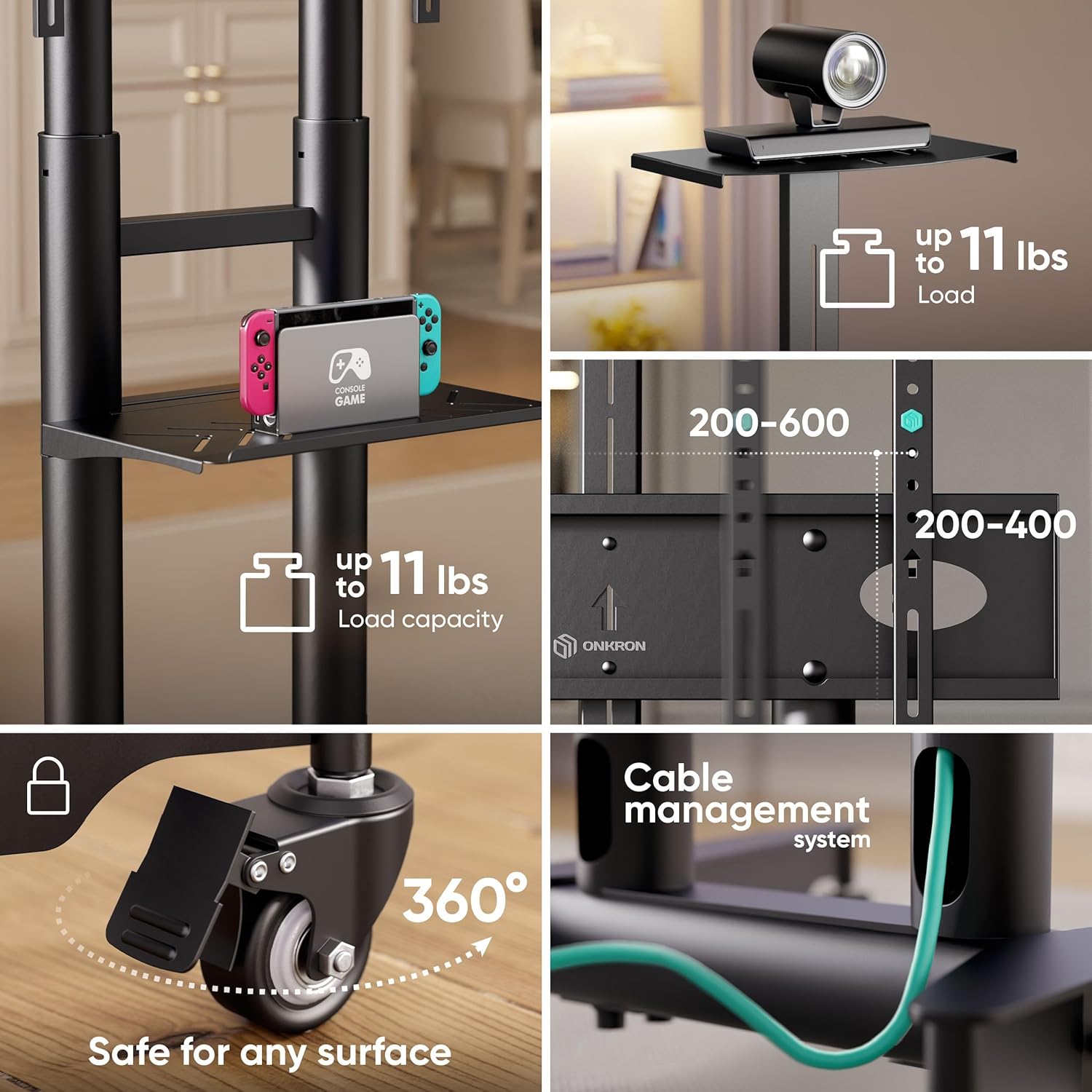
איור 5.2: מְפוֹרָט view of the ONKRON Mobile TV Stand's features. This image highlights the sturdy media shelf with its load capacity, the versatile VESA mounting options, the 360-degree rotating and lockable wheels for safe and easy movement, and the integrated cable management system for a tidy setup.
Using the Media Shelf:
The steel media shelf can hold up to 11 פאונד (5 ק"ג) and is ideal for placing devices such as gaming consoles, DVD players, or streaming boxes. The shelf's height is also adjustable along the main columns to suit your setup.
ניהול כבלים:
The stand features a built-in cable management system within the vertical columns. Route your TV and device cables through these channels to maintain a clean and organized appearance, preventing tangles and potential hazards.
6. תחזוקה
Regular maintenance will ensure the longevity and safe operation of your ONKRON Mobile TV Stand.
- ניקוי: נגבו את המעמד במטלית רכה ויבשה. במקרה של סימנים עקשניים, נקו מעטamp ניתן להשתמש במטלית, ולאחר מכן ייבוש מיידי. יש להימנע מחומרי ניקוי שוחקים או ממסים.
- בדוק חיבורים: בדקו מעת לעת את כל הברגים והברגים כדי לוודא שהם מהודקים היטב ומאובטחים. הדקו מחדש במידת הצורך.
- בדיקת גלגלים: Inspect the wheels regularly for any debris or damage that might hinder smooth movement. Clean or replace if needed.
- בדיקת עומס: Always ensure the weight of your TV and devices does not exceed the specified maximum load capacities.
7. פתרון תקלות
If you encounter any issues with your TV stand, refer to the common problems and solutions below:
| בְּעָיָה | סיבה אפשרית | פִּתָרוֹן |
|---|---|---|
| המעמד מתנדנד או לא יציב. | חיבורים רופפים; רצפה לא אחידה; עמוס יתר. | Ensure all bolts are tightened. Move to a level surface. Verify TV and shelf weight are within limits. |
| קושי בהזזת המעמד. | הגלגלים נעולים; פסולת בגלגלים. | Unlock all wheels. Clean any debris from the casters. |
| הטלוויזיה לא מתאימה למתקן. | Incorrect VESA pattern; TV too large/heavy. | Verify your TV's VESA pattern is within 200x200-600x400mm. Check TV size (32-75 inches) and weight (max 132 lbs). |
| Media shelf is not stable. | Shelf not properly secured; overloaded. | Ensure the shelf is correctly installed and its securing screws are tight. Do not exceed the 11 lbs load capacity. |
8. מפרטים
- מותג: אונקרון
- דֶגֶם: TS1571-B
- תאימות גודל טלוויזיה: 32 - 75 אינץ'
- Maximum TV Load Capacity: 132 פאונד (60 ק"ג)
- תאימות VESA: 200x200mm, 300x200mm, 300x300mm, 400x200mm, 400x300mm, 400x400mm, 600x400mm
- טווח כוונון גובה: 100 ס"מ (39.3 אינץ') עד 146.5 ס"מ (57.6 אינץ')
- Media Shelf Load Capacity: 11 פאונד (5 ק"ג)
- חוֹמֶר: סגסוגת פלדה
- משקל פריט: 34.7 פאונד (15.7 ק"ג)
- מידות חבילה: 35.67 x 11.73 x 7.32 אינץ' (90.6 x 29.8 x 18.6 ס"מ)
- סוג הרכבה: הר קומה
- צֶבַע: שָׁחוֹר
9. אחריות ותמיכה
ONKRON products undergo multi-stage quality control to ensure safety and reliability. For any questions, concerns, or assistance with your ONKRON Mobile TV Stand, please contact our customer support team. Our experts are ready to help you.
For additional information or to download the official PDF user manual, please visit the ONKRON website or refer to the link provided with your purchase documentation.
מדריך למשתמש מקוון (PDF): הורד כאן
Ask a question about this manual
Ask about setup, troubleshooting, compatibility, parts, safety, or missing instructions. Manuals+ will review the question and use this page’s manual context to help answer it.