
1. הקדמה
Thank you for choosing the Vamav Nova12 12-inch Professional Amplified Speaker with DSP. This manual provides essential information for the safe and efficient operation of your new audio equipment. Please read this manual thoroughly before use and retain it for future reference.
2. הוראות בטיחות
כדי להבטיח פעולה בטוחה ולמנוע נזק, יש להקפיד על אמצעי הזהירות הבאים:
- מקור כוח: Connect the speaker only to a power supply specified in the specifications section. Ensure the power cable is not damaged or pinched.
- אוורור: אין לחסום פתחי אוורור. יש לוודא זרימת אוויר מספקת סביב היחידה כדי למנוע התחממות יתר.
- לַחוּת: Do not expose the speaker to rain, moisture, or excessive humidity. This product is not waterproof.
- מיקום: Place the speaker on a stable, level surface. Avoid placing it near heat sources or in direct sunlight.
- ניקוי: Disconnect from power before cleaning. Use a dry, soft cloth. Do not use liquid cleaners or aerosols.
- שֵׁרוּת: אל תנסה לתת שירות למוצר זה בעצמך. הפנה את כל השירות לאנשי שירות מוסמכים.
3. תכולת החבילה
ודא שכל הפריטים נמצאים בחבילה:
- Vamav Nova12 12 אינץ' מקצועי Amplified Speaker with DSP
- כבל חשמל
- מדריך למשתמש (מסמך זה)
4. המוצר נגמרview
The Vamav Nova12 is a professional amplified speaker featuring a 12-inch woofer and integrated Digital Signal Processing (DSP) for optimized audio performance. It is designed for various applications, including home theater systems, televisions, and game consoles.
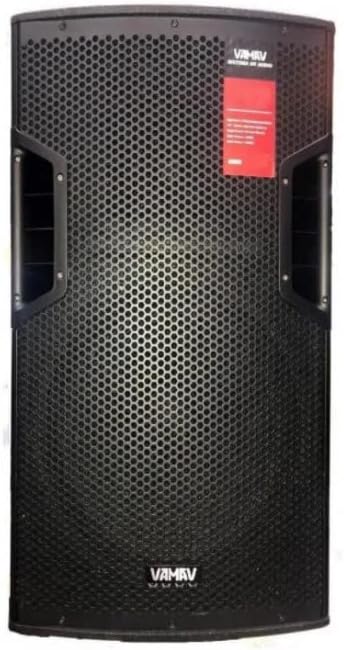
איור 4.1: חזית View
This image displays the front of the Vamav Nova12 speaker, featuring a robust metal grille protecting the 12-inch woofer and tweeters. The Vamav logo is visible at the bottom, and handles are integrated on the sides for portability.

איור 4.2: אחורי View
This image shows the rear panel of the Vamav Nova12 speaker, which houses the DSP control interface, various input and output connections (including RCA), and the power input. The cooling vents are also visible.
5. התקנה
Follow these steps to set up your Vamav Nova12 speaker:
- מיקום: Position the speaker on a stable, flat surface. Ensure there is sufficient space around the unit for proper ventilation. The speaker is designed for floor mounting.
- חיבור חשמל: Connect the provided power cable to the power input on the rear panel of the speaker, then plug the other end into a suitable electrical outlet.
- קלט שמע: Connect your audio source (e.g., home theater system, television, game console) to the RCA input ports on the rear panel of the speaker using an RCA cable (not included). Ensure correct left/right channel connections if applicable.
6. הוראות הפעלה
Once the speaker is set up, follow these instructions for operation:
- הפעלה: Locate the power switch on the rear panel and switch it to the 'ON' position. The DSP display should illuminate.
- התאמת עוצמת הקול: Use the master volume control knob on the rear panel to adjust the overall output level of the speaker. Start with a low volume and gradually increase it to a comfortable listening level.
- DSP Controls: The integrated DSP (Digital Signal Processor) allows for fine-tuning of the audio characteristics. Refer to the DSP interface on the rear panel to navigate menus and adjust settings such as equalization, crossover points, and other audio parameters. Specific DSP functions are controlled via the tactile interface.
- השמעת אודיו: Begin playing audio from your connected source. Adjust the source volume and speaker volume as needed.
- כיבוי: When finished, switch the power button on the rear panel to the 'OFF' position.
7. תחזוקה
Proper maintenance ensures the longevity and optimal performance of your speaker:
- ניקוי: Regularly wipe the exterior of the speaker with a soft, dry, lint-free cloth. Do not use abrasive cleaners, waxes, or solvents.
- אוורור: Periodically check that the ventilation openings are free from dust and debris. Use a soft brush or compressed air to clear any blockages.
- אִחסוּן: If storing the speaker for an extended period, disconnect it from power, clean it, and store it in a cool, dry place, preferably in its original packaging.
8. פתרון תקלות
If you encounter issues with your Vamav Nova12 speaker, refer to the following common problems and solutions:
| בְּעָיָה | סיבה אפשרית | פִּתָרוֹן |
|---|---|---|
| אין כוח | כבל חשמל לא מחובר; שקע חשמל לא פעיל; מתג ההפעלה כבוי | Ensure power cable is securely connected; Check power outlet with another device; Turn power switch to 'ON' |
| אין קול | Audio cable not connected; Source device not playing; Speaker volume too low; DSP settings incorrect | Check RCA cable connections; Verify audio playback on source device; Increase speaker volume; Reset DSP settings if necessary |
| צליל מעוות | Volume too high (speaker or source); Damaged audio cable; DSP settings incorrect | Reduce volume on both speaker and source; Try a different audio cable; Adjust DSP settings |
9. מפרטים
Detailed technical specifications for the Vamav Nova12 speaker:
| תכונה | מִפרָט |
|---|---|
| דֶגֶם | Nova12 |
| סוג רמקול | וופר |
| תכונה מיוחדת | Tweeters, DSP |
| שימושים מומלצים | Game Consoles, Home Theater Systems, Televisions |
| מכשירים תואמים | Home Theater, Television, Game Console |
| קוטר סאב וופר | 12 אינץ' |
| צֶבַע | שָׁחוֹר |
| אֲטִימוּת | שֶׁקֶר |
| שיטת בקרה | מִשׁוּשִׁי |
| גודל רמקול | 12 אינץ' |
| מקור כוח | חשמלי עם כבלים |
| חיי סוללה ממוצעים | 5 Hours (if applicable, for internal components) |
| משקל המוצר | 25 ק"ג |
| טכנולוגיית קישוריות | RCA |
| מצב פלט שמע | מונו |
| סוג הרכבה | הר קומה |
10. אחריות ותמיכה
Vamav products are designed for reliability and performance. For specific warranty details, please refer to the warranty card included with your purchase or contact your retailer. Keep your proof of purchase for any warranty claims.
For technical support or service inquiries, please contact the retailer where you purchased the product or visit the official Vamav webאתר ליצירת קשר.