
מדריך למשתמש ברמקול נייד REAL-EL X-770
דגם: EL121600004
1. הקדמה
Thank you for choosing the REAL-EL X-770 Portable Speaker. This manual provides essential information for the safe and efficient operation of your device. Please read it thoroughly before use and retain it for future reference.
2. מידע בטיחות
To ensure safe operation and prevent damage to your device, please observe the following precautions:
- אין לחשוף את הרמקול למים, לחות או טמפרטורות קיצוניות.
- הימנע מהפלת הרמקול או הכפיפה למכות חזקות.
- אל תנסה לפרק, לתקן או לשנות את הרמקול בעצמך. צור קשר עם אנשי שירות מוסמכים לקבלת סיוע.
- הרחק את הרמקול ממקורות חום, אור שמש ישיר וחומרים דליקים.
- Use only the specified charging cable and power adapter (if included) to charge the device.
- האזנה ממושכת בעוצמת קול גבוהה עלולה לגרום לנזק שמיעה.
3. תכולת החבילה
פרקו בזהירות את הקופסה וודאו שכל הפריטים נמצאים:
- REAL-EL X-770 Portable Speaker Unit
- Charging Cable (USB-A to USB-C, or similar, specific type not provided)
- מדריך למשתמש (מסמך זה)
Note: The product data mentioned "Camera Body" as an included component. This is likely an error. The actual included components for a portable speaker typically include the speaker unit and a charging cable.
4. המוצר נגמרview
Familiarize yourself with the main components of your REAL-EL X-770 Portable Speaker:
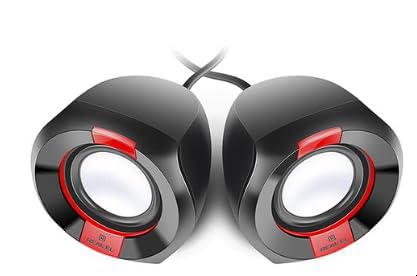
תמונה 1: חזית view of the REAL-EL X-770 Portable Speaker. This image displays the speaker's compact design, the main speaker grille, and typical control buttons for power, volume, and playback.
- לחצן הפעלה: לחץ והחזק כדי להפעיל/לכבות את הרמקול.
- כפתור הגברת עוצמת הקול/הבאת הרצועה: לחיצה קצרה להגברת עוצמת הקול, לחיצה ארוכה לרצועה הבאה.
- כפתור הנמכת עוצמת הקול/הרצועה הקודמת: לחיצה קצרה להנמכת עוצמת הקול, לחיצה ארוכה לרצועה הקודמת.
- לחצן הפעלה/השהה: לחץ כדי להפעיל או להשהות אודיו.
- לחצן מצב: Press to switch between input modes (e.g., Bluetooth, HDMI, AUX).
- יציאת טעינה: לחיבור כבל הטעינה.
- יציאת HDMI: For audio input from compatible devices.
5. התקנה
5.1 טעינת הרמקול
- חבר את כבל הטעינה לשקע הטעינה של הרמקול.
- Connect the other end of the charging cable to a USB power adapter (not included) or a powered USB port.
- נורית חיווי הטעינה תידלק (הצבע עשוי להשתנות) כדי להראות שהרמקול נטען.
- Once fully charged, the indicator light may change color or turn off. Disconnect the speaker from the charger.
5.2 הפעלה/כיבוי
- To power ON: Press and hold the כפתור הפעלה for approximately 3 seconds. An indicator light will turn on, and you may hear an audible prompt.
- To power OFF: Press and hold the כפתור הפעלה for approximately 3 seconds. The indicator light will turn off, and you may hear an audible prompt.
6. הפעלת הרמקול
6.1 זיווג בלוטות '
- Ensure the speaker is powered ON and in Bluetooth pairing mode (usually indicated by a flashing blue LED). If not, press the כפתור מצב until Bluetooth mode is active.
- במכשיר הנייד שלך (סמארטפון, טאבלט, מחשב), הפעל את Bluetooth וחפש מכשירים זמינים.
- Select "REAL-EL X-770" from the list of found devices.
- לאחר הצימוד, הרמקול ישמיע צליל אישור, ונורית חיווי ה-Bluetooth תפסיק להבהב ותישאר קבועה.
- כעת ניתן להשמיע אודיו מהמכשיר דרך הרמקול.
6.2 HDMI Audio Input
The REAL-EL X-770 supports audio input via HDMI. This allows connection to devices such as TVs, gaming consoles, or media players that output audio through HDMI.
- Connect an HDMI cable (not included) from the audio output port of your source device to the HDMI input port on the REAL-EL X-770 speaker.
- Power on both the speaker and the source device.
- הקש על כפתור מצב on the speaker until the HDMI input mode is selected.
- Ensure the audio output settings on your source device are configured to send audio via HDMI.
- Adjust the volume on both the speaker and the source device as needed.
6.3 בקרת עוצמת הקול
- To increase volume: Short press the לחצן הגברת עוצמת הקול/הרצועה הבאה.
- To decrease volume: Short press the הורדת עוצמת הקול/לחצן המסלול הקודם.
6.4 בקרת השמעה
- To play/pause: Press the לחצן הפעלה/השהה.
- To skip to the next track: Long press the לחצן הגברת עוצמת הקול/הרצועה הבאה.
- To go to the previous track: Long press the הורדת עוצמת הקול/לחצן המסלול הקודם.
7. תחזוקה
7.1 ניקוי
- נגבו את החלק החיצוני של הרמקול בעזרת מטלית רכה, יבשה ונטולת סיבים.
- אין להשתמש בחומרי ניקוי שוחקים, אלכוהול, בנזן או ממסים כימיים אחרים, מכיוון שאלה עלולים לפגוע במשטח.
- הימנעו מלחות להיכנס לפתחים כלשהם.
7.2 אחסון
- כאשר הרמקול אינו בשימוש למשך תקופות ממושכות, יש לאחסן אותו במקום קריר ויבש, הרחק מאור שמש ישיר וטמפרטורות קיצוניות.
- It is recommended to charge the speaker at least once every three months to maintain battery health.
8. פתרון תקלות
| בְּעָיָה | סיבה אפשרית | פִּתָרוֹן |
|---|---|---|
| הרמקול לא נדלק. | הסוללה התרוקנה. | טען את הרמקול במלואו. |
| אין קול מהרמקול. | Volume is too low or muted. Incorrect input mode selected. Device not paired (Bluetooth). | Increase volume on both speaker and source device. Ensure correct input mode (Bluetooth/HDMI). Re-pair Bluetooth device. |
| לא ניתן לבצע צימוד דרך בלוטות'. | הרמקול לא במצב צימוד. המכשיר רחוק מדי. הפרעות. | Ensure speaker is in Bluetooth pairing mode. Move devices closer. Turn off other Bluetooth devices. |
| HDMI audio not working. | Incorrect mode. Cable issue. Source device settings. | Ensure speaker is in HDMI mode. Check HDMI cable connection. Verify source device audio output settings. |
9. מפרטים
| תכונה | פְּרָט |
|---|---|
| מותג | REAL-EL |
| שם הדגם | X-770 |
| מספר דגם | EL121600004 |
| טכנולוגיית קישוריות | HDMI, Bluetooth (assumed for portable speaker) |
| מידות המוצר | 25.4 x 5.08 x 6.86 ס"מ |
| משקל פריט | 5.29 קילוגרם |
| צֶבַע | סַסגוֹנִיוּת |
| סוללות כלולות | לֹא |
| סוללות נדרשות | לֹא |
Note: While the product data indicates no batteries are included or required, portable speakers typically feature an internal rechargeable battery for wireless operation. This specification might refer to the absence of user-replaceable or external batteries. The speaker is designed to be charged via its charging port. Specifications are subject to change without prior notice. For the most up-to-date information, please refer to the manufacturer's official webאֲתַר.
10. אחריות ותמיכה
The REAL-EL X-770 Portable Speaker comes with a manufacturer's warranty. Please refer to the warranty card included with your purchase or visit the official REAL-EL webבאתר לקבלת תנאי האחריות המפורטים.
For technical support, service inquiries, or further assistance, please contact REAL-EL customer service through their official channels. Contact information can typically be found on the product packaging or the manufacturer's webאֲתַר.