
1. הקדמה
The FULAIM VL1 is a cost-effective UHF wireless microphone system designed for clear and reliable audio recording. This system is suitable for content creators, vloggers, and videographers using Android mobile phones, PCs, or laptops. It features simple plug-and-record operation, 16 selectable channels, and noise reduction technology to ensure high-quality sound capture.
2. מה בקופסה
אנא ודא שכל הרכיבים נמצאים בחבילה שלך:
- 1 x FULAIM VL1 Transmitter
- 1 x FULAIM VL1 Receiver (USB Type-C)
- 1 x Lavalier מיקרופון
- 1 x מתאם USB-C ל- USB-A
- 1 x כבל טעינה USB
- 1 x מדריך למשתמש

Image: Contents of the FULAIM VL1 Wireless Microphone System package, including transmitter, receiver, lavalier microphone, adapters, and cables.
3. המוצר נגמרview
The FULAIM VL1 system consists of a transmitter and a receiver, each with distinct features for optimal performance.
תכונות משדר:
- יציאת כניסת מיקרופון
- כפתור הפחתת רעש
- כפתור הפעלה
- מסך תצוגה
- כפתור בחירת ערוץ
- אנטנה משדרת
- Charging input port (Micro USB)
- נורית חיווי עבודה
תכונות מקלט:
- Receiving antenna A
- נורית חיווי עבודה
- מחוון מצב החיבור
- מחוון הקלטה
- Receiving antenna B
- USB Type-C connection plug
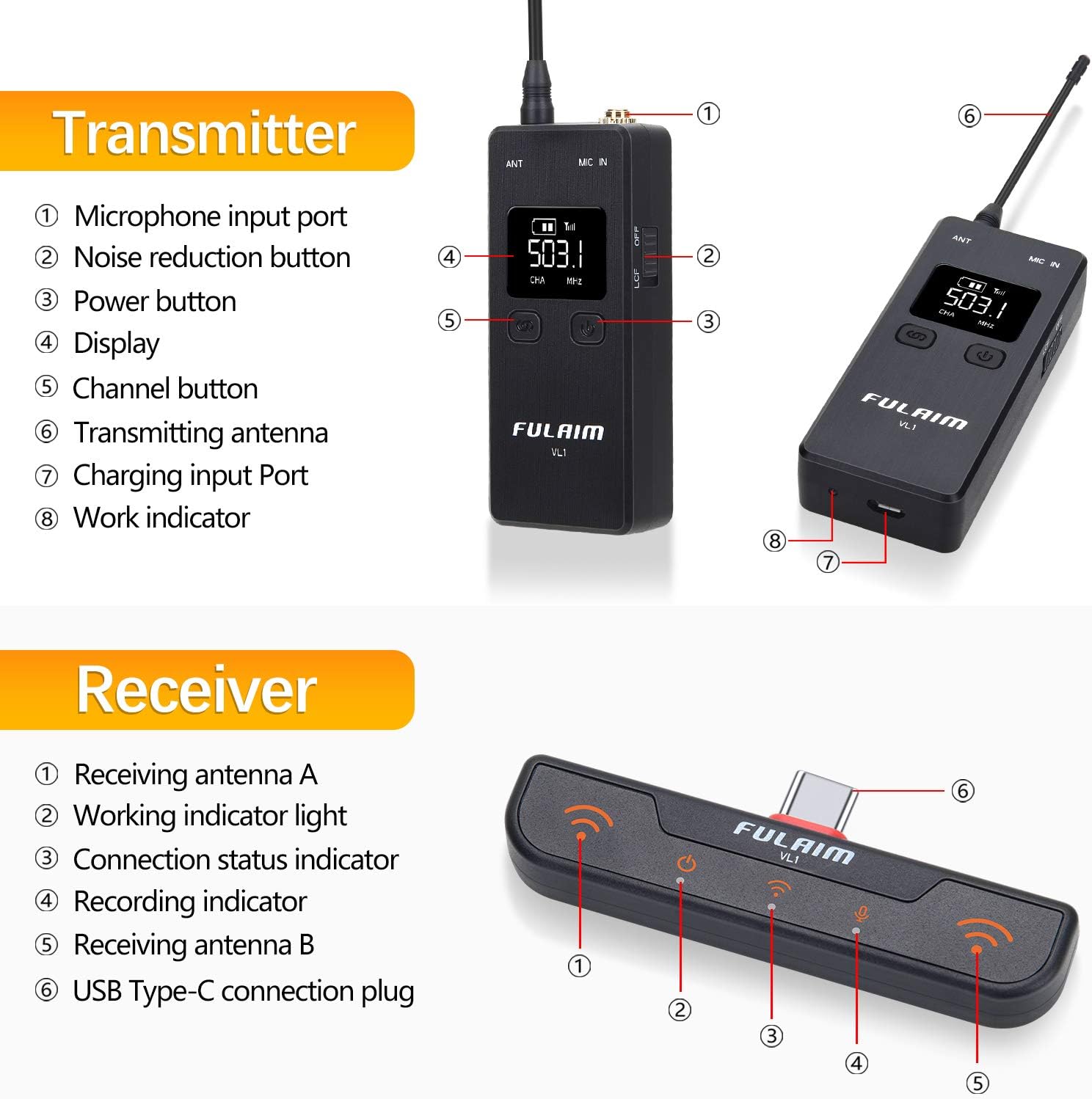
Image: Detailed diagram illustrating the various parts and controls of the FULAIM VL1 Transmitter and Receiver units.
4. מדריך התקנה
4.1. טעינת המשדר
Before initial use, fully charge the transmitter. Connect the provided USB charging cable to the Micro USB charging port on the transmitter and a USB power source. The internal lithium-ion polymer battery offers up to six hours of operation on a full charge.

Image: The FULAIM VL1 Transmitter being charged via a USB cable connected to a laptop. The receiver is shown connected to a smartphone.
4.2. Connecting to Android Mobile Phones
- Ensure your Android phone has a USB Type-C port.
- Plug the FULAIM VL1 receiver directly into the USB Type-C port of your smartphone. Ensure it is securely connected. You may need to remove your phone case for a proper fit.
- The receiver is powered directly by the phone and does not require separate charging.
- Turn on the FULAIM VL1 transmitter by pressing and holding the power button. The transmitter and receiver should automatically pair.
- Connect the lavalier microphone to the microphone input port on the transmitter.
- Open your recording application (e.g., camera app, voice recorder, or streaming app) and ensure the external microphone is selected as the audio input source in your phone's settings if necessary.

Image: Illustration showing the FULAIM VL1 receiver's compatibility with a range of USB-C Android smartphones from different brands.
4.3. חיבור למחשב/מחשב נייד
- Use the provided USB-C to USB-A adapter. Connect the FULAIM VL1 receiver to the USB-C end of the adapter.
- Plug the USB-A end of the adapter into an available USB port on your PC or laptop.
- Turn on the FULAIM VL1 transmitter. The units should automatically pair.
- Connect the lavalier microphone to the microphone input port on the transmitter.
- On your computer, navigate to your sound settings (e.g., Windows Sound Settings or macOS System Preferences > Sound). Select the FULAIM VL1 as your default input device.
- Open your desired application (e.g., Zoom, OBS, Audacity) and confirm that the FULAIM VL1 is selected as the audio input.

Image: The FULAIM VL1 receiver connected to a laptop via a USB-C to USB-A adapter, demonstrating compatibility with PC and laptop systems.
4.4. Attaching the Lavalier Microphone
Clip the lavalier microphone to your clothing, approximately 6-8 inches (15-20 cm) below your chin, ensuring it is facing towards your mouth for optimal sound capture. Avoid placing it where it might rub against clothing or jewelry, which can cause unwanted noise.
5. הוראות הפעלה
5.1. הפעלה/כיבוי
To power on the transmitter, press and hold the power button until the display illuminates. To power off, press and hold the power button again until the display turns off. The receiver powers on automatically when connected to a device.
5.2. בחירת ערוץ
The FULAIM VL1 system operates on 16 selectable UHF channels, organized into 4 groups with 4 channels each. If you experience interference, you can change the operating channel:
- On the transmitter, press the channel button (usually labeled 'CH' or similar) to cycle through available channels.
- The receiver will automatically synchronize with the transmitter's channel.
- Select a channel that provides clear audio without interference.
5.3. הפחתת רעש
The transmitter features a noise reduction function to minimize ambient background noise. To activate or deactivate this feature, press the dedicated noise reduction button on the transmitter. The display will indicate when noise reduction is active.

Image: A visual representation of audio waveforms before and after noise reduction, demonstrating the system's ability to clarify sound.
6. תחזוקה
- ניקוי: Use a soft, dry cloth to clean the transmitter and receiver. Do not use liquid cleaners or solvents.
- אִחסוּן: יש לאחסן את המערכת במקום קריר ויבש, הרחק מאור שמש ישיר וטמפרטורות קיצוניות.
- טיפול בסוללה: For optimal battery life, avoid fully discharging the transmitter's battery frequently. If storing for extended periods, charge the battery to approximately 50% every few months.
- אנטנות: Handle the antennas with care to prevent bending or damage.
7. פתרון תקלות
| בְּעָיָה | סיבה אפשרית | פִּתָרוֹן |
|---|---|---|
| אין קול או עוצמת קול נמוכה |
|
|
| הפרעות או רעש סטטי |
|
|
| Transmitter battery drains quickly |
|
|
| המקלט לא מזוהה על ידי המכשיר |
|
|
8. מפרטים
| תכונה | מִפרָט |
|---|---|
| גורם צורת מיקרופון | לאבלייר |
| מקור כוח | Battery Powered (Transmitter), USB-C (Receiver) |
| מספר ערוצים | 16 (UHF) |
| תגובת תדר | עד 18 KHz |
| יחס אות לרעש | 92 dB |
| סוללת משדר | 1 Lithium Polymer (included), 750mAh |
| Operating Time (Transmitter) | עד 6-8 שעות |
| טכנולוגיית קישוריות | USB |
| סוג מחבר | 3.5 mm Jack (for lavalier mic), USB Type-C (Receiver) |
| מכשירים תואמים | Laptop, Personal Computer, Smartphone (USB-C Android) |
| דפוס קוטבי | כל-כיווני |
| משקל פריט (משדר) | 8 גרם (0.282 אונקיות) |
| מספר דגם | 1TX |
| UPC | 762409380212 |
9. אחריות ותמיכה
FULAIM products are designed for reliability and performance. This product is covered by a standard return policy. For specific warranty details, technical support, or service inquiries, please refer to the documentation included with your purchase or visit the official FULAIM store: