
יוניווה E1801
מדריך למשתמש בטלפון נייד לגיל הזהב UNIWA E1801
דגם: E1801
1. הקדמה
The UNIWA E1801 is a user-friendly mobile phone designed with large buttons and a clear display, making it ideal for seniors. It features essential functions such as calling, messaging, FM radio, MP3/MP4 playback, and a built-in flashlight. This manual provides comprehensive instructions for setting up, operating, and maintaining your device.
2. מידע בטיחות
- אין לפרק או לשנות את המכשיר.
- Use only original or approved batteries and chargers.
- הימנעו מחשיפת הטלפון לטמפרטורות קיצוניות, לאור שמש ישיר או לחות.
- Keep the phone away from medical devices to prevent interference.
- יש להשליך את הטלפון והסוללה באחריות בהתאם לתקנות המקומיות.
3. תכולת החבילה
אנא בדקו את תוכן האריזה בעת פתיחת הקופסה. אם חסרים פריטים או פגומים, צרו קשר עם הקמעונאי שלכם.
- UNIWA E1801 Mobile Phone
- BL-5C 800mAh Battery
- מַטעֵן
- מדריך למשתמש (מסמך זה)
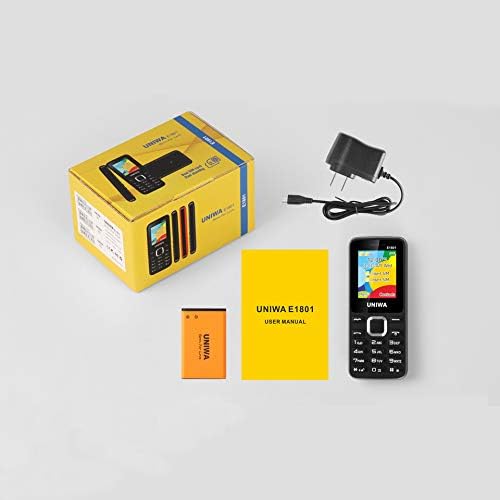
Image: Contents of the UNIWA E1801 package, showing the phone, battery, charger, and user manual neatly arranged next to the product box.
4. המוצר נגמרview
Familiarize yourself with the physical components of your UNIWA E1801 phone.

Image: The UNIWA E1801 mobile phone held in a hand, showcasing its compact size, large keypad, and clear color display with the UNIWA logo.
- לְהַצִיג: 1.77-inch QQVGA screen (160 x 128 pixels) for clear visibility.
- לוח מקשים: Large, ergonomic buttons with clear numbering for easy dialing and navigation.
- מקשי ניווט: Plated navigation keys for intuitive menu control.
- מצלמה אחורית: 0.08 MP camera for basic photo capture.
- רַמקוֹל: Integrated 2030 box speaker for loud and clear audio.
- פָּנַס כִּיס: Built-in LED flashlight for convenience.
- Non-slip Frame: Textured frame design for a secure grip.

תמונה: תקריב view of the UNIWA E1801's keypad, highlighting the ergonomic design and the metallic finish of the central navigation keys.

Image: The UNIWA E1801 phone with an inset showing the detailed texture of its non-slip frame, designed for a secure grip.

Image: The rear of the UNIWA E1801 phone, with an overlay illustrating the powerful 2030 box speaker and its sound projection.
5. התקנה
5.1. התקנת כרטיסי SIM
The UNIWA E1801 supports dual SIM cards, allowing you to use two different numbers simultaneously.
- הסר את הכיסוי האחורי של הטלפון.
- אתר את חריצי כרטיסי ה-SIM.
- Carefully insert your SIM cards into the designated slots with the gold contacts facing down.
- ודא שכרטיסי ה-SIM מוכנסים היטב.

Image: The back of the UNIWA E1801 phone with the cover removed, clearly showing the two SIM card slots and an illustration of two SIM cards.
5.2. התקנת הסוללה
- After inserting the SIM cards, place the BL-5C 800mAh battery into the battery compartment, aligning the gold contacts.
- Gently press down until the battery is securely in place.
- החזירו את הכיסוי האחורי, וודאו שהוא נכנס למקומו בנקישה.
5.3. טעינת הטלפון
לפני השימוש הראשון, טען את סוללת הטלפון במלואה.
- חבר את המטען לשקע הטעינה בטלפון.
- חבר את המטען לשקע חשמל.
- מחוון הסוללה על המסך יציג את מצב הטעינה.
- לאחר טעינה מלאה, נתק את המטען.
6. הוראות הפעלה
6.1. הפעלה/כיבוי
- כדי להפעיל: לחץ והחזק את לחצן ההפעלה/סיום שיחה עד שהמסך יידלק.
- כדי לכבות: לחץ והחזק את לחצן ההפעלה/סיום שיחה עד להופעת אפשרויות הכיבוי, לאחר מכן בחר "כיבוי".
6.2. ביצוע שיחות
- ממסך הסרק, הזן את מספר הטלפון באמצעות לוח המקשים.
- לחץ על כפתור השיחה הירוק כדי להתחיל את השיחה.
- כדי לסיים שיחה, לחץ על כפתור סיום שיחה האדום.
6.3. שליחת הודעות
- עבור אל "תפריט" > "הודעות" > "כתוב הודעה".
- הזן את ההודעה שלך באמצעות לוח המקשים.
- הזן את מספר הטלפון של הנמען או בחר מתוך אנשי הקשר.
- לחץ על "שלח".
6.4. שימוש ברדיו FM
The phone features a wireless FM radio.
- עבור אל "תפריט" > "רדיו FM".
- Select "Auto search" to find available stations.
- Use the navigation keys to switch between stations.

Image: The UNIWA E1801 phone displaying its FM radio interface, showing a frequency of 142.2 MHz, with musical notes and a classic radio in the background, indicating its wireless FM capability.
6.5. שימוש בפנס
The built-in flashlight can be easily activated.
- Typically, a dedicated button or a long press on a specific key (refer to your phone's quick guide) activates the flashlight.
- Alternatively, access it via "Menu" > "Tools" > "Flashlight".

Image: The UNIWA E1801 phone with a bright beam of light emanating from its top, illustrating the built-in flashlight function.
6.6. תכונות אחרות
- MP3/MP4 Playback: Supports multimedia playback. Transfer files to a TF card (up to 16GB, not included) and access them via the "Multimedia" menu.
- ספר טלפונים: Store up to 300 contacts.
- כְּלֵי עֲבוֹדָה: Includes games, calendar, alarm clock, calculator, world clock, and recorder.
7. תחזוקה
- ניקוי: השתמשו במטלית רכה ויבשה לניקוי פני השטח של הטלפון. אין להשתמש בחומרי ניקוי נוזליים או בתרסיסים.
- אִחסוּן: יש לאחסן את הטלפון במקום קריר ויבש, הרחק מאור שמש ישיר וטמפרטורות קיצוניות.
- טיפול בסוללה: Avoid fully discharging the battery frequently. Charge it regularly to prolong its lifespan.
8. פתרון תקלות
| בְּעָיָה | סיבה אפשרית | פִּתָרוֹן |
|---|---|---|
| הטלפון לא נדלק. | הסוללה חלשה או שאינה מותקנת כראוי. | טען את הסוללה. ודא שהסוללה מוכנסת כהלכה. |
| לא ניתן לבצע או לקבל שיחות. | אין כרטיס SIM, כרטיס SIM לא מוכנס כהלכה, או שאין קליטת רשת. | Ensure SIM card is inserted. Check network signal strength. Contact your service provider. |
| איכות שמע ירודה. | Low volume, poor network signal, or speaker/microphone obstruction. | Adjust volume. Move to an area with better signal. Clean speaker/microphone openings. |
| הסוללה מתרוקנת במהירות. | שימוש תכוף, אפליקציות ברקע או סוללה ישנה. | הפחת את בהירות המסך. סגור יישומים שאינם בשימוש. שקול להחליף את הסוללה אם היא ישנה. |
9. מפרטים
| תכונה | פְּרָט |
|---|---|
| מספר דגם | E1801 |
| מידות | 108 x 45 x 14 מ"מ |
| מִשׁקָל | 68 גרם |
| מעבד | SC6531E |
| להקת רשת | 2G: GSM850/900/1800/1900 מגה-הרץ, GPRS |
| כרטיס סים | Dual SIM, Dual Standby |
| קיבולת ספר טלפונים | 300 כניסות |
| לְהַצִיג | 1.77 inch QQVGA, 160 x 128 pixels |
| מַצלֵמָה | מצלמה אחורית של 0.08 מגה פיקסל, 640 x 480 פיקסלים |
| מולטימדיה | MP3, MP4 |
| זֵכֶר | Supports TF card up to 16 GB (max) |
| בלוטות' | V2.1 |
| סוֹלְלָה | BL-5C 800mAh |
| זמן דיבור | עד 240 דקות |
| זמן המתנה | עד 200 שעות |
| שפות | אנגלית, רוסית, עברית, ערבית, צרפתית, ספרדית, פולנית, גרמנית, איטלקית, פורטוגזית, סינית |
| תכונות | Games, Calendar, Alarm Clock, Calculator, World Clock, Flashlight, E-book, WAP, Recorder |
10. אחריות ותמיכה
Your UNIWA E1801 mobile phone comes with a standard manufacturer's warranty. Please refer to the warranty card included in your package for specific terms and conditions.
For technical support, troubleshooting assistance, or warranty claims, please contact your point of purchase or the official UNIWA customer service. Keep your purchase receipt as proof of purchase.
For more information, visit the official UNIWA webאתר או צור קשר עם ערוצי התמיכה שלהם.