1. הקדמה
Welcome to the instruction manual for your new Marea Smart Watch B60001/5. This guide will help you understand the features, setup, and operation of your device to ensure optimal performance and user experience. Please read this manual thoroughly before using your watch.
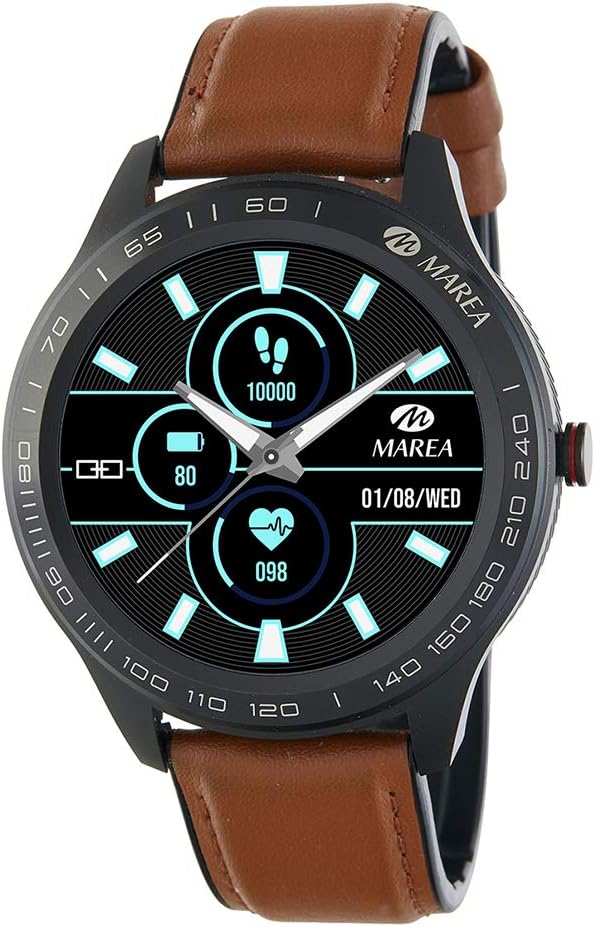
Image: Marea Smart Watch B60001/5. This image shows the watch face displaying steps (10000), battery level (80%), heart rate (098), and date (01/08/WED). The watch has a black casing and a brown leather strap.
2. הגדרה ראשונית
2.1 טעינת השעון
Before first use, fully charge your Marea Smart Watch. Connect the charging cable to the charging port on the back of the watch and plug the USB end into a power adapter (not included) or a computer's USB port. The watch display will indicate charging status.
- טעינה מלאה אורכת בדרך כלל כשעתיים.
- Battery life is approximately 5 to 7 days, depending on usage.
2.2 התקנה וצימוד של אפליקציה
To unlock the full potential of your Marea Smart Watch, you need to install the dedicated application on your smartphone and pair the devices.
- הורד את האפליקציה: חפש the "Marea Smart" app in your smartphone's app store (Google Play Store for Android or Apple App Store for iOS).
- התקן את האפליקציה: פעל לפי ההוראות שעל המסך כדי להתקין את היישום.
- אפשר Bluetooth: ודא שה-Bluetooth מופעל בטלפון החכם שלך.
- פתח את האפליקציה: Launch the Marea Smart app and follow the prompts to create an account or log in.
- התאם את השעון: Within the app, navigate to the device pairing section. The app will search for available devices. Select "Marea B60001/5" from the list to initiate pairing. Confirm the pairing request on both your watch and smartphone if prompted.
דרישות מערכת: iOS 8.0 or higher / Android 5.1 or higher.
3. הוראות הפעלה
3.1 ניווט בסיסי
The Marea Smart Watch features a 1.39-inch touchscreen display. Swipe left, right, up, or down to navigate through different menus and functions. Tap to select an option or confirm an action. The side button typically serves as a power button or a back button, depending on the context.
3.2 תכונות ניטור בריאות
Your watch is equipped with various sensors to monitor your health metrics:
- דופק: עוקב באופן רציף אחר קצב הלב שלך.
- לחץ דם: מספק קריאות לחץ דם משוערות.
- אלקטרוקרדיוגרמה (אק"ג): Records ECG data.
- חמצן בדם: מודד את רוויון החמצן בדם (SpO2).
- ניטור שינה: עוקב אחר דפוסי השינה שלך ואיכותם.
- תזכורת מים: מזכיר לך לשתות מים במרווחי זמן קבועים.
הערה: נתוני ניטור הבריאות הם לעיון בלבד ואין להשתמש בהם לאבחון רפואי או טיפול. יש להתייעץ עם איש מקצוע רפואי במקרה של חששות בריאותיים.
3.3 Activity Tracking Features
Track your daily activities and fitness goals:
- שלבים: סופר את מספר הצעדים שננקטו במהלך היום.
- מֶרְחָק: מעריך את המרחק שעברת בהתבסס על צעדיך.
- Calories Consumed: מחשב קלוריות שנשרפו במהלך פעילות גופנית.
- Step Goal: Allows you to set and track daily step targets.
- תזכורת בישיבה: Alerts you when you have been inactive for too long.
- כרונוגרף: A stopwatch function for timing activities.
3.4 הודעות
Once paired with your smartphone, your Marea Smart Watch can display notifications:
- התראות שיחות: Receive alerts for incoming calls.
- הודעות הודעה: View הודעות טקסט נכנסות.
- התראות ברשתות חברתיות: Get alerts from your connected social media applications.
Ensure app permissions are granted on your smartphone for notifications to function correctly.
3.5 פונקציות אחרות
- אַזעָקָה: Set multiple alarms through the app.
- שלט רחוק למוזיקה: שלוט בהשמעת מוזיקה בסמארטפון שלך ישירות מהשעון.
- שלט רחוק למצלמה: השתמש בשעון שלך כמצמד מרחוק למצלמת הסמארטפון שלך.
- מצא את השעון: Use the app to locate your watch if it's within Bluetooth range.
- מצא טלפון: Use your watch to make your phone ring if it's within Bluetooth range.
4. תחזוקה וטיפול
To ensure the longevity and proper functioning of your Marea Smart Watch, follow these care guidelines:
- ניקוי: נגבו את השעון והרצועה באופן קבוע בעזרת מטלית רכה ויבשה. במידת הצורך, השתמשו במטלית רכה קלות.amp cloth, then dry thoroughly. Avoid harsh chemicals or abrasive materials.
- עמידות במים: The watch has an IP67 protection rating, meaning it is resistant to dust and can withstand immersion in water up to 1 meter for 30 minutes. It is suitable for daily use and light splashes, but not recommended for swimming, diving, or hot showers.
- טֶמפֶּרָטוּרָה: הימנעו מחשיפת השעון לטמפרטורות קיצוניות (חמות או קור) או לאור שמש ישיר למשך תקופות ממושכות.
- אִחסוּן: כאשר השעון אינו בשימוש למשך זמן רב, יש לאחסן אותו במקום קריר ויבש.
5. פתרון תקלות
If you encounter issues with your Marea Smart Watch, refer to the following common solutions:
- שעון לא נדלק: ודא שהשעון טעון במלואו. חבר אותו למטען למשך 30 דקות לפחות.
- לא ניתן להתאים לסמארטפון:
- ודא שה-Bluetooth מופעל בטלפון החכם שלך.
- ודא שהשעון נמצא בטווח Bluetooth (בדרך כלל 10 מטרים).
- הפעילו מחדש את השעון ואת הסמארטפון.
- Check if the Marea Smart app is updated to the latest version.
- שכח את המכשיר בהגדרות ה-Bluetooth של הטלפון ונסה לבצע התאמה שוב דרך האפליקציה.
- התראות שלא התקבלו:
- Verify that notifications are enabled in the Marea Smart app.
- Check your smartphone's settings to ensure the app has permission to send notifications.
- ודא שהשעון מחובר דרך בלוטות'.
- נתוני בריאות לא מדויקים: Ensure the watch is worn snugly on your wrist, about one finger's width above the wrist bone. Avoid excessive movement during measurements.
- חיי סוללה קצרים: Reduce screen brightness, disable continuous heart rate monitoring if not needed, and limit the number of notifications.
אם הבעיה נמשכת, אנא פנו לתמיכת הלקוחות.
6. מפרטים
| מותג | מארה |
| מספר דגם | B60001 |
| גודל תצוגה | 1.39 אינץ' |
| מַעֲרֶכֶת הַפעָלָה | iOS and Android (iOS 8.0+, Android 5.1+) |
| טכנולוגיית קישוריות | בלוטות' |
| תכונות מיוחדות | Chronograph, Alarm, Health Monitoring (HR, BP, ECG, SpO2, Sleep), Activity Tracking |
| מכשירים תואמים | סמארטפון |
| קיבולת סוללה | 160 מיליאמפר/שעה |
| חיי סוללה | 5 עד יומיים |
| דירוג הגנת מים | IP67 |
| צֶבַע | חוּם |
| GPS | אין GPS |
7. אחריות ותמיכה
For warranty information, please refer to the documentation provided at the time of purchase or contact your retailer. If you require technical assistance or have questions not covered in this manual, please visit the official Marea webאתר או צרו קשר עם שירות תמיכת הלקוחות שלהם.
שמור את הוכחת הרכישה שלך לתביעות אחריות.