
מָבוֹא
This manual provides detailed instructions for the installation, operation, and maintenance of your CO-Z Swing Gate Opener. Please read this manual thoroughly before installation and use to ensure proper function and safety. Keep this manual for future reference.
מידע בטיחות
בטיחותך היא מעל לכל. אנא הקפידו על הנחיות הבטיחות הבאות:
- ודא שכל חיבורי החשמל מבוצעים על ידי חשמלאי מוסמך.
- הרחיקו ילדים וחיות מחמד מאזור השער במהלך הפעולה.
- אל תנסו לתקן את היחידה בעצמכם. צרו קשר עם אנשי שירות מוסמכים.
- The system features automatic reverse upon obstacle detection. However, always exercise caution and ensure the path is clear.
- In case of power failure, use the manual unlock key to operate the gate.
- Install the alarm lamp and safety beam for enhanced security and visibility.
תוכן החבילה
ודא שכל הרכיבים קיימים לפני תחילת ההתקנה. אם חסרים או פגומים חלקים כלשהם, פנה לתמיכת הלקוחות.
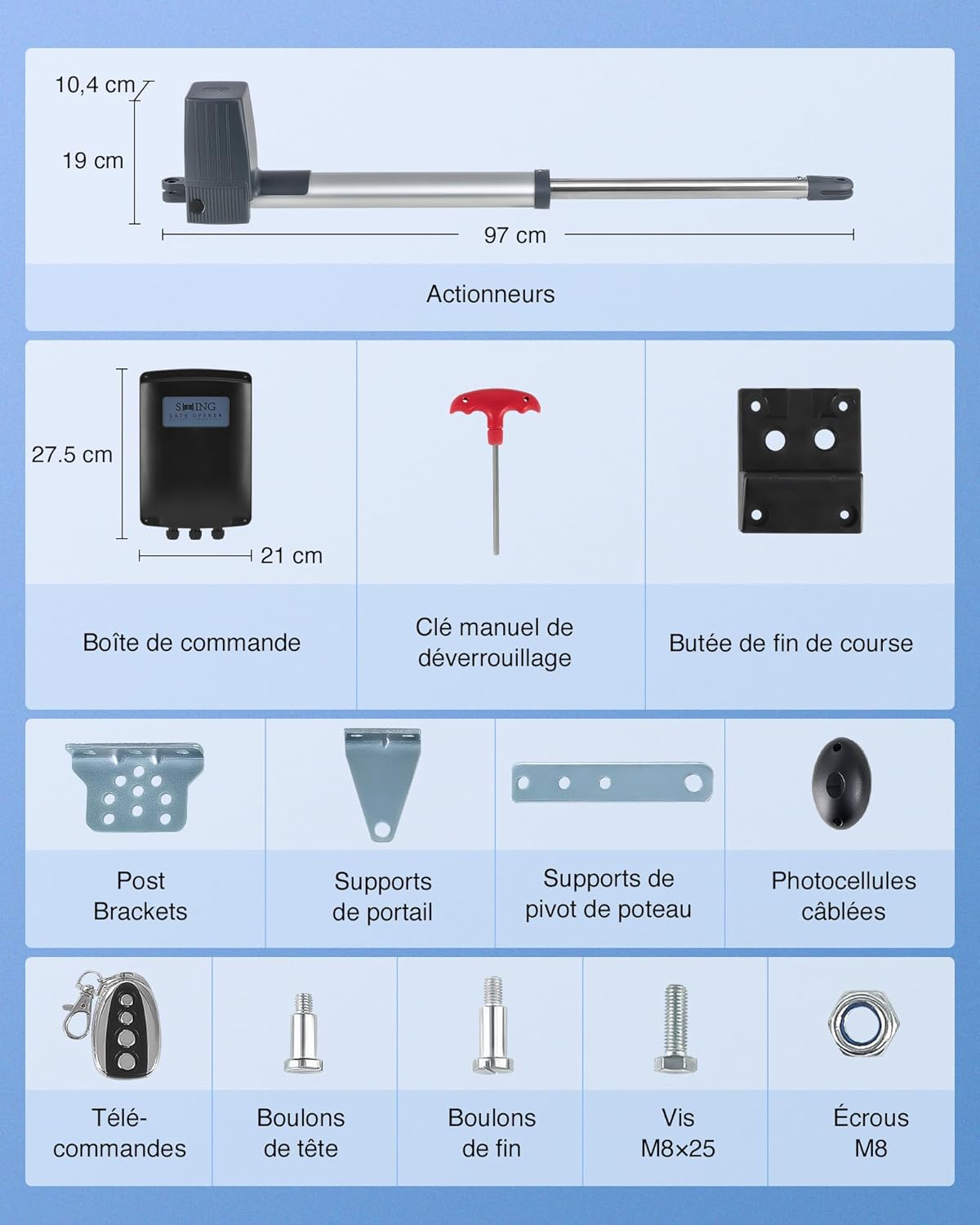
תיאור תמונה: A diagram illustrating the components included in the CO-Z Swing Gate Opener package. It shows two actuators with dimensions (10.4 cm height, 19 cm width, 97 cm length), a control box (27.5 cm height, 21 cm width), a manual release key, an end stop, post brackets, gate brackets, pivot post supports, wired photocells, remote controls, head bolts, end bolts, M8x25 screws, and M8 nuts.
- 1x Swing Gate Motor (Actuator)
- 1x תיבת בקרה
- 2x Remote Controls (Model WSR1)
- 1x Manual Release Key
- 1x Mounting Accessory Kit (includes various bolts, screws, nuts, brackets, end stop, and photocells)
מפרטים
| תכונה | מִפרָט |
|---|---|
| מספר דגם | KMJ-SGO-03DE |
| אורך שער מקסימלי | 2.5 m (per leaf) |
| משקל שער מקסימלי | 300 ק"ג (לכל עלה) |
| כוח מנוע | 80 וואט DC |
| Thrust Force | 1500 N |
| מהירות פתיחה | 18-22 seconds / 90° |
| רמת רעש | < 58 dB |
| מכת בוכנה | מקסימום 4 מ ' |
| חוֹמֶר | Metal (Aluminum finish) |
| מידות (L x W x H) | 62 x 19 x 10.4 cm (Actuator) |
| מִשׁקָל | 17.02 ק"ג |
| תאימות כוח | AC, Solar, Battery (not included) |
| התנגדות סביבתית | Heat, Cold, Corrosion resistant (IP44) |
| טמפרטורת הפעלה | -20 מעלות צלזיוס עד 70 מעלות צלזיוס |
התקנה והתקנה
Careful planning and installation are crucial for optimal performance and safety. Refer to the detailed installation diagrams provided.
1. מיקומי הרכבה
The gate opener supports multiple mounting configurations to suit various gate and post designs. Choose the appropriate position based on your gate structure.

תיאור תמונה: A diagram showing five different mounting positions for the gate opener: inside the gate, wall side, wall facade, outside the gate, and front and side wall. Each position illustrates how the actuator connects to the gate and post/wall.
- Inside the Gate: Actuator mounted on the inside of the gate post.
- Outside the Gate: Actuator mounted on the outside of the gate post.
- Wall Side: Actuator mounted on the side of a wall.
- Wall Facade: Actuator mounted on the front face of a wall.
- Front and Side Wall: Combination mounting for specific wall structures.
2. חיבור ספק כוח
The system is versatile and can be powered by AC, solar, or battery. Ensure correct wiring according to the provided electrical diagrams.

תיאור תמונה: A diagram illustrating the power supply options for the gate opener. It shows the control box connected to a gate, with options for connecting to batteries (not included), solar panels, or domestic AC power. It notes that charging batteries and solar power requires a power converter (not included).
- מתח AC: Connect the control box to a standard domestic power outlet.
- אנרגיה סולארית: For off-grid or energy-efficient operation, connect to solar panels. A power converter (not included) is required.
- כוח סוללה: The system can be powered by batteries (not included). A power converter (not included) is required for charging.
Refer to the wiring diagram in the full manual for detailed electrical connections.
הוראות הפעלה
Once installed, the CO-Z Swing Gate Opener offers convenient and secure operation.
1. פעולת שלט רחוק
Use the provided remote controls to open and close your gate. Ensure you are within range for reliable operation.

תיאור תמונה: A hand holding a remote control, with a car dashboard in the background, indicating remote operation of the gate opener. The remote control has multiple buttons for different functions.
- Press the designated button on the remote to open the gate.
- Press again to close the gate.
- The gate will open smoothly in approximately 18-22 seconds for a 90° swing.
2. Automatic Rebound Feature
For enhanced safety, the gate opener is equipped with an automatic rebound mechanism. If an obstacle is detected during closing, the gate will stop and reverse direction.

תיאור תמונה: A diagram illustrating the automatic rebound safety feature. One panel shows a car passing through an open gate with infrared sensors. Another panel shows a person walking near a closing gate, which then reverses direction to avoid contact.
3. הפעלה ידנית
במקרה של כוח outage or system malfunction, the gate can be operated manually using the provided release key.

תיאור תמונה: A split image showing two modes of operation. On the left, a gate is shown in electric mode, automatically locking. On the right, a close-up of the manual release key inserted into the actuator, indicating manual mode for emergencies.
- Locate the manual release mechanism on the actuator.
- Insert the manual release key and turn it to disengage the motor.
- You can now open or close the gate by hand.
- Remember to re-engage the motor after manual operation for automatic function.
תַחזוּקָה
תחזוקה שוטפת מבטיחה את אורך החיים והפעולה האמינה של פותח השערים שלכם.
- יַרחוֹן: Inspect the gate and opener for any signs of wear, damage, or loose connections. Ensure the gate moves freely without obstruction.
- רִבעוֹן: Clean the actuators and control box to prevent dirt and debris buildup. Check the photocells for obstructions.
- מדי שנה: Lubricate moving parts of the gate hinges and actuator arms as recommended by the gate manufacturer. Check all electrical wiring for integrity.
- Ensure the area around the gate is clear of vegetation and debris that could interfere with operation or sensors.

תיאור תמונה: A wooden double gate with the CO-Z gate opener installed, shown in rainy weather. Icons indicate all-weather durability, IP44 rating, minimal noise (<58dB), and suitability for slopes up to 15°.
The CO-Z gate opener is designed for all-weather durability, resisting heat, cold, and corrosion, with an IP44 rating and an operating temperature range of -20°C to 70°C.
פתרון בעיות
If you encounter issues with your gate opener, refer to the following common problems and solutions before contacting support.
| בְּעָיָה | סיבה אפשרית | פִּתָרוֹן |
|---|---|---|
| השער לא מגיב לשלט רחוק. | Dead remote battery, remote out of range, power outage, motor disengaged. | Replace remote battery, move closer to gate, check power supply, ensure motor is engaged. |
| Gate opens/closes partially or reverses unexpectedly. | Obstruction in gate path, faulty photocells, incorrect limit switch settings. | Clear obstructions, clean/check photocells, refer to installation guide for limit switch adjustment. |
| Gate operates slowly or with unusual noise. | Low power, mechanical friction, worn components. | Check power supply, lubricate gate hinges and actuator, inspect for damaged parts. |
| שחרור ידני לא עובד. | Key not fully inserted or turned correctly, mechanism jammed. | Ensure key is fully inserted and turned firmly. Do not force. |
אחריות ותמיכה
CO-Z products are designed for durability and performance. For warranty information, technical support, or to purchase replacement parts (e.g., remote control model WSR1), please contact CO-Z customer service through your retailer or the official CO-Z webאֲתַר.
Please have your model number (KMJ-SGO-03DE) and purchase date available when contacting support.