
1. הקדמה
This manual provides essential instructions for the safe and effective use of your Benson Amps PREAMP מִרֹאשׁamp Pedal. Please read this manual thoroughly before operating the device and retain it for future reference.
The Benson Amps PREAMP pedal is a versatile FET-based preamp, overdrive, boost, and fuzz pedal designed to deliver a wide range of tones, from clean enhancement to saturated drive. It features a 2-band EQ for tone shaping.
2. מידע בטיחות
- ספק כוח: Use only a 9-volt DC power supply with a center-negative polarity. Incorrect power supplies can damage the unit and void the warranty.
- סְבִיבָה: Do not expose the pedal to extreme temperatures, humidity, water, or direct sunlight.
- ניקוי: יש לנקות רק בעזרת מטלית יבשה ורכה. אין להשתמש בחומרי ניקוי נוזליים.
- שֵׁרוּת: אל תנסה לטפל ביחידה בעצמך. הפנה את כל הטיפולים לאנשי שירות מוסמכים.
- מיקום: הנח את הדוושה על משטח יציב כדי למנוע נפילות מקריות.
3. תכולת החבילה
ודא שהחבילה שלך מכילה את הפריטים הבאים:
- Benson Amps PREAMP מִרֹאשׁamp פֵּדָל
- מדריך למשתמש (מסמך זה)
- (Power supply not typically included, sold separately)
4. בקרות ותכונות
The Benson Amps PREAMP pedal features several controls to shape your tone:
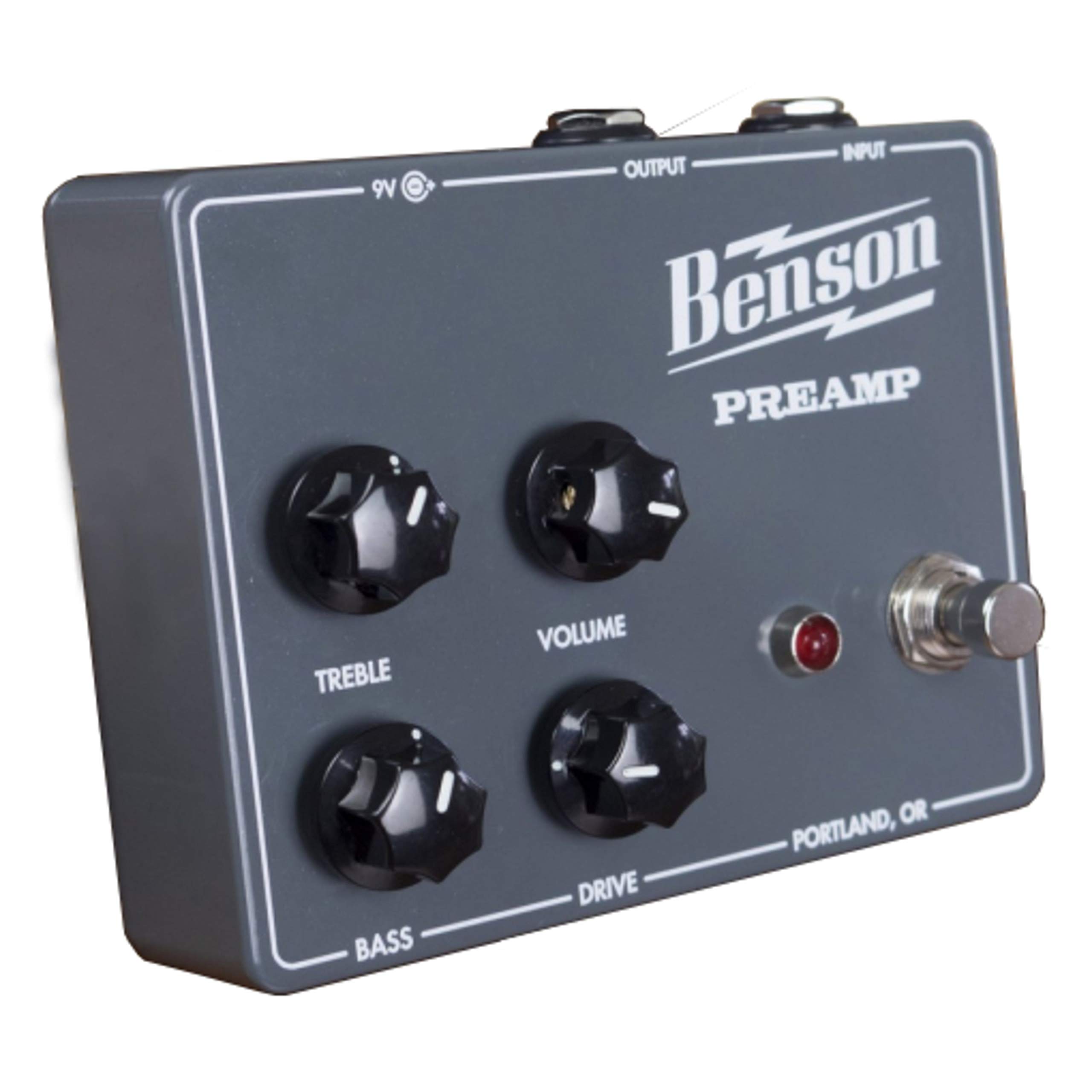
איור 1: חזית view of the Benson Amps PREAMP מִרֹאשׁamp Pedal, showing the control layout.
- כפתור הרווח: שולט בכמות הקדםamp gain, ranging from clean boost to saturated overdrive and fuzz.
- ידית עוצמת הקול: מכוונן את רמת הפלט הכוללת של הדוושה.
- כפתור טרבל: A 2-band EQ control for adjusting high frequencies.
- כפתור בס: A 2-band EQ control for adjusting low frequencies.
- מתג רגליים: מפעיל או עוקף את האפקט.
- שקע קלט: Connect your instrument (guitar, bass, etc.) here.
- שקע יציאה: התחבר לשלך ampמפחית או הדוושה הבאה בשרשרת האיתות.
- קלט DC: For connecting a 9V DC center-negative power supply.
5. התקנה
- חיבור חשמל: Connect a 9V DC center-negative power supply (not included) to the DC Input jack on the pedal.
- חיבור מכשיר: Connect your instrument to the Input Jack of the pedal using a standard 1/4-inch instrument cable.
- Ampחיבור למכשיר: Connect the Output Jack of the pedal to your amplifier's input or the next pedal in your signal chain using a standard 1/4-inch instrument cable.
- הגדרות ראשונות: Before powering on, set all knobs (Gain, Volume, Treble, Bass) to their middle positions (12 o'clock) for a neutral starting point.
- הפעלה: ודא שלך amplifier is on and at a low volume. Then, power on the pedal.

איור 2: צד view of the Benson Amps PREAMP מִרֹאשׁamp Pedal, illustrating input and output connections.
6. הפעלת הדוושה
6.1 פעולה בסיסית
- Engaging/Bypassing: Press the footswitch to toggle the effect on or off. When the effect is on, the LED indicator will illuminate.
- התאמת עוצמת הקול: Use the Volume knob to match the output level of the pedal to your amplifier's input, or to boost your signal.
6.2 עיצוב צלילים
- השג שליטה:
- Low Gain (7-10 o'clock): Provides a clean boost or subtle tube-like enhancement. Ideal for pushing an already overdriven amp or adding clarity.
- Mid Gain (10-2 o'clock): Introduces breakup, offering mild to moderate overdrive tones. Suitable for classic rock and blues.
- High Gain (2-5 o'clock): Delivers saturated distortion and fuzz-like textures. Experiment for heavier tones.
- EQ Controls (Treble & Bass): Adjust these knobs to fine-tune the frequency response.
- לְשַׁלֵשׁ: Increase for brighter tones, decrease for warmer, darker sounds.
- בַּס: Increase for fuller, thicker tones, decrease to tighten up the low end.
6.3 Using with Different Ampבעלי חיים
הקדםAMP pedal is designed to interact dynamically with your amplifier. For best results, experiment with its placement in your signal chain and how it drives your amp's input. It can be used as a standalone overdrive/fuzz or as a preamp to drive the power section of an amplifier, potentially bypassing the amp's own preamp via an effects loop return.
7. תחזוקה
- ניקוי: Wipe the pedal with a soft, dry cloth to remove dust and fingerprints. Do not use abrasive cleaners or solvents.
- אִחסוּן: When not in use for extended periods, store the pedal in a cool, dry place away from direct sunlight.
- בדיקת כבלים: Periodically check all cables for signs of wear or damage. Replace faulty cables immediately.
8. פתרון תקלות
| בְּעָיָה | סיבה אפשרית | פִּתָרוֹן |
|---|---|---|
| אין צליל כאשר הדוושה לחוצה. |
|
|
| צליל חלש או מעוות. |
|
|
| רעש או זמזום מוגזמים. |
|
|
9. מפרטים
| תכונה | פְּרָט |
|---|---|
| דֶגֶם | מִרֹאשׁAMP |
| מותג | טון מלא |
| משקל פריט | 12.6 אונקיות |
| מידות המוצר | 4.5 x 3.5 x 2 אינץ' |
| מקור כוח | Battery Powered (9V DC, center-negative adapter recommended) |
| כרך ידtage | 9 וולט |
| פלט וואטtage | 30 Watts (referring to the amp it emulates, not the pedal's output) |
| סוג חומר | מתכת, פלסטיק |
| פורמט אותות | אנלוגי |
| סוג מחבר | ג'ק 6.35 מ"מ |
| מכשירים תואמים | גִיטָרָה |
10. אחריות ותמיכה
למידע על אחריות ותמיכה טכנית, אנא עיינו במדריך הרשמי של היצרן. webאתר או צרו קשר עם מחלקת שירות הלקוחות שלהם. שמרו את קבלת הרכישה כהוכחת קנייה.
Manufacturer: Fulltone
Model: PREAMP