1. הקדמה
Thank you for choosing the PatrolEyes PE-DV5-2 Body Camera. This device is designed for professional use, offering high-definition video recording, advanced night vision capabilities, and integrated GPS for reliable evidence collection. This manual will guide you through the setup, operation, and maintenance of your new body camera to ensure optimal performance and longevity.
2. תכולת החבילה
אנא ודא שכל הפריטים נמצאים בחבילה שלך:
- PatrolEyes PE-DV5-2 Body Camera
- Battery (Included Components)
- USB טעינה/כבל נתונים
- מטען קיר
- קליפ הרכבה
- מדריך למשתמש (מסמך זה)
3. חלקים ובקרות
Familiarize yourself with the various parts and controls of your PatrolEyes PE-DV5-2 body camera.

איור 3.1: חֲזִית view of the PatrolEyes PE-DV5-2 body camera, highlighting the central camera lens, surrounding infrared (IR) lights for night vision, and the PatrolEyes logo at the bottom. The device has a rugged, black casing.

איור 3.2: Front-side perspective of the PatrolEyes PE-DV5-2 body camera, providing a clearer view of the camera lens and the array of control buttons located on the side panel, including the yellow button at the top.

איור 3.3: צַד view of the PatrolEyes PE-DV5-2 body camera, prominently featuring the red record button and the covered USB port for charging and data transfer.
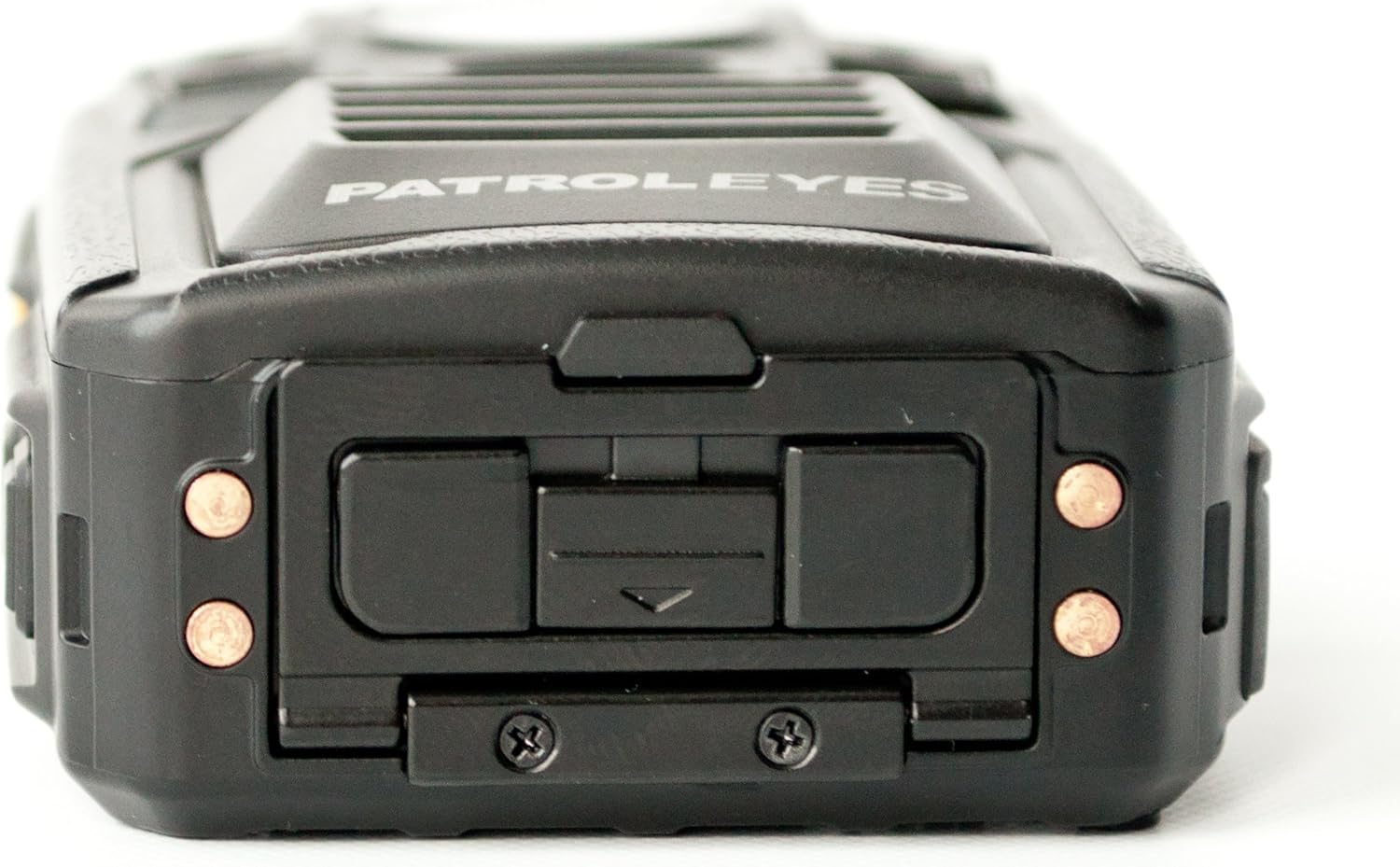
איור 3.4: רֹאשׁ view of the PatrolEyes PE-DV5-2 body camera, displaying the GPS indicator light and other top-mounted features.

איור 3.5: תַחתִית view of the PatrolEyes PE-DV5-2 body camera, revealing the charging contacts designed for use with a docking station.
4. תחילת העבודה
4.1. טעינת הסוללה
Before first use, fully charge the camera's battery. The camera comes with a rechargeable battery.
- Connect the USB charging cable to the camera's USB port.
- Plug the other end of the USB cable into the wall charger and then into a power outlet.
- נורית חיווי הטעינה תידלק. היא תשנה צבע או תכבה לאחר השלמת הטעינה.
Alternatively, use a compatible docking station (sold separately) for charging.
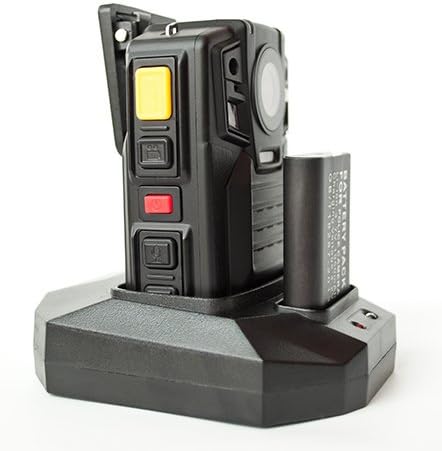
איור 4.1: The PatrolEyes body camera securely placed in its docking station, which also features a dedicated slot for charging an additional battery pack.

איור 4.2: אֲחוֹרִי view of the PatrolEyes docking station, clearly showing the power input port and the USB data port for connecting to a computer.
4.2. הפעלה / כיבוי
- כדי להפעיל: Press and hold the Power button for a few seconds until the device vibrates and the indicator lights turn on.
- כדי לכבות: Press and hold the Power button until the device vibrates and the indicator lights turn off.
4.3. Attaching the Mounting Clip
Attach the provided mounting clip to the back of the camera. This allows you to securely fasten the camera to your uniform or gear.
5. הפעלת המצלמה
5.1. הקלטת וידאו
The camera supports video capture resolutions of 1080p, 480p, and 720p.
- ודא שהמצלמה מופעלת.
- לחץ על הלחצן הייעודי לחצן הקלטה (often red) once to start video recording. The recording indicator light will flash.
- הקש על לחצן הקלטה again to stop recording. The indicator light will stop flashing.
5.2. צילום תמונות
The camera has an effective still resolution of 33 MP.
- While in standby mode or during video recording, press the כפתור תמונה once to capture a still image.
5.3. ראיית לילה (IR)
The camera features auto IR night vision with a range of 30 feet, utilizing infrared light sources.
- The camera is equipped with automatic infrared (IR) activation. In low-light conditions, the IR lights will automatically turn on to provide clear night vision footage.
5.4. פונקציונליות GPS
The integrated GPS module automatically records location data with your video footage. Ensure the camera has a clear view של השמיים לצורך קליטת אות GPS אופטימלית.
5.5. השמעה
אתה יכול מחדשview recorded videos and photos directly on the camera's screen.
- Enter Playback mode via the menu or a dedicated button (refer to on-screen prompts).
- נווט דרך files using the directional buttons.
- Press the OK/Select button to play a video or view תמונה.
5.6. חיבור למחשב
כדי להעביר files, connect the camera to a computer using the provided USB cable.
- הפעל את המצלמה.
- חבר את המצלמה למחשב באמצעות כבל ה- USB.
- The camera will appear as a removable disk drive on your computer.
- You can now access and transfer video and photo files.
6. תחזוקה וטיפול
6.1. ניקיון
- נגבו את גוף המצלמה בעזרת מטלית רכהamp בַּד. אין להשתמש בכימיקלים קשים או בחומרי ניקוי שוחקים.
- עבור העדשה, השתמשו במטלית ותמיסה מיוחדות לניקוי עדשות כדי למנוע שריטות.
6.2. אחסון
- אחסן את המצלמה במקום קריר ויבש, הרחק מאור שמש ישיר וטמפרטורות קיצוניות.
- Ensure the battery is partially charged (around 50%) if storing for extended periods to preserve battery life.
6.3. טיפול בסוללה
- הימנעו מפריקת הסוללה באופן מלא לעתים קרובות.
- השתמשו רק באביזרי טעינה מקוריים או מאושרים.
7. פתרון תקלות
| בְּעָיָה | סיבה אפשרית | פִּתָרוֹן |
|---|---|---|
| המצלמה לא נדלקת. | טעינת סוללה חלשה או ללא טעינה כלל. | טען את הסוללה במלואה. |
| לא ניתן להקליט וידאו/לצלם תמונות. | Storage full. | לְהַעֲבִיר files to a computer and delete them from the camera. |
| איכות וידאו/תמונה ירודה. | Dirty lens; low light conditions. | Clean the lens; ensure IR is active in low light. |
| ה-GPS לא קולט אות. | חסימה view of sky; indoor use. | עברו לאזור חיצוני פתוח. |
| המצלמה לא מזוהה על ידי המחשב. | כבל USB פגום; בעיית דרייבר. | Try a different USB port/cable; ensure camera is powered on. |
8. מפרטים
| תכונה | פְּרָט |
|---|---|
| מספר דגם | PE-DV5-2 |
| רזולוציית לכידת וידאו | 1080p, 480p, 720p |
| רזולוציית סטילס אפקטיבית | 33 מגה פיקסל |
| קצב פריימים | 30 פריימים לשנייה |
| טווח ראיית לילה | 30 רגל |
| טכנולוגיית קישוריות | אלחוטי (Wi-Fi) |
| מקור כוח | מופעל על סוללה |
| רכיבים כלולים | סוֹלְלָה |
| דירוג הגנה בינלאומי | IP54 |
| תכונות מיוחדות | חיישן תנועה, ראיית לילה |
| שימוש בפנים/חוץ | פנימי, חיצוני |
| יַצרָן | סיור עיניים |
| תאריך זמין ראשון | 14 במאי 2017 |
9. מידע על אחריות
PatrolEyes products typically come with a limited manufacturer's warranty. Please refer to the warranty card included with your purchase or visit the official PatrolEyes webבאתר לקבלת תנאי האחריות המפורטים. שמור את הוכחת הרכישה שלך לצורך תביעות אחריות.
10. תמיכת לקוחות
For technical assistance, troubleshooting beyond this manual, or inquiries about your PatrolEyes PE-DV5-2 body camera, please contact PatrolEyes customer support. Contact information can typically be found on the manufacturer's webבאתר או על אריזת המוצר.
משאבים מקוונים: Visit the official PatrolEyes webאתר לשאלות נפוצות, עדכוני תוכנה וחומרי תמיכה נוספים.