
פידליטי מוזיקלי M6SCD
Musical Fidelity M6SCD User Manual
Model: M6SCD | Brand: Musical Fidelity
1. הקדמה
The Musical Fidelity M6SCD is a high-performance CD player and digital-to-analog converter designed to deliver exceptional audio fidelity from both standard Red Book CDs and various digital sources. Featuring a 32-bit DAC with 192 kHz upsampling, the M6SCD provides outstanding technical and musical performance. Its versatile design includes multiple digital inputs, allowing it to function as a highly revealing outboard DAC for devices such as music streamers and Blu-ray players.
2. מידע בטיחות
Please read these safety instructions carefully before operating the M6SCD. Retain this manual for future reference.
- מקור כוח: Connect the unit only to the type of power supply indicated on the rear panel. Ensure the voltage נכון לאזור שלך.
- אוורור: אין לחסום פתחי אוורור. יש לוודא זרימת אוויר מספקת סביב היחידה כדי למנוע התחממות יתר.
- מים ולחות: אין לחשוף את המכשיר לגשם, לחות, טפטופים או התזות. אין להניח חפצים מלאים בנוזלים, כגון אגרטלים, על המכשיר.
- חוֹם: אין למקם את היחידה ליד מקורות חום כגון רדיאטורים, אוגרי חום, תנורים או מכשירים אחרים (כולל ampמחצבים) המייצרים חום.
- ניקוי: נתקו את המכשיר משקע החשמל לפני הניקוי. השתמשו רק במטלית יבשה.
- שֵׁרוּת: אל תנסה לטפל במוצר זה בעצמך. פנה לכל טיפול וטיפול באנשי שירות מוסמכים. פתיחת היחידה עלולה לחשוף אותך לנפחים מסוכנים.tages או סכנות אחרות.
- מוצר לייזר: This product is a Class 1 Laser Product. Avoid direct exposure to the laser beam.
3. תכולת החבילה
Carefully unpack the M6SCD and check that all the following items are present:
- יחידת Musical Fidelity M6SCD
- כבל חשמל
- שלט רחוק (עם סוללות)
- מדריך למשתמש (מסמך זה)
4. המוצר נגמרview
4.1 לוח קדמי

Figure 4.1: Front Panel of the M6SCD. Features include the power button, stop/play/pause/skip controls, input selection buttons (CD, SPDIF, Optical, USB), and the disc tray.
The front panel provides access to essential controls and the disc loading mechanism. From left to right, you will find the power button, display screen, CD tray, and various control buttons for playback and input selection.
- PWR: לחצן הפעלה/כיבוי.
- לְהַפְסִיק: מפסיק את השמעת התקליטורים.
- CD: Selects the internal CD player as the source.
- SPDIF: Selects one of the coaxial digital inputs.
- אוֹפּטִי: Selects one of the optical digital inputs.
- USB: Selects the asynchronous USB input.
- לְהַצִיג: Shows track information, input selection, and operational status.
- מגש דיסקים: For loading and unloading CDs.
- בקרות השמעה: Play/Pause, Skip Forward, Skip Backward, Eject.
4.2 פאנל אחורי
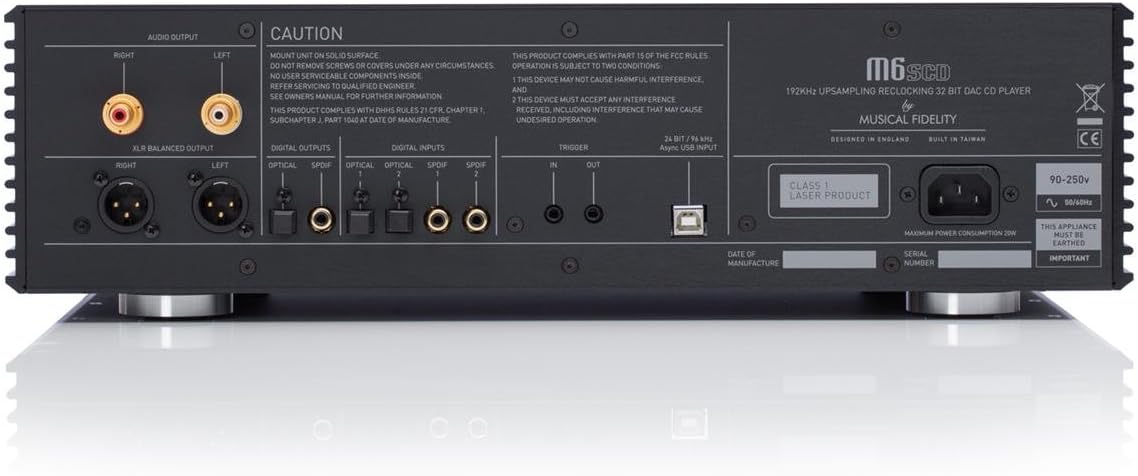
Figure 4.2: Rear Panel of the M6SCD. Connections include RCA and XLR balanced audio outputs, multiple optical and coaxial digital inputs, a USB input, trigger connections, and the AC power inlet.
The rear panel houses all the input and output connections for the M6SCD, allowing integration into your audio system.
- פלט שמע (RCA): Unbalanced stereo analog outputs for connecting to an ampliifier או preampחיים יותר.
- פלט מאוזן XLR: Balanced stereo analog outputs for connecting to compatible balanced audio equipment.
- Digital Inputs (Optical 1, 2): Two optical (TOSLINK) digital inputs for connecting external digital sources.
- Digital Inputs (SPDIF 1, 2): Two coaxial (RCA) digital inputs for connecting external digital sources.
- כניסת USB: Asynchronous USB Type B input for connecting to a computer or other USB audio source.
- הפעל כניסה/יציאה: For system integration with other compatible components.
- כניסת מתח AC: לחיבור כבל החשמל המצורף.
5. התקנה
5.1 פריקה ומיקום
Carefully remove the M6SCD from its packaging. Place the unit on a solid, level surface away from direct sunlight, heat sources, and excessive moisture. Ensure there is adequate ventilation around the unit, especially above and behind it, to allow for proper heat dissipation.
5.2 חיבורים
Before making any connections, ensure the M6SCD and all connected components are powered off and unplugged from the mains supply.
5.2.1 חיבור פלט שמע
Connect the M6SCD to your ampliifier או preamplifier using high-quality audio cables. You have two options:
- RCA (לא מאוזן): Connect RCA cables from the "AUDIO OUTPUT" (RCA) jacks on the M6SCD to the corresponding analog input jacks on your amplifier. Ensure left and right channels are correctly matched.
- XLR (מאוזן): For optimal performance with compatible equipment, connect XLR cables from the "XLR BALANCED OUTPUT" jacks on the M6SCD to the balanced input jacks on your ampחיים יותר.
5.2.2 Digital Input Connections (Optional)
If you wish to use the M6SCD as an external DAC for other digital sources, connect them to the appropriate digital inputs:
- אוֹפּטִי: Use a TOSLINK optical cable to connect your digital source (e.g., TV, game console) to one of the "OPTICAL" inputs.
- Coaxial (SPDIF): Use a coaxial digital cable to connect your digital source (e.g., Blu-ray player, streamer) to one of the "SPDIF" inputs.
- USB: Connect a USB Type A to Type B cable from your computer's USB port to the "USB" input on the M6SCD. You may need to install specific drivers for your operating system (refer to Musical Fidelity's webאתר לבדיקת זמינות נהגים).
5.2.3 חיבור מתח
Once all audio and digital connections are made, connect the supplied power cable to the "AC POWER INLET" on the rear of the M6SCD and then to a suitable wall outlet.
6. הוראות הפעלה
6.1 הפעלה/כיבוי
Press the "PWR" button on the front panel or the remote control to turn the M6SCD on or off. The display will illuminate when the unit is powered on.
6.2 השמעת תקליטורים
- Press the "Eject" button (triangle with line) on the front panel or remote to open the disc tray.
- Place a CD gently into the disc tray with the label side facing up.
- Press the "Eject" button again, or gently push the tray, to close it. The M6SCD will read the disc.
- Press the "Play/Pause" button (triangle) to begin playback.
- Use the "Skip Forward" (double arrow right) and "Skip Backward" (double arrow left) buttons to navigate between tracks.
- Press "Stop" (square) to stop playback.
6.3 Using Digital Inputs
To use the M6SCD as a DAC for external digital sources:
- Ensure your external digital source is connected to the appropriate input on the M6SCD's rear panel.
- Press the corresponding input selection button on the front panel or remote control: "SPDIF" for coaxial inputs, "OPTICAL" for optical inputs, or "USB" for the USB input.
- The display will indicate the selected input.
- Begin playback from your external digital source. The M6SCD will process the digital audio signal.
7. תחזוקה
Proper care will ensure the longevity and performance of your M6SCD.
- ניקוי: Disconnect the power cable before cleaning. Use a soft, dry, lint-free cloth to wipe the exterior surfaces. Do not use liquid cleaners, aerosols, or abrasive materials, as these may damage the finish.
- טיפול בדיסק: טפלו בתקליטורים בקצוות שלהם. שמרו עליהם נקיים וללא שריטות. אחסנו את התקליטורים בקופסאות שלהם כאשר אינם בשימוש.
- אוורור: בדקו מעת לעת שפתחי האוורור נקיים מאבק ופסולת.
- אִחסוּן: אם מאחסנים את המכשיר לתקופה ממושכת, יש לנתק אותו מאספקת החשמל ולאחסן אותו במקום קריר ויבש, רצוי באריזתו המקורית.
8. פתרון תקלות
If you experience issues with your M6SCD, consult the table below for common problems and solutions. If the problem persists, contact Musical Fidelity customer support.
| בְּעָיָה | סיבה אפשרית | פִּתָרוֹן |
|---|---|---|
| אין כוח | כבל חשמל לא מחובר; שקע בקיר אינו פעיל. | ודא שכבל החשמל מחובר היטב. בדוק את שקע הקיר באמצעות מכשיר אחר. |
| אין צליל מהדיסק | נבחר קלט שגוי ב amplifier; CD dirty/scratched; M6SCD output cables loose. | Select correct input on your amplifier. Clean or replace CD. Check audio cable connections. Ensure "CD" input is selected on M6SCD. |
| No sound from digital input | Incorrect input selected on M6SCD; Digital cable loose/faulty; External source not playing. | Select correct digital input (SPDIF, Optical, USB) on M6SCD. Check digital cable connections. Ensure external source is playing and outputting digital audio. |
| השלט רחוק לא עובד | סוללות התרוקנו; חסימה בין השלט ליחידה; חיישן השלט חסום. | Replace batteries. Remove any obstructions. Ensure remote sensor on M6SCD is clear. |
| מגש הדיסק לא נפתח/נסגר | Obstruction in tray; Unit not powered on. | Check for any foreign objects. Ensure unit is powered on. Do not force the tray. |
9. מפרטים
Technical specifications for the Musical Fidelity M6SCD.
| תכונה | פְּרָט |
|---|---|
| סוג DAC | 32 bit Delta-Sigma (bit stream) dual differential 8x over-sampling |
| תגובת תדר | 10Hz to 20 kHz -0.2dB max. |
| כניסות דיגיטליות | 2 x Coaxial (SPDIF), 2 x Optical (TOSLINK), 1 x Asynchronous USB (Type B) |
| יציאות אנלוגיות | 1 x Stereo RCA (unbalanced), 1 x Stereo XLR (balanced) |
| מידות המוצר (L x W x H) | 19.69 x 9.84 x 23.62 אינץ' |
| משקל פריט | 23.2 פאונד (10.5 ק"ג) |
| צֶבַע | שָׁחוֹר |
| תכונות מיוחדות | Very low jitter, Multiple digital inputs |
10. אחריות ותמיכה
Musical Fidelity products are designed and manufactured to the highest quality standards. For information regarding warranty coverage, service, or technical support, please refer to the warranty card included with your product or visit the official Musical Fidelity webאֲתַר.
רִשְׁמִי Webאֲתַר: www.musicalfidelity.com
Please have your model number (M6SCD) and serial number ready when contacting support.