מָבוֹא
The Boogie Board Basics Reusable Writing Pad is a digital drawing tablet designed for jotting down notes, creating sketches, and practicing writing. It utilizes patented liquid crystal technology to provide a natural writing experience on a durable screen. The device offers instant erase functionality, allowing for quick clearing of the display with the push of a button, eliminating the need for paper.
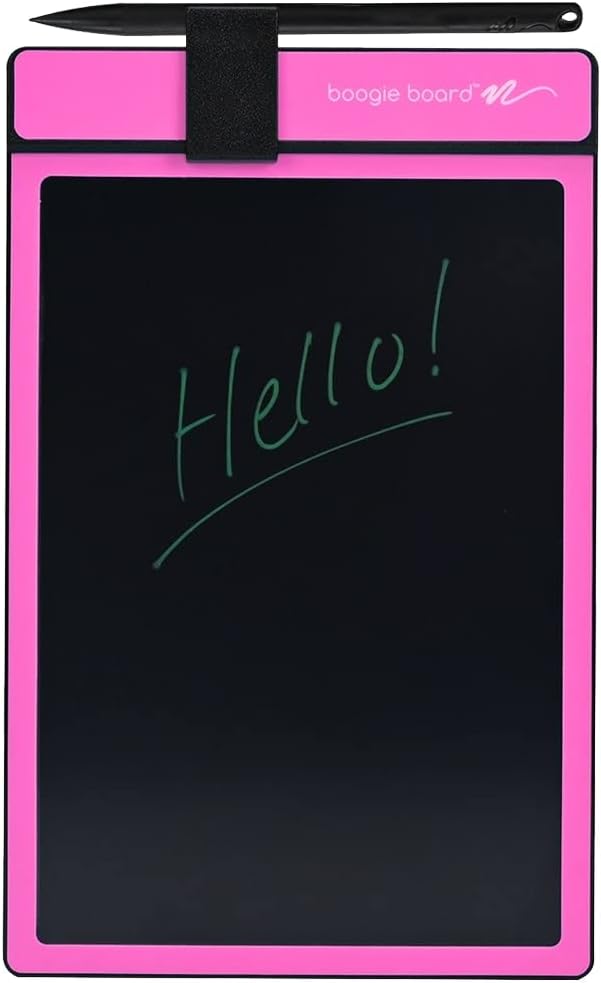
תמונה: חזית view of the Boogie Board Basics in pink, displaying the word "Hello!" written on its black LCD screen. A black stylus is secured at the top.
מה יש בקופסה
עם פתיחת האריזה, יש לוודא שכל הרכיבים נמצאים:
- Boogie Board Basics Reusable Writing Tablet
- עט סטיילוס
הגדרה
The Boogie Board Basics is designed for immediate use with minimal setup. It comes with a pre-installed battery.
- פרק את המכשיר: Carefully remove the Boogie Board and its stylus from the packaging.
- צרף את הסטיילוס: The stylus can be stored in the integrated holder at the top of the board.
- מוכן לשימוש: The device is now ready for writing or drawing.

תמונה: זווית view of the pink Boogie Board, highlighting the stylus holder at the top, the "Push to Clear" button, and the main writing surface where text can be created with the stylus or a fingernail.
הוראות הפעלה
כתיבה וציור
- Use the included stylus pen to write or draw directly on the LCD screen.
- The pressure-sensitive surface allows for varying line thickness based on the force applied.
- Alternatively, you can use any non-scratching object, such as a fingernail, to write on the surface.

Image: A pair of hands holding the pink Boogie Board, with one hand using the black stylus to write the word "Hello!" on the screen.
Erasing Content
- To clear the screen, press the circular "Clear" button located at the top center of the device.
- The Quick Clear technology will instantly erase all content from the display.

Image: A hand's index finger pressing the circular clear button located at the top of the pink Boogie Board, indicating the erase function.
חיי סוללה
The Boogie Board Basics uses a sealed, non-replaceable Lithium Metal battery. The battery is primarily consumed during the clearing process. With typical use, the battery is designed to last for several years and tens of thousands of erases.
תַחזוּקָה
ניקוי המסך
- To clean the screen, use a soft, lint-free cloth.
- עבור סימנים עקשניים, מעט דamp cloth with water or a mild, non-abrasive screen cleaner can be used.
- Avoid using harsh chemicals, abrasive cleaners, or solvents, as these can damage the screen.
אִחסוּן
- Store the Boogie Board in a cool, dry place away from direct sunlight and extreme temperatures.
- Ensure the stylus is securely placed in its holder to prevent loss.
פתרון בעיות
| בְּעָיָה | סיבה אפשרית | פִּתָרוֹן |
|---|---|---|
| Screen does not clear. | הסוללה התרוקנה. | The battery is sealed and non-replaceable. If the board no longer clears, it may have reached the end of its lifespan. |
| הכתיבה קלושה או לא עקבית. | Insufficient pressure applied or screen surface is dirty. | Apply more pressure with the stylus. Clean the screen as per maintenance instructions. |
| Stylus is lost. | Stylus not secured in holder. | Any non-scratching object can be used to write on the board. Replacement styluses may be available from the manufacturer. |
מפרטים
| תכונה | פְּרָט |
|---|---|
| מספר דגם | PT01085PNKA0002 |
| מידות המוצר | 10.8 x 6.8 x 0.6 אינץ' |
| משקל פריט | 4.6 אונקיות |
| אלכסון מסך גלוי | 9 אינץ' / 22 ס"מ |
| סוג סוללה | סוללת ליתיום מתכת אחת (כלולה, לא ניתנת להחלפה) |
| תכונה מיוחדת | עט סטיילוס |
| יַצרָן | בוגי בורד |
| תאריך ראשון זמין | 6 בינואר 2011 |

Image: A diagram showing the dimensions of the Boogie Board Basics, indicating a width of 8.25 inches, a height of 7.4 inches, and a diagonal screen size of 8.75 inches.
אחריות ותמיכה
For information regarding product warranty, returns, or technical support, please refer to the official Boogie Board website or contact their customer service directly. The product's buybox winner information indicates a 30-day refund/replacement policy through Amazon.
Official Boogie Board Store: בקר בחנות
מדריך למשתמש (PDF): הורד PDF