PowerA Advantage Wireless Controller for Nintendo Switch 2 - Mario & Yoshi
Modello: NSGP0569-01V
Introduzione
Questo manuale fornisce istruzioni complete per PowerA Advantage Wireless Controller, designed for use with the Nintendo Switch family of devices. It covers setup, operation, maintenance, and troubleshooting to ensure optimal performance and longevity of your controller.
Caratteristiche principali
Moduli ad effetto Hall: Equipped with contact-free magnetic sensors in the thumbsticks to prevent stick drift, offering smoother control, enhanced precision, and increased longevity.
Pulsanti di gioco avanzati: Two mappable buttons can be programmed on the fly during gameplay without needing to access system settings.
Intuitive Motion Controls: Experience fluid and responsive motion controls for aiming, steering, flying, and other in-game actions.
Pulsante C: Provides quick access to GameChat features.
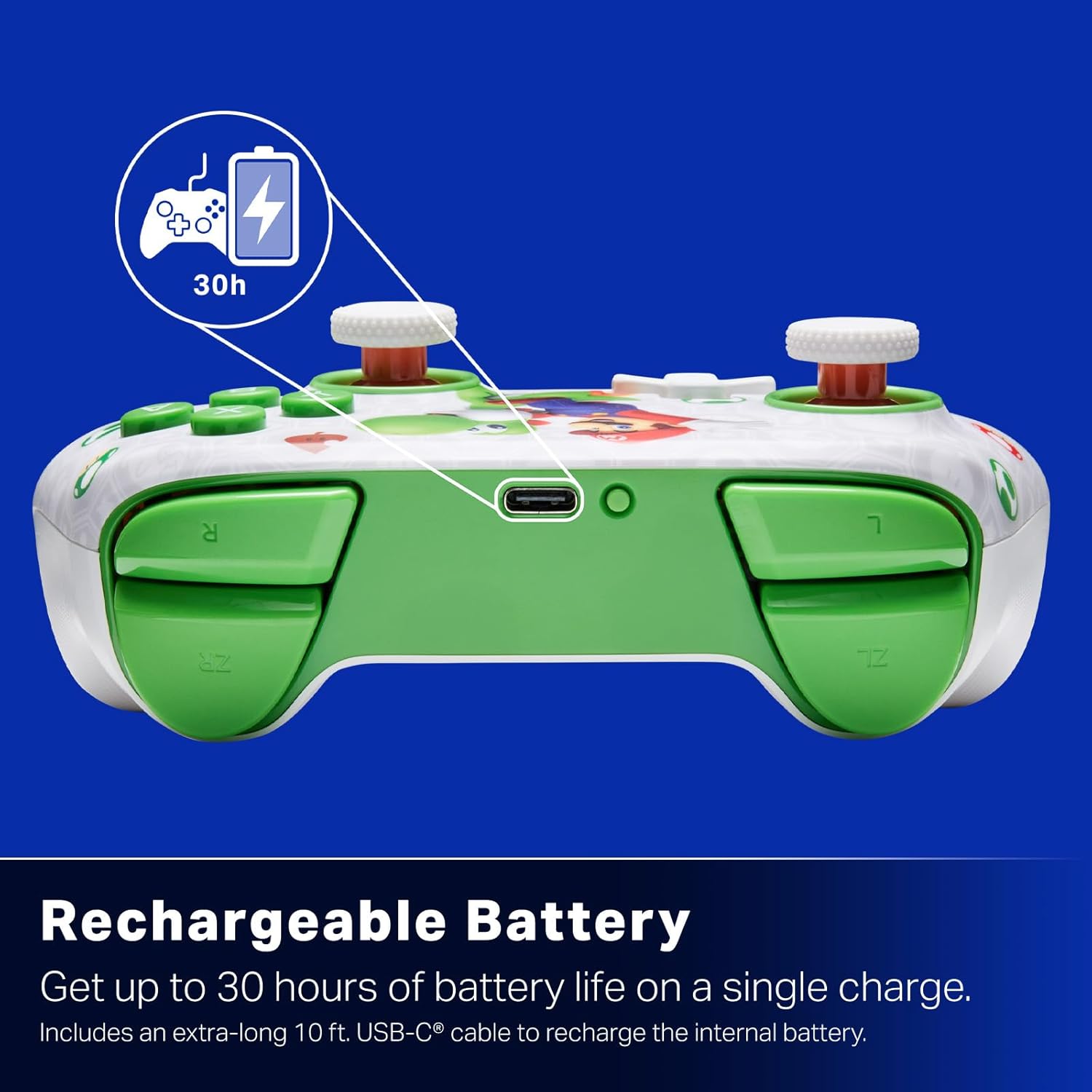
Batteria ricaricabile: Offers up to 30 hours of gameplay on a single charge. Includes a 10 ft. (3m) USB-C cable for recharging.
Design ergonomico: Crafted for comfort during extended gaming sessions, utilizing cutting-edge ergonomics and high-quality materials.
Nintendo Family Compatibility: Compatible with Nintendo Switch 2, Nintendo Switch, Nintendo Switch – OLED Model, and Nintendo Switch Lite.
Licenza ufficiale: PowerA products undergo rigorous testing by Nintendo to ensure compatibility and quality.
Istruzioni di installazione
1. Ricarica iniziale
Before first use, fully charge your PowerA Advantage Wireless Controller. Connect the included 10 ft. (3m) USB-C cable to the controller's USB-C port and the other end to a powered USB port on your Nintendo Switch dock or a USB wall adapter.
Figure 1: Controller connected via USB-C for charging, highlighting the rechargeable battery feature.
2. Abbinamento con Nintendo Switch
Assicurati che la tua console Nintendo Switch sia accesa e aggiornata con il software di sistema più recente.
Dal menu HOME, seleziona Controllori, Poi Cambia impugnatura/ordine.
On the PowerA Advantage Wireless Controller, press and hold the Pulsante SYNC located on the top edge of the controller for at least three seconds. The player indicator LEDs on the bottom of the controller will begin to flash.
Once the controller successfully pairs, the player indicator LED(s) corresponding to the controller number will remain lit.
Premere il tasto Un bottone per confermare e uscire dalla schermata di associazione.
For subsequent uses, simply press the HOME button on the controller to wake it up and automatically reconnect to your Switch console.
Istruzioni per l'uso
Controlli di base
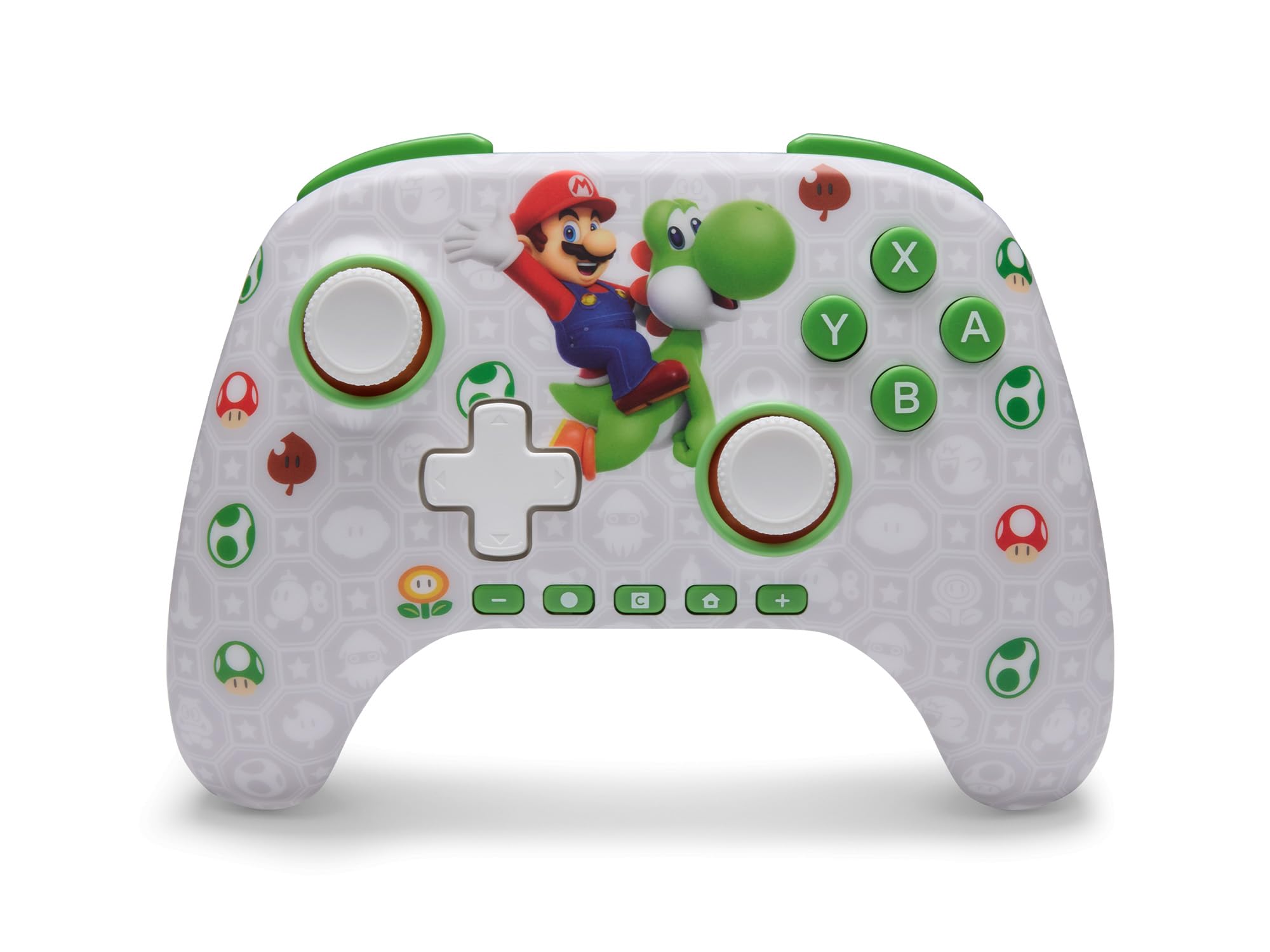
Il PowerA Advantage Wireless Controller features standard Nintendo Switch button layouts, including A, B, X, Y buttons, L/R and ZL/ZR shoulder buttons, a D-pad, and dual analog sticks. Familiarize yourself with these controls for general gameplay.
Figura 2: Fronte view del PowerA Advantage Wireless Controller, highlighting the Mario and Yoshi design and button layout.
Pulsanti di gioco avanzati (AGB)
The controller includes two mappable Advanced Gaming Buttons (AGR and AGL) on the back. These buttons can be assigned to replicate any other button on the controller for quick access during gameplay.
Premere il tasto Program Button (PRGM) on the back of the controller. The Program LED will flash.
Premere il tasto Advanced Gaming Button (AGR or AGL) you wish to map. The Program LED will flash rapidly.
Premere il tasto pulsante you want to assign to the Advanced Gaming Button (e.g., A, B, X, Y, L, R, ZL, ZR, D-pad directions). The Program LED will stop flashing, indicating successful mapping.
To clear a mapped button, repeat steps 1-2, then press the Pulsante del programma Ancora.
Figure 3: Advanced Gaming Buttons (AGB) on the back of the controller, with an illustration of mappable functions.
Controlli di movimento
The controller supports motion controls, allowing for intuitive interaction in compatible games. These controls are automatically enabled when supported by the game.
Figure 4: Controller demonstrating motion control capabilities through tilting.
C Button (GameChat)
The dedicated C Button provides quick access to GameChat features in supported titles, enhancing your multiplayer experience.
Figure 5: The 'C' button, used for GameChat features.
Manutenzione
Pulizia: Utilizzare un panno morbido e asciutto per pulire il controller. Evitare l'uso di prodotti chimici aggressivi o materiali abrasivi.
Magazzinaggio: Conservare il controller in un luogo fresco e asciutto, lontano dalla luce solare diretta e da temperature estreme.
Cura della batteria: Per prolungare la durata della batteria, evitare di scaricare completamente il controller frequentemente. Caricarlo regolarmente, anche se non lo si utilizza costantemente.
Cura del cavo: Handle the USB-C charging cable with care. Avoid bending or twisting it excessively.
Risoluzione dei problemi
Il controller non si connette/non si associa
Assicurarsi che il controller sia completamente carico.
Verifica che la console Nintendo Switch sia aggiornata all'ultima versione del software di sistema.
Repeat the pairing process (see "Pairing with Nintendo Switch" in Setup Instructions).
If issues persist, try restarting both the controller and the Nintendo Switch console.
Stick Drift
Il PowerA Advantage Controller features Hall Effect modules designed to prevent stick drift. If you experience any unintended input, ensure the controller's firmware is up to date (check PowerA's official websito per gli aggiornamenti).
Recalibrate the joysticks through the Nintendo Switch system settings if necessary (System Settings > Controllers and Sensors > Calibrate Control Sticks).
Durata breve della batteria
Assicurarsi che il controller sia completamente carico prima di ogni utilizzo.
Battery life can vary based on game usage and features enabled.
Per una ricarica ottimale, utilizzare il cavo USB-C in dotazione.
Specifiche
Caratteristica
Dettaglio
Numero di modello
NSGP0569-01V
Connettività
Wireless (Bluetooth), USB-C (for charging)
Dispositivi compatibili
Nintendo Switch 2, Nintendo Switch, Nintendo Switch – OLED Model, Nintendo Switch Lite
Durata della batteria
Fino a 30 ore (varia in base all'utilizzo)
Lunghezza del cavo
10 ft. (3m) USB-C
Dimensioni
5.88 x 4.21 x 2.36 pollici
Peso
0.66 libbre
Caratteristiche speciali
Hall Effect Thumbsticks, Mappable Advanced Gaming Buttons, Motion Controls, C Button
Garanzia e supporto
Il PowerA Advantage Wireless Controller comes with a Garanzia limitata di due anniPer informazioni dettagliate sulla garanzia, supporto prodotto o per registrare il prodotto, visitare il sito ufficiale PowerA websito a PowerA.com/Supporto.
Figure 6: Official Nintendo Licensed Product badge, ensuring quality and compatibility.
Ask a question about this manual
Ask about setup, troubleshooting, compatibility, parts, safety, or missing instructions. Manuals+ will review the question and use this page’s manual context to help answer it.