
1. Introduzione
Thank you for choosing the TOPTRO TP3 4K Google TV Portable Projector. This manual provides essential information for setting up, operating, and maintaining your projector. Please read it thoroughly before use to ensure optimal performance and safety.
The TOPTRO TP3 is designed to deliver a versatile and immersive viewing experience, featuring integrated Google TV, AI-powered image adjustments, and comprehensive connectivity options. Enjoy your content at home, outdoors, or on the go.
2. Prodotto finitoview
2.1 Caratteristiche principali
- Integrated Google TV: Access over 10,000 official streaming applications, including Netflix, Prime Video, and YouTube, without additional devices.
- Google Voice Control: Use the remote control's voice assistant button to search for content, adjust settings, and control playback hands-free.
- AI-Powered Image Adjustment: Features automatic focus, automatic keystone correction, obstacle avoidance, and automatic screen adjustment for a perfectly aligned and clear image within seconds.
- Native 1080P Resolution with 4K Decoding: Delivers sharp, detailed images and natural colors, supporting 4K video decoding.
- Short Throw Ratio (0.8:1): Projects a 60-inch image from just one meter distance, ideal for small spaces.
- 90-Degree Rotating Stand: Allows for flexible projection angles, including ceiling projection.
- Connettività avanzata: Equipped with dual-band WiFi 6, Bluetooth 5.3, HDMI ARC, USB, and a 3.5mm audio jack for wide device compatibility.
- Design portatile: Weighing only 1.2 kg (2.6 lbs) with a hidden carry handle, making it easy to transport.
2.2 Contenuto della confezione
Assicurarsi che tutti gli articoli siano presenti nel pacco:
- Proiettore TOPTRO TP3
- Telecomando
- Cavo HDMI
- Adattatore di alimentazione
- Manuale d'uso
3. Impostazione
3.1 Posizionamento iniziale
Place the projector on a stable, flat surface. The 90-degree rotating stand allows for various projection angles, including wall, ceiling, or tabletop. For optimal image quality, ensure the projection surface is smooth and light-colored.

Image: The TOPTRO TP3 projector can be used in diverse environments, from living rooms to outdoor camping, showcasing la sua adattabilità.
3.2 Collegamento di alimentazione
- Connect the power adapter to the projector's power input.
- Plug the power adapter into a suitable electrical outlet (220V).
- Premere il pulsante di accensione sul proiettore o sul telecomando per accenderlo.
3.3 Connessione di rete
Upon first startup, follow the on-screen prompts to connect to your Wi-Fi network. The projector supports dual-band WiFi 6 for a fast and stable connection.
3.4 Configurazione di Google TV
After connecting to Wi-Fi, sign in with your Google account to access Google TV and download applications from the Google Play Store. This step is crucial for utilizing the integrated streaming services.

Image: The projector's interface showing integrated Google TV with direct access to popular streaming applications.
4. Istruzioni per l'uso
4.1 Funzionamento di base
- Accensione/spegnimento: Premere il pulsante di accensione sul telecomando o sul proiettore.
- Navigazione: Use the directional buttons on the remote to navigate menus.
- Selezione: Premere il pulsante 'OK' per confermare le selezioni.
- Controllo del volume: Utilizzare i pulsanti del volume sul telecomando.
4.2 Regolazione dell'immagine
The TOPTRO TP3 features AI-powered automatic image adjustments:
- Messa a fuoco automatica: Il proiettore regola automaticamente la nitidezza dell'immagine.
- Correzione trapezoidale automatica: Automatically corrects distorted images to a rectangular shape.
- Evitare gli ostacoli: Detects and adjusts the image to avoid objects on the projection surface.
- Auto Screen Adjustment: Optimizes the image to fit the screen area.
These adjustments occur automatically within seconds of powering on or repositioning the projector. Manual digital zoom (80-100%) is also available for fine-tuning image size.

Image: Visual representation of the projector's AI-powered automatic image adjustment features, ensuring a clear and aligned picture.
4.3 Controllo vocale di Google
Press the dedicated voice assistant button on your remote control and speak your command. For example, say "Open YouTube" or "Play music." The projector will respond to your voice commands for quick access to functions and content.
4.4 Screen Mirroring (Google Cast)
Utilize Google Cast technology to wirelessly mirror content from your smartphone or tablet to the projector. For iPhone users, download the "AirScreen" application from the Google Play Store on the projector for wireless screen mirroring.
4.5 Rotating Stand Usage
The integrated 90-degree rotating stand allows you to easily adjust the projection angle. Simply pivot the projector to direct the image onto a wall, screen, or ceiling. This feature is particularly useful for bedroom viewing or creative setups.
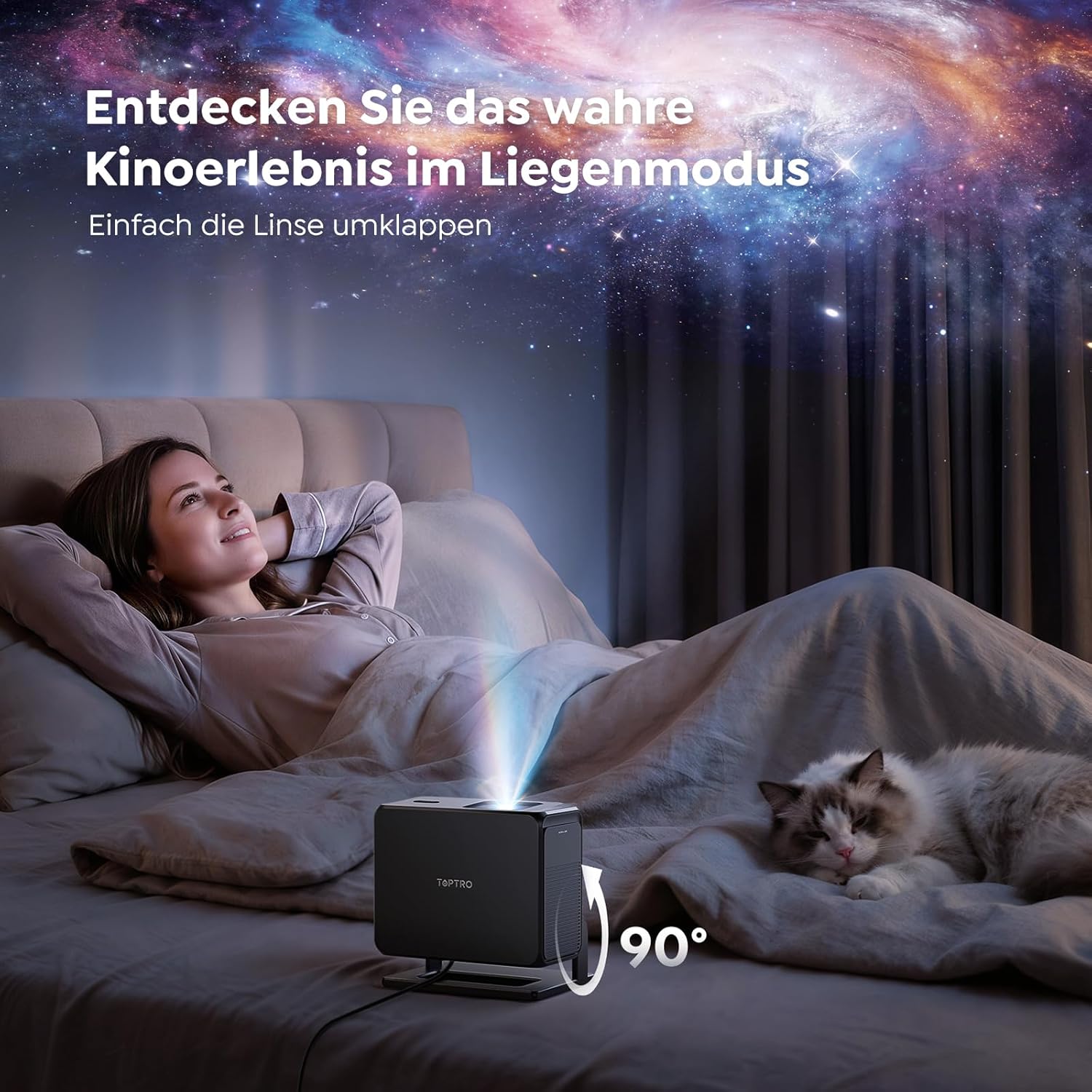
Image: The TOPTRO TP3 projector rotated 90 degrees to project content onto a bedroom ceiling, offering a unique viewesperienza di acquisizione.
5. Connettività
5.1 Connessioni cablate
- HDMI ARC/CEC: Connect external devices like laptops, gaming consoles (Xbox/PlayStation 5), or Blu-ray players. The ARC feature allows audio to be sent back to a compatible sound system.
- USB: Collegare unità USB per la riproduzione multimediale.
- Jack audio da 3.5 mm: Collegare altoparlanti esterni cablati o cuffie.
5.2 Connessioni wireless
- Wi-Fi 6: Provides faster and more stable wireless connectivity for streaming and online content.
- Bluetooth 5.3: Collega cuffie o altoparlanti Bluetooth per un'esperienza audio migliorata.
6. Manutenzione
6.1 Pulizia della lente
Gently clean the projector lens with a soft, lint-free cloth designed for optical surfaces. Avoid using abrasive cleaners or excessive force, as this can scratch the lens.
6.2 Pulizia generale
Pulire l'esterno del proiettore con un panno morbido e asciutto. Non utilizzare detergenti liquidi direttamente sul dispositivo.
6.3 Conservazione
Quando non in uso, conservare il proiettore in un luogo fresco e asciutto, lontano dalla luce solare diretta e da temperature estreme. Utilizzare l'imballaggio originale o una custodia protettiva per evitare l'accumulo di polvere e danni.
7. Risoluzione Dei Problemi
7.1 Nessuna immagine visualizzata
- Assicurarsi che il proiettore sia acceso e collegato a una fonte di alimentazione.
- Check all cable connections (HDMI, USB) to external devices.
- Verify the input source selected on the projector matches the connected device.
- Confirm the lens cap is removed.
7.2 Immagine sfocata
- Lasciare che la funzione di messa a fuoco automatica completi la regolazione.
- Assicurarsi che la superficie di proiezione sia piana e che il proiettore sia stabile.
- Clean the projector lens if smudges or dust are visible.
7.3 Nessun suono
- Controllare il livello del volume sia sul proiettore che sul dispositivo sorgente collegato.
- Ensure external speakers or headphones are properly connected (wired or Bluetooth).
- If using HDMI ARC, verify your sound system is compatible and correctly configured.
7.4 Il telecomando non funziona
- Sostituire le batterie del telecomando.
- Assicurarsi che non vi siano ostacoli tra il telecomando e il ricevitore IR del proiettore.
For further assistance, refer to the detailed troubleshooting section in the full user manual or contact customer support.
8. Specifiche
| Caratteristica | Specificazione |
|---|---|
| Marca | TOPTRO |
| Nome del modello | TP3 |
| Risoluzione nativa | 1920x1080 (1080P) |
| Supporto per la decodifica video | 4K |
| Tipo di visualizzazione | GUIDATO |
| Caratteristiche speciali | Auto Focus, Auto Keystone Correction, Obstacle Avoidance, Auto Screen Adjustment, Google TV, Google Voice Control |
| Tecnologia di connettività | HDMI, USB, Bluetooth 5.3, Wi-Fi 6 |
| Interfaccia Hardware | HDMI ARC/CEC, USB, 3.5mm Audio |
| Dimensioni del prodotto (LxWxH) | Dimensioni: 19.4 x 15.8 x 14.1 cm |
| Peso dell'articolo | 1.2 kg |
| Fattore di forma | Portatile |
| Tipo di montaggio | Ceiling Mount, Tabletop, Wall |
| Dimensione minima dell'immagine | 40 pollici |
| Dimensione massima dell'immagine | 120 pollici |
| Distanza massima di lancio | 2.13 metri |
| Voltage | 220 Volt |
| Componenti inclusi | Cavo HDMI |
| Colore | Nero |
| Tipo di controllore | Telecomando |
| Dispositivi compatibili | Xbox/PlayStation 5, Smartphone, Tablet, Laptop, Speaker, Notebook |
| Usi consigliati | Giochi, Affari, Home Cinema, Istruzione |
9. Garanzia e supporto
9.1 Informazioni sulla garanzia
Per i termini e le condizioni di garanzia specifici, consultare la scheda di garanzia inclusa nel prodotto. Conservare la prova d'acquisto per eventuali reclami in garanzia.
9.2 Assistenza clienti
If you encounter any issues or have questions regarding your TOPTRO TP3 projector, please contact our customer service team. We provide prompt, professional, and effective support to ensure a smooth user experience.
I dettagli di contatto possono essere trovati solitamente sul nostro sito ufficiale websito o sulla scheda di garanzia.