
1. Introduzione
The XTOOL IP500 is a professional diagnostic scan tool designed for Jeep, Dodge, and Chrysler vehicles. It offers comprehensive full system diagnostics, bi-directional control, and various special reset functions. This manual provides instructions for setting up, operating, maintaining, and troubleshooting your IP500 device.

Image 1.1: The XTOOL IP500 diagnostic tool, highlighting its key capabilities including bi-directional control, full system diagnostics, all services, and FCA CAN FD support.
2. Impostazione
2.1 Contenuto della confezione
Prima di iniziare, assicurarsi che tutti i componenti siano presenti:
- XTOOL IP500 Main Unit
- Cavo principale OBD2
- 12+8 Adapter Cable (for 2018+ FCA vehicles)
- Adattatore di alimentazione (se applicabile)
- Manuale dell'utente (questo documento)
2.2 Collegamento del dispositivo
- Individuare la porta OBD2 del veicolo, in genere sotto il cruscotto, sul lato del conducente.
- For most vehicles, connect the OBD2 Main Cable directly to the vehicle's OBD2 port and the IP500 device.
- For 2018 and newer FCA (Fiat Chrysler Automobiles) vehicles (Jeep, Dodge, Chrysler, RAM), use the included 12+8 Adapter Cable. Connect the 12-pin and 8-pin connectors to the vehicle's respective ports, then connect the OBD2 male connector of the adapter to the OBD2 female connector of the main cable, and finally to the IP500 device.
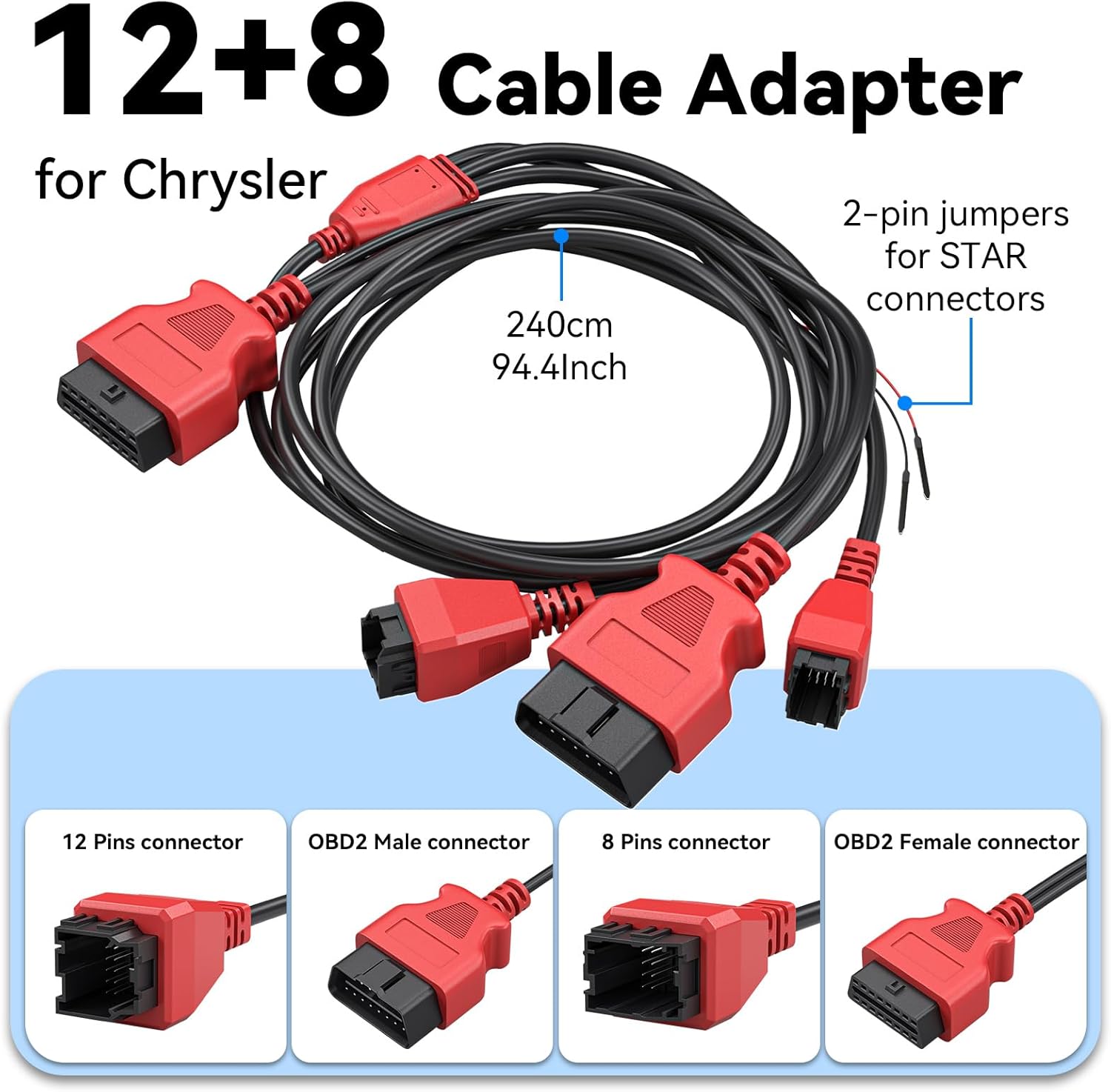
Immagine 2.1: Dettagliata view of the 12+8 Cable Adapter, illustrating its various connectors and overall length, essential for connecting to newer FCA vehicles.
2.3 Initial Power-On and Software Updates
- Once connected, the IP500 device should power on automatically. If not, press the power button.
- Segui le istruzioni sullo schermo per selezionare la lingua preferita (sono supportate 23 lingue).
- Collega il dispositivo a una rete Wi-Fi.
- Navigate to the 'Updates' section on the main menu to download and install the latest software. Regular updates ensure optimal performance and vehicle compatibility.
3. Istruzioni per l'uso
3.1 Navigazione nel menu principale
The IP500 features a 5.45" HD touchscreen for intuitive navigation. The main menu typically includes options such as 'Auto Scan', 'Diagnosis', 'OBD II', 'Special Function', 'Updates', and 'More'.
3.2 Diagnostica completa del sistema
This function allows you to access and diagnose all available electronic control modules within the vehicle. It supports comprehensive diagnostics for Fiat Group vehicles (Chrysler, Dodge, Jeep, RAM) from 1998 to 2024.
- Select 'Diagnosis' from the main menu.
- Seleziona la marca e il modello del veicolo.
- Perform an 'Auto Scan' or manually select specific systems (e.g., Engine, Transmission, ABS, Airbag, HVAC, Suspension, Headlamp, Audio, A/C).
- View live data streams, read and clear Diagnostic Trouble Codes (DTCs).

Image 3.1: The IP500 device displaying a diagnostic menu, with an overlay showing various vehicle systems it can diagnose, such as engine, airbag, and transmission.
3.3 Special Functions and Reset Services
The IP500 provides access to 18+ special functions for various vehicle maintenance and repair tasks, including those for 2018+ FCA vehicles using the 12+8 adapter.
- Select 'Special Function' from the main menu.
- Choose the desired service from the list. Common services include:
- Ripristino EPB: Ripristino del freno di stazionamento elettronico.
- Ripristino SAS: Calibrazione del sensore dell'angolo di sterzata.
- Ripristino BMS: Ripristino del sistema di gestione della batteria.
- Regolazione dei fari: Adjusting headlight settings.
- Codifica iniettore: Coding new injector values.
- Abbinamento dell'acceleratore: Throttle body relearn.
- Sanguinamento ABS: Performing ABS brake bleeding.
- Abbinamento cambio: Transmission adaptation.
- Sistema di sospensione: Suspension calibration.
- Inizializzazione della finestra: Window motor relearn.
- Seat Matching: Seat position calibration.
- Ripristino della spia di manutenzione: Resetting service indicators.
- A/F Settings: Air/Fuel ratio adjustments.
- Modalità di trasporto: Deactivating/activating transport mode.

Image 3.2: A visual representation of the 'ALL RESET SERVICES' menu on the IP500, showing various available functions for vehicle maintenance.
3.4 Controllo bidirezionale (test attivi)
This feature allows the IP500 to send commands to vehicle components and receive feedback, enabling active testing of actuators and sensors. This helps in quickly pinpointing issues.
- Select 'Diagnosis' and then navigate to the specific system.
- Cercare le opzioni "Test attivo" o "Controllo bidirezionale".
- Examples of components that can be tested include: Windows, Mirrors, Injectors, Door Locks, Braking systems, Wipers, Headlights, and Horns.

Image 3.3: The IP500 illustrating bi-directional control capabilities, showing how it can command and receive feedback from various vehicle components.
3.5 Funzioni OBD2 complete
The IP500 supports all 10 modes of OBD2 testing, providing essential diagnostic information for emissions-related issues.
- Select 'OBD II' from the main menu.
- Le funzioni disponibili includono:
- Leggi i codici: Retrieve current, pending, and permanent DTCs.
- Codici chiari: Erase DTCs and turn off the Malfunction Indicator Light (MIL).
- Dati in tempo reale: View real-time data parameters.
- Cornice di congelamento: View un'istantanea delle condizioni operative del veicolo quando si verifica un guasto correlato alle emissioni.
- Prontezza I/M: Verificare la prontezza dei sistemi di monitoraggio delle emissioni.
- Test del monitor O2: Recupera i risultati del test di monitoraggio del sensore O2.
- Test del monitor di bordo: Recupera i risultati per i componenti e i sistemi di propulsione correlati alle emissioni.
- Prova dei componenti: Avviare un test di tenuta per il sistema EVAP del veicolo.
- Informazioni sul veicolo: Recupera il numero di identificazione del veicolo (VIN), l'ID di calibrazione (CALID) e il numero di verifica della calibrazione (CVN).

Image 3.4: The IP500's interface showing the comprehensive range of OBD2 functions available for vehicle diagnostics.
3.6 FCA Secure Gateway Access
For 2018+ FCA vehicles equipped with a Secure Gateway Module (SGM), the 12+8 adapter cable provides direct diagnostic access without requiring an FCA AutoAuth subscription. This allows full diagnostic capabilities on these newer models.

Image 3.5: The IP500 demonstrating FCA Secure Gateway Access, indicating its compatibility with 2018+ Chrysler, Dodge, and Jeep vehicles.
4. Manutenzione
4.1 Pulizia del dispositivo
Utilizzare un morbido, damp cloth to clean the device's screen and body. Avoid using abrasive cleaners or solvents that could damage the surface.
4.2 Aggiornamenti software
Regularly check for and install software updates via Wi-Fi. These updates provide new vehicle coverage, bug fixes, and improved functionality. The IP500 offers free lifetime functional updates.
4.3 Conservazione
Store the device in a cool, dry place away from direct sunlight and extreme temperatures. Keep it in its protective case when not in use to prevent damage.
5. Risoluzione Dei Problemi
5.1 Il dispositivo non si accende
- Ensure the device is correctly connected to the vehicle's OBD2 port.
- Controllare il volume della batteria del veicolotage; a low battery might prevent the device from powering up.
- Verify the OBD2 port fuse in the vehicle.
5.2 Errori di comunicazione
- Confirm the ignition is in the ON position (engine off).
- Ensure the correct vehicle make, model, and year are selected in the device menu.
- For 2018+ FCA vehicles, verify the 12+8 adapter is correctly installed.
- Prova a connetterti a un veicolo diverso per escludere un problema specifico del veicolo.
5.3 Il software si blocca o rallenta le prestazioni
- Riavviare il dispositivo.
- Assicurarsi che il software sia aggiornato.
- Clear cache or temporary files if the option is available in device settings.
6. Specifiche
| Caratteristica | Descrizione |
|---|---|
| Processore | Dual-Core da 1.2 GHz |
| Display | Schermo tattile HD da 5.45" |
| Batteria | 3150mAh |
| Magazzinaggio | 32 GB |
| Sistema operativo | Basato su Android |
| Copertura del veicolo | Fiat Group (Chrysler, Dodge, Jeep, RAM) 1998-2024; 2018+ FCA with 12+8 adapter |
| Lingue | 23 lingue supportate |
| Aggiornamenti | Free Lifetime Functional Updates |
7. Garanzia e supporto
7.1 Informazioni sulla garanzia
For detailed warranty information, please refer to the official XTOOL website or contact your point of purchase. The device includes free lifetime functional updates, ensuring ongoing software support.
7.2 Supporto tecnico
If you encounter any issues or require technical assistance, please contact XTOOL customer support. Contact details can typically be found on the official XTOOL websito o nella sezione "Informazioni" del dispositivo.