1. Introduzione
The Havit MS966SE is a high-performance tri-mode gaming mouse designed for versatility, precision, and comfort. It features a PixArt PMW3325 optical sensor, offering exceptional tracking accuracy and adjustable DPI settings up to 10,000. With its tri-mode connectivity, you can seamlessly switch between 2.4GHz wireless, Bluetooth 5.3, and USB-C wired modes to suit your gaming or work environment. The lightweight and ergonomic design ensures comfortable use during extended sessions, complemented by dynamic RGB lighting for a personalized aesthetic.

Figure 1: Havit MS966SE Gaming Mouse with USB-C cable.
2. Impostazione
2.1 Disimballaggio
Carefully remove the mouse and all accessories from the packaging. Ensure all components are present:
- Mouse da gioco Havit MS966SE
- Cavo da USB-C a USB-A
- Ricevitore USB a 2.4 GHz
- Manuale dell'utente (questo documento)
2.2 Collegamento del mouse
The MS966SE offers three connectivity options:
2.2.1 Modalità wireless a 2.4 GHz
- Insert the 2.4GHz USB receiver into an available USB-A port on your computer.
- Locate the mode switch on the bottom of the mouse and slide it to the 2.4G posizione.
- Il mouse si collegherà automaticamente al computer.
2.2.2 Modalità Bluetooth 5.3
- Locate the mode switch on the bottom of the mouse and slide it to the BT posizione.
- Sul tuo computer o dispositivo mobile, apri le impostazioni Bluetooth e cerca nuovi dispositivi.
- Select "Havit MS966SE" from the list of available devices to pair.
2.2.3 Modalità cablata USB-C
- Connect one end of the provided USB-C cable to the mouse and the other end to an available USB-A port on your computer.
- Il mouse passerà automaticamente alla modalità cablata e inizierà a caricarsi.
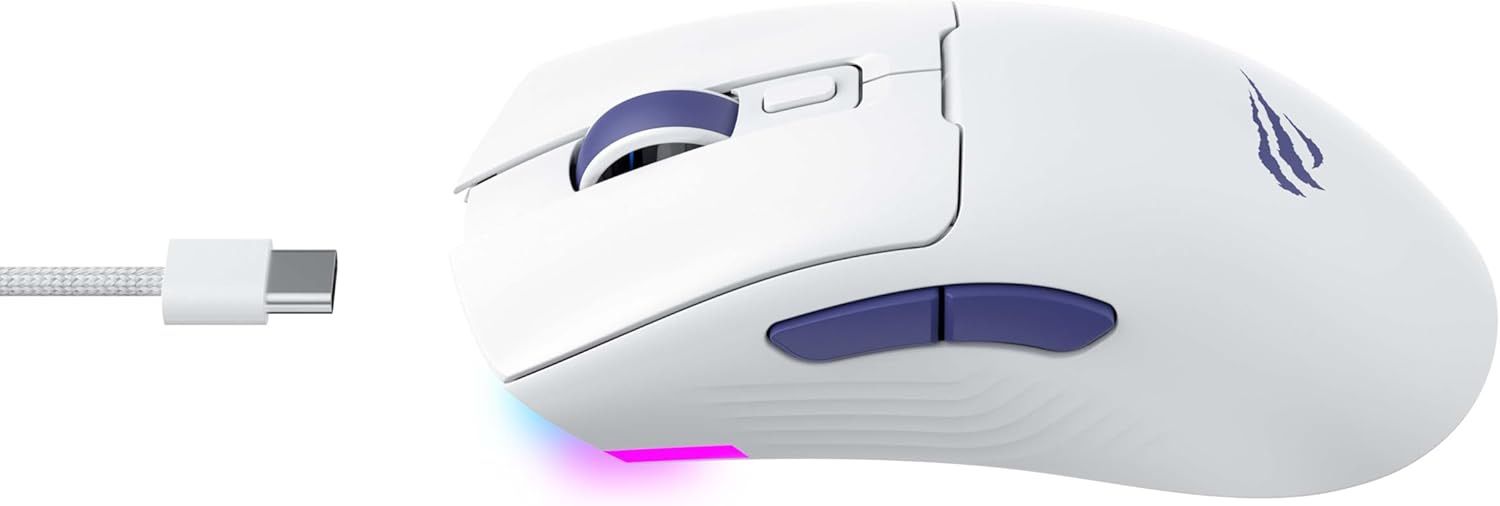
Figura 2: lato view of the mouse, highlighting the USB-C port.
2.3 Ricarica del mouse
To charge the mouse, connect it to your computer using the USB-C cable. The mouse can be used in wired mode while charging. An indicator light on the mouse will show the charging status (refer to the manufacturer's website or product packaging for specific light behaviors).
3. Istruzioni per l'uso
3.1 Funzioni dei pulsanti
The Havit MS966SE features several programmable buttons for enhanced control:
- Pulsante sinistro del mouse: Funzione standard di clic primario.
- Pulsante destro del mouse: Funzione di clic secondario standard.
- Rotella di scorrimento: Scorre verso l'alto/verso il basso e funge da pulsante centrale.
- Pulsante ciclo DPI: Located behind the scroll wheel, this button cycles through preset DPI sensitivity levels.
- Pulsanti laterali (avanti/indietro): Tipicamente utilizzato per la navigazione in web browsers or can be programmed for in-game actions.

Figure 3: Side buttons and ergonomic design.
3.2 Regolazione DPI
The PixArt PMW3325 sensor allows for adjustable DPI settings up to 10,000. Press the DPI cycle button (located behind the scroll wheel) to switch between different sensitivity levels. Each press will cycle to the next preset DPI, allowing you to quickly adapt to various tasks or game scenarios.
3.3 Connectivity Mode Switching
To switch between 2.4GHz wireless, Bluetooth, and wired modes, use the physical switch located on the bottom of the mouse. Ensure the correct mode is selected based on your connection preference.
3.4 Illuminazione RGB
The mouse features dynamic RGB lighting. Specific controls for RGB lighting effects, colors, and brightness may be available through dedicated software provided by Havit. Please visit the official Havit website for software downloads and further customization options.
4. Manutenzione
4.1 Pulizia
- Scollegare il mouse dal computer prima di pulirlo.
- Per pulire la superficie del mouse, utilizzare un panno morbido, asciutto e privo di lanugine.
- Per sporco ostinato, leggermente dampPulisci il panno con acqua o una soluzione detergente delicata. Evita prodotti chimici aggressivi.
- Utilizzare un cotton fioc o aria compressa per pulire la zona attorno ai pulsanti e alla rotellina di scorrimento.
- Non immergere il mouse in acqua o in altri liquidi.
4.2 Conservazione
When not in use for extended periods, store the mouse in a cool, dry place away from direct sunlight and extreme temperatures. If storing for a long time, ensure the mouse is fully charged to maintain battery health.
5. Risoluzione Dei Problemi
5.1 Il mouse non risponde
- Controlla la potenza: Assicurarsi che il mouse sia acceso e che la batteria sia sufficientemente carica.
- Controllare la connettività:
- Modalità cablata: Assicurati che il cavo USB-C sia collegato saldamente sia al mouse che al computer. Prova una porta USB diversa.
- Wireless a 2.4 GHz: Ensure the USB receiver is properly inserted and the mouse is set to 2.4G mode. Try a different USB port for the receiver.
- Modalità Bluetooth: Assicurati che il Bluetooth sia abilitato sul tuo dispositivo e che il mouse sia associato. Prova a disassociare e riassociare il mouse.
- Ricomincia: Riavvia il computer e il mouse.
5.2 DPI non cambia
- Assicurati di premere il pulsante del ciclo DPI corretto.
- Se si utilizza un software personalizzato, controllare le impostazioni DPI all'interno del software.
5.3 Ritardo o disconnessioni in modalità wireless
- Interferenza: Avvicinare il mouse al ricevitore/dispositivo. Evitare ostacoli tra il mouse e il ricevitore.
- Livello della batteria: Una batteria scarica può influire sulle prestazioni wireless. Caricare il mouse.
- Porta USB: Try connecting the 2.4GHz receiver to a different USB port, preferably a USB 2.0 port if available, as some USB 3.0 ports can cause interference.
6. Specifiche
| Marca | avere |
| Modello | MS966SE |
| Tecnologia di connettività | Tri-Mode: 2.4GHz Wireless, Bluetooth 5.3, USB-C Wired |
| Tecnologia | Ottico (PixArt PMW3325) |
| Livelli DPI | Up to 10,000 adjustable DPI |
| Caratteristiche speciali | Ergonomic Design, Dynamic RGB Lighting |
| Sistemi operativi compatibili | Windows, macOS, Linux |
| Dispositivi compatibili | Notebook, Personal Computer, Tablet, Smartphone |
| Peso del mouse | Circa 68 grammi |
| Tipo di batteria | Agli ioni di litio |
7. Garanzia e supporto
7.1 Informazioni sulla garanzia
This Havit MS966SE Gaming Mouse comes with a Garanzia del produttore di 1 anniSi prega di conservare la prova d'acquisto per eventuali reclami in garanzia. La garanzia copre difetti di materiali e fabbricazione in normali condizioni d'uso.
7.2 Assistenza clienti
For technical assistance, troubleshooting beyond this manual, or warranty inquiries, please contact Havit customer service directly. You can find the most up-to-date contact information and support resources on the official Havit webposto (www.havit.com).