
Introduzione
This manual provides essential information for setting up, operating, maintaining, and troubleshooting your HP 15.6-inch FHD IPS Touchscreen Laptop. Please read this guide thoroughly to ensure optimal performance and longevity of your device. This laptop features an AMD Ryzen 7 7730U processor, 64GB DDR4 RAM, 2.28TB storage (2TB SSD + 288GB Docking Station Set), AMD Radeon Graphics, and runs on Windows 11 Pro.
Impostare
Unpacking and Initial Power-On
Carefully remove all components from the packaging. Connect the power adapter to the laptop and a power outlet. Press the power button to turn on the laptop. Follow the on-screen instructions to complete the initial Windows 11 Pro setup.
Accessori inclusi
Your laptop package includes the following accessories:
- 1x 7-in-1 Docking Station with 256GB Storage
- 1 scheda MicroSD da 32 GB con adattatore
- 1x cavo dati di tipo C
- 1 cavo di ricarica 3 in 1
- 1x panno per la pulizia della pelle scamosciata
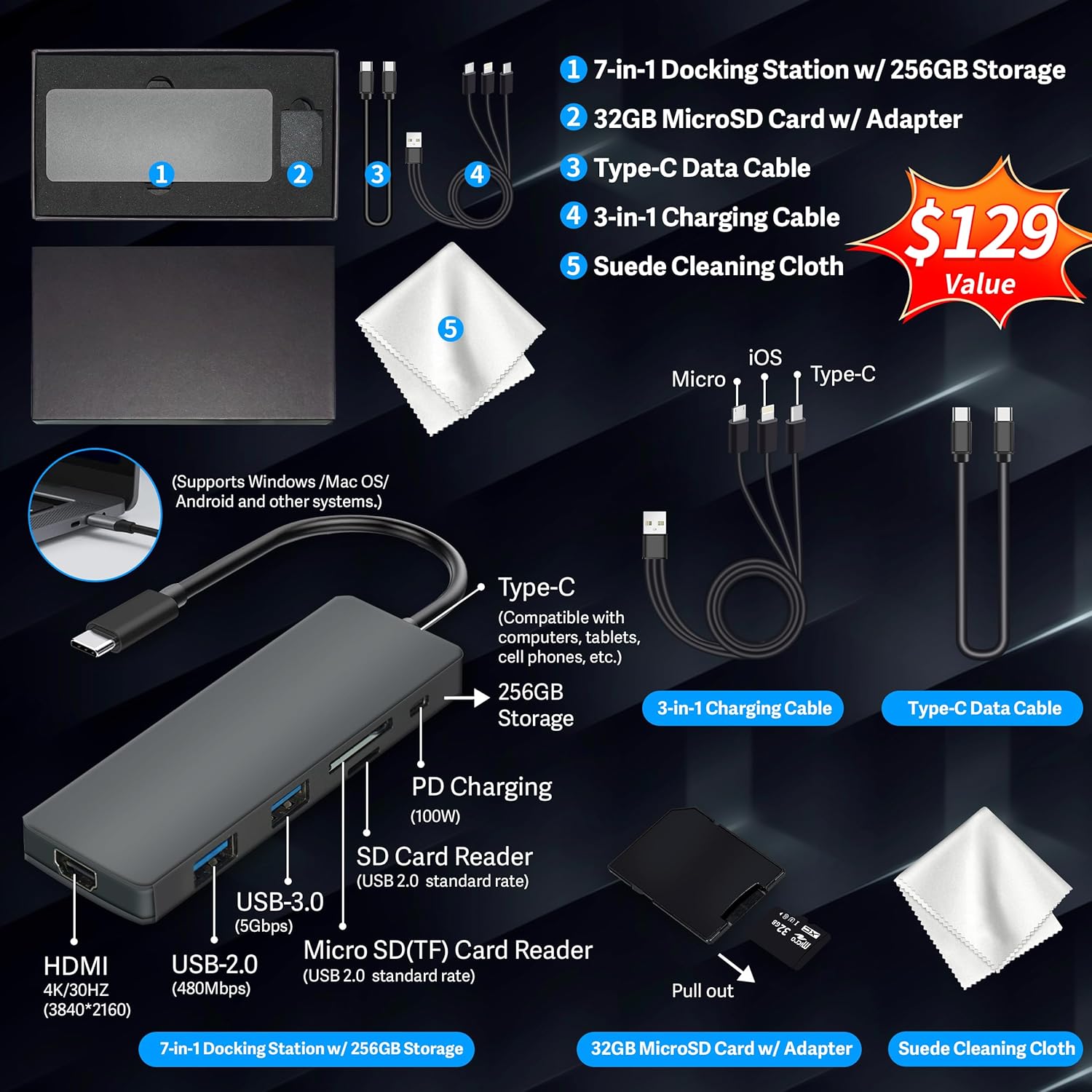
Figure 1: Included accessories, including the 7-in-1 docking station, various cables, and a cleaning cloth.
Utilizzo del tuo laptop
Caratteristiche dello schermo
The HP 15.6-inch laptop features an FHD IPS touchscreen display with a resolution of 1920 x 1080 pixels and an anti-glare coating. This display provides clear and vibrant visuals from various viewangoli di inclinazione.

Figure 2: The 15.6-inch FHD IPS display offers crisp and vivid details.
Connectivity and Peripherals
Your laptop is equipped with various connectivity options and integrated features to enhance your user experience.
- Telecamera HD 720p: Per videochiamate e riunioni online.
- Wi-Fi 6: Per una connettività Internet wireless ad alta velocità.
- Bluetooth: Per collegare periferiche wireless come mouse, tastiere e cuffie.
- Tastiera numerica: A full numeric keypad is integrated for efficient data entry and calculations.

Figure 3: Key features for staying connected and productive, including the numeric keypad.
The laptop includes multiple ports for connecting external devices:
- 2 porte USB di tipo A
- 1 porta USB di tipo C
- 1x porta HDMI
- 1x Headphone/Microphone Combo jack

Figure 4: Multi-port configuration on the laptop for various connections.
Prestazioni e multitasking
Equipped with an AMD Ryzen 7 7730U processor, 64GB DDR4 RAM, and AMD Radeon Graphics, this laptop is designed for efficient multitasking and demanding applications. The 2.28TB storage (2TB SSD + 288GB Docking Station Set) provides ample space and fast access to your files.

Figure 5: Core specifications for performance and storage.

Figure 6: Laptop demonstrating effortless multitasking with several applications running simultaneously.
The laptop is designed for extended use, offering reliable battery life to support your daily tasks.

Figure 7: The laptop supports continuous work throughout the day with its battery performance.
Manutenzione
To ensure the longevity and optimal performance of your HP laptop, follow these maintenance guidelines:
- Pulizia: Use the provided suede cleaning cloth or a soft, lint-free cloth to clean the screen and exterior. Avoid harsh chemicals.
- Aggiornamenti software: Regularly update your Windows 11 Pro operating system and drivers to ensure security and performance.
- Cura della batteria: Evitare di scaricare completamente la batteria frequentemente. Per periodi di conservazione prolungati, caricare la batteria fino a circa il 50-70%.
- Ventilazione: Assicurarsi che le prese d'aria del laptop non siano ostruite per evitare il surriscaldamento. Utilizzare il laptop su una superficie rigida e piana.
- Magazzinaggio: Conservare il portatile in un luogo fresco e asciutto, lontano dalla luce solare diretta e da temperature estreme.
Risoluzione dei problemi
Questa sezione affronta i problemi più comuni che potresti riscontrare con il tuo laptop.
Il portatile non si accende
- Assicurarsi che l'adattatore di alimentazione sia collegato saldamente sia al laptop sia a una presa di corrente funzionante.
- Verificare che la presa di corrente funzioni collegandovi un altro dispositivo.
- Se la batteria è completamente scarica, lasciarla in carica per almeno 15-30 minuti prima di provare ad accenderla.
Screen Remains Blank
- Controllare che il portatile sia acceso (spia di alimentazione).
- Try connecting an external monitor to see if display output is available.
- Regolare la luminosità dello schermo utilizzando i tasti funzione.
Problemi di connettività Wi-Fi
- Assicurati che il Wi-Fi sia abilitato nelle impostazioni di Windows.
- Riavvia il router e il modem.
- Aggiorna i driver Wi-Fi tramite Gestione dispositivi.
- Verificare la presenza di eventuali ostacoli fisici o interferenze.
Prestazioni lente
- Chiudere le applicazioni non necessarie in esecuzione in background.
- Controllare Task Manager per individuare processi che consumano molta CPU o RAM.
- Assicurati che il sistema operativo e i driver siano aggiornati.
- Eseguire una pulizia e una deframmentazione del disco (per gli HDD, non è necessario per gli SSD).
- Eseguire la scansione per rilevare malware o virus.
Specifiche
Below are the detailed technical specifications for your HP 15.6-inch FHD IPS Touchscreen Laptop.

Figure 8: Laptop dimensions and weight for portability.
| Caratteristica | Dettaglio |
|---|---|
| Marca | HP |
| Nome del modello | HP 15.6" FHD IPS Touchscreen Laptop |
| Dimensioni dello schermo | 15.6 pollici |
| Risoluzione dello schermo | 1920 x 1080 pixel (FHD) |
| Tipo di visualizzazione | LED IPS Touchscreen |
| Processore | AMD Ryzen 7 7730U (8 Cores, 2 GHz base) |
| Coprocessore grafico | Scheda grafica AMD Radeon (integrata) |
| Memoria RAM | 64 GB DDR4 (3200 MHz) |
| Magazzinaggio | 2 TB SSD + 288 GB Docking Station Set (Total 2.28 TB) |
| Sistema operativo | Windows 11 Pro |
| Connettività | Wi-Fi 6 (802.11ax), Bluetooth, HDMI, USB |
| Porti | 2x USB Type-A, 1x USB Type-C, 1x HDMI, 1x Headphone/Microphone Combo |
| Webcamma | Telecamera HD 720p |
| Tastiera | Dimensioni standard con tastierino numerico |
| Dimensioni (L x P x P) | 14.17" x 9.29" x 0.73" |
| Peso dell'articolo | 3.52 libbre (circa 1.6 kg) |
| Colore | Argento |
| Codice UPC | 196188514924 |
| ASIN | B0FX2NR2WN |
Informazioni sulla garanzia
Your HP laptop comes with a manufacturer's warranty. For upgraded components (RAM/SSD), a 1-year warranty is provided by SnowBell. The original 1-year manufacturer warranty applies to all other components of the laptop. Please retain your proof of purchase for warranty claims. For detailed terms and conditions, refer to the warranty documentation included with your product or visit the official HP support websito.
Supporto
Per ulteriore assistenza, supporto tecnico o richieste di assistenza, fare riferimento alle seguenti risorse:
- Supporto ufficiale HP Websito: Visita supporto.hp.com per driver, manuali e guide alla risoluzione dei problemi.
- Aiuto in linea: Utilize the built-in Windows 11 Pro help features for software-related questions.
- Contatta il rivenditore: For issues related to upgraded components or purchase, contact SnowBell or your point of purchase.