
1. Introduzione
Thank you for choosing the Angrox Backlit Universal Remote Control for LG Smart TVs. This remote is designed to provide a seamless and enhanced television viewing experience, especially in low-light conditions. It serves as a direct replacement for your original LG TV remote, offering broad compatibility and ease of use without requiring complex setup procedures. This manual provides detailed instructions for setting up, operating, maintaining, and troubleshooting your new remote control.
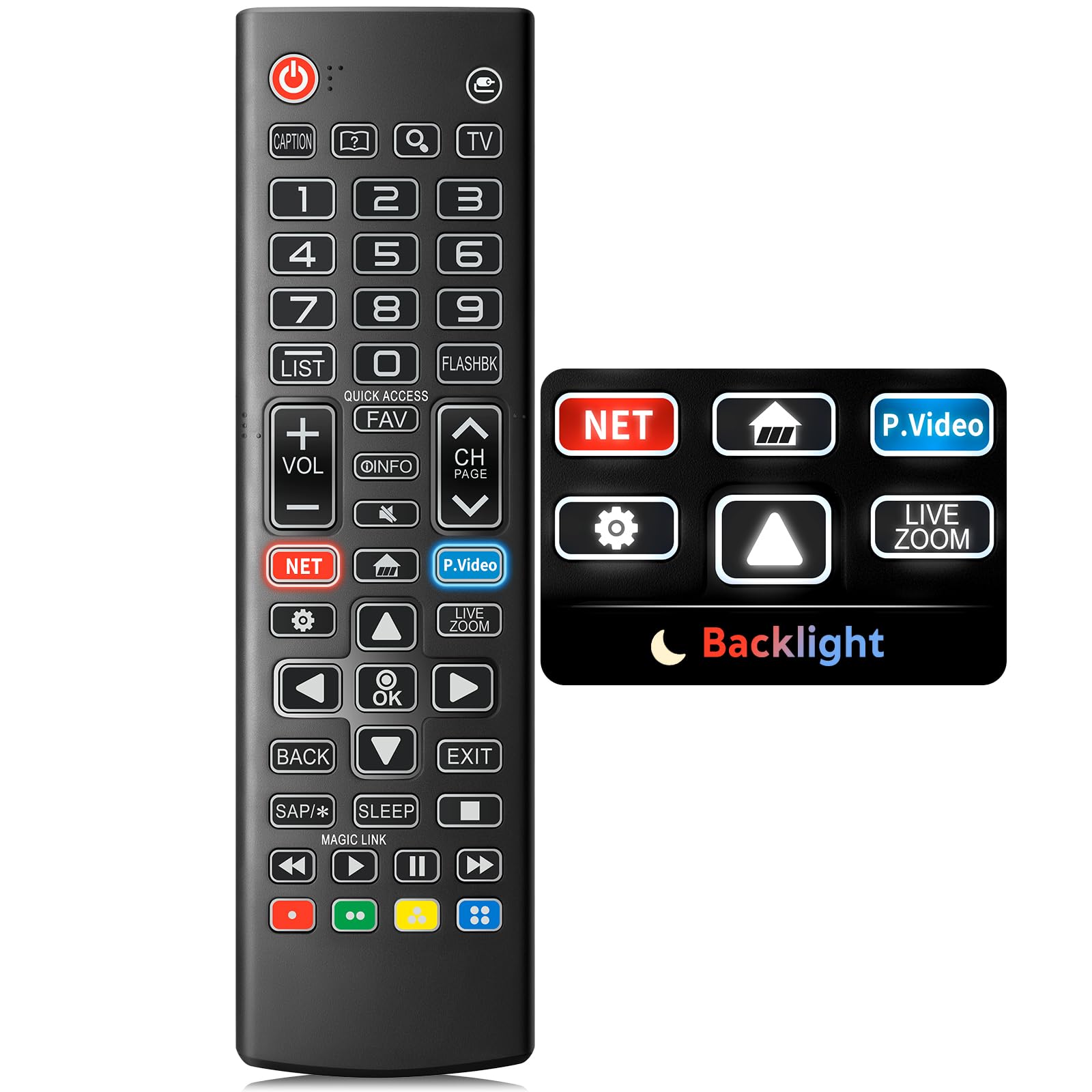
Image: The Angrox Backlit Universal Remote Control, a sleek black remote with clearly labeled buttons.
2. Caratteristiche principali
- Easy Nighttime Operation: Features soft glow buttons that illuminate, allowing for clear visibility and use in dark environments without causing glare. The backlight activates with any button press and automatically turns off after 10 seconds of inactivity.
- Compatibilità universale: Designed as a direct replacement for LG TV remotes, compatible with all LG TV models. No programming or complex pairing is required; it works immediately out of the box.
- High-Quality Performance: Equipped with sensitive buttons and stable signal transmission for smooth and responsive operation.
- Design ergonomico: Shaped to fit comfortably in the hand, reducing fatigue during extended use. The button layout is intuitive for users of all ages.
- Durevole e affidabile: Constructed from high-quality, sturdy materials to withstand daily use and accidental drops, ensuring a long lifespan.

Image: A comparison showing the remote control with its backlight off and then with its buttons illuminated, highlighting the easy nighttime operation feature.

Image: The remote control displayed alongside various LG TV models (OLED, UHD, QNED, NanoCell), illustrating its broad compatibility.
3. Istruzioni per l'installazione
3.1 Installazione della batteria
- Individuare il coperchio del vano batterie sul retro del telecomando.
- Far scorrere il coperchio verso il basso o premere il fermo per aprire il vano.
- Inserire due (2) batterie AAA, assicurandosi che i terminali positivo (+) e negativo (-) siano allineati correttamente con gli indicatori all'interno del vano.
- Richiudere il coperchio del vano batteria facendolo scorrere in posizione finché non scatta in posizione.
Nota: Batteries are not included with the remote control. Please use new AAA alkaline batteries for optimal performance.

Image: A visual guide demonstrating the correct insertion of two AAA batteries into the remote control's battery compartment.
3.2 Initial Use (No Pairing Required)
The Angrox Backlit Universal Remote Control is designed for immediate use with LG Smart TVs. No pairing or programming steps are necessary. Once batteries are installed, the remote is ready to control your LG television.
4. Istruzioni per l'uso
This section details the functions of the buttons on your Angrox remote control.

Image: A comprehensive layout of the remote control, with labels pointing to each button and describing its primary function.
4.1 Funzioni di base
- Energia (
 ): Accende o spegne la TV.
 - Ingresso (): Cambia la sorgente di ingresso (ad esempio, HDMI 1, HDMI 2).
- Volume su/giù (VOL +/-): Regola il livello del volume.
- Canale su/giù (CH Page): Cambia il canale televisivo.
- Muto (): Disattiva o riattiva l'audio della TV.
- Tasti numerici (0-9): Inserisce direttamente i numeri dei canali o altri input numerici.
- Pulsanti di navigazione (su/giù/sinistra/destra): Utilizzato per scorrere i menu e le opzioni.
- Pulsante OK: Selects menu items or confirms your input.
4.2 Pulsanti funzione speciali
- Pulsante Netflix: Avvia direttamente l'applicazione Netflix.
- Amazon Prime Video Button: Avvia direttamente l'applicazione Amazon Prime Video.
- Accesso rapido: A feature that allows you to enter a specified app or Live TV directly by pressing and holding the number buttons.
- Lista: Accede all'elenco dei programmi salvati.
- Flashback: Ritorna a quello precedente viewcanale o ingresso modificato.
- Informazioni: Displays information on the current program.
- Preferito: Accedi all'elenco dei tuoi canali preferiti.
- Impostazioni (): Accesses the Quick Settings menu.
- Indietro: Cancella le visualizzazioni sullo schermo e torna alla TV viewing.
- Uscita: Esce dal menu corrente.
- Sonno: Accesses the sleep timer.
- Pulsanti di controllo multimediale (Riproduci, Pausa, Stop, Avanti veloce, Riavvolgi): Controls media content playback.
4.3 Funzione di retroilluminazione
The remote control features a soft backlight for easy use in the dark. Simply press any button, and the backlight will turn on. It will automatically turn off after 10 seconds of inactivity to conserve battery life.
Video: A demonstration of the Angrox Backlit Remote for LG Smart TV, showcasing its easy nighttime use and responsive buttons. This video highlights the convenience of the backlit feature in dark environments.
5. Specifiche
| Marca | Angrox |
| Nome del modello | Numero di modello: AKB75095307 |
| Numero di modello | Numero di modello: AKB75095307 |
| Caratteristiche speciali | Backlit, Ergonomic, Lightweight, No Programming Required, Universal |
| Dispositivi compatibili | Television (All LG TV models) |
| Numero massimo di dispositivi supportati | 1 |
| Tecnologia di connettività | Infrarossi |
| Quantità del pulsante | 30 |
| Tipo di controllore | Controllo dei pulsanti |
| Portata massima | 10 metri (circa 33 piedi) |
| Numero di batterie richieste | 2 batterie AAA |
| Tipo di batteria | Alcalino |
| Dimensioni articolo (L x P x A) | 9.25 cm L x 1.89 cm P x 0.73 cm A |
6. Risoluzione Dei Problemi
Se riscontri problemi con il telecomando, fai riferimento alle seguenti soluzioni comuni:
- Il telecomando non risponde:
- Assicurarsi che le batterie siano inserite correttamente con la polarità corretta (+/-).
- Sostituisci le vecchie batterie con nuove batterie alcaline AAA.
- Verificare che non vi siano ostacoli tra il telecomando e il ricevitore a infrarossi del televisore.
- Ensure you are within the maximum operating range (10 meters) of the TV.
- Retroilluminazione non funzionante:
- Verify battery power. Low batteries may affect backlight functionality.
- The backlight is designed to turn off after 10 seconds of inactivity. Press any button to reactivate it.
- Specific buttons not working (e.g., Netflix, Amazon Prime):
- Ensure your LG Smart TV is connected to the internet and the respective applications are installed and updated.
- Some smart TV features or app shortcuts may vary slightly depending on your TV's model and region.
- Remote feels sluggish or unresponsive:
- Sostituire le batterie con batterie nuove.
- Clean the remote's infrared emitter (at the top) and the TV's IR receiver with a soft, dry cloth to ensure a clear signal path.
7. Manutenzione
Per garantire la longevità e le prestazioni ottimali del tuo telecomando Angrox, segui queste linee guida per la manutenzione:
- Pulizia: Use a soft, dry cloth to clean the remote's surface. Avoid using liquid cleaners, aerosols, or harsh chemicals, as they may damage the remote.
- Sostituzione della batteria: Replace batteries promptly when the remote's performance declines or if the backlight becomes dim. Remove batteries if the remote will not be used for an extended period to prevent leakage.
- Magazzinaggio: Conservare il telecomando in un luogo fresco e asciutto, lontano dalla luce solare diretta, da temperature estreme e da elevata umidità.
- Evitare gocce: Sebbene sia durevole, cadute ripetute possono danneggiare i componenti interni. Maneggiare il telecomando con cura.
8. Garanzia e supporto
8.1 Informazioni sulla garanzia
The Angrox Backlit Universal Remote Control (Model AKB75095307) is covered by a Garanzia di 90 giorni from the date of purchase. This warranty covers manufacturing defects and ensures the product functions as described under normal use. It does not cover damage caused by misuse, accidents, unauthorized modifications, or normal wear and tear.
8.2 Assistenza clienti
For any questions, technical assistance, or warranty claims, please contact Angrox customer support through the retailer where you purchased the product or visit the official Angrox store online. Please have your purchase receipt and product model number available when contacting support.