
Introduzione
Thank you for choosing the JUOVI 65W 20000mAh Portable Charger. This high-capacity power bank is designed to provide reliable and fast charging for a wide range of devices, including laptops, tablets, and smartphones. Please read this manual carefully to ensure proper use and optimal performance of your device.
Contenuto della confezione
- 1 × JUOVI 65W 20000mAh Power Bank
- 1 × USB-C to USB-C Cable (1 ft)
- 1 × Manuale utente
Prodotto finitoview
Familiarize yourself with the components of your JUOVI Power Bank:

Figure 1: JUOVI Power Bank with USB-C and USB-A ports, and digital display.
- USB-C Ports (C1 IN/OUT, C2 IN/OUT): Two ports supporting 65W PD 3.0 fast charging for both input and output.
- USB-A Ports (USB1 OUT, USB2 OUT): Two ports supporting 30W fast charging output.
- Display digitale: Mostra la percentuale della batteria in tempo realetage e lo stato di carica.
- Pulsante di accensione: Activates the display and controls charging modes.
Caratteristiche principali
65W High-Speed Laptop Charging & PD 3.0 Fast Charging
The power bank features dual USB-C ports capable of delivering 65W PD 3.0 fast charging. This allows for rapid recharging of compatible laptops, such as a 14-inch MacBook Pro to 50% in approximately 40 minutes, and an iPhone to 60% in just 30 minutes. It provides efficient power for laptops, tablets, and phones during travel or daily use.
Massive 20000mAh Capacity & Charge 4 Devices Simultaneously
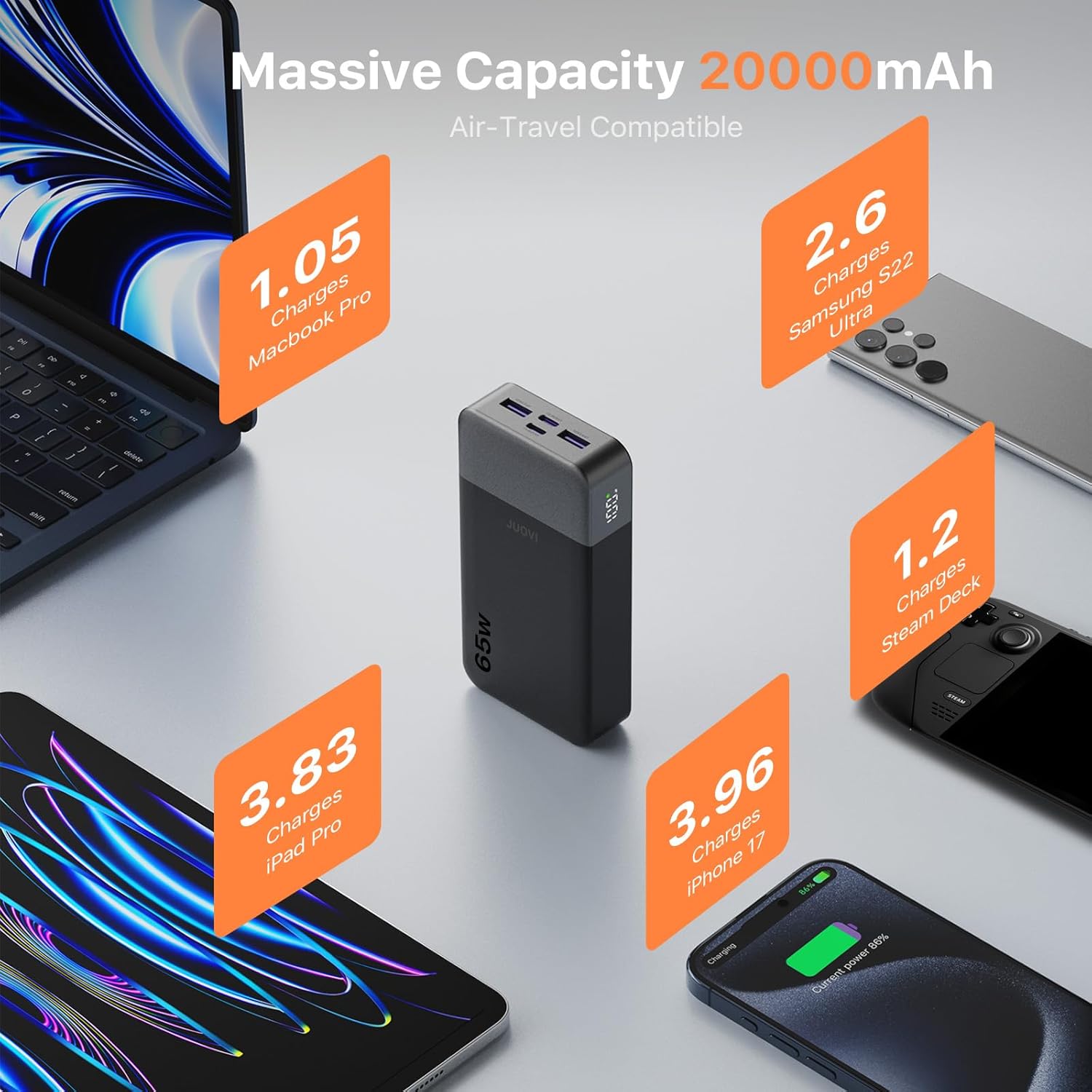
Figure 2: High capacity of JUOVI Power Bank for multiple devices.
With a 20000mAh battery, this power bank offers extended power. It includes 2 USB-C (65W) and 2 USB-A (30W) ports, enabling simultaneous charging of up to four devices, such as a laptop, tablet, phone, and earbuds. It is designed for travel, camping, flights, and daily commutes.

Figure 3: Charging multiple devices with the JUOVI Power Bank.
Dual-Mode Charging for All Devices & Trickle Mode
This charger supports a default high-power mode for laptops and tablets. For delicate devices like AirPods, Bluetooth headphones, and smartwatches, a simple double-press of the power button activates Low-Current Mode (Trickle Mode), providing safe and gentle charging to preserve battery health.
Smart Digital Display & Real-Time Power Monitoring
The integrated digital display provides real-time visibility of the remaining battery percentage and current charging status. This feature helps users accurately monitor power levels and plan usage without unexpected shutdowns.
Protezione di sicurezza

Figure 4: JUOVI Power Bank's 6-way safety protection features.
The power bank is engineered with a multi-protection system that guards against overcharging, overheating, short-circuit, and overcurrent. An intelligent chip monitors voltage and current in real-time, adjusting output for safe operation.
Impostare
Caricare il Power Bank
- Connect the provided USB-C to USB-C cable to one of the power bank's USB-C (IN/OUT) ports.
- Collegare l'altra estremità del cavo a un caricabatterie da parete USB-C compatibile (non incluso) con una potenza minima di 45 W per una velocità di ricarica ottimale.
- Il display digitale mostrerà la percentuale della batteriatage increasing, indicating that the power bank is charging.
- Once the display shows 100%, the power bank is fully charged.
Istruzioni per l'uso
Caricare i tuoi dispositivi
- Controlla il livello della batteria: Premere una volta il pulsante di accensione view la percentuale attuale della batteriatage sul display digitale.
- Connetti dispositivo:
- For laptops and fast-charging devices, use a USB-C to USB-C cable and connect to either USB-C (IN/OUT) port.
- For other devices, use a compatible USB-A cable and connect to either USB-A (OUT) port.
- Avviare la ricarica: The power bank will automatically begin charging your device. The digital display will show the charging status.
- Ricarica ottimale: For maximum charging speed, it is recommended to charge one device at a time, especially high-power devices like laptops. Charging multiple devices simultaneously may reduce power per port.
Activating Trickle Mode (Low-Current Mode)
Trickle Mode is ideal for charging low-power devices such as wireless earbuds, smartwatches, or Bluetooth headphones, preventing overcharging and preserving their battery life.
- Connect your low-power device to any available output port on the power bank.
- Double-press the power button. The digital display will show a small icon (e.g., "L" or a specific symbol) indicating that Trickle Mode is active.
- To exit Trickle Mode and return to standard charging, double-press the power button again.
Specifiche
| Numero di modello | J2931 |
| Capacità della batteria | 20000mAh |
| Potenza massima in uscita | 65W |
| Porte USB-C | 2 (C1 IN/OUT, C2 IN/OUT) - up to 65W PD 3.0 |
| Porte USB-A | 2 (USB1 OUT, USB2 OUT) - up to 30W |
| Dimensioni del prodotto | 5.39 x 2.76 x 1.04 pollici |
| Peso dell'articolo | 14.1 once |
| Caratteristiche speciali | Spegnimento automatico, display digitale, ricarica rapida, protezione da sovraccarico, protezione da cortocircuito |
Risoluzione dei problemi
- Dispositivo non in carica:
- Assicurarsi che il power bank abbia una carica sufficiente.
- Verificare che il cavo di ricarica sia collegato saldamente sia al power bank sia al dispositivo.
- Prova un cavo o una porta di ricarica diversi.
- Verifica che il tuo dispositivo sia compatibile con le specifiche di uscita del power bank.
- Ricarica lenta:
- Assicurati di utilizzare un cavo compatibile con la ricarica rapida e che il tuo dispositivo supporti la ricarica rapida.
- If multiple devices are connected, disconnect some to allow higher power output to a single device.
- Check if Trickle Mode is accidentally activated (double-press power button to toggle).
- Il power bank non si carica:
- Ensure the USB-C cable is connected to an IN/OUT port and to a functional wall adapter.
- Provare un adattatore a muro o una presa di corrente diversi.
- Use the provided USB-C to USB-C cable for optimal input charging.
Manutenzione
- Tenere il power bank lontano da temperature estreme, luce solare diretta e liquidi.
- Conservare in luogo fresco e asciutto quando non in uso.
- Evitare di far cadere o sottoporre il dispositivo a forti impatti.
- Pulire la superficie con un panno morbido e asciutto. Non utilizzare prodotti chimici aggressivi o materiali abrasivi.
- Caricare il power bank almeno una volta ogni tre mesi per preservare la salute della batteria se non viene utilizzato per lunghi periodi.
Garanzia e supporto
For warranty information or technical support, please refer to the contact details provided on the product packaging or visit the official JUOVI websito. Conservare la ricevuta d'acquisto come prova d'acquisto per eventuali reclami in garanzia.


