
Introduzione
This manual provides detailed instructions for the setup, operation, and maintenance of your Yigars Robot Vacuum and Mop Y680. Please read this manual thoroughly before using the device to ensure optimal performance and safety.
Contenuto della confezione
Verifica che tutti gli articoli elencati di seguito siano inclusi nel tuo pacchetto:
- Robot aspirapolvere (x1)
- Base Station with Auto-Empty Function (x1)
- Filtri (x2)
- Mop Pad (x2, one pre-installed)
- Spazzola laterale (x4)
- Serbatoio dell'acqua (x1)
- Dust Bag (x5, one pre-installed)
- Strumento di pulizia (preinstallato)
- Manuale utente (x1)

Figure 1: Included components of the Yigars Robot Vacuum and Mop Y680.
Impostare
- Disimballare e posizionare la stazione base: Remove all packaging materials. Place the auto-empty base station against a wall in an open area with good Wi-Fi signal. Ensure there are no obstacles within 1.5 meters (5 feet) in front and 0.5 meters (1.6 feet) on either side of the base station.

Figure 2: Proper placement of the auto-empty base station for optimal operation.
- Installare le spazzole laterali: Attach the side brushes to the designated slots on the underside of the robot vacuum until they click into place.
- Install Mop Pad and Water Tank: If using the mopping function, fill the water tank with clean water and attach the mop pad to the mop bracket. Slide the assembled water tank and mop bracket into the rear of the robot until it clicks.
- Carica iniziale: Place the robot vacuum onto the charging contacts of the base station. Ensure the robot is properly aligned. Allow the robot to fully charge before its first use (approximately 4-5 hours).
- Connessione all'app per dispositivi mobili: Download the companion mobile app (e.g., Tuya Smart or Smart Life) from your app store. Follow the in-app instructions to connect your Yigars Y680 to your home's 2.4GHz Wi-Fi network. (Note: 5GHz networks are not supported).

Figure 3: Step-by-step guide for connecting the robot vacuum to the mobile application.
- Mappatura iniziale: For the first cleaning cycle, allow the robot to complete a full scan of your home to create an accurate map. This map will be used for efficient navigation and personalized cleaning settings.

Figure 4: The robot vacuum utilizing LiDAR for precise navigation and mapping.
Istruzioni per l'uso
Modalità di pulizia
- Pulizia automatica: Il robot pulisce in modo intelligente l'intera casa in base alla disposizione mappata.
- Pulizia della zona: Select specific areas on the app map for targeted cleaning.
- Pulizia delle macchie: Dirigere il robot alla pulizia di un'area piccola e concentrata.
Suction and Mopping Settings
The Y680 offers customizable cleaning power:
- Livelli di aspirazione: Choose from four adjustable suction levels (up to 8000 Pa) via the mobile app to suit different floor types and debris.
- Water Flow Settings: Select from three water flow settings for mopping, allowing adjustment for varying floor materials and dirt levels.
- Potenziamento del tappeto: The robot automatically detects carpets using ultrasonic sensors and increases suction power for deeper cleaning.

Figure 5: Illustration of the robot vacuum's adjustable suction power.
Navigazione e mappatura
The Y680 utilizes advanced navigation for thorough coverage:
- Navigazione LiDAR: 360-degree laser LDS technology accurately maps your home and plans efficient cleaning routes.
- Archiviazione multi-mappa: The robot can store up to five distinct maps, ideal for multi-level homes.
- Superamento degli ostacoli: Capable of clearing obstacles up to 20mm and climbing 15° inclines, allowing it to navigate thresholds and carpets.
- Zone vietate: Use the app to define areas the robot should avoid, such as pet bowls or delicate furniture.

Figure 6: The robot vacuum using LiDAR for precise navigation and mapping.
App e controllo vocale
- Pulizia personalizzata: The mobile app allows you to select specific zones, set no-go areas, schedule cleaning times, and customize water flow and suction levels for each room.
- Comandi vocali: Compatible with Amazon Alexa and Google Assistant for convenient voice-activated operation.
- Aggiornamenti OTA: The robot supports Over-The-Air (OTA) updates for continuous firmware and software improvements.
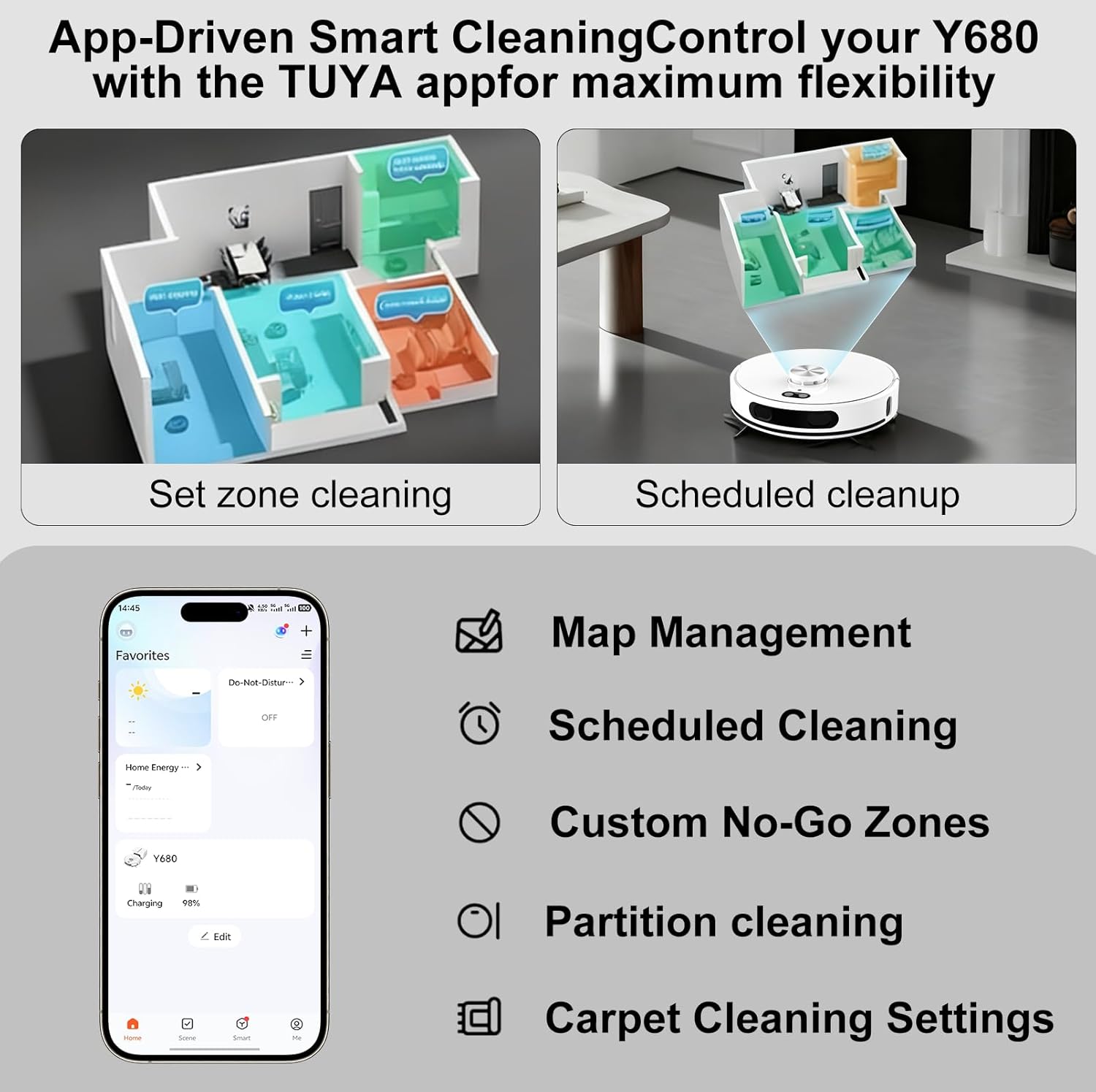
Figure 7: Mobile app interface for personalized cleaning settings and map management.
Battery Life and Smart Recharging
- Autonomia estesa: A powerful 5200mAh battery provides up to 220 minutes of cleaning time, covering up to 3229 square feet (300 square meters) on a single charge.
- Smart Recharge and Resume: When the battery is low, the robot automatically returns to its charging dock. Once sufficiently recharged, it resumes cleaning from where it left off.
Manutenzione
Pattumiera autosvuotante
The Y680 features an auto-empty base station that empties the robot's dustbin into a large-capacity dust bag. This provides up to 60 days of hands-free cleaning.
- Sostituzione del sacchetto antipolvere: Replace the dust bag in the base station approximately every 60 days, or when full. This ensures hygienic disposal of collected debris.

Figure 8: The robot vacuum returning to its self-emptying base station.
Componenti di pulizia
- Filtri: Regularly check and clean the filters to maintain optimal suction performance. Replace filters as needed (extra filters are provided).
- Panni per mocio: Remove and clean the mop pads after each mopping session. They can be hand-washed or machine-washed.
- Side Brushes and Main Brush: Periodically inspect and clean the side brushes and main brush to remove tangled hair or debris. Use the provided cleaning tool for easy maintenance.
- Sensori: Per garantire una navigazione precisa, pulire i sensori del robot con un panno morbido e asciutto.
Risoluzione dei problemi
If you encounter any issues with your Yigars Y680, please refer to the following common solutions:
- Il robot non si carica: Ensure the base station is plugged in and the robot is properly aligned with the charging contacts. Clean the charging contacts on both the robot and the base station.
- Robot bloccato: Clear any loose cables, small objects, or thick rugs that might obstruct the robot's path. Ensure no-go zones are correctly set in the app.
- Scarsa prestazione di pulizia: Check and empty the dustbin/dust bag. Clean or replace filters, main brush, and side brushes. Ensure the water tank is filled for mopping.
- Problemi di connettività dell'app: Verifica che la tua rete Wi-Fi sia a 2.4 GHz. Riavvia il router e il robot. Assicurati che il robot sia nel raggio d'azione della rete Wi-Fi.
- Rumori insoliti: Inspect the main brush and side brushes for tangled hair or debris. Check if any foreign objects are lodged in the wheels.
Per ulteriore assistenza, contattare l'assistenza clienti.
Specifiche
| Marca | Yigars |
| Nome del modello | Y680 |
| Potenza di aspirazione | Fino a 8000 Pa |
| Capacità della batteria | 5200mAh |
| Durata | Fino a 220 minuti |
| Capacità del sacchetto per la polvere | 2.5 litri (fino a 60 giorni) |
| Tipo di navigazione | LiDAR (Laser Distance Sensing) |
| Eliminazione degli ostacoli | 20mm |
| Incline Climbing | 15° |
| Connettività | Wi-Fi a 2.4 GHz (5 GHz non supportato) |
| Controllo vocale | Amazon Alexa, Assistente Google |
| Dimensioni del prodotto | 13.5 cm L x 13.5 cm P x 3.8 cm A |
| Peso dell'articolo | 8.5 libbre |
| Tipo di filtro | Filtro HEPA |
| Raccomandazione di superficie | Legno duro, moquette, piastrelle, laminato |
Garanzia e supporto
Your Yigars Robot Vacuum and Mop Y680 comes with a Garanzia di due anni from the date of purchase. This warranty covers manufacturing defects and ensures reliable operation.
We offer 24/7 after-sales customer service and lifetime technical support. Should you encounter any issues or require assistance, please do not hesitate to contact our support team.
For support, please refer to the contact information provided in the included User Manual or visit the official Yigars websito.