
Introduzione
This manual provides essential information for setting up, operating, and maintaining your TCL 32S5K 32-inch HD QLED Google Smart TV. Please read this manual thoroughly before using your television to ensure safe and optimal performance. Keep this manual for future reference.
Informazioni sulla sicurezza
Seguire sempre le precauzioni di sicurezza di base quando si utilizza questo televisore per ridurre il rischio di incendi, scosse elettriche e lesioni. Non esporre il televisore a pioggia o umidità. Non aprire il televisore.asing; refer all servicing to qualified personnel. Ensure proper ventilation and avoid placing the TV near heat sources. Use only the power cord and accessories specified by the manufacturer.
Contenuto della confezione
Verificare che tutti gli articoli siano presenti nel pacco:
- TCL 32S5K 32-inch HD QLED Google Smart TV
- Telecomando
- Cavo di alimentazione
- Supporto TV (2 pezzi) e viti
- Guida rapida
- Scheda di garanzia
Impostare
Installazione fisica
Installazione del supporto: Place the TV screen-down on a soft, flat surface. Attach the two stand pieces to the designated slots on the bottom of the TV using the provided screws. Ensure the stand is securely fastened.
Montaggio a parete: If wall-mounting, ensure you use a VESA-compatible wall mount (not included) and follow the wall mount manufacturer's instructions. Disconnect the power cord before mounting.
Collegamento dei dispositivi
Connect your external devices to the appropriate ports on the TV. Refer to the image below for port locations and types.

Figure 1: Rear and Side Connectivity Ports. This image illustrates the various input and output ports available on the TCL 32S5K Smart TV, including USB 2.0, LAN, Antenna/Cable In, Digital Audio Out (Optical), HDMI 1, HDMI 2, and AV In adapter.
- HDMI Ports (1, 2): Collega lettori Blu-ray, console di gioco, decoder via cavo/satellitari o altri dispositivi abilitati HDMI.
- Porta USB 2.0: Collegare dispositivi di archiviazione USB per la riproduzione di contenuti multimediali.
- Porta LAN: Collegare un cavo Ethernet per una connessione Internet cablata.
- Ingresso antenna/cavo: Collegare un'antenna o un segnale TV via cavo.
- Uscita audio digitale (ottica): Collegalo a un ricevitore audio esterno o a una soundbar per l'audio digitale.
- Adattatore AV In: Utilizzare l'adattatore in dotazione per collegare dispositivi più vecchi con uscite video composito e audio stereo.
Initial Power On and Google TV Setup
After connecting all necessary cables, plug the power cord into an electrical outlet. Press the power button on the remote control or on the TV. Follow the on-screen instructions to complete the initial setup, which includes selecting your language, connecting to a Wi-Fi network, and signing in to your Google account to access Google TV features.
Operativo
Funzioni del telecomando
The remote control allows you to navigate the Google TV interface, adjust volume, change channels, access apps, and control playback. Familiarize yourself with the button layout for easy operation.
Interfaccia di Google TV
Google TV organizes your favorite movies, shows, and live TV from across your apps and subscriptions. Use the remote to browse recommendations, search for content, and manage your watch list. Access the Google Play Store to download additional applications.
Funzionalità di connettività
- Wifi: Connects your TV to your home wireless network for internet access and streaming.
- Bluetooth: Pair Bluetooth-enabled devices such as headphones or game controllers for a personalized experience.
- Googlecast (Chromecast built-in): Cast content from your compatible mobile devices or computer directly to your TV screen.
Impostazioni immagine e audio
Your TCL 32S5K TV features QLED technology, Full HD resolution, HDR10 support, and Dolby Audio for an enhanced viewing and listening experience. Adjust picture modes (e.g., Standard, Vivid, Movie) and sound modes (e.g., Standard, Music, Movie) through the TV settings menu to suit your preferences.

Figure 2: Image Quality Features. This image highlights the key display technologies of the TCL 32S5K Smart TV, including QLED for vibrant colors, FHD (Full High Definition) for clear resolution, and HDR10 for enhanced contrast and brightness.
Manutenzione
Pulire la TV
Scollegare sempre la TV prima di pulirla. Utilizzare un panno morbido e asciutto per pulire lo schermo e il mobile. Per macchie ostinate, strofinare leggermenteampen the cloth with water or a mild, non-abrasive screen cleaner. Never spray cleaner directly onto the screen or allow liquids to enter the TV's openings.
Aggiornamenti software
Your Google TV may receive automatic software updates. Ensure your TV is connected to the internet to receive these updates, which can improve performance and add new features. You can also manually check for updates in the TV's settings menu.
Risoluzione dei problemi
Se riscontri problemi con la tua TV, fai riferimento alle seguenti soluzioni comuni:
- Nessun potere: Controlla che il cavo di alimentazione sia collegato saldamente sia al televisore che alla presa elettrica. Prova una presa diversa.
- No Picture/Poor Picture: Ensure all cables are correctly connected. Check the input source. Adjust picture settings. If using an antenna, check signal strength.
- No Sound/Poor Sound: Check volume levels and mute settings. Ensure external audio devices are properly connected and selected as the audio output.
- Il telecomando non funziona: Sostituisci le batterie. Assicurati che non ci siano ostacoli tra il telecomando e il sensore IR del televisore.
- Problemi di connessione di rete: Restart your router and modem. Reconnect to the Wi-Fi network in the TV settings. For wired connections, ensure the Ethernet cable is properly connected.
- Google TV Slow/Unresponsive: Restart the TV by unplugging it for a few minutes and plugging it back in. Clear cache for problematic apps in settings.
Per problemi persistenti, consultare il supporto TCL websito o contattare il servizio clienti.
Specifiche
Below are the technical specifications for the TCL 32S5K Smart TV:
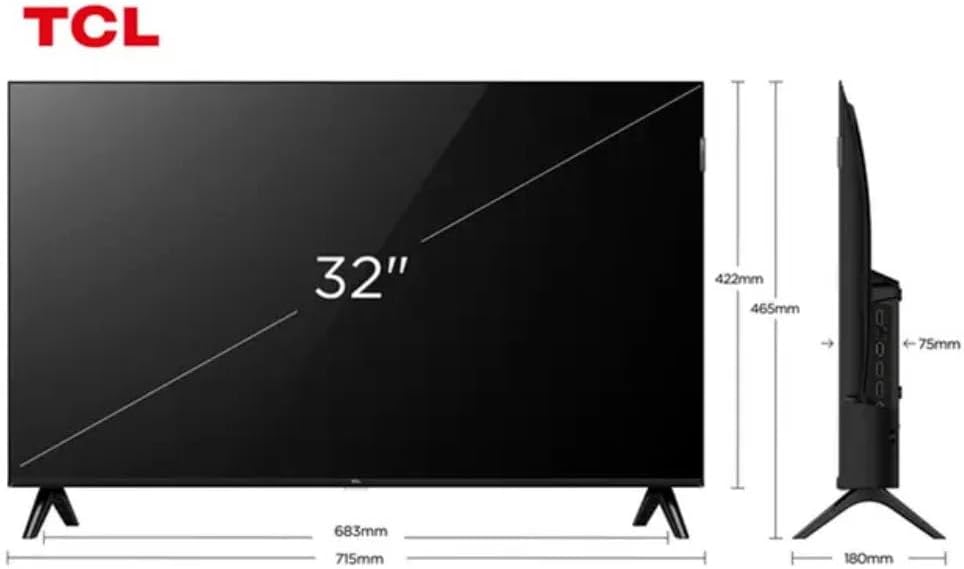
Figure 3: TV Dimensions. This image provides a detailed diagram of the TCL 32S5K Smart TV's physical dimensions, including screen size (32 inches), width (715mm), height (422mm without stand, 465mm with stand), and depth (75mm).
| Caratteristica | Descrizione |
|---|---|
| Nome del modello | 32S5K |
| Dimensioni dello schermo | 32 pollici |
| Tecnologia di visualizzazione | QLED |
| Risoluzione | 1080p (Full HD) |
| Frequenza di aggiornamento | Frequenza 60 Hz |
| Connettività | Bluetooth, Ethernet, HDMI, USB, Wi-Fi |
| Porte HDMI totali | 2 |
| Caratteristiche speciali | Integrated Speaker, Google TV, Googlecast Integrated, HDR10, Dolby Audio |
| Dimensioni del prodotto (P x L x A) | 7.6P x 71.6L x 42.3A centimeters (approx. 3 x 28.2 x 16.7 inches) |
| Produttore | TCL |
| Paese di origine | Brasile |
Garanzia e supporto
Informazioni sulla garanzia
The TCL 32S5K Smart TV comes with a Garanzia del produttore di 1 anni. This warranty covers defects in materials and workmanship under normal use. Please retain your proof of purchase for warranty claims. For specific terms and conditions, refer to the warranty card included in your package or visit the official TCL websito.
Assistenza clienti
If you require technical assistance, have questions about your product, or need to initiate a warranty claim, please contact TCL customer support. You can typically find contact information on the TCL official websito o nella documentazione del prodotto.
Before contacting support, please have your TV model number (32S5K) and serial number ready, along with a detailed description of the issue.


