
1. Introduzione e oltreview
The Brondi Amico Tuo 4G (Flipper) is a user-friendly mobile phone designed for simplicity and ease of use. It features large backlit keys, a clear internal display, and an external display for convenient notification viewing when the flip is closed. This device includes a remote control function, allowing family members to assist with settings, and an SOS button for immediate emergency contact.
This manual provides detailed instructions on how to set up, operate, maintain, and troubleshoot your Brondi Amico Tuo 4G mobile phone.
2. Cosa c'è nella scatola
Si prega di controllare il contenuto della confezione per assicurarsi che siano presenti tutti gli articoli:
- Brondi Amico Tuo 4G Mobile Phone
- Base di ricarica
- Caricabatterie di tipo C
- Batteria
- Manuale dell'utente (questo documento)
3. Caratteristiche principali
The Brondi Amico Tuo 4G (Flipper) offers several features designed for ease of use and safety:
- Grandi tasti retroilluminati: Provides a comfortable keyboard that is clearly visible even in low-light conditions.
- Voice Announcement of Dialed Numbers: The phone can audibly repeat the numbers you dial.
- Capovolgimento attivo: Answer incoming calls by opening the flip and end calls by closing it.
- Telecomando: Allows authorized family members to remotely intervene and assist with phone settings.
- See & Call: Quickly call favorite contacts by selecting their photo.
- Pulsante SOS: Located on the back, this button sends emergency SMS messages and calls pre-set emergency numbers when pressed.
- 11 Direct Memories: Quick access keys for easily contacting important numbers.
- 3 Dedicated Quick Keys: M1, M2, and Camera buttons for immediate access to frequently used functions.
- Camera with LED Flash: Capture photos and record important moments with ease.
- Hands-free and Vibration: Offerte amplified listening and clear alerts, useful in noisy environments.
- FM Radio and Multimedia Player: Goditi la musica e view contenuti multimediali.
- Bluetooth 5.1 + EDR: Ensures stable connection with other Bluetooth-enabled devices.
- Memoria espandibile: Features a MicroSD slot supporting up to 32GB for additional storage.
- Doppio display: Includes an internal 2.4-inch display and an external 1.77-inch display for immediate control and notifications.
- Dual SIM 4G and VoLTE: Modern connectivity for clear calls and the ability to manage two phone numbers.
- Durata della batteria: Provides up to 300 minutes of talk time and 180 hours of standby time.
4. Guida all'installazione
4.1 Inserimento della/e scheda/e SIM e della scheda MicroSD
1. Aprire la cover posteriore del telefono.
2. Carefully remove the battery if it is already inserted.
3. Locate the SIM card slot(s) and MicroSD card slot. This phone supports Dual SIM 4G.
4. Insert your SIM card(s) into the designated slots, ensuring the gold contacts face downwards and the card is correctly oriented as indicated by the diagram near the slot.
5. If desired, insert a MicroSD card (up to 32GB) into its slot for additional storage.
4.2 Inserimento della batteria
1. After inserting the SIM and MicroSD cards, place the battery into the battery compartment, aligning the gold contacts on the battery with the contacts in the phone.
2. Gently press down on the battery until it is securely in place.
3. Replace the back cover, ensuring it clicks firmly into position.
4.3 Ricarica del telefono
Prima del primo utilizzo, caricare completamente la batteria del telefono.
1. Connect the Type-C charger cable to the charging port on the phone or place the phone in the charging cradle.
2. Collegare il caricabatterie a una presa di corrente.
3. The charging indicator on the phone will illuminate. Once fully charged, the indicator may change color or turn off.
4. Disconnect the charger once charging is complete.
4.4 Accensione/Spegnimento
Per accendere: tenere premuto il pulsante di accensione/fine chiamata (solitamente rosso) finché lo schermo non si illumina.
Per spegnere: tenere premuto il pulsante di accensione/fine chiamata, quindi selezionare "Spegni" dalle opzioni sullo schermo.
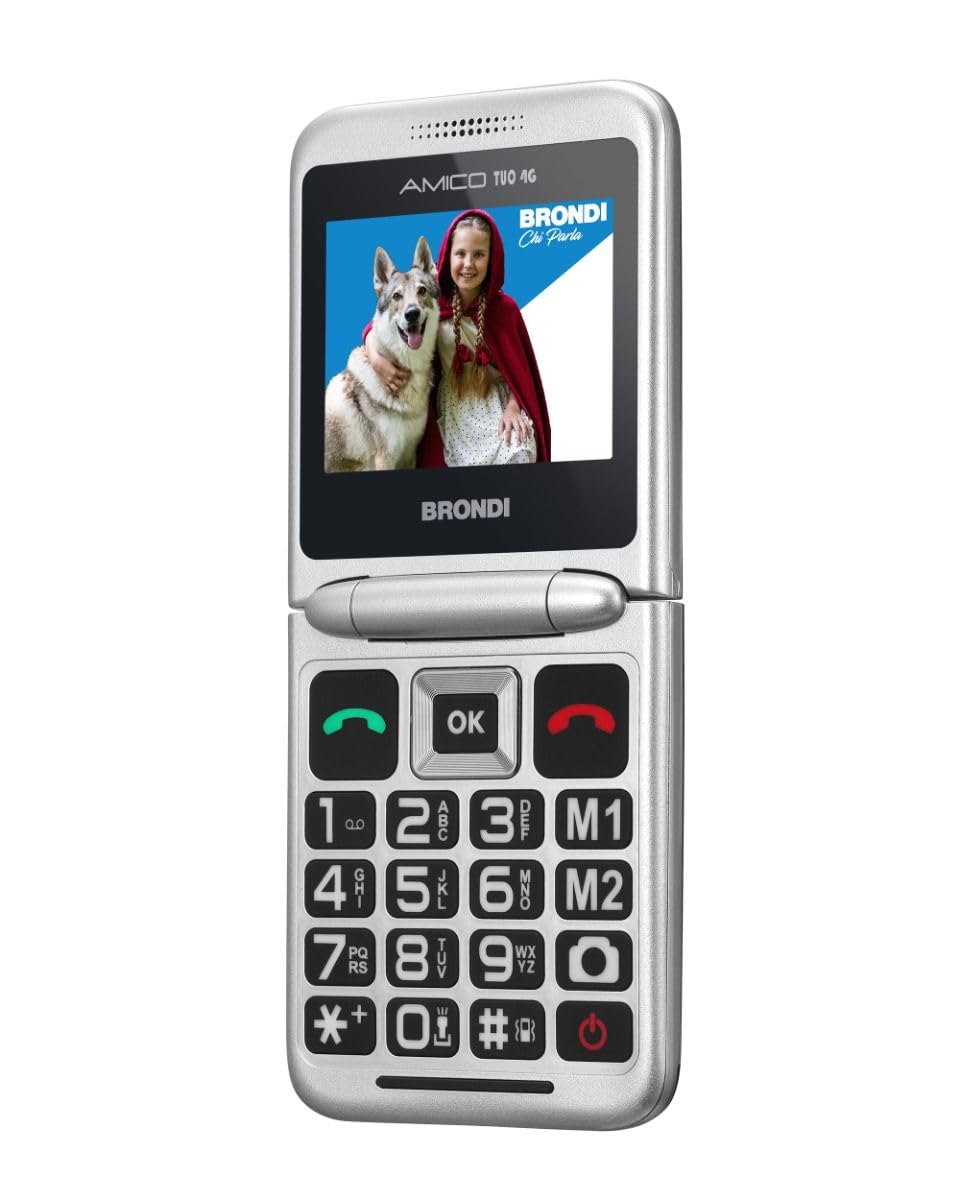
Image 1: Brondi Amico Tuo 4G (Flipper) mobile phone in its closed position, showing the external display.

Image 2: Brondi Amico Tuo 4G (Flipper) mobile phone in its open position, displaying the internal screen and large keypad.
5. Istruzioni per l'uso
5.1 Effettuare e ricevere chiamate
Effettuare una chiamata:
- Aprire il flip del telefono.
- Dial the desired number using the large keypad. The phone will announce the dialed numbers if the feature is enabled.
- Premere il pulsante verde di chiamata per avviare la chiamata.
- Alternatively, use the M1, M2, or other direct memory keys to call pre-saved contacts.
Ricevere una chiamata:
- When the phone rings, open the flip to answer the call (Active Flip feature).
- To end a call, close the flip or press the Red End Call button.
5.2 Utilizzo della funzione SOS
The SOS button is a critical safety feature. Ensure it is configured correctly.
Impostazione dei numeri di emergenza:
- Vai al menu delle impostazioni del telefono.
- Find the 'SOS Settings' or 'Emergency Settings' option.
- Add up to five emergency contact numbers. These numbers will be called sequentially and receive an emergency SMS when the SOS button is activated.
Attivazione SOS:
- In an emergency, press and hold the SOS button located on the back of the phone for a few seconds.
- The phone will automatically send an emergency SMS to the pre-set numbers and then begin calling them one by one until a connection is made.
5.3 Utilizzo della fotocamera
1. Press the dedicated Camera quick key or navigate to the Camera application from the menu.
2. Frame your shot using the internal display.
3. Press the 'OK' button or the designated camera button to take a photo.
4. The LED flash will activate automatically in low light conditions or can be manually controlled via camera settings.
5.4 FM Radio and Multimedia Player
Access the 'FM Radio' or 'Multimedia Player' from the main menu to listen to radio stations or play audio/video files stored on your MicroSD card.
5.5 Connettività Bluetooth
1. Go to 'Settings' and then 'Bluetooth'.
2. Turn Bluetooth on.
3. Cercare dispositivi disponibili e seleziona il dispositivo con cui desideri effettuare l'associazione.
4. Seguire le istruzioni visualizzate sullo schermo per completare il processo di associazione.
5.6 Funzionalità del controllo remoto
The remote control feature allows trusted family members to manage certain phone settings remotely. For detailed setup and usage of this feature, please refer to the specific instructions provided in the phone's software or contact Brondi customer support.
6. Manutenzione
To ensure the longevity and optimal performance of your Brondi Amico Tuo 4G (Flipper) phone, follow these maintenance guidelines:
- Pulizia: Use a soft, dry cloth to clean the phone's exterior. Avoid using liquid cleaners or aerosols, as they may damage the device.
- Cura della batteria: Avoid extreme temperatures. Do not expose the battery to direct sunlight or very cold conditions. Charge the battery regularly, but avoid overcharging or letting it completely drain for extended periods.
- Magazzinaggio: Quando non lo si utilizza per lunghi periodi, conservare il telefono in un luogo fresco e asciutto.
- Resistenza all'acqua: Questo dispositivo è non resistente all'acquaEvitare l'esposizione all'acqua o a elevata umidità.
7. Risoluzione Dei Problemi
If you encounter issues with your phone, try the following troubleshooting steps:
- Il telefono non si accende: Ensure the battery is correctly inserted and fully charged. Try connecting the charger and attempting to power on again.
- No Signal/Call Issues: Controlla che la scheda SIM sia inserita correttamente. Assicurati di trovarti in un'area con copertura di rete. Riavvia il telefono.
- Batteria non in carica: Verify that the charger and cable are properly connected to both the phone/cradle and the power outlet. Check if the charger or cable is damaged.
- SOS Function Not Working: Confirm that emergency numbers are correctly saved in the SOS settings. Ensure the phone has network signal to send SMS and make calls.
- Problemi di schermo: If the screen is unresponsive or frozen, try restarting the phone by removing and reinserting the battery (if possible) or performing a forced restart (refer to specific device instructions if available).
If problems persist, please contact Brondi customer support.
8. Specifiche
| Caratteristica | Specificazione |
|---|---|
| Marca | Brondi |
| Nome del modello | Pinna |
| Sistema operativo | Proprietario |
| Modello CPU | MediaTek Helio |
| Capacità di memoria | 1 GB |
| Risoluzione | 240x320 |
| Fornitore di servizi wireless | Tutti i vettori |
| Tecnologia cellulare | 4G |
| Tecnologia di connettività | 4G, Bluetooth 5.1 |
| Colore | Nero |
| Capacità di archiviazione dei dati | 1 GB |
| Number of SIM Card Slots | Doppia SIM |
| Tipo di Porta USB | USB-C |
| Fattore di forma | Capovolgere |
| User Interface Interaction Type | Tastiera alfanumerica |
| Livello di resistenza all'acqua | Non resistente all'acqua |
| Maximum Supported Flash Memory Size | 32 GB |
| Descrizione della fotocamera | Camera with LED Flash |
| Flash della fotocamera | Lampeggiatore LED |
| Capacità della batteria | 1000 mAh |
| Tempo di conversazione telefonica | 300 minuti |
| Average Battery Life in Use | 300 minuti |
| Funzionalità GPS | Falso |
| Tipo di schermo | LCD |
| Risoluzione massima dello schermo | 480x270 |
| Tecnologia senza fili | LTE |
| Produttore | Brondi |
| Serie di modelli | Amico Tuo |
| Usi specifici del prodotto | Senior Citizens Communication |
9. Garanzia e supporto
9.1 Garanzia del prodotto
The Brondi Amico Tuo 4G (Flipper) mobile phone comes with a Garanzia del produttore di 2 anniSi prega di conservare la prova d'acquisto per eventuali reclami in garanzia. La garanzia copre i difetti di fabbricazione in normali condizioni d'uso.
9.2 Assistenza clienti
For technical assistance, warranty claims, or further inquiries, please contact Brondi customer service through their official websito o le informazioni di contatto fornite nella confezione del prodotto.