
1. Introduzione
Grazie per l'acquistoasing the SDRD 217 Bluetooth Karaoke Machine. This manual provides detailed instructions for safe operation, setup, and maintenance of your device. Please read this manual thoroughly before use and retain it for future reference.

Image: The SDRD 217 Karaoke Machine in an outdoor setting, demonstrating its portability and use for entertainment.
2. Informazioni sulla sicurezza
- Non esporre il dispositivo all'acqua o all'umidità.
- Evitare temperature estreme.
- Non tentare di smontare o riparare il dispositivo da soli.
- Tenere fuori dalla portata dei bambini.
- Utilizzare solo il cavo di ricarica fornito.
3. Contenuto della confezione
Verificare che tutti gli articoli siano presenti nel pacco:
- 1 x SDRD 217 Karaoke Machine
- 2 x microfoni wireless
- 1 x cavo di ricarica (USB tipo C)
- Cavo 1 x AUX
- 1 x Manuale utente (questo documento)

Image: The SDRD 217 Karaoke Machine, two wireless microphones, and included cables, illustrating the complete package contents.
4. Prodotto finitoview
The SDRD 217 features a compact design with integrated storage and charging for its two wireless microphones. It includes dual 4-inch speakers for clear audio output and various connectivity options.
4.1 Unità principale
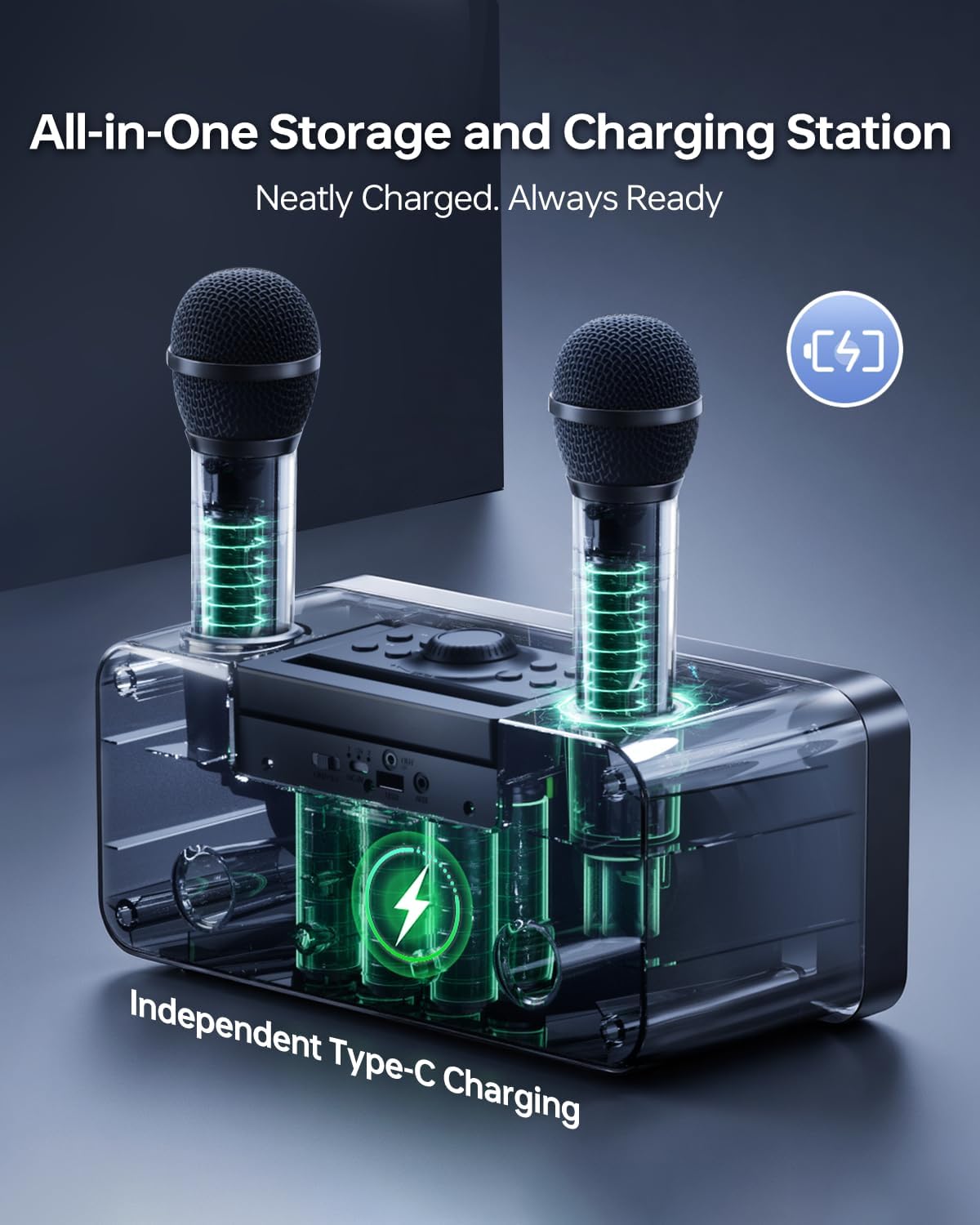
Immagine: Frontale view of the SDRD 217 Karaoke Machine, showing the speakers and control panel.
4.2 microfoni wireless

Immagine: dettagliata view of the wireless microphone, highlighting its control panel for volume, echo, and EQ adjustments, LED display, and rechargeable battery compartment.
5. Impostazione
5.1 Ricarica della macchina per karaoke
Before first use, fully charge the karaoke machine. Connect the provided USB Type-C charging cable to the charging port on the machine and to a compatible USB power adapter (not included). The charging indicator will show the charging status.

Image: The karaoke machine with microphones docked, illustrating the integrated storage and charging station.
5.2 Ricarica dei microfoni
The wireless microphones can be charged by placing them into the dedicated slots on the karaoke machine. They can also be charged individually using a USB Type-C cable.
5.3 Accensione/Spegnimento
Press and hold the power button on the karaoke machine to turn it on or off. Repeat for each microphone.
5.4 Associazione Bluetooth
- Accendi il dispositivo karaoke. Entrerà automaticamente in modalità di associazione Bluetooth.
- Abilita il Bluetooth sul tuo dispositivo mobile (smartphone, tablet, PC).
- Cercare "SDRD 217" in the list of available devices and select it to pair.
- Un suono di conferma indicherà l'avvenuto abbinamento.

Image: The SDRD 217 Karaoke Machine demonstrating its Bluetooth 5.3 connectivity range for mobile and PC devices.
5.5 Collegamento AUX
To connect a device via AUX, use the provided AUX cable. Plug one end into the AUX-in port on the karaoke machine and the other end into the audio output of your device. The machine will automatically switch to AUX mode.

Image: The SDRD 217 Karaoke Machine connected to an external speaker via an AUX-out connection, illustrating expanded audio capabilities.
5.6 Riproduzione USB
Inserire una chiavetta USB contenente audio MP3 files into the USB port on the karaoke machine. The machine will automatically detect and play the audio files.
6. Istruzioni per l'uso
6.1 Controlli del microfono
Each wireless microphone features controls for adjusting your vocal output:
- Volume: Use the VOL+ and VOL- buttons to adjust microphone volume.
- Eco: Use the ECH+ and ECH- buttons to add or reduce echo effect.
- EQ: Press the EQ button to cycle through different equalization presets.
6.2 Controlli degli altoparlanti
The main unit has controls for music playback and overall volume:
- Volume principale: Ruotare la manopola principale per regolare il volume generale.
- Riproduci/Pausa: Press the Play/Pause button to start or stop music playback.
- Traccia precedente/successiva: Use the arrow buttons to skip to the previous or next song.
6.3 modalità di illuminazione a LED
The karaoke machine features dynamic LED lights. Press the light mode button to cycle through 5 different lighting effects.
Image: The SDRD 217 Karaoke Machine showcasing its five dynamic LED light modes, which can be switched to match the mood.
6.4 Funzione di registrazione
When a USB drive is inserted, you can use the recording function to capture your performance. Refer to the specific button on the main unit for initiating and stopping recordings.
7. Manutenzione
7.1 Pulizia
Pulire il dispositivo con un panno morbido e asciutto. Non utilizzare detergenti abrasivi o solventi.
7.2 Conservazione
Store the karaoke machine and microphones in a cool, dry place away from direct sunlight and extreme temperatures.
7.3 Cura della batteria
To prolong battery life, fully charge the device before long periods of storage and recharge it at least once every three months.
8. Risoluzione Dei Problemi
| Problema | Possibile causa | Soluzione |
|---|---|---|
| Nessun potere | La batteria è scarica. | Charge the karaoke machine and microphones. |
| Nessun suono dagli altoparlanti | Volume is too low or muted. Device not properly connected. | Increase volume. Check Bluetooth or AUX connection. |
| Il microfono non funziona | Microphone is off or battery is low. Not paired correctly. | Turn on microphone, charge it. Re-pair if necessary. |
| Connessione Bluetooth instabile | Device is too far from the karaoke machine. Interference. | Move devices closer. Avoid obstacles or other wireless devices. |
9. Specifiche
- Modello: Numero SDRD 217
- Numero di altoparlanti: 2
- Dimensioni altoparlante: 4 pollici
- Connettività: Bluetooth 5.3, 3.5 mm Jack (AUX), USB Type-C
- Capacità della batteria: 4000mAh (main unit)
- Tempo di gioco: Fino a 12 ore
- Microfoni: 2 x Rechargeable Wireless Microphones
- Dimensioni: 11.42 x 5.31 x 5.31 pollici
- Peso: 4.86 libbre
- Componenti inclusi: Karaoke Machine, 2 Wireless Microphones, Charging Cable, AUX Cable, User Manual

Immagine: Primo piano view of the SDRD 217's 4.0-inch superior speakers, emphasizing high power and immersive sound.
10. Video ufficiale del prodotto
Video: An official demonstration of the SDRD SD-216 Karaoke Machine, showcasing its features and performance. Note: Model 216 is similar to 217 in core functionality.
11. Garanzia e supporto
For warranty information and technical support, please refer to the contact details provided on the product packaging or visit the official SDRD websito. Conservare la ricevuta d'acquisto come prova d'acquisto per eventuali reclami in garanzia.
Supporto online: Visit the SDRD Store on Amazon