
1. Introduzione
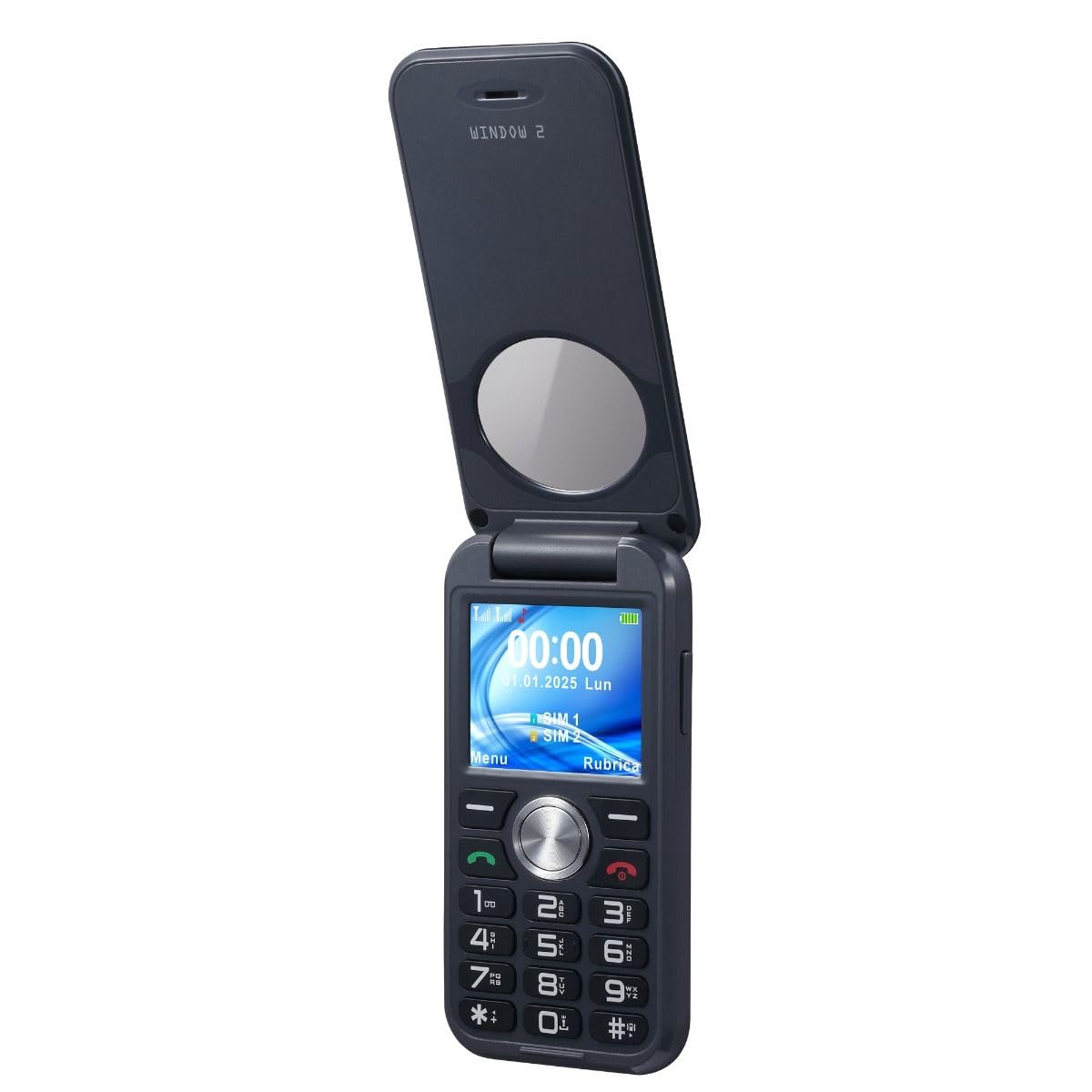
The Brondi WINDOW 2 is a user-friendly flip mobile phone designed for clear and comfortable communication. It features a larger 2-inch screen for enhanced visibility and ease of use. Key functionalities include active flip to answer/end calls, a dedicated LED torch, and notifications visible when the flip is closed. This device supports Dual SIM functionality, allowing you to manage two numbers simultaneously. The package includes the WINDOW 2 mobile phone, a Type-C charger, battery, and this user manual.
Caratteristiche del prodotto:
- Display da 2 pollici per una visione chiara viewing.
- Active Flip: Answer and end calls by simply opening or closing the phone.
- LED Torch: Instant illumination with a dedicated button.
- Closed Flip Notifications: Check calls and messages without opening the phone.
- Vibration: Ensures you don't miss calls, even in silent mode.
- Dual SIM: Manage two phone numbers on one device.
- Long Battery Life: Up to 190 minutes talk time and 160 hours standby.
- Type-C Charger: Modern and convenient charging.

2. Impostazione
2.1. Disimballaggio e ispezione iniziale
Rimuovere con attenzione tutti i componenti dall'imballaggio. Verificare che tutti gli articoli elencati nella sezione "Contenuto della confezione" siano presenti e integri.
2.2. Installazione della batteria e della scheda SIM
Per installare la batteria e la/e scheda/e SIM:
- Rimuovere la cover posteriore del telefono.
- Insert your SIM card(s) into the designated slot(s). The Brondi WINDOW 2 supports Dual SIM.
- Inserire la batteria nel suo alloggiamento, assicurandosi che i contatti siano allineati correttamente.
- Riposizionare il coperchio posteriore finché non scatta saldamente in posizione.
2.3. Carica della batteria
Connect the Type-C charger to the phone and a power outlet. The charging indicator will illuminate. If the battery is completely drained, the indicator may not respond immediately; wait patiently for a few minutes for the charging process to initiate and the indicator to appear.
3. Istruzioni per l'uso
3.1. Accensione/spegnimento
To power on the phone, press and hold the power button until the screen illuminates. To power off, press and hold the power button and select 'Power Off' from the options.
3.2. Effettuare e ricevere chiamate
- Effettuare una chiamata: Inserire il numero di telefono tramite la tastiera e premere il pulsante verde di chiamata.
- Receiving a Call (Active Flip): Simply open the flip cover to answer an incoming call. Close the flip cover to end the call.
3.3. Chiamate di emergenza SOS
The phone features an SOS emergency button. Pressing this button will automatically dial up to 5 pre-set family numbers. Ensure emergency contacts are configured in the phone settings.
3.4. Utilizzo della torcia LED
The Brondi WINDOW 2 includes a dedicated LED torch. Press the torch button on the side of the phone to turn it on or off.
3.5. Regolazione del volume
Use the volume control buttons located on the side of the phone to adjust call volume, ringtone volume, and media volume.
3.6. Impostazioni della lingua
To change the phone's language:
- Vai a Impostazioni.
- Selezionare Impostazioni del telefono.
- Scegliere Lingue.
- Select your desired language and confirm with OK.
3.7. Setting Ringtones
To customize your phone's ringtones:
- Vai a Impostazioni.
- Selezionare Professionistafiles, Poi Generale.
- Scegliere Personalizzare.
- Selezionare SIM1 Ringtone or SIM2 Ringtone to set your preferred ringtone.
3.8. Disabling Keypad Vocals
If you wish to turn off the vocal feedback when pressing keypad buttons:
- Vai a Impostazioni.
- Selezionare Professionistafiles, Poi Generale.
- Scegliere Personalizzare.
- Trovare Tastiera e seleziona Clic or Silenzioso invece di Voce umana.
4. Manutenzione
4.1. Cura della batteria
Per massimizzare la durata e le prestazioni della batteria:
- Evitare di esporre il telefono a temperature estreme.
- Caricare completamente la batteria prima del primo utilizzo.
- If the phone is not used for an extended period, charge it periodically to prevent deep discharge.
- The battery capacity is 800 mAh, providing approximately 3.17 hours of average battery life and 190 minutes of talk time.
4.2. Assistenza generale
- Keep the phone dry. This device is non resistente all'acqua.
- Pulisci il telefono con un panno morbido e asciutto. Evita di usare prodotti chimici aggressivi.
- Protect the screen from scratches by keeping it away from sharp objects.
5. Risoluzione Dei Problemi
5.1. Problemi comuni e soluzioni
- Il telefono non si accende: Ensure the battery is correctly inserted and charged. Connect the charger and wait a few minutes if the battery was completely drained.
- Impossibile effettuare/ricevere chiamate: Verificare che la/le scheda/e SIM siano inserite e attivate correttamente. Verificare la potenza del segnale di rete.
- Nessun suono o volume basso: Adjust the volume using the side buttons. Check ringtone settings.
- Keypad vocals are active/inactive unexpectedly: Refer to section 3.8 for instructions on disabling/enabling keypad vocals.
6. Specifiche
| Caratteristica | Dettaglio |
|---|---|
| Marca | Brondi |
| Nome del modello | Windows 2 |
| Sistema operativo | Proprietario |
| Capacità di memoria | 1 GB |
| Dimensioni dello schermo | 2 pollici |
| Risoluzione | 208x156 |
| Operatore di telefonia mobile | Tutti i vettori |
| Tecnologia cellulare | 2G |
| Tecnologia di connettività | GSM |
| Colore | Nero |
| Slot per schede SIM | Doppia SIM |
| Porta di ricarica | USB-C |
| Fattore di forma | Capovolgere |
| User Interface Type | Tastiera alfanumerica |
| Livello di resistenza all'acqua | Non resistente all'acqua |
| Presa per cuffie | 3.5 millimetri |
| Flash della fotocamera | GUIDATO |
| Capacità della batteria | 800 milioneamper-hour (mAh) |
| Durata media della batteria | 3.17 ore |
| Tempo di conversazione | 190 minuti |
| Funzionalità GPS | Falso |
| Tipo di schermo | LCD |
7. Garanzia e supporto
7.1. Garanzia del prodotto
The Brondi WINDOW 2 mobile phone comes with a Garanzia del produttore di 2 anniSi prega di conservare la prova d'acquisto per eventuali reclami in garanzia.
7.2. Informazioni sul produttore
Manufacturer: Brondi
7.3 Ulteriore assistenza
For additional support or inquiries, please refer to the official Brondi websito o contattare il loro servizio clienti.