
1. Prodotto finitoview
The AOHI USB4 2.0 Cable (Model AOC-L017) is a high-performance USB-C to USB-C cable designed for advanced data transfer, fast charging, and high-resolution display output. It supports the latest USB4 2.0 standard, offering exceptional speed and versatility for a wide range of devices.
2. Caratteristiche principali
- Blazing 80Gbps Data Transfer: Experience lightning-fast bidirectional data transfer at 80Gbps, with a video bandwidth of up to 120Gbps. Transfer large files, including 10GB in just one second, for enhanced productivity.
- Ricarica ultraveloce da 240 W: Supports PD 3.1 technology, delivering up to 240W Power Delivery for rapid charging of laptops, smartphones, and other USB-C devices. An integrated E-Marker chip ensures safe and stable charging.
- Dual 8K or Triple 4K Display Support: Capable of supporting a single 8K@165Hz/4K@540Hz display, dual 8K@60Hz displays, or triple 4K@144Hz displays. Compatible with DP2.1 and multi-display daisy-chaining for powerful workstation setups.
- Compatibilità universale: Seamlessly connects with USB4, USB 3.2, and Thunderbolt 3/4/5 devices. Compatible with MacBook Pro/Mac, SSDs, iPhones (15/16/17 series), iPads, USB-C displays, docking stations, and GaN chargers.
- Soft and Durable Design: Constructed with an aluminum alloy shell for efficient heat dissipation, advanced 3D spraying technology, and 16 coaxial cables for exceptional strength and flexibility. The skin-friendly material ensures a comfortable user experience.
3. Configurazione e connessione
Connecting your AOHI USB4 2.0 Cable is straightforward. Ensure your devices support USB-C connectivity and the desired functionalities (data, charging, display).
- Identify the USB-C ports on your source device (e.g., laptop, Mac mini) and target device (e.g., monitor, external SSD, smartphone).
- Gently insert one end of the AOHI USB4 2.0 Cable into the USB-C port of your source device.
- Insert the other end of the cable into the USB-C port of your target device.
- For display connections, ensure your monitor is powered on and set to the correct input source.
- For charging, ensure your power adapter is connected to a power source and provides sufficient wattage per il tuo dispositivo.
The cable is designed for plug-and-play functionality, automatically detecting and configuring the connection for optimal performance.
4. Istruzioni per l'uso
4.1 Trasferimento dati
The AOHI USB4 2.0 Cable supports bidirectional data transfer at 80Gbps and unidirectional video bandwidth up to 120Gbps. This allows for rapid transfer of large filetra dispositivi compatibili.
- Connect the cable between your computer and an external storage device (e.g., SSD).
- Trascina e rilascia files as you normally would. The high bandwidth ensures minimal waiting times.

Image: AOHI USB4 2.0 Cable demonstrating its high-speed data transfer capabilities, with visual indicators for 80Gbps bidirectional and up to 120Gbps unidirectional bandwidth.
4.2 Ricarica rapida
With PD 3.1 support, the cable delivers up to 240W of power, enabling fast charging for a wide range of USB-C devices.
- Connect one end of the cable to a compatible 240W (or lower) USB-C power adapter.
- Connect the other end to your laptop, smartphone, tablet, or other USB-C powered device.
- The integrated E-Marker chip will communicate with your devices to ensure safe and efficient power delivery.

Image: The AOHI USB4 2.0 Cable connected to a laptop, illustrating its 240W Power Delivery 3.1 fast charging capability.
4.3 Visualizzazione dell'uscita
Leverage the cable's DisplayPort 2.1 compatibility for stunning visual experiences across multiple monitors.
- Display singolo: Connect your device to a single monitor for 8K resolution at 165Hz or 4K resolution at 540Hz.
- Doppio display: Connect to two 8K monitors running at 60Hz each.
- Tripli display: Connect to three 4K monitors running at 144Hz each.
- Ensure your graphics card and monitors support the desired resolutions and refresh rates.
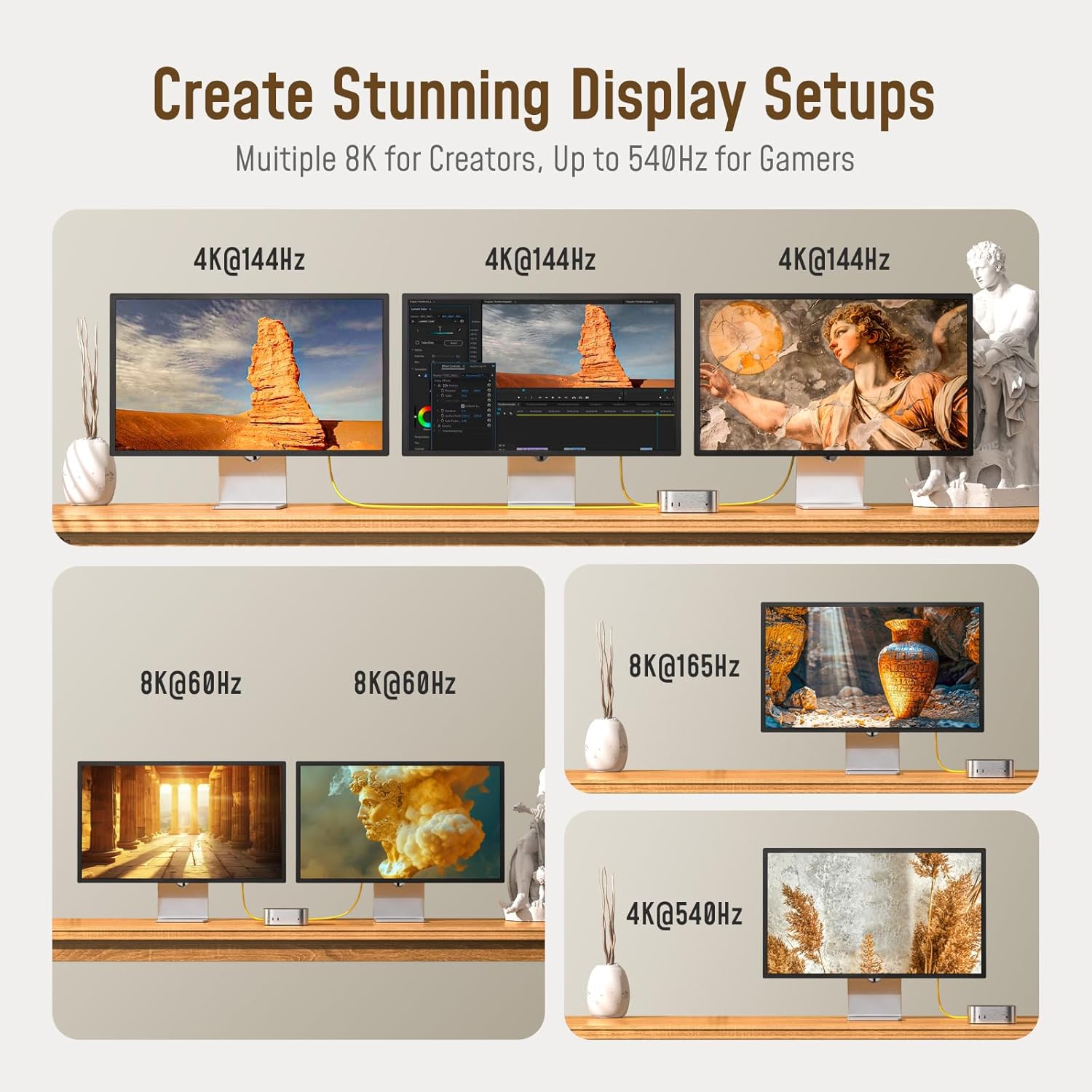
Image: Visual representation of the AOHI USB4 2.0 Cable's ability to support various high-resolution display setups, including dual 8K and triple 4K monitors.
4.4 Compatibilità universale
The cable is designed to work seamlessly with a broad range of devices, ensuring future-proof connectivity.
- Connect to MacBooks, Mac mini, Dell XPS, ASUS ROG, HP Pavilion, Razer Blade, and other compatible laptops.
- Use with external SSDs for high-speed storage access.
- Charge and sync iPhones (15, 16, 17 Pro Max, Air, Plus, Pro), Samsung Galaxy (S23, S22, S21, S10, Note 20, 10, 9, 8), Google Pixel, and other USB-C phones.
- Connect to iPads (Pro, Air, mini) and other tablets.
- Compatible with various USB-C docking stations and monitors.

Image: An illustration showing the AOHI USB4 2.0 Cable's broad compatibility with different devices, including laptops, USB-C monitors, tablets, smartphones, SSDs, and docking stations.
5. Cura e manutenzione
To ensure the longevity and optimal performance of your AOHI USB4 2.0 Cable, follow these care guidelines:
- Magazzinaggio: When not in use, store the cable in its portable storage box or use the included cable tie to keep it neatly coiled. Avoid tight bends or kinks.
- Pulizia: Wipe the cable and connectors with a soft, dry cloth to remove dust or debris. Do not use harsh chemicals or abrasive materials.
- Gestione: Always grasp the connector head when plugging or unplugging the cable. Avoid pulling directly on the cable itself to prevent damage to the internal wiring.
- Ambiente: Use the cable in indoor environments. Avoid exposing it to extreme temperatures, direct sunlight, or moisture.

Immagine: Primo piano view of the AOHI USB4 2.0 Cable highlighting its soft, skin-friendly material and robust construction with 16-core coaxial cables and aluminum alloy caps.
6. Risoluzione Dei Problemi
If you encounter issues with your AOHI USB4 2.0 Cable, try the following troubleshooting steps:
- No Connection/Recognition:
- Ensure both ends of the cable are securely plugged into the correct ports.
- Try connecting the cable to different ports on your devices.
- Provare il cavo con un altro dispositivo compatibile per escludere problemi specifici del dispositivo.
- Restart your connected devices.
- Ricarica lenta:
- Verificare che l'adattatore di alimentazione supporti la potenza richiestatage for fast charging (e.g., 240W, 140W, 100W).
- Ensure your device also supports fast charging protocols.
- Check if other cables or adapters provide faster charging to the same device.
- Display Issues (No Signal, Flickering, Incorrect Resolution):
- Confirm that your monitor is powered on and set to the correct input.
- Check your device's display settings to ensure the correct resolution and refresh rate are selected.
- Aggiorna i driver grafici del tuo computer.
- Ensure your monitor and device support the desired display standard (e.g., DP2.1).
- Surriscaldamento:
- While the cable has an aluminum alloy shell for heat dissipation, ensure it's not covered or in an enclosed space during heavy use.
- Se il surriscaldamento persiste, interrompere l'uso e contattare l'assistenza.
7. Specifiche
| Caratteristica | Dettaglio |
|---|---|
| Marca | AOHI |
| Numero di modello | AOC-L017 |
| Tipo di connettore | USB tipo C (maschio-maschio) |
| Tipo di cavo | Tipo di USB4 2.0 |
| Velocità di trasferimento dati | 80 Gbps (Bidirectional), Up to 120 Gbps (Unidirectional) |
| Erogazione di potenza | 240W (PD 3.1) |
| Supporto di visualizzazione | Single 8K@165Hz / 4K@540Hz, Dual 8K@60Hz, Triple 4K@144Hz (DP2.1 compatible) |
| Compatibilità | USB4, USB 3.2, Thunderbolt 3/4/5 devices |
| Caratteristiche speciali | E-Marker Chip, Aluminum Alloy Shell, 16 Coaxial Cables |
| Colore | Giallo |
| Peso dell'articolo | 3.5 once |
| Lunghezza | 3.3 piedi (1 metro) |
8. Contenuto della confezione
The AOHI USB4 2.0 Cable package includes:
- 1 x USB4 2.0 USB-C to USB-C Cable (3.3 ft)
- 1 x scatola di immagazzinaggio portatile
- 1 x Scheda di garanzia

Image: The AOHI USB4 2.0 Cable and its accompanying portable storage box, as found in the product packaging.
9. Garanzia e supporto
AOHI is committed to providing high-quality products and customer satisfaction. Your AOHI USB4 2.0 Cable comes with the following:
- Rimborso entro 30 giorni: Se non sei soddisfatto del tuo acquisto, potresti avere diritto a un rimborso entro 30 giorni.
- Sostituzione entro 18 mesi: The product is covered by an 18-month replacement warranty for manufacturing defects.
- 7/24 Professional Online Support: For any questions, technical assistance, or warranty claims, please contact our customer support team available 24/7.
Per i termini e le condizioni dettagliate, fare riferimento alla scheda di garanzia allegata.
10. Video dimostrativo del prodotto
Video: A comprehensive demonstration of the AOHI USB4 2.0 Cable, showcasing its unboxing, flexible design, and practical applications for data transfer, charging various devices (laptop, AirPods, phone), and connecting to a monitor for display output.