
Introduzione
This manual provides essential information for the safe and efficient use of your Google Pixel 9 Pro 5G smartphone. Please read these instructions carefully before operating your device.

Figura 1: Fronte view of the Google Pixel 9 Pro 5G.
Cosa c'è nella scatola
Verificare che tutti gli articoli siano presenti nella confezione:
- Smartphone Google Pixel 9 Pro
- Cavo da USB-C a USB-C (1 m, USB 2.0)
- Strumento di espulsione del vassoio SIM
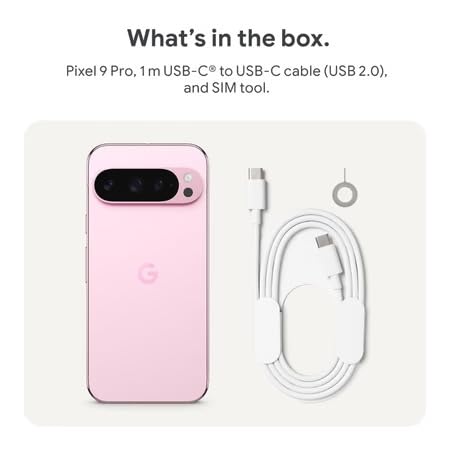
Figure 2: Included items in the Pixel 9 Pro packaging.
Impostare
1. Inserimento della scheda SIM
- Locate the SIM tray on the side of your Pixel 9 Pro.
- Inserire lo strumento di espulsione della SIM fornito nel piccolo foro sul vassoio della SIM e premere delicatamente finché il vassoio non fuoriesce.
- Inserisci la scheda Nano-SIM nel vassoio con i contatti dorati rivolti verso il basso. Assicurati che sia inserita correttamente.
- Carefully push the SIM tray back into the device until it is flush.
2. Ricarica iniziale
Prima del primo utilizzo, si consiglia di caricare completamente il dispositivo.
- Collega il cavo USB-C alla porta di ricarica nella parte inferiore del telefono.
- Connect the other end of the cable to a compatible USB power adapter (sold separately) and plug it into a power outlet.
- L'icona della batteria sullo schermo indicherà lo stato di carica.
3. Accensione/Spegnimento
- Per accendere: Press and hold the Power button (located on the right side) until the Google logo appears on the screen.
- Per spegnere: Tieni premuto il pulsante di accensione, quindi tocca "Spegni" sullo schermo.
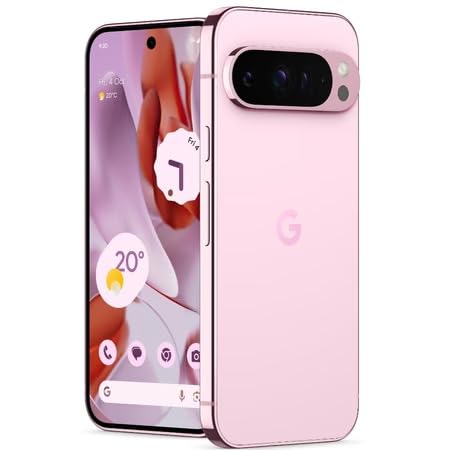
Figure 3: Power and volume buttons on the side of the device.
4. Procedura guidata di configurazione iniziale
Upon powering on for the first time, follow the on-screen instructions to:
- Seleziona la tua lingua e la tua regione.
- Connettersi a una rete Wi-Fi.
- Accedi con il tuo account Google o creane uno nuovo.
- Set up security features such as fingerprint unlock, face unlock, PIN, pattern, or password.
- Transfer data from an old device (optional).
Istruzioni per l'uso
Navigazione di base
- Gesti touchscreen: Interact with the device using taps, swipes, pinches (for zoom), and long presses.
- Schermata iniziale: Access your applications, widgets, and customize your layout.
- Notifiche: Scorri verso il basso dalla parte superiore dello schermo a view notifiche.
- Impostazioni rapide: Swipe down twice from the top of the screen to access quick settings toggles (Wi-Fi, Bluetooth, etc.).
Funzionamento della fotocamera
The Pixel 9 Pro features a powerful triple rear camera system.

Figure 4: Rear camera system of the Pixel 9 Pro.
- Apertura della fotocamera: Tocca l'icona dell'app Fotocamera nella schermata iniziale o nella schermata di blocco.
- Cambio lenti: Tap the icons on the viewfinder to switch between wide, ultrawide, and 5x telephoto lenses.
- Modalità di scatto: Select from various modes such as Night Sight for low-light conditions, Astrofotografia for capturing stars, Macro for close-up shots, Esposizione lunga for creative effects, and Ritratto for depth-of-field effects.
- Zoom ad alta risoluzione: Pinch the screen to digitally zoom up to 30x. For video, Super Res Zoom supports up to 20x.
- Controlli Pro: Access advanced camera settings like shutter speed and manual focus for greater creative control.
Gestione della batteria
- Controllo del livello della batteria: View la percentuale della batteriatage in the status bar or in Settings > Battery.
- Risparmio estremo della batteria: Enable this mode in Settings > Battery > Extreme Battery Saver to significantly extend battery life.
- Ricarica: Use the provided USB-C cable and a compatible power adapter for optimal charging speed.
Funzionalità di sicurezza
Your Pixel 9 Pro incorporates multiple hardware security layers to protect your data.
- Sblocco delle impronte digitali: Register your fingerprints in Settings > Security & privacy > Device unlock.
- Sblocco facciale: Imposta il riconoscimento facciale per uno sblocco comodo.
- PIN/Sequenza/Password: Always set a strong screen lock method.
- Aggiornamenti software: Regularly install system updates to ensure your device has the latest security patches.
Sensore di temperatura
The Pixel 9 Pro includes a thermometer for measuring temperature.
- Open the dedicated Thermometer app.
- Follow the on-screen instructions to measure body temperature or the temperature of objects.
- Temperature data can be saved and tracked within the Fitbit application.
Manutenzione
Pulizia del dispositivo
- Per pulire lo schermo e il corpo del telefono, utilizzare un panno morbido e privo di lanugine.
- Evitare l'uso di materiali abrasivi, prodotti chimici aggressivi o spray aerosol.
- Do not submerge the device in water, despite its water-resistant rating.
Aggiornamenti software
Google regularly releases software updates to improve performance, add features, and enhance security.
- To check for updates, go to Settings > System > System update.
- Ensure your device is connected to Wi-Fi and has sufficient battery charge before installing updates.
Cura fisica
The Pixel 9 Pro is built with Corning Gorilla Glass Victus 2 and is water-resistant, offering durability against everyday drops and spills.
- While durable, avoid excessive impacts or drops to prevent damage.
- Consider using a screen protector and a protective case for additional safeguarding.
Risoluzione dei problemi
Dispositivo non risponde
If your phone becomes unresponsive, perform a force restart:
- Tenere premuto il pulsante di accensione per circa 10-15 secondi finché il dispositivo non si riavvia.
App che si bloccano o si bloccano
- Chiudere l'app problematica e riaprirla.
- Clear the app's cache: Go to Settings > Apps > See all apps > [App Name] > Storage & cache > Clear cache.
- Assicurati che l'app sia aggiornata all'ultima versione disponibile sul Google Play Store.
- Riavvia il telefono.
Network Connectivity Issues (Wi-Fi/Cellular)
- Toggle Wi-Fi or cellular data off and then back on.
- Riavvia il telefono.
- Verifica che la scheda SIM sia inserita correttamente.
- Ripristina le impostazioni di rete: vai su Impostazioni > Sistema > Opzioni di ripristino > Ripristina Wi-Fi, dispositivi mobili e Bluetooth.
La batteria si scarica rapidamente
- Controlla l'utilizzo della batteria in Impostazioni > Batteria per identificare le app che consumano più energia.
- Ridurre la luminosità dello schermo e la durata del timeout dello schermo.
- Disable unnecessary features like GPS, Bluetooth, and Wi-Fi when not in use.
- Enable Extreme Battery Saver mode.
Ripristino delle impostazioni di fabbrica (ultima risorsa)
Warning: A factory reset will erase all data from your phone. Back up all important data before proceeding.
- Vai su Impostazioni > Sistema > Opzioni di ripristino > Cancella tutti i dati (ripristino dati di fabbrica).
- Confirm your decision when prompted.
Specifiche
| Caratteristica | Dettaglio |
|---|---|
| Marca | |
| Modello | Pixel 9 Pro |
| Sistema operativo | Androide 15 |
| Processore | Google Tensor G4 (3.1 GHz) |
| Memoria RAM | 16 GB |
| Memoria interna | 256 GB |
| Display | 6.3 Inches LTPO OLED (Actua), 1280 x 2856 Pixels, 120 Hz Refresh Rate |
| Telecamera posteriore | 50 MP wide + 48 MP ultrawide (Macro) + 48 MP 5x telephoto |
| Fotocamera frontale | 42 MP |
| Capacità della batteria | 4700 milioneamp Hours (up to 24 hours average life) |
| Connettività | 5G, Wi-Fi 7, Bluetooth 5.3, NFC, UWB, USB-C |
| Scheda SIM | Singola Nano SIM |
| Resistenza all'acqua | Resistente all'acqua |
| Dimensioni | 8 x 72 x 153 millimetri |
| Peso | 198 grammi |
Garanzia e supporto
Informazioni sulla garanzia
Your Google Pixel 9 Pro 5G comes with a Garanzia del produttore di 1 anni dalla data di acquisto. La presente garanzia copre i difetti di fabbricazione in condizioni di normale utilizzo. Si prega di conservare la prova d'acquisto per eventuali reclami in garanzia.
Assistenza clienti
For technical assistance, warranty claims, or other support inquiries, please contact Google customer service:
- Produttore: Google LLC, 1600 Amphitheatre Parkway, Montagna View, CA 94043, Stati Uniti
- Phone Support (India): +91 7718892303
- Importer Contact (India): Nexora Axis Private Limited (+91 7718892303)
For the most up-to-date support information, please visit the official Google Pixel support websito.