
1. Introduzione
The Havit H2002BG Wireless Gaming Headphones are designed to provide a versatile audio experience for gaming and entertainment. Featuring tri-mode connectivity, these headphones offer seamless switching between 2.4GHz wireless, Bluetooth, and wired connections (3.5mm and Type-C). Enjoy immersive sound with 53mm dynamic drivers and virtual 7.1 surround sound support, all while benefiting from a comfortable design with an adjustable head beam and memory foam earcups. The detachable omnidirectional microphone ensures clear communication.
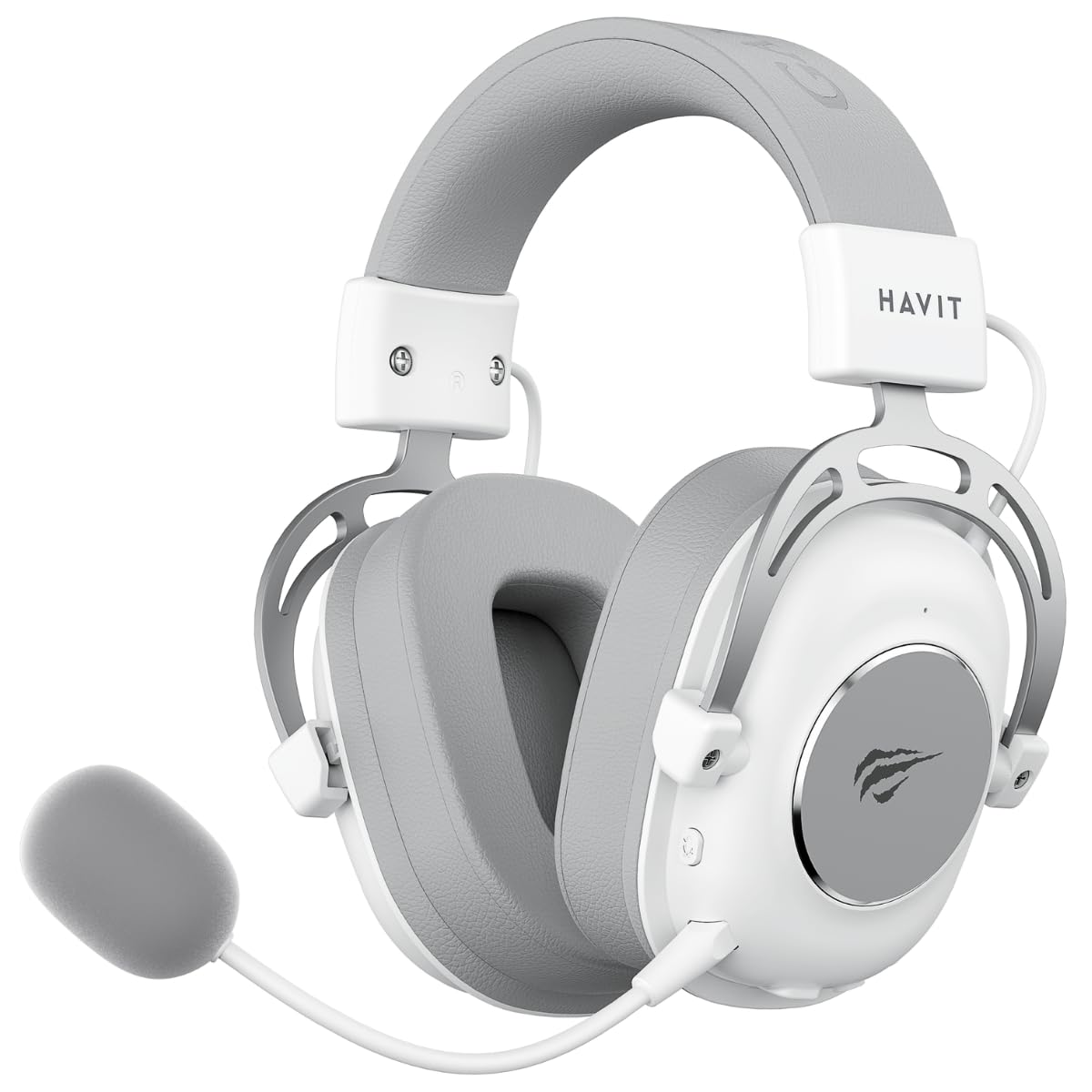
Figure 1: Havit H2002BG Wireless Gaming Headphones
2. Caratteristiche del prodotto
- Connettività Tri-Mode: Supports 2.4GHz wireless, Bluetooth, 3.5mm audio jack, and Type-C wired connections for broad compatibility.
- Driver dinamici da 53 mm: Delivers powerful and clear audio for an immersive experience.
- Suono surround virtuale 7.1: Enhances spatial audio awareness for gaming.
- Design confortevole: Features an adjustable head beam and memory foam earcups for extended wear comfort.
- Microfono omnidirezionale staccabile: Fornisce una comunicazione vocale chiara e può essere rimosso quando non serve.
- Batteria a lunga durata: Up to 26 hours of playtime on a single charge with a 1200mAh battery.

Figure 2: Tri-Mode Connection Capabilities

Figure 3: Virtual 7.1 Surround Sound Feature
3. Contenuto della confezione
Si prega di controllare la confezione per verificare la presenza dei seguenti elementi:
- 1 x Havit H2002BG Wireless Gaming Headphones
- 1 x Detachable Omnidirectional Microphone
- 1 chiavetta USB da 2.4 GHz
- 1 cavo audio da 3.5 mm
- 1 x Cavo di ricarica di tipo C
- 1 x Manuale utente (questo documento)
4. Impostazione
4.1 Carica iniziale
- Collegare il cavo di ricarica Type-C alla porta di ricarica delle cuffie.
- Plug the other end of the Type-C cable into a USB power source (e.g., computer USB port, USB wall adapter).
- Allow the headphones to fully charge before first use. The LED indicator will show charging status.
4.2 Attacco microfono
- Locate the microphone port on the left earcup of the headphones.
- Insert the detachable microphone firmly into the port until it clicks into place.
4.3 Collegamento delle cuffie
The Havit H2002BG offers multiple connection options:

Figura 4: Controlli e porte delle cuffie
4.3.1 2.4GHz Wireless Connection (PC/Console with USB-A)
- Plug the 2.4GHz USB dongle into an available USB-A port on your PC or compatible gaming console.
- Power on the headphones by pressing and holding the power button.
- The headphones should automatically connect to the dongle. The LED indicator will confirm connection.
- On your device, ensure the Havit H2002BG is selected as the audio output and input device.
4.3.2 Bluetooth Connection (Mobile Devices/PC with Bluetooth)
- Power on the headphones and switch to Bluetooth mode (refer to Operating Instructions for mode switching). The LED indicator will flash, indicating pairing mode.
- On your mobile device or PC, enable Bluetooth and search for new devices.
- Select "Havit H2002BG" from the list of available devices to pair.
- Una volta effettuato l'accoppiamento, l'indicatore LED emetterà una luce fissa.
4.3.3 Connessione cablata (jack audio da 3.5 mm)
- Connect one end of the 3.5mm audio cable to the 3.5mm port on the headphones.
- Plug the other end of the 3.5mm audio cable into the audio output jack of your device (e.g., gaming console controller, PC, smartphone).
- The headphones will operate in passive wired mode.
4.3.4 Wired Connection (Type-C Cable)
- Connect the Type-C cable to the Type-C port on the headphones.
- Plug the other end of the Type-C cable into a compatible Type-C port on your device. This connection can provide both audio and charging simultaneously.
5. Istruzioni per l'uso
5.1 Accensione/spegnimento
- Accensione: Tenere premuto il pulsante di accensione per circa 3 secondi finché l'indicatore LED non si accende.
- Spegni: Tenere premuto il pulsante di accensione per circa 3 secondi finché l'indicatore LED non si spegne.
5.2 Controllo del volume
- Use the volume wheel or dedicated volume buttons on the earcup to adjust the audio output level.
5.3 Disattivazione/attivazione del microfono
- Press the microphone mute button to toggle the microphone on or off. An indicator light on the microphone or headphones may show its status.
5.4 Cambio di modalità
- Use the mode button to cycle between 2.4GHz wireless, Bluetooth, and wired (3.5mm/Type-C) connection modes. The LED indicator will change to reflect the active mode.
5.5 Suono surround virtuale 7.1
- Activate or deactivate the virtual 7.1 surround sound feature using the dedicated button on the headphones or through compatible software on your PC.
5.6 Controllo dell'illuminazione RGB
- If applicable, use the designated button to cycle through different RGB lighting effects or turn them off.
6. Manutenzione
6.1 Pulizia
- Pulisci le cuffie con un panno morbido, asciutto e privo di lanugine.
- Non utilizzare prodotti chimici aggressivi, solventi per la pulizia o detergenti aggressivi.
- Evitare che l'umidità penetri nelle aperture.
6.2 Conservazione
- Conservare le cuffie in un luogo fresco e asciutto, lontano dalla luce solare diretta e da temperature estreme.
- Se si conserva la batteria per un periodo prolungato, assicurarsi che sia parzialmente carica (circa il 50%) per mantenerla in buone condizioni.
6.3 Cura della batteria
- Evitare di scaricare completamente la batteria frequentemente.
- Charge the headphones regularly, even if not in frequent use, to prevent deep discharge.
7. Risoluzione Dei Problemi
7.1 Nessun suono
- Assicurarsi che le cuffie siano accese e cariche.
- Controllare i livelli del volume sia delle cuffie che del dispositivo collegato.
- Verify that the headphones are correctly connected (2.4GHz dongle, Bluetooth paired, or wired cable securely inserted).
- Confirm that the Havit H2002BG is selected as the primary audio output device in your PC or console settings.
7.2 Il microfono non funziona
- Ensure the detachable microphone is securely attached to the headphones.
- Check if the microphone mute function is active.
- Verify microphone input settings on your connected device and ensure Havit H2002BG is selected.
- Test the microphone in different applications or communication software.
7.3 Problemi di connessione
- 2.4 GHz: Ensure the USB dongle is fully inserted and there are no significant obstructions or interference sources nearby. Try re-pairing by restarting both headphones and the device.
- Bluetooth: Ensure the headphones are in Bluetooth pairing mode and within the effective range (typically 10 meters). Try unpairing and re-pairing the device.
- Wired: Ensure all cables (3.5mm or Type-C) are fully inserted into their respective ports and are not damaged.
7.4 Problemi di ricarica
- Ensure the Type-C charging cable is properly connected to both the headphones and the power source.
- Try using a different Type-C charging cable or a different USB power adapter/port.
- Controllare che la porta di ricarica delle cuffie sia pulita e priva di detriti.
8. Specifiche
| Caratteristica | Specificazione |
|---|---|
| Modello | H2002BG |
| Diametro del driver | 53mm |
| Impedenza | 64 ± 15% Ω |
| Sensibilità | 111 ± 3 dB |
| Risposta in frequenza | 20 Hz - 20 kHz |
| Capacità della batteria | 1200mAh |
| Tempo di gioco | Fino a 26 ore |
| Connettività | 2.4GHz Wireless, Bluetooth, 3.5mm, Type-C |
| Microfono | Omnidirezionale, staccabile |
| Fattore di forma | Sopra l'orecchio |
| Materiale | Metallo, Plastica |
| Colore | Bianco/Grigio |
9. Garanzia e supporto
9.1 Informazioni sulla garanzia
The Havit H2002BG Wireless Gaming Headphones are covered by a Garanzia limitata di 1 anni from the date of purchase. This warranty covers manufacturing defects and workmanship under normal use. It does not cover damage caused by misuse, accidents, unauthorized modifications, or normal wear and tear. Please retain your proof of purchase (receipt or invoice) for any warranty claims.
9.2 Assistenza clienti
For further assistance, technical support, or warranty inquiries, please contact Havit customer service or visit the official Havit website. You may find FAQs, additional troubleshooting guides, and contact information there.
Havit ufficiale Websito: www.havit.com