
1. Prodotto finitoview
The LEFANT M2 Pro is an advanced robot vacuum and mop designed to provide efficient and comprehensive floor cleaning. It features dToF laser navigation for precise mapping, powerful 6000Pa suction, and a smart 2-in-1 sweeping and mopping function. The device also includes an automatic dust collection station for hands-free maintenance and can be controlled via a dedicated app or voice commands.
Caratteristiche principali:
- dToF Laser Navigation & PSD Obstacle Avoidance: Maps your home with high precision and detects obstacles in real-time.
- Potenza di aspirazione 6000Pa: Effectively removes dust, pet hair, debris, and crumbs from various surfaces.
- 2-in-1 Sweeping and Mopping: Cleans and mops simultaneously with an electronic water tank for adjustable flow.
- Customized Cleaning & Multi-Floor Mapping: Create up to 3 floor maps, set no-go zones, and customize cleaning schedules via the app.
- 2.5L Automatic Dust Emptying Station: Garantisce fino a 90 giorni di raccolta della polvere senza l'uso delle mani.
- App intelligente e controllo vocale: Compatible with Alexa, Google Home, and the Lefant app for convenient control.
2. Contenuto della confezione
Before setup, ensure all items are present in the package:
- Robot aspirapolvere x 1
- Automatic Emptying Station x 1
- Supporto per mocio x 1
- Cavo di alimentazione x 1
- Manuale utente x 1
- Sacchetti per la polvere x 2
- Panno lavabile per mocio x 1
- Filtro HEPA x 4
- Dry Mop Cloth x 1
- Strumento di pulizia x 1
- Spazzola laterale x 2
- Filter Sponge for Dustbin x 2

3. Guida all'installazione
3.1 Posizionamento iniziale e addebito
- Place the automatic emptying station against a wall in an open area, ensuring there are no obstacles within 1 meter to either side and 1.5 meters in front.
- Connect the power cable to the station and plug it into a power outlet.
- Place the robot onto the charging contacts of the station to begin initial charging. Ensure the robot is fully charged before its first use.
3.2 Connessione all'app Lefant
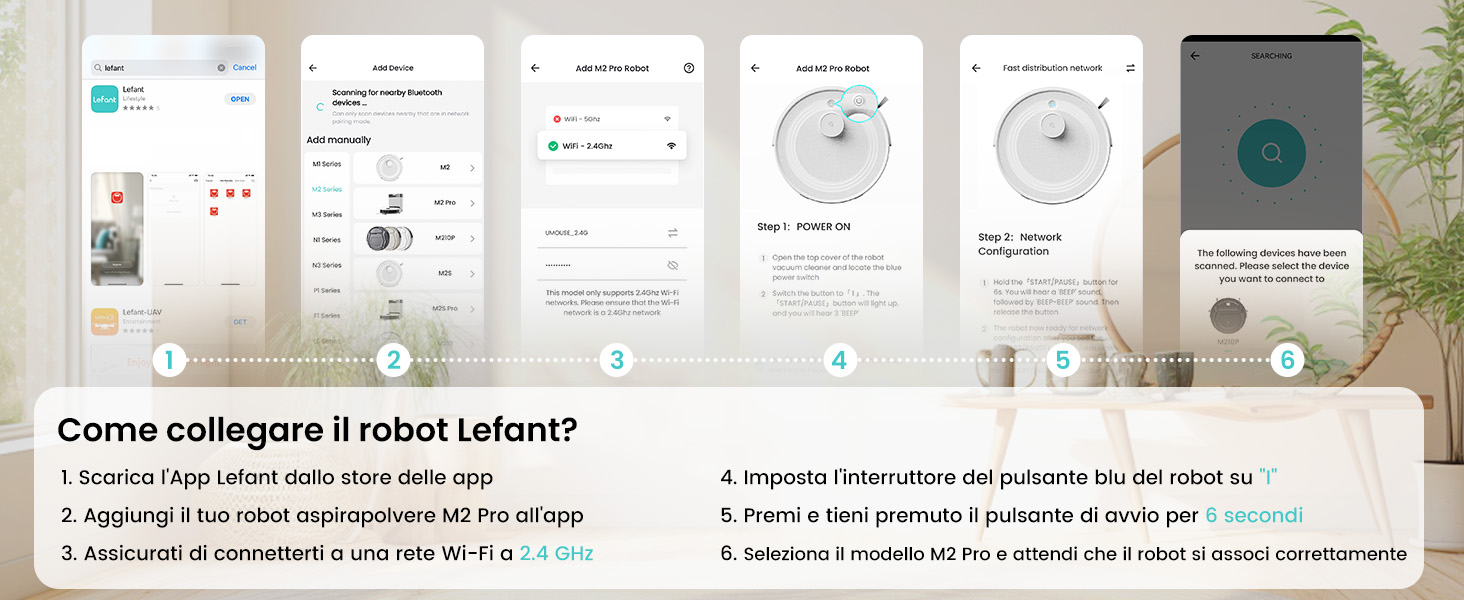
The Lefant app allows for full control and customization of your robot vacuum. Follow these steps to connect:
- Download the 'Lefant' app from your mobile device's app store (App Store for iOS or Google Play Store for Android).
- Apri l'app e registrati o accedi al tuo account.
- Add your M2 Pro robot vacuum to the app by following the on-screen instructions.
- Assicurati che il tuo dispositivo mobile sia connesso a una rete Wi-Fi a 2.4 GHz. Il robot supporta solo Wi-Fi a 2.4 GHz.
- Turn on the robot by setting the blue power button to 'I'.
- Press and hold the start button on the robot for 6 seconds until you hear a voice prompt indicating network configuration mode.
- Select the M2 Pro model in the app and wait for the robot to pair successfully.

3.3 Connecting to Voice Assistants (Alexa/Google Home)
For hands-free control, integrate your M2 Pro with Amazon Alexa or Google Home:
- Open the Lefant App. Navigate to Profile > Third-party assistance for voice commands.
- Registra il tuo account vocale e la password nell'app Lefant.
- Open the Alexa App (or Google Home App). Go to 'More' > 'Skills & Games' (or 'Works with Google').
- Cercare 'Vita intelligente'.
- Fare clic su "Abilita per l'uso".
- Seleziona la tua regione e inserisci l'account vocale e la password del passaggio 2.
- Wait for the connection to complete. You can now use voice commands like "Alexa, ask robot to clean."
4. Istruzioni per l'uso
4.1 modalità di pulizia
M2 Pro offre diverse modalità di pulizia per soddisfare le tue esigenze:
- Pulizia automatica: Il robot pulisce e naviga in modo intelligente in tutta la casa.
- Pulizia spot: Si concentra su una specifica area sporca per una pulizia intensiva.
- Pulizia dei bordi: Pulisce lungo le pareti e i bordi dei mobili.
- Pulizia programmata: Imposta orari specifici per la pulizia automatica del robot.
- Pulizia delle zone: Define specific rooms or areas to be cleaned.

4.2 Controllo dell'app
L'app Lefant offre un controllo completo sul tuo M2 Pro:
- Avvio/Pausa Pulizia: Avviare o interrompere i cicli di pulizia.
- Regola la potenza di aspirazione: Choose from multiple suction levels (Low, Medium, High).
- Regolare il flusso d'acqua: Control the water output for mopping (Low, Medium, High).
- Imposta zone vietate: Definisci le aree che il robot deve evitare.
- View Mappa di pulizia: Monitor the robot's progress and cleaned areas in real-time.
- Pulizia programmata: Program daily or weekly cleaning tasks.
- Mappatura multipiano: Store maps for up to 3 different floors.

4.3 Controllo vocale
Once connected to Alexa or Google Home, use simple voice commands:
- "Alexa, chiedi al robot di pulire."
- "Alexa, ask robot to recharge."
- "Alexa, chiedi al robot di smettere di pulire."

5. Manutenzione
5.1 Svuotamento automatico della polvere
The M2 Pro's automatic emptying station collects dust for up to 90 days, minimizing manual intervention. The station uses 2.5L dust bags for hygienic disposal.

5.2 Pulizia del contenitore della polvere e del filtro
While the automatic station handles most dust, regular inspection and cleaning of the robot's internal dustbin and filters are recommended to maintain optimal performance. The M2 Pro's improved dustbin design ensures 98% debris removal during emptying.

5.3 Mop Cloth and Side Brush Maintenance
- Remove and clean the washable mop cloth after each mopping session.
- Regularly check the side brushes for tangled hair or debris and clean or replace them as needed.
6. Risoluzione Dei Problemi
If you encounter issues with your LEFANT M2 Pro, refer to the following common problems and solutions:
| Problema | Possibile causa | Soluzione |
|---|---|---|
| Il robot non si avvia o non risponde. | Batteria scarica; Interruttore di alimentazione spento; Robot bloccato. | Assicurarsi che il robot sia carico; controllare l'interruttore di alimentazione; rimuovere eventuali ostruzioni. |
| Scarsa efficienza di pulizia. | Contenitore della polvere pieno; Filtri intasati; Spazzole usurate. | Svuotare il contenitore della polvere; pulire/sostituire i filtri; pulire/sostituire le spazzole. |
| Il robot si blocca spesso. | Obstacles (cables, small items); Uneven surfaces. | Clear floor of obstacles; Use no-go zones for problematic areas. |
| Impossibile connettersi al Wi-Fi/all'app. | Banda Wi-Fi errata (non 2.4 GHz); password errata; robot non in modalità di associazione. | Ensure 2.4GHz Wi-Fi; Verify password; Re-enter pairing mode (hold start button for 6s). |
| Automatic emptying not working. | Dust bag full; Obstruction in emptying duct. | Replace dust bag; Check and clear emptying duct. |
Per una risoluzione dei problemi più dettagliata, fare riferimento al manuale utente completo o contattare l'assistenza clienti.
7. Specifiche
| Caratteristica | Dettaglio |
|---|---|
| Marca | SINISTRO |
| Nome del modello | M2 Pro |
| Colore | M2 Pro-black |
| Dimensioni del prodotto | Dimensioni: 32 x 32 x 9.4 cm |
| Peso dell'articolo | 6.24 chilogrammi |
| Capacità del bidone della spazzatura | 2.5 Liters (Auto-empty station) |
| Voltage | 19 Volt |
| Materiale | Plastica |
| Caratteristiche speciali | Smart Mapping, dToF Laser Navigation, PSD Obstacle Avoidance, Carpet Boost, App/Voice Control |
| Dispositivi compatibili | Smartphone (2.4GHz Wi-Fi), Alexa, Google Home |
| Superfici consigliate | Hard floor, Carpet, Parquet, Tiles |
| Autonomia massima | 140 minuti |
8. Garanzia e supporto
I prodotti LEFANT sono progettati per garantire affidabilità e prestazioni. Per informazioni sulla garanzia, consultare la documentazione inclusa con il prodotto o visitare il sito ufficiale LEFANT. website. If you require technical assistance, have questions about your product, or need to report an issue, please contact LEFANT customer support through the following channels:
- App Lefant: Accedi alle funzionalità di supporto direttamente dall'applicazione.
- Ufficiale Websito: Visita www.lefant.com per domande frequenti, guide alla risoluzione dei problemi e informazioni di contatto.
- Supporto via e-mail: Fare riferimento alla confezione del prodotto o al sito ufficiale websito per l'indirizzo email di supporto dedicato.
Please have your product model number (M2 Pro) and purchase details ready when contacting support to ensure efficient service.