
1. Introduzione
This manual provides comprehensive instructions for the Cleyver T57W IP Phone and the Cleyver ODHW25V2 DECT Headset System. This professional VoIP package is designed to enhance communication efficiency in business environments.
Il sistema comprende:
- Cleyver T57W IP Phone: A Voice over IP (VoIP) phone featuring a 7-inch color touchscreen, Wi-Fi, and Bluetooth connectivity.
- Cleyver ODHW25V2 DECT Duo Headset: A wireless DECT headset with dual earcups and noise cancellation for clear audio.
- Electronic Hook Switch (EHS) Module: Enables remote call control directly from the headset.

Figure 1.1: Cleyver T57W IP Phone, ODHW25V2 DECT Headset, and connecting cables.
2. Contenuto della confezione
Prima di procedere con l'installazione, verificare che tutti gli elementi siano presenti nella confezione:
- Cleyver T57W IP Phone
- Cornetta e cavo della cornetta
- Cavo Ethernet
- Power Adapter for IP Phone
- Cleyver ODHW25V2 DECT Duo Headset
- DECT Headset Base Station
- Power Adapter for Headset Base Station
- EHS Module and Connecting Cables
- Guida rapida (se inclusa)
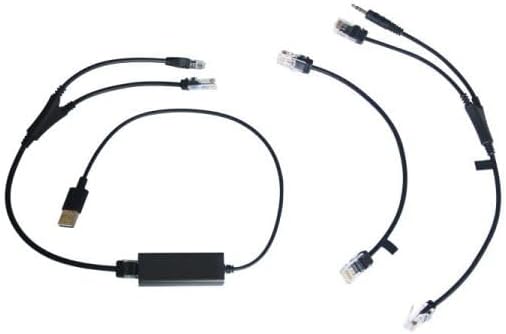
Figure 2.1: Included connecting cables for the IP phone and headset system.
3. Impostazione
3.1. Cleyver T57W IP Phone Setup
- Collegare il portatile: Plug one end of the coiled handset cord into the handset port on the IP phone and the other end into the handset.
- Connetti alla rete: Connect one end of the Ethernet cable to the Internet port on the IP phone and the other end to your network router or switch.
- Connetti alimentazione: Plug the power adapter into the power port on the IP phone and then into an electrical outlet. The phone will power on automatically.
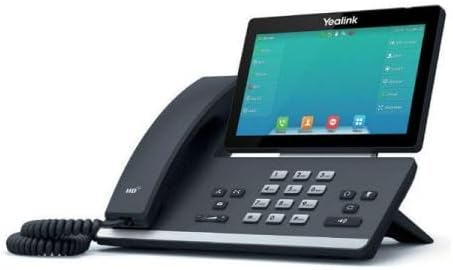
Figura 3.1: lato view of the Cleyver T57W IP Phone, illustrating port locations for connections.
3.2. Cleyver ODHW25V2 DECT Headset Setup
- Connect Headset Base Power: Plug the power adapter into the power port on the DECT headset base station and then into an electrical outlet.
- Connect to IP Phone (EHS): Use the provided EHS module and cables to connect the headset base station to the appropriate ports on the Cleyver T57W IP Phone. Refer to the EHS module's specific instructions for detailed connection steps, as ports may vary.
- Posizionare l'auricolare sulla base: Place the ODHW25V2 headset onto the charging cradle of the base station. Ensure it is seated correctly for charging.
- Abbinamento (se necessario): The headset and base station are usually pre-paired. If pairing is required, follow the instructions in the headset's specific manual.
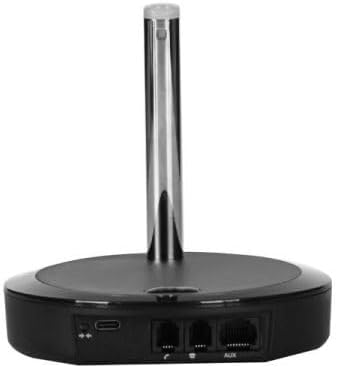
Figura 3.2: Posteriore view of the DECT headset base station, showing power and connection ports.
3.3. Configurazione iniziale
Upon first power-up, the T57W IP Phone will guide you through initial setup steps on its 7-inch touchscreen. This typically includes:
- Impostazioni di rete: Configure IP address (DHCP or Static), DNS.
- Registrazione dell'account SIP: Enter your SIP server address, username, password, and other credentials provided by your VoIP service provider.
- Data e ora: Set the correct date and time or configure NTP server.
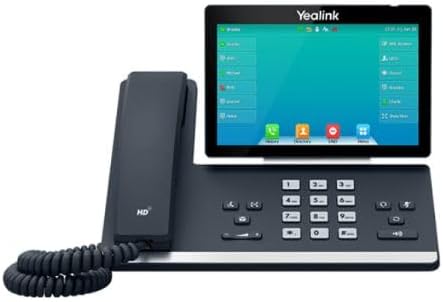
Figura 3.3: Fronte view of the Cleyver T57W IP Phone, highlighting the 7-inch color touchscreen.
4. Istruzioni per l'uso
4.1. T57W IP Phone Basic Operations
- Effettuare una chiamata: Lift the handset or press the Speaker button, then dial the number and press the Dial/Send key. Alternatively, use the touchscreen to select a contact.
- Risposta a una chiamata: Lift the handset, press the Speaker button, or press the Answer soft key on the touchscreen.
- Terminare una chiamata: Riagganciare il ricevitore o premere il tasto funzione Termina chiamata.
- Presa: During a call, press the Hold soft key.
- Trasferimento: During a call, press the Transfer soft key and follow the on-screen prompts.
- Conferenza: During a call, press the Conference soft key and follow the on-screen prompts to add participants.
- Regolazione del volume: Use the volume keys on the phone to adjust handset, speaker, or ringer volume.
4.2. ODHW25V2 DECT Headset Usage
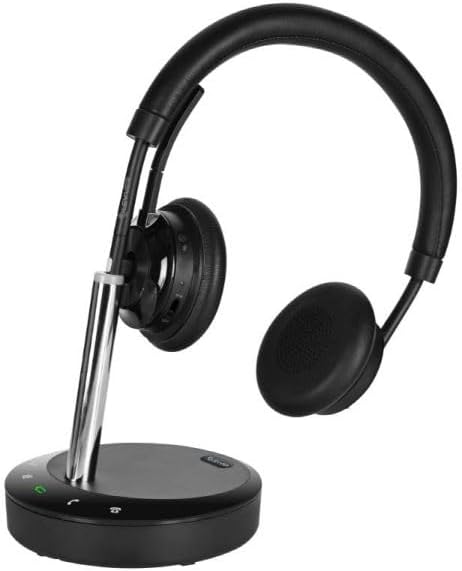
Figure 4.1: Cleyver ODHW25V2 DECT Headset on its charging base, ready for use.
- Indossare l'auricolare: Adjust the headband and microphone boom for a comfortable fit. The dual earcups provide passive noise isolation.
- Answering/Ending Calls (EHS): When connected via EHS, you can answer or end calls by pressing the call control button on the headset.
- Controllo del volume: Use the volume buttons on the headset to adjust listening volume.
- Disattiva audio: Press the mute button on the headset to mute your microphone during a call.
- Ricarica: Always return the headset to its base station when not in use to ensure it remains charged.

Figura 4.2: Esample of a user operating the Cleyver T57W IP Phone and headset for business communication.
5. Manutenzione
5.1. Pulizia
- Use a soft, dry, anti-static cloth to clean the phone's surface and touchscreen.
- For the headset, gently wipe earcups and headband with a slightly damp panno. Evitare l'eccessiva umidità.
- Non utilizzare prodotti chimici aggressivi, solventi o detergenti abrasivi.
5.2. Aggiornamenti software
Periodically check for firmware updates for your Cleyver T57W IP Phone through the phone's web interface or system settings. Updates can provide new features, performance improvements, and security enhancements. Consult your IT administrator or VoIP service provider for guidance on applying updates.
5.3. Headset Battery Care
- Always return the headset to its charging base when not in use to maintain optimal battery life.
- Evitare di scaricare completamente la batteria frequentemente.
- Store the headset in a cool, dry place if not used for extended periods.
6. Risoluzione Dei Problemi
If you encounter issues with your Cleyver T57W IP Phone and ODHW25V2 DECT Headset System, refer to the following common problems and solutions:
| Problema | Possibile causa | Soluzione |
|---|---|---|
| Il telefono non si accende | Adattatore di alimentazione non collegato o difettoso. | Ensure the power adapter is securely connected to the phone and a working electrical outlet. Try a different outlet. |
| Nessun segnale di linea / Impossibile effettuare chiamate | Network connection issue; SIP account not registered. | Check Ethernet cable connection. Verify network status on the phone's screen. Ensure SIP account details are correctly entered and registered. Contact your VoIP provider if registration fails. |
| Headset not connecting or poor audio | Headset out of range; low battery; EHS module issue. | Ensure headset is within range of the base station. Place headset on base to charge. Verify EHS module connections and configuration. Re-pair headset if necessary. |
| Il touchscreen non risponde | Problema temporaneo del software. | Restart the IP phone by unplugging and re-plugging the power adapter. |
7. Specifiche
Key technical specifications for the Cleyver T57W IP Phone and ODHW25V2 DECT Headset System:
| Caratteristica | Dettaglio |
|---|---|
| Marca | Astuto |
| Numero di modello | YEALINKT57WHW20V2 |
| IP Phone Display | Touchscreen a colori da 7 pollici |
| Connectivity (IP Phone) | SIP-VoIP, Built-in Wi-Fi, Bluetooth |
| Cuffia Tipo | DECT Duo, Wireless, Noise Cancellation |
| Gestione delle chiamate | Electronic Hook Switch (EHS) support |
| Fonte di alimentazione | Wired (Power Adapters included) |
| Materiale | Plastica, Metallo |
| Dimensioni del prodotto | 30 x 22 x 23.5 cm (L x P x A) |
| Peso dell'articolo | 1.2 kg |
| Dispositivi compatibili | DECT phone systems, VoIP SIP phones |
8. Garanzia e supporto
8.1. Informazioni sulla garanzia
The Cleyver T57W IP Phone and ODHW25V2 DECT Headset System comes with a garanzia di due anni dalla data di acquisto. La presente garanzia copre difetti di fabbricazione e malfunzionamenti in condizioni di normale utilizzo. Si prega di conservare la prova d'acquisto per eventuali reclami in garanzia.
8.2. Assistenza clienti
For technical assistance, troubleshooting beyond this manual, or warranty inquiries, please contact your vendor or Cleyver customer support. Refer to the contact information provided with your purchase documentation or visit the official Cleyver websito per le risorse di supporto.