
Introduzione
Thank you for choosing the PRUNUS J-165 Portable Radio. This compact and versatile radio offers AM, FM, and Shortwave (SW) reception, along with convenient features like preset station buttons, a sleep timer, and a lock function. Designed for ease of use and portability, the J-165 provides reliable audio entertainment wherever you go. This manual will guide you through the setup, operation, and maintenance of your new radio.
Prodotto finitoview
The PRUNUS J-165 is a lightweight, battery-operated radio featuring a clear speaker and a 3.5mm headphone jack for private listening. Its compact design includes a back clip and hand strap for enhanced portability.
Caratteristiche principali:
- Ricezione multibanda: Access FM (87-108 MHz), AM (520-1710 KHz), and two Shortwave bands (SW1: 4.70-10.00 MHz, SW2: 11.40-17.9 MHz).
- 5 Preset Station Buttons: Quickly save and recall your favorite radio stations.
- Sveglia: Set the radio to automatically turn off after 0-90 minutes.
- Design portatile: Compact size (approximately 4.6 x 2.6 x 1.2 inches, weighing 3.6 oz) with a back clip and hand strap.
- Funzione di blocco: Prevents accidental button presses during transport or use.
- Accoglienza eccellente: Equipped with an advanced DSP chip and a 16-inch telescopic antenna for stable signal reception.
- Suono chiaro: Built-in magnetic speaker and 3.5mm headphone jack.
- Funzionamento a batteria: Powered by AA batteries (not included) for use at home or outdoors.
Radio Components and Controls:
Familiarize yourself with the various parts of your PRUNUS J-165 radio.
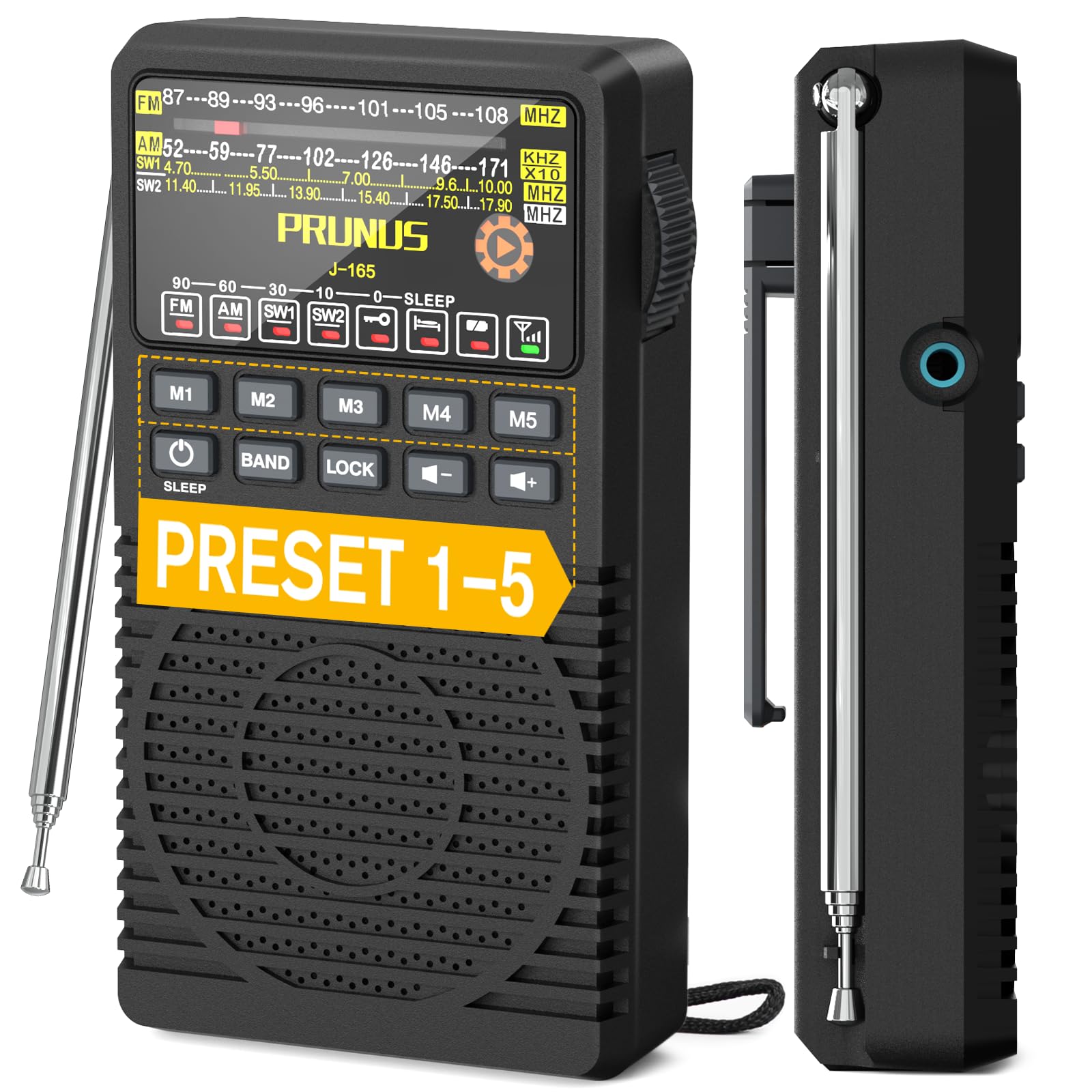

Impostare
1. Installazione della batteria:
- Individuare il vano batteria sul retro della radio.
- Carefully open the battery compartment cover. Some models may require turning a small dial or using a pry tool to release the latch, especially the first time. The belt clip may need to be lifted or moved slightly to access the cover.
- Insert two (2) AA batteries (not included) into the compartment, ensuring correct polarity (+ and -) as indicated inside the compartment.
- Chiudere saldamente il coperchio del vano batterie.

2. Accensione iniziale:
Premere e tenere premuto il tasto ENERGIA button to turn on the radio. The display will illuminate, and the radio will start playing from the last tuned station or a default frequency.
Istruzioni per l'uso
1. Accensione/spegnimento:
- Premere e tenere premuto il tasto ENERGIA button to turn the radio ON or OFF.
2. Selezione della banda:
- Premere il tasto BANDA button repeatedly to cycle through FM, AM, SW1, and SW2 bands. The selected band will be indicated on the display.
3. Tuning to a Station:
- Use the large side tuning knob to manually scan for stations. Turn the knob slowly for precise tuning.
- A signal indicator light will illuminate when a strong station is found, aiding in tuning accuracy.
4. Preset Stations (M1-M5):
The radio allows you to save up to 5 favorite stations for each band (FM, AM, SW1, SW2).
- Per salvare una stazione:
- Tune to your desired station using the tuning knob.
- Premere e tenere premuto uno dei pulsanti preimpostati (M1 A M5) finché il display non conferma che la stazione è stata salvata.
- Per richiamare una stazione:
- Ensure you are on the correct band (FM, AM, SW1, or SW2).
- Press the corresponding preset button (M1 A M5) once to instantly tune to the saved station.

5. Controllo del volume:
- Utilizzare il Volume su (+) E Volume basso (-) pulsanti per regolare il livello del suono.
6. Timer di spegnimento:
Il timer di spegnimento consente alla radio di spegnersi automaticamente dopo un periodo di tempo impostato.
- Premere il tasto SONNO button repeatedly to cycle through available sleep timer durations (e.g., 10, 30, 60, 90 minutes, or OFF). The selected duration will be shown on the display.
- The radio will automatically power off once the set time has elapsed.

7. Funzione di blocco:
The lock function prevents accidental button presses.
- Premere il tasto SERRATURA button to activate or deactivate the lock function. When activated, a lock icon will appear on the display, and most buttons will be unresponsive.
8. Uso delle cuffie:
- Plug any standard 3.5mm headphones (not included) into the headphone jack located on the side of the radio for private listening. The internal speaker will automatically mute when headphones are connected.

Manutenzione
Pulizia:
- Pulire la radio con un panno morbido e asciutto. Non utilizzare detergenti liquidi o materiali abrasivi.
- Keep the radio away from dust, dirt, and moisture.
Cura della batteria:
- Rimuovere le batterie se la radio non verrà utilizzata per un periodo prolungato per evitare perdite.
- Replace batteries when the low battery indicator light appears or when audio quality degrades.
Risoluzione dei problemi
| Problema | Possibile causa/soluzione |
|---|---|
| La radio non si accende. |
|
| Ricezione scarsa o rumore statico. |
|
| Difficulty tuning to a specific station. |
|
| I pulsanti non rispondono. |
|
| Nessun suono dall'altoparlante quando le cuffie sono scollegate. |
|
Specifiche
| Caratteristica | Dettaglio |
|---|---|
| Marca | Prugna |
| Modello | J-165 |
| Tecnologia sintonizzatore | DSP (elaborazione del segnale digitale) |
| Bande radiofoniche | FM, AM, SW1, SW2 |
| Gamma di frequenza FM | Frequenza 87-108 MHz |
| Gamma di frequenza AM | Frequenza |
| Gamma di frequenza SW1 | Frequenza 4.70-10.00 MHz |
| Gamma di frequenza SW2 | Frequenza 11.40-17.9 MHz |
| Fonte di alimentazione | 2 batterie AA (non incluse) |
| Presa per cuffie | 3.5mm standard |
| Materiale | Plastica |
| Dimensioni (circa) | 4.6 x 2.6 x 1.2 pollici (11.7 x 6.6 x 3.0 cm) |
| Peso (circa) | 3.6 once (102 g) senza batterie |

Informazioni sulla garanzia
PRUNUS products are manufactured to high-quality standards. For specific warranty details, please refer to the warranty card included with your purchase or visit the official PRUNUS websito. Conservare la ricevuta d'acquisto come prova d'acquisto per eventuali reclami in garanzia.
Assistenza clienti
If you encounter any issues or have questions regarding your PRUNUS J-165 radio that are not covered in this manual, please contact PRUNUS customer support. Contact information can typically be found on the product packaging, the official PRUNUS websito o tramite il tuo rivenditore.