
1. Introduzione
The SEESII SG-003A is a versatile analog current-voltage signal generator designed for industrial and scientific applications. It functions as a simulator for 4-20mA current and 0-24V voltage signals, offering real-time curve monitoring, historical record storage, and programmable multi-signal functions. This manual provides detailed instructions for the proper setup, operation, and maintenance of your device.
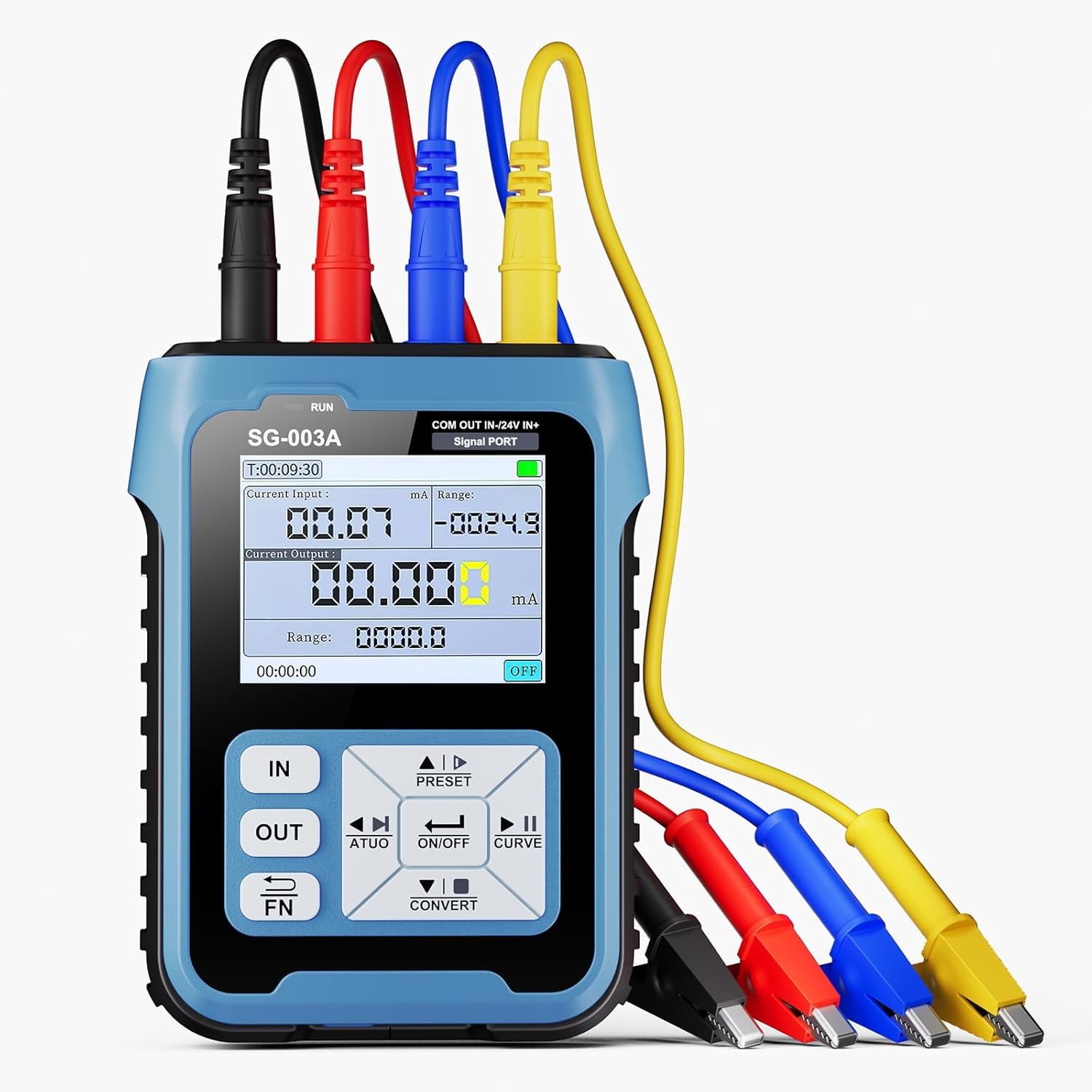
Figura 1.1: Oltreview of the SEESII SG-003A Multifunctional Signal Generator.
2. Caratteristiche del prodotto
- Live Curve Visualization: Monitor input and output signal patterns through a real-time curve. Users can set the curve's sampling interval, and the simulator automatically adjusts the displayed curve within the predefined range.
- Diverse Signal Capabilities: The signal generator offers a range of signal types, such as 0-24mA current, 0-24V voltage, XMT passive current, and Hz pulse. This broad spectrum ensures suitable signals for various professional uses.
- Rapid Preset Tuning: Equipped with 4 sets of preset signal values, it allows for quick adjustments. It also transforms input signals into different output formats, proving itself a highly functional and dependable tool for professionals in various sectors.
- Porte multiple: Boasts 4 inner diameters and 4mm ports. The Blue (IN-) serves as an alternative function/input, which can be switched to a 24V test power source. The Red (OUT) and Black (COM) ports constitute the output interface, while the Yellow (IN+) and Blue (IN-) form the input interface. Color-coded design enables straightforward identification.
- Uscita programmabile: Output magnitude adjusts automatically according to configurations. Users can choose among three operating modes: steady ascent, steady descent, or cyclic operation.
- 2.4-inch TFT Display with Backlight: Provides clear visibility of readings and settings.
- Batteria ricaricabile integrata da 3000 mAh: Offers extended operation and portability.

Figure 2.1: The 2.4-inch TFT Display with Backlight for clear readings.
3. Contenuto della confezione
Verifica che tutti gli articoli siano presenti nel tuo pacco:
- Signal Generator (1 unit)
- USB Type-C Cable (1 unit)
- Caricabatterie USB (1 unità)
- Alligator Clips (4 units: Blue, Yellow, Black, Red)

Figure 3.1: Complete Accessory Kit.
4. Specifiche
| Parametro | Valore |
|---|---|
| Numero di modello | SG003ca |
| Peso dell'articolo | 490 grammi |
| Dimensioni del pacco | Dimensioni: 15.6 x 14.6 x 9.3 cm |
| Tipo di batteria | 1 batteria agli ioni di litio (inclusa) |
| Precisione della misurazione | 0.01 |
| Produttore | SEESII |
5. Impostazione
5.1 Ricarica del dispositivo
The SG-003A comes with a built-in 3000mAh Lithium Ion battery. Before first use, fully charge the device using the provided USB Type-C cable and USB charger. A full charge typically takes 4-6 hours and provides up to 8 hours of continuous use or 24 hours of standby time.

Figure 5.1: Charging the SG-003A via Type-C Port.
5.2 Port Identification and Wiring
The device features clearly labeled and color-coded ports for easy identification and connection. Refer to the diagram below for port layout:

Figura 5.2: Dispositivo sopraview con componenti etichettati.
The main ports are:
- Black (COM): Common port. In input mode, paired with Blue (IN-) or Yellow (IN+) for signal reception. In output mode, paired with Red (OUT) or Blue (IN-) (24V) for signal output or power.
- Red (OUT): Output port. Paired with Black (COM) for signal output.
- Blue (IN-): Dual-function port. Input negative, paired with Yellow (IN+) for signal reception. Can also be switched to a 24V test power source when paired with Black (COM).
- Yellow (IN+): Input port. Paired with Blue (IN-) for the external signal's positive terminal.

Figure 5.3: Port Layout and General Connection Diagram.
Cablaggio Examples:
Output Port Wiring: Connect the Red (OUT) and Black (COM) ports to your PLC or process instrument for signal output.

Figure 5.4: Output Port Wiring.
Dual-Function Port Wiring (24V Power): Use the Blue (IN-) and Black (COM) ports to supply 24V power and monitor feedback, for example, with pneumatic valves.

Figure 5.5: Dual-Function Port Wiring for 24V Power.
Input Port Wiring: Connect the Yellow (IN+) and Blue (IN-) ports to receive external signals, such as valve position feedback.

Figure 5.6: Input Port Wiring for Signal Reception.
6. Istruzioni per l'uso
6.1 Accensione/spegnimento
Premere e tenere premuto il tasto ACCESO/SPENTO pulsante per accendere o spegnere il dispositivo.
6.2 Signal Generation Modes
The SG-003A supports various output signal types:
- Active Current (0-24mA)
- Passive Current (0-24mA)
- Voltage (0-24 V)
- Frequency/PWM (0-9999Hz)
- 24V Loop (0-24mA)
Utilizzare i pulsanti di navigazione (UP, GIÙ, SINISTRA, GIUSTO) e il ENTRARE button to navigate through the menu and select the desired output mode.
6.3 Adjusting Output Parameters
Once an output mode is selected, use the navigation buttons to adjust the specific parameters (e.g., current value, voltage value, frequency, duty cycle for PWM). The display will show the current settings and real-time output.
6.4 Real-Time Curve Monitoring
The device can display a real-time curve of the input or output signal. To access this feature, navigate to the curve monitoring option in the menu. You can adjust the sampling interval for the curve display.

Figure 6.1: Real-Time Curve Monitoring in action.
6.5 Using Preset Values
The SG-003A includes 4 sets of preset signal values for quick adjustments. Use the PRESET button to cycle through or select these stored configurations.
6.6 Programmable Output
For automated testing, configure the programmable output feature. You can set the output to operate in steady ascent, steady descent, or cyclic modes. Refer to the on-screen menu for detailed programming steps.
6.7 Demonstrative Video: Waveform Generation
Watch this video to see various waveforms generated by a similar function generator, demonstrating the capabilities of such devices in testing environments.
Video 6.1: Demonstration of various waveform outputs (Sine, Square, Triangle, Sawtooth, ECG, etc.) from a function generator, displayed on an oscilloscope.
7. Manutenzione
7.1 Pulizia
Pulire il dispositivo con un panno morbido e asciutto. Non utilizzare detergenti abrasivi o solventi, poiché potrebbero danneggiare il casing or screen. Ensure no liquids enter the ports.
7.2 Conservazione
Store the SG-003A in a cool, dry place away from direct sunlight and extreme temperatures. If storing for extended periods, ensure the battery is partially charged (around 50%) to prolong its lifespan.
7.3 Protezione in silicone
The device is designed with silicone protection on both sides and integrated non-slip silicone stripes for durability and grip. While this offers protection, avoid dropping the device from significant heights.

Figure 7.1: Silicone Protection on the SG-003A.
8. Risoluzione Dei Problemi
8.1 Il dispositivo non si accende
- Ensure the battery is sufficiently charged. Connect the device to the charger and wait for at least 30 minutes before attempting to power on again.
- Verificare che il pulsante di accensione sia premuto correttamente.
8.2 Incorrect Output Readings
- Controllare tutti i collegamenti elettrici per verificare la corretta polarità e il contatto sicuro.
- Ensure the correct output mode and parameters are selected in the device settings.
- Verify the external device or circuit being tested is functioning correctly.
8.3 Problemi di visualizzazione
- If the display is dim, adjust the backlight settings in the device menu.
- Se lo schermo non risponde, prova a riavviare il dispositivo.
For issues not covered here, please contact SEESII customer support.
9. Garanzia e supporto
The SEESII SG-003A Signal Generator comes with a manufacturer's warranty. Please refer to the warranty card included in your package for specific terms and conditions. For technical support, troubleshooting assistance, or warranty claims, please contact SEESII customer service through their official channels.