
1. Introduzione
This manual provides detailed instructions for the installation, operation, and maintenance of your new XTRONS Android 14 Qualcomm 665 Car Stereo. Please read this manual thoroughly before using the product to ensure proper functionality and safety.
1.1 Modelli e anni applicabili
This car stereo is compatible with the following vehicle models and years:
- Per BMW: E46 4-door Sedan (1998-2005), E46 2-door Coupe (1999-2006), E46 2-door Convertible (1999-2006), E46 5-door Touring (1999-2005), E46 3-door Hatchback (2000-2004), E46 M3 (2000-2006)
- For Rover: Rover 75 (1999-2005)
- For MG: ZT (2001-2005)

Figura 1: Modelli e anni applicabili
1.2 Note importanti sulla compatibilità
Before installation, please check your car's center console and air-conditioning cover for compatibility. If necessary, remove the air-conditioning cover to fit the unit perfectly. Additional cables may be required depending on your vehicle's original setup.

Figure 2: Important Notes on Compatibility and Required Cables
2. Caratteristiche principali
- Schermo QLED IPS da 9 pollici: 1280*800 high-definition QLED display with a capacitive touchscreen, 178° wide viewing angle, powered by Adreno 610 GPU for ultra-smooth 4K entertainment.
- CPU ad alte prestazioni: Qualcomm Snapdragon 665 Octa-Core processor with 8GB RAM and 256GB ROM storage, running Android 14 for responsive performance.
- Connettività smartphone: Built-in Wireless Car Auto Play, Built-in Wireless & Wired Android Auto, and Bluetooth 5.0 for calls and voice control.
- DSP integrato: Digitale Amplifier Processing (TDA7808) and DTS Digital Sound (Si47925) for enhanced audio fidelity and interference immunity.
- Decodifica CANbus ottimizzata: Seamless integration with vehicle features like steering wheel control, ACC control, reversing control, and door status.
- Schermo diviso e Picture-in-Picture: Run two applications side-by-side or watch videos while multitasking.
- Wi-Fi a doppia banda: Supporta le bande da 2.4 GHz e 5 GHz per una connettività Internet più veloce e stabile.
2.1 Caratteristiche visive

Figure 3: 9-inch QLED IPS Screen
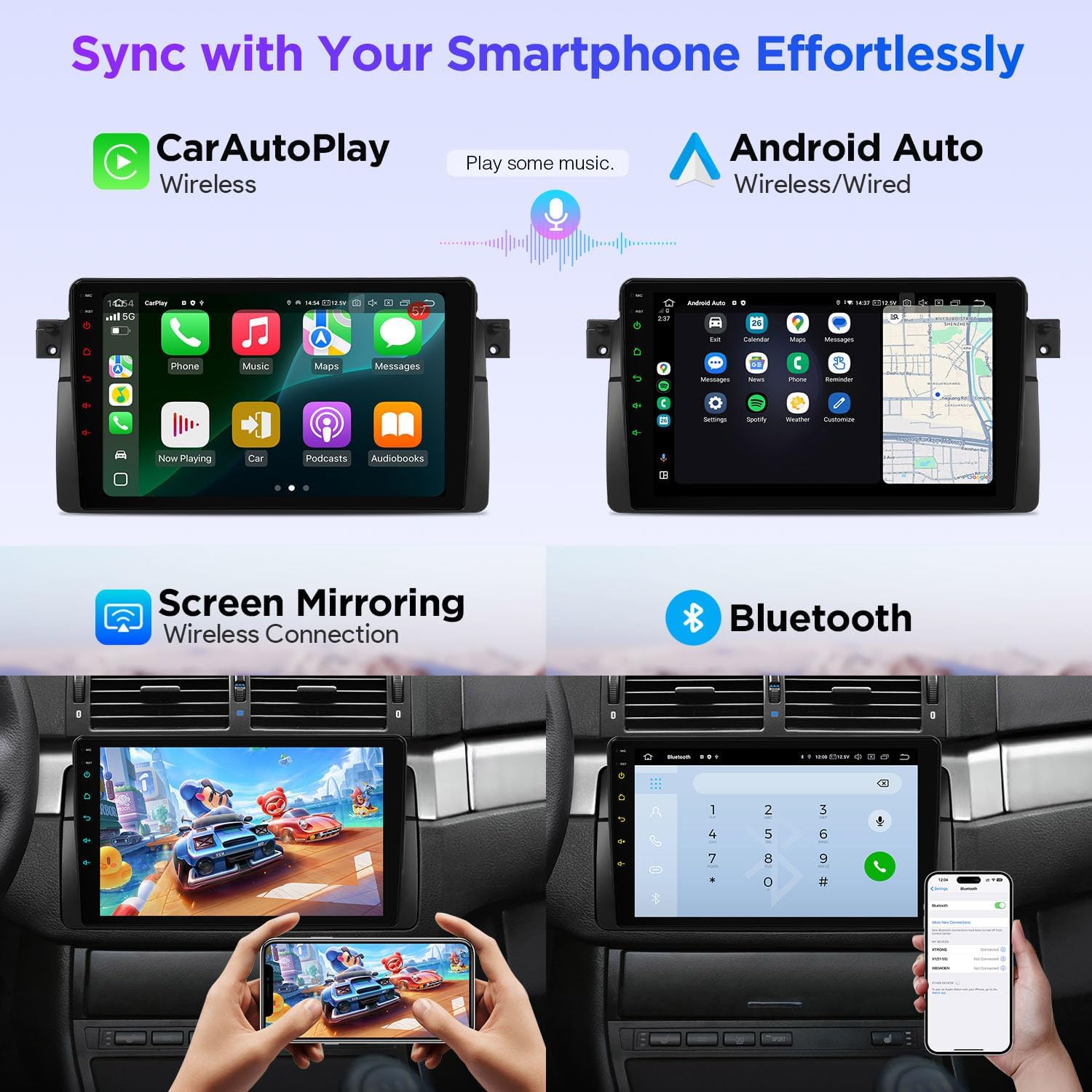
Figure 4: Smartphone Connectivity (CarPlay & Android Auto)

Figure 5: Smart and Intuitive UI with Day/Night Mode
2.2 Caratteristiche audio

Figure 6: DTS Digital Sound and DSP Controls
2.3 Integrazione del veicolo
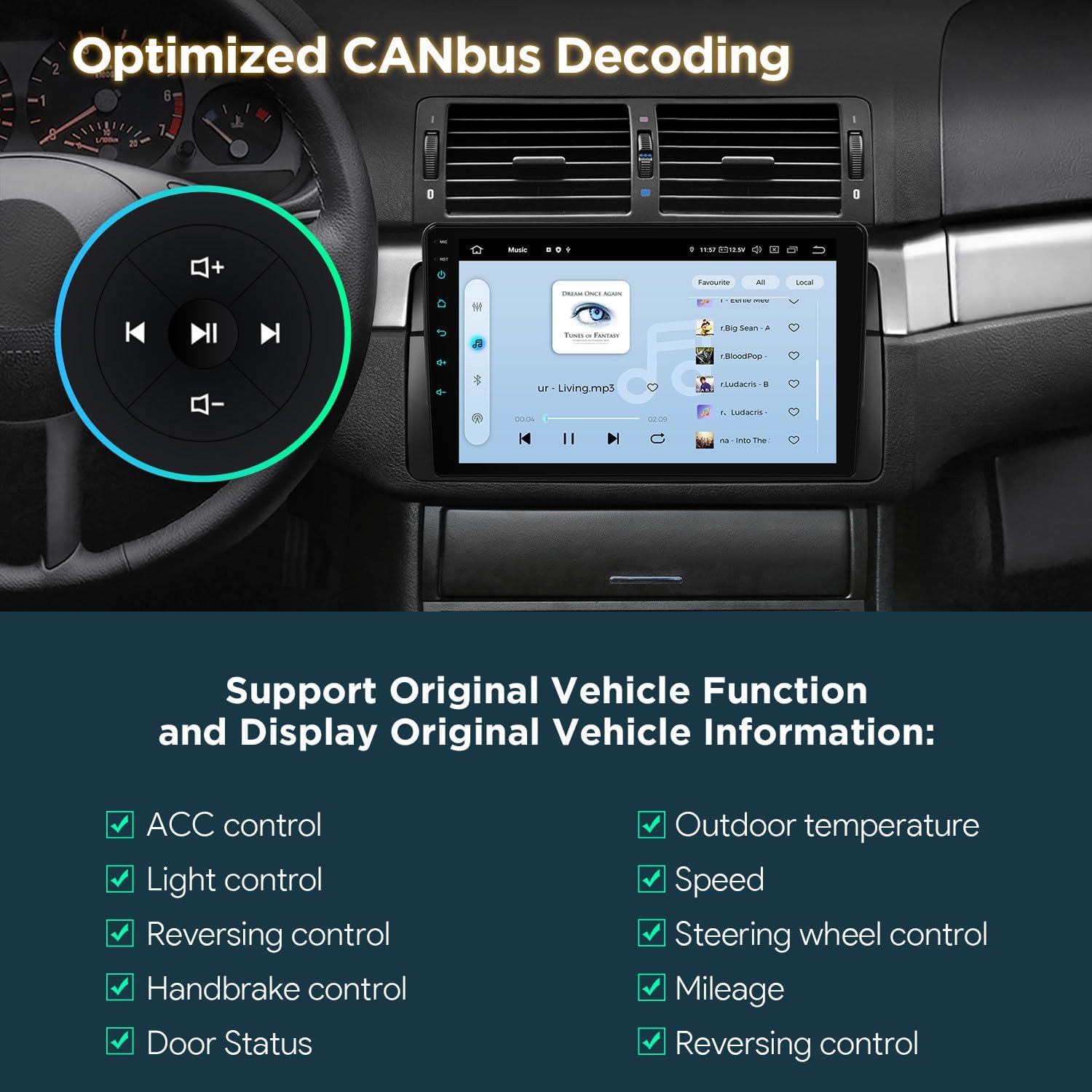
Figure 7: Optimized CANbus Decoding
3. Configurazione e installazione
Questa sezione fornisce una panoramica generaleview of the installation process. For detailed, step-by-step instructions, please refer to the included English Manual and German Manual.
3.1 Unboxing e componenti

Figure 8: Package Content and Accessories
3.2 Processo di installazioneview
Installation typically involves removing the existing car stereo, connecting the provided wiring harness and accessories, and securing the new head unit. Ensure all connections are secure before reassembling the dashboard.
Video 1: XTRONS 9 Inch Qualcomm Car Stereo for BMW E46 M3 Rover 75 MG ZT - Product Overview and Features. This video provides a visual overview of the product's features and how it integrates into the car environment.
Video 2: Eonon Car Stereo for E46X6S - Installation Guide. This video demonstrates the installation process for a car stereo in a BMW E46, which is highly relevant for this product.
4. Istruzioni per l'uso
4.1 Navigazione dell'interfaccia utente (UI)
The unit features a smart and intuitive UI with customizable day/night modes and quick access toggles for your favorite applications. Navigate through menus by swiping and tapping the QLED touchscreen.
4.2 Integrazione smartphone (CarPlay e Android Auto)
Connect your smartphone wirelessly via Bluetooth for Wireless Car Auto Play (iPhone) or Wireless & Wired Android Auto (Android phones). This allows access to navigation, calls, music, and voice assistants (Siri/Google Assistant) directly from the head unit.
4.3Bluetooth 5.0
Utilize Bluetooth 5.0 for hands-free calling and audio streaming. Pair your device through the Bluetooth settings menu on the head unit.
4.4 Built-in DSP Audio Control
Access the built-in Digital Sound Processor (DSP) to fine-tune your audio experience. Adjust equalizer settings, sound field, and other audio parameters to your preference.
4.5 Split Screen & Picture-in-Picture
To activate split-screen mode, long-press an app icon and drag it to one side of the screen. For Picture-in-Picture, start a video and then navigate to another app; the video will continue playing in a small, movable window.
4.6 Navigazione GPS
The unit supports various GPS navigation applications. Download your preferred navigation app from the Play Store and follow its instructions for route planning and guidance.
Ingresso telecamera AHD 4.7
Connect an AHD (Analog High Definition) camera for clear rearview o anteriore-view display. The system automatically switches to the camera view in retromarcia.
Wi-Fi a doppia banda 4.8
Connect to available Wi-Fi networks (2.4GHz or 5GHz) to access online features, download apps, and browse the internet.
5. Manutenzione
Per garantire la longevità e le prestazioni ottimali della tua autoradio XTRONS, segui queste linee guida per la manutenzione:
- Pulizia dello schermo: Utilizzare un panno morbido e privo di lanugine per pulire delicatamente il touchscreen del QLED. Per le macchie ostinate, strofinare leggermenteampPulisci il panno con un detergente per schermi specifico per dispositivi elettronici. Evita prodotti chimici aggressivi o materiali abrasivi.
- Aggiornamenti software: Periodically check for software updates through the unit's settings menu to ensure you have the latest features and performance enhancements.
- Controllo della temperatura: Evitare di esporre l'unità a temperature estreme per periodi prolungati.
- Verifiche della connessione: Controllare di tanto in tanto tutti i collegamenti elettrici per accertarsi che siano saldi e privi di corrosione.
6. Risoluzione Dei Problemi
Se riscontri problemi con l'autoradio, fai riferimento ai seguenti passaggi comuni per la risoluzione dei problemi:
- Nessun potere: Controllare tutti i collegamenti elettrici e assicurarsi che l'accensione del veicolo sia inserita. Verificare che il fusibile sia intatto.
- Nessun suono: Controllare i collegamenti degli altoparlanti, i livelli del volume e le impostazioni audio (incluso il DSP). Assicurarsi che sia selezionata la sorgente audio corretta.
- Touchscreen non reattivo: Prova a riavviare l'unità. Se il problema persiste, esegui un ripristino delle impostazioni di fabbrica (nota: questa operazione cancellerà tutti i dati utente).
- Segnale GPS perso: Assicurarsi che l'antenna GPS sia installata correttamente e abbia una visuale libera view del cielo.
- Problemi di connettività Bluetooth/Wi-Fi: Ensure Bluetooth/Wi-Fi is enabled on both the head unit and your device. Try re-pairing or reconnecting.
- Funzioni CANbus non funzionanti: Verify the CANbus box and cable are correctly installed and configured.
For more detailed troubleshooting or persistent issues, please consult the full English Manual or contact XTRONS customer support.
7. Specifiche
| Caratteristica | Descrizione |
|---|---|
| Marca | XTRONI |
| Modello | B0FMJSN8NP |
| Sistema operativo | Androide 14 |
| processore | Qualcomm Snapdragon 665 Octa Core |
| Memoria RAM | 8 GB |
| Capacità di archiviazione della memoria | 256 GB |
| Dimensioni dello schermo | 9 pollici |
| Tipo di visualizzazione | QLED, IPS Panel |
| Risoluzione | 1280*800 |
| Tecnologia di connettività | Bluetooth 5.0, USB, Dual Band Wi-Fi (2.4GHz & 5GHz) |
| Caratteristiche speciali | Bluetooth, Touchscreen, Built-in DSP, Wireless CarPlay, Android Auto, Optimized CANbus Decoding, Split Screen, Picture-in-Picture |
| Sistema di navigazione satellitare supportato | GPS |
| Metodo di controllo | Tocco, Voce |
8. Cosa c'è nella scatola
The following components are included with your XTRONS Car Stereo:
- 1 × cablaggio ISO
- 1 × cavo RCA
- 1 × Cavo antenna radio
- 1 × 4G +Antenna (4G Function not supported in USA)
- 1 × 4G -Antenna
- 1 × Antenna GPS
- 2 × Cavo USB
- 1 × scatola CANbus
- 1 × Cavo della fotocamera
- 1 × cavo CANbus
- 1 × Manuale inglese
- 1 × German Manual
9. Garanzia e supporto
9.1 Informazioni sulla garanzia
Questo prodotto viene fornito con un Garanzia del produttore di 1 anniSi prega di conservare la prova d'acquisto per eventuali reclami in garanzia.
9.2 Assistenza clienti
For technical assistance, troubleshooting, or warranty inquiries, please contact XTRONS customer support through their official websito o le informazioni di contatto fornite nella confezione del prodotto.