
1. Introduzione
The WatchGuard Firebox T185 is a high-performance tabletop firewall designed to provide enterprise-grade security for branch offices and retail environments. This device handles demanding traffic loads and offers flexible connectivity options, including SFP+ fiber, 2.5Gb, and 1Gb Ethernet ports. It integrates advanced threat protection, VPN support, and SD-WAN capabilities to ensure secure and efficient network operations.
2. Informazioni sulla sicurezza
- Leggere tutte le istruzioni prima di utilizzare il dispositivo.
- Garantire un'adeguata messa a terra per evitare scosse elettriche.
- Non esporre il dispositivo a umidità o temperature estreme.
- Utilizzare solo l'alimentatore fornito con il dispositivo.
- Non aprire il dispositivo casing; affidare la manutenzione a personale qualificato.
- Secure the device physically using the Kensington Lock slot to prevent theft.
3. Contenuto della confezione
Verificare che tutti gli articoli siano presenti nel pacco:
- WatchGuard Firebox T185 Appliance
- Adattatore di alimentazione
- Cavo Ethernet
- Guida rapida
4. Fisico oltreview
Familiarize yourself with the ports, indicators, and features of your Firebox T185.

This image displays the WatchGuard Firebox T185, highlighting its front and rear panels. The front panel features LED indicators for status and mode. The rear panel includes a DC power input, two USB 3.2 ports, one O/WAN 1/LAN port, four 1 Gbps LAN ports (ports 2-5), two 2.5 Gbps PoE ports (ports 6-7), one 10 Gbps SFP+ port, a reset button, and a power switch. A Kensington lock slot is also visible.

The WatchGuard Firebox T185 is shown held in a hand, illustrating its compact tabletop form factor suitable for various environments.

Un dettagliato view of the rear panel of the Firebox T185, showing the power input, USB ports, 1GbE LAN ports, 2.5GbE PoE ports, and the SFP+ port.
Indicatori LED
I LED del pannello frontale forniscono informazioni sullo stato:
- LED di stato: Indica lo stato operativo del dispositivo.
- Attn LED: Alerts to system warnings or errors.
- LED modalità: Mostra la modalità operativa corrente.
- LED delle porte: Indicate link status and activity for each network port.
5. Configurazione iniziale
- Disimballare il dispositivo: Carefully remove the Firebox T185 and all accessories from the packaging.
- Collegare i cavi di rete:
- Connect your internet source (modem or upstream router) to the O/WAN 1/LAN porta.
- Collegare i dispositivi di rete interni (switch, computer) al LAN ports (2-5). For higher speeds, use the 2.5 Gbps PoE ports (6-7) o il Porta SFP+ secondo necessità.
- Connetti alimentazione: Plug the power adapter into the device's power input and then into a power outlet. Turn on the power switch.
- Accensione: The device will power on automatically. Observe the LED indicators for boot-up status.
- Configurazione iniziale: Accedi al dispositivo web interface or use WatchGuard Cloud for initial configuration. Refer to the Quick Start Guide for default IP addresses and login credentials.
Questo video fornisce un prodotto suview of the WatchGuard Firebox T185, demonstrating its features and potential deployment scenarios. It highlights the device's physical aspects and connectivity options.
6. Istruzioni per l'uso
Once configured, the Firebox T185 operates continuously to protect your network. Management is typically performed through the WatchGuard Cloud platform or a local web interfaccia.
- Monitoraggio: Regularly check the device status through the WatchGuard Cloud dashboard or local interface for alerts and performance metrics.
- Aggiornamenti del firmware: Keep the device firmware updated to ensure the latest security patches and features. Follow WatchGuard's official update procedures.
- VPN Connections: Utilize the VPN features for secure remote access or site-to-site connectivity as configured.
- SD-WAN: Leverage SD-WAN capabilities for optimized traffic routing and network resilience.
7. Manutenzione
- Pulizia regolare: Mantenere il dispositivo pulito dalla polvere. Utilizzare un panno morbido e asciutto per pulire l'esterno. Non utilizzare detergenti liquidi.
- Ventilazione: Assicurare un adeguato flusso d'aria attorno al dispositivo per evitare il surriscaldamento. Non ostruire le aperture di ventilazione.
- Gestione del firmware: Periodically check for and apply firmware updates as recommended by WatchGuard.
- Backup della configurazione: Regularly back up your device configuration to prevent data loss in case of an issue.
8. Risoluzione Dei Problemi
- Nessun potere:
- Check the power cable connection and ensure the power outlet is functional. Verify the power switch is in the 'On' position.
- Nessuna connettività di rete:
- Verify all Ethernet cables are securely connected. Check the status of the port LEDs. Ensure your internet service is active. Review network configuration settings.
- Prestazioni lente:
- Check network traffic and resource utilization through the management interface. Ensure firmware is up-to-date. Consider reviewing security policies for potential bottlenecks.
- Surriscaldamento del dispositivo:
- Ensure the device is placed in a well-ventilated area. Clear any dust from the ventilation openings.
9. Specifiche tecniche
| Caratteristica | Valore |
|---|---|
| IPS Throughput (full scan) | 2.40 Gbps |
| Firewall Throughput (IMIX) | 7.90 Gbps |
| VPN Throughput (IMIX) | 1.14 Gbps |
| HTTPS (IPS enabled, full scan) | 1.00 Gbps |
| Interfacce di rete | 4 x 1 GbE, 4 x 2.5 GbE, 1 x SFP/SFP+ |
| Interfacce I/O | 1 Serial/2 USB-A 3.2 |
| Nome del modello | Scatola di fuoco WatchGuard T185 |
| Caratteristica speciale | UTM, VPN Support, Integrated SD-WAN |
| Usi consigliati | Attività commerciale |
| Tecnologia di connettività | Ethernet, SFP+ |
| Peso dell'articolo | 6.8 libbre |
| Sistema operativo | Attrezzatura antincendio |
| Data Transfer Rate (UTM) | 1830 Megabit al secondo |
| Velocità massima di trasferimento dati in upstream | 1830 Megabit al secondo |
| Larghezza di banda della porta LAN | 2500 Mbps |
| Modem Compatible | NO |
| Copertura | Software and emergency support |
| Codice UPC | 654522437150 |
| Produttore | GuardaGuardia |
| Numero di parte del produttore | WGT185000+WGT1850063 |

This image displays a table detailing key performance specifications for the WatchGuard Firebox T185, including IPS, Firewall, VPN, and HTTPS throughputs, as well as network and I/O interfaces.
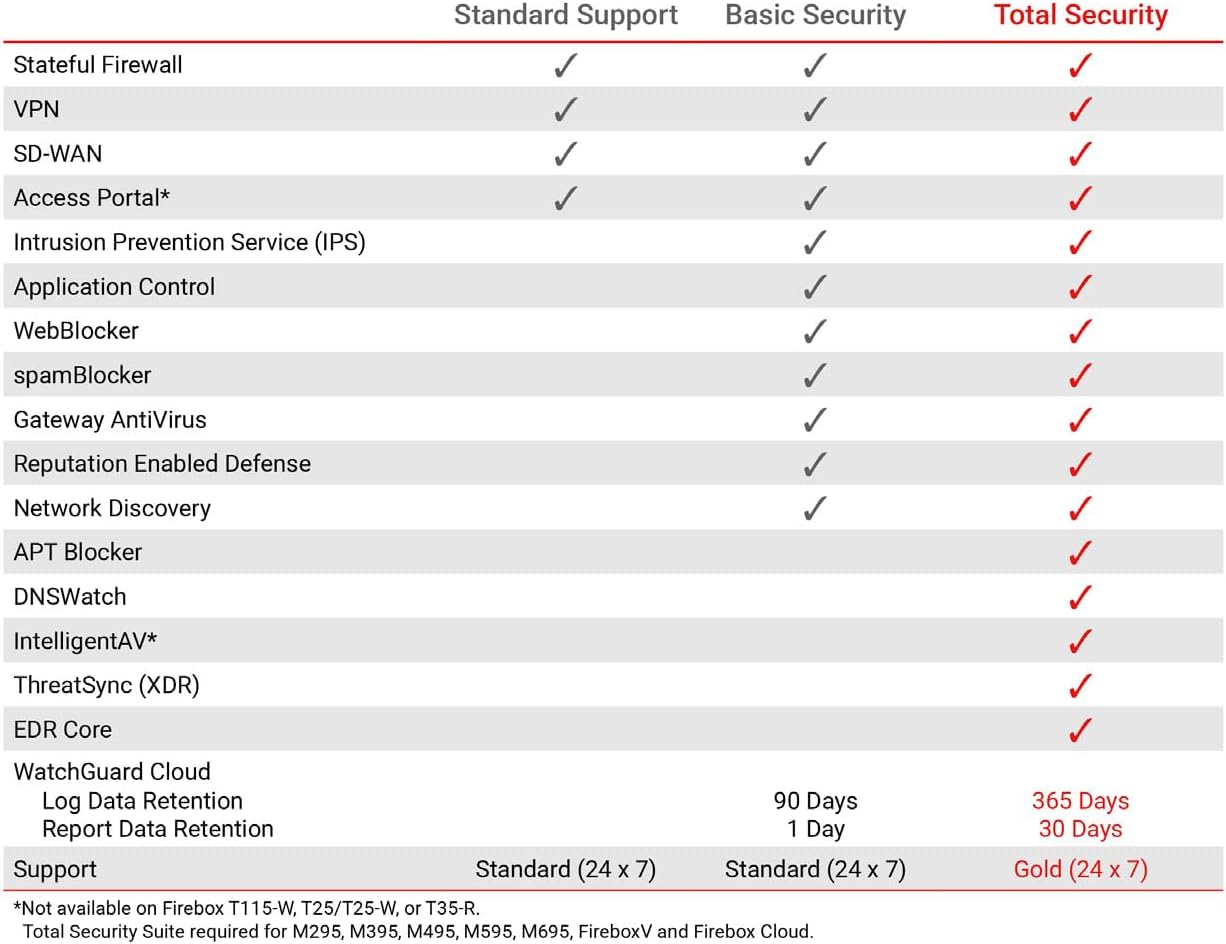
This table compares the security features included with Standard Support, Basic Security Suite, and Total Security Suite for the WatchGuard Firebox T185, showing which features are enabled for each option.
10. Garanzia e supporto
The WatchGuard Firebox T185 comes with a 3-year Standard Support license (WGT185003).
- Supporto standard: Provides software updates and 24x7 emergency technical assistance, along with business-hours support for routine inquiries.
- Piani di protezione: Additional protection plans may be available, such as a 4-Year Protection Plan or a Complete Protect monthly plan. Refer to your purchase documentation for details.
- Supporto del produttore: Per ulteriore assistenza, visitare il sito ufficiale WatchGuard support websito oppure contatta il loro servizio clienti.