
1. Introduzione
Thank you for choosing the DazzlingStage 60W 9LED RGBW Stage Wall Wash Bar Light. This manual provides essential information for the safe and effective operation of your lighting fixture. Please read it thoroughly before installation and use, and retain it for future reference.
Questo ètage light bar features 9 high-power RGBW LEDs, offering a wide spectrum of colors and dynamic lighting effects suitable for various events and venues.

Immagine 1.1: Passoview of the DazzlingStage 60W 9LED RGBW Stage Wall Wash Bar Lights in various colors.
2. Istruzioni di sicurezza
- Sicurezza elettrica: Garantire l'alimentazione voltage matches the specifications of the fixture. Always disconnect power before cleaning, servicing, or moving the unit.
- Installazione: Install the fixture in a well-ventilated area, away from heat sources. Ensure secure mounting to prevent accidental falls.
- Operazione: Do not look directly into the light source when the fixture is operating, as it can cause eye damage. Avoid operating the unit in wet or damp condizioni.
- Manutenzione: Affidare qualsiasi intervento di manutenzione a personale qualificato. Non tentare di riparare l'unità da soli.
- Bambini: Tenere il dispositivo fuori dalla portata dei bambini.
3. Contenuto della confezione
Dopo aver disimballato, verificare che tutti gli articoli elencati di seguito siano inclusi e in buone condizioni:
- DazzlingStage 60W 9LED RGBW Stage Wall Wash Bar Light (x1 per pack)
- Power Cord (x1 per pack)
- Remote Control (x1 per pack)
- Mounting Bracket (x1 per pack)
- Knobs (x2 per pack)
- Black Gaskets (x2 per pack)
- Instruction Manual (x1 per pack)

Immagine 3.1: Contenuto incluso nella confezione del prodotto.
4. Componenti del prodotto
Familiarize yourself with the main components of the light bar:
- Serie LED: 9 RGBW LEDs for color mixing.
- Pannello di controllo: Features a 4-digit LED display and control buttons (MENU, UP, DOWN, ENTER) for mode selection and parameter adjustment.
- Porte DMX IN/OUT: For connecting to a DMX controller or linking multiple units.
- Alimentazione IN/OUT: Per il collegamento dell'alimentazione e il collegamento a cascata dell'alimentazione ad altre unità.
- Staffa di fissaggio: Adjustable bracket for floor standing or truss mounting.
- Radiatore: Sistema di raffreddamento integrato per mantenere una temperatura di esercizio ottimale.

Image 4.1: Key components and dimensions of the light bar.
5. Configurazione e installazione
The DazzlingStage Wall Wash Bar Light offers flexible installation options:
5.1 Montaggio della staffa
Attach the included mounting bracket to the light bar using the provided knobs and gaskets. Ensure the bracket is securely fastened.
5.2 Opzioni di posizionamento
- Da pavimento: The bracket allows the light bar to stand upright on a flat surface. Adjust the angle as needed.
- Montaggio su traliccio: Utilizzare clamps (not included) to attach the bracket to a lighting truss. Ensure the truss and clamps can support the weight of the fixture.
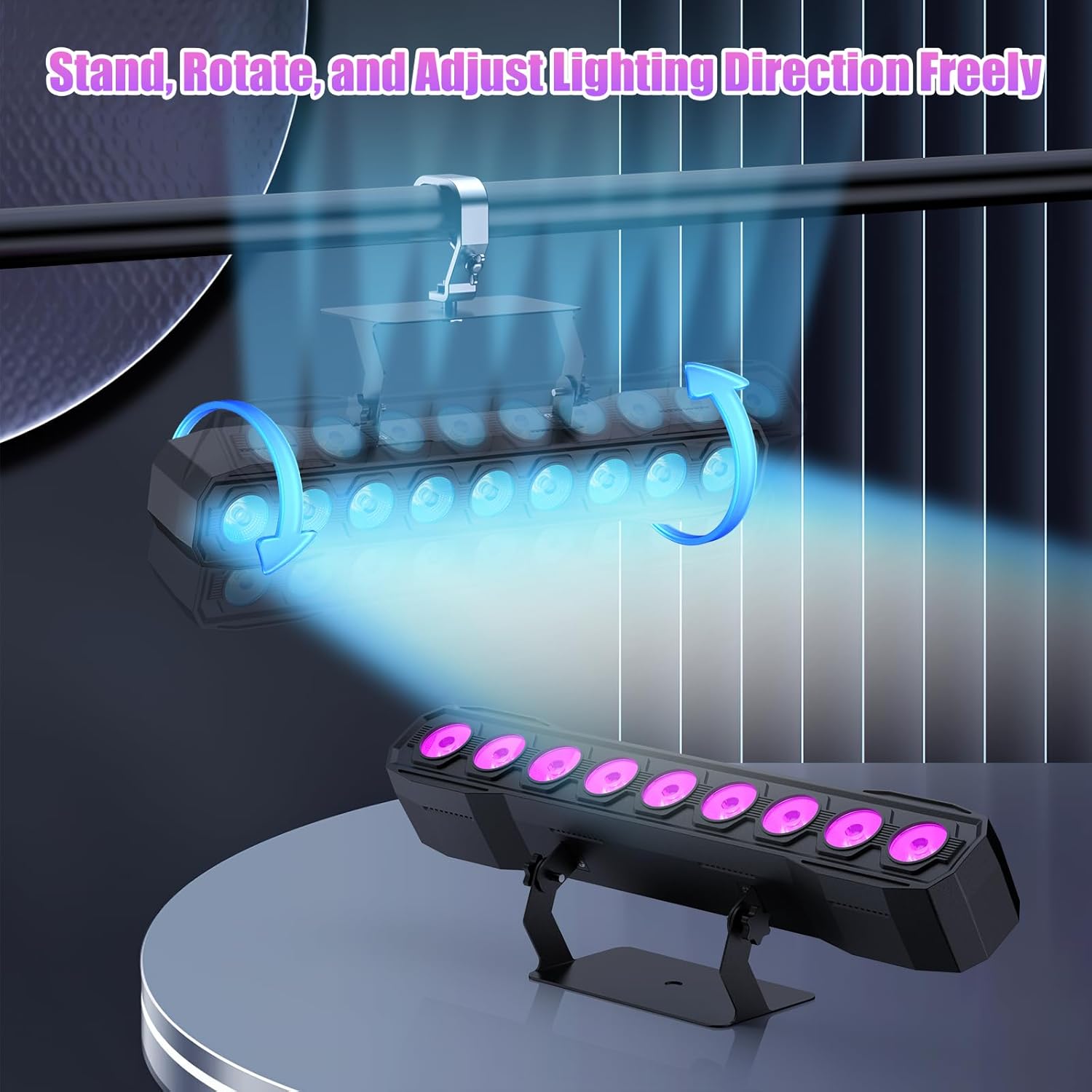
Image 5.1: Illustration of mounting and angle adjustment options.
5.3 Collegamento di alimentazione
Connect the power cord to the Power IN port on the back of the fixture and then to a suitable power outlet. Multiple units can be daisy-chained using the Power OUT port to simplify wiring for larger setups.
6. Modalità operative
The DazzlingStage Wall Wash Bar Light supports several control modes:
- Controllo DMX512: For professional control via a DMX console.
- Modalità automatica: Pre-programmed lighting sequences.
- Controllo attivato dal suono: Le luci reagiscono ai suoni ambientali.
- Telecomando: Convenient wireless control using the included remote.
- Modalità Master-Slave: Link multiple units where one acts as a master and others as slaves, synchronizing effects.
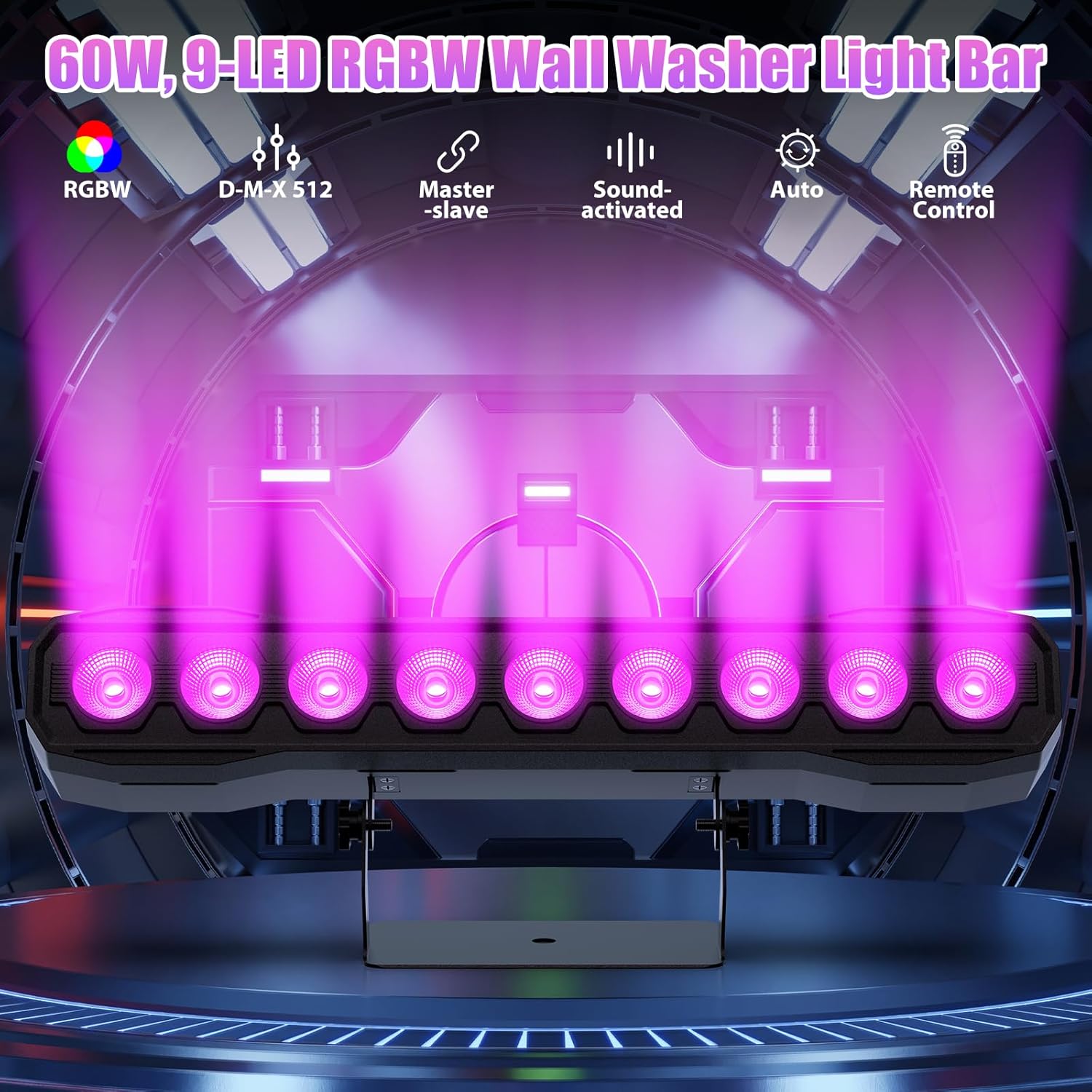
Immagine 6.1: Passoview delle modalità di controllo disponibili.
6.1 Display Panel Operation
Use the buttons on the back of the fixture to navigate the menu and select modes:
- MENU: Scorre le opzioni del menu principale.
- SOTTOSOPRA: Adjusts values or navigates sub-menus.
- ACCEDERE: Conferma la selezione.
6.2 Effetti di luce
The fixture supports various dynamic effects:
- Miscelazione dei colori: Over 16.7 million color combinations with 0-100% linear dimming.
- Strobe: Effetto lampeggiante.
- Saltare: Cambiamenti di colore istantanei.
- Dissolvenza: Transizioni fluide tra i colori.
- Impulso: Gradual changing effects.
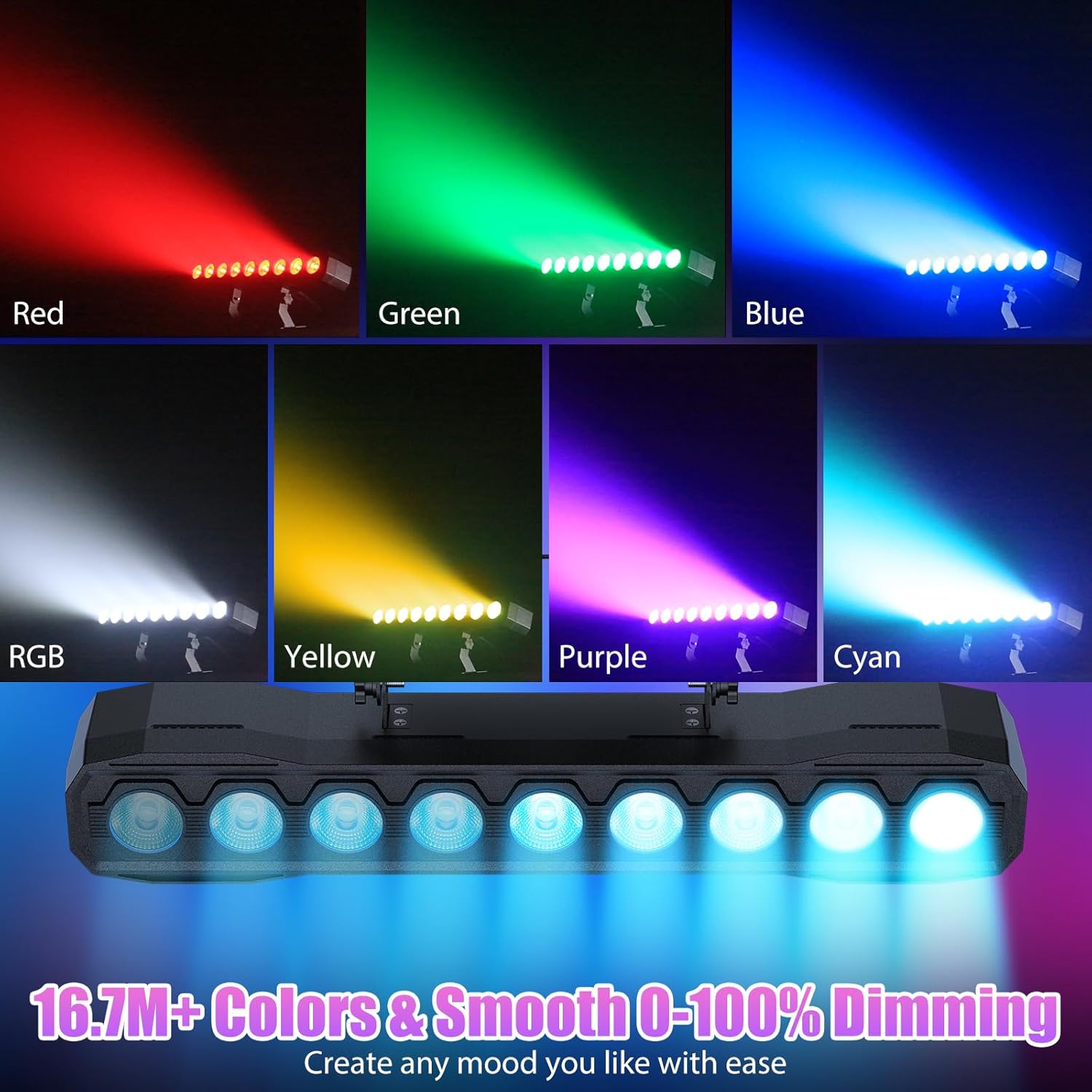
Immagine 6.2: Es.amples of color mixing and dimming capabilities.

Image 6.3: Visual representation of Strobe, Jump, Fade, and Pulse effects.
7. Funzioni di controllo remoto
Il telecomando incluso consente un comodo accesso a diverse funzioni:
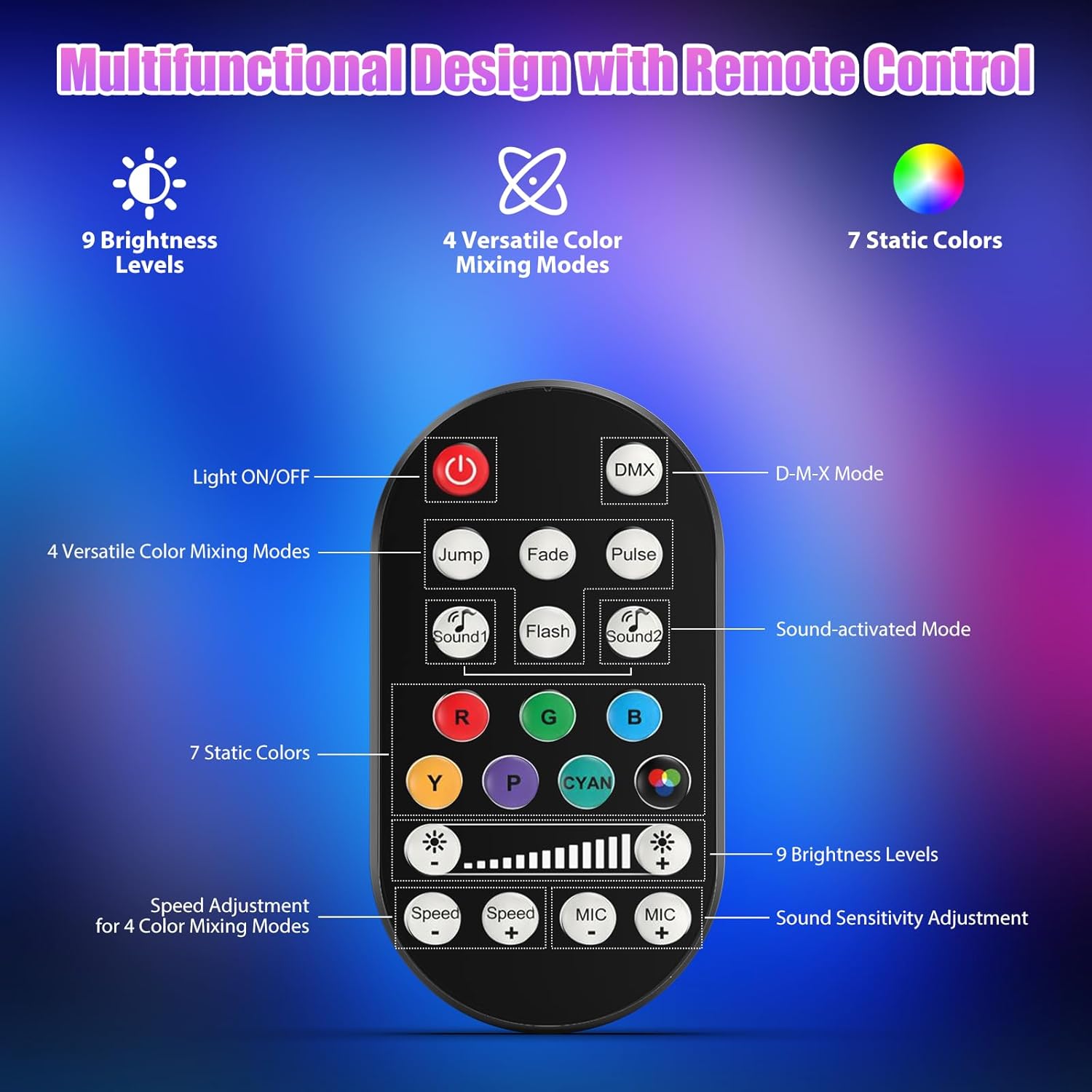
Immagine 7.1: Disposizione e funzioni del telecomando.
- Luce accesa/spenta: Accende o spegne l'unità.
- DMX: Attiva la modalità di controllo DMX.
- Jump, Fade, Pulse, Flash: Selects different color mixing modes.
- Sound1, Sound2: Activates sound-activated modes with different sensitivities.
- R, G, B, Y, P, Cyan, White: Seleziona colori statici.
- Livelli di luminosità: Adjusts the overall intensity of the light (9 levels).
- Velocità +/-: Regola la velocità degli effetti dinamici.
- MIC +/-: Adjusts the sound sensitivity for sound-activated modes (15 levels).
8. Controllo DMX512
For advanced control, connect the fixture to a DMX512 controller. The light bar typically uses 4 or 8 DMX channels. Refer to the display panel for DMX address setting and channel assignments.
8.1 Impostazione dell'indirizzo DMX
Use the MENU, UP, DOWN, and ENTER buttons on the fixture's display panel to set the DMX starting address. The display will show 'AXXX' where XXX is the address (e.g., A001).
8.2 DMX Channel Functions (Example - 8 Channel Mode)
| Canale | Funzione | Intervallo di valori | Descrizione |
|---|---|---|---|
| CH1 | Maestro Oscuratore | 0-255 | Luminosità generale (da 0% a 100%) |
| CH2 | Intensità rossa | 0-255 | Red LED brightness (0% to 100%) |
| CH3 | Intensità verde | 0-255 | Green LED brightness (0% to 100%) |
| CH4 | Intensità blu | 0-255 | Blue LED brightness (0% to 100%) |
| CH5 | Intensità bianca | 0-255 | White LED brightness (0% to 100%) |
| CH6 | Strobe/Effect | 0-255 | 0-10: No function; 11-255: Strobe speed (slow to fast) |
| CH7 | Programma automatico | 0-255 | Selects and controls speed of built-in auto programs |
| CH8 | Suono attivo | 0-255 | Activates sound mode and adjusts sensitivity |
Tabella 8.1: esample DMX Channel Functions (may vary slightly by firmware version).
9. Manutenzione
Una manutenzione regolare garantisce prestazioni ottimali e prolunga la durata del tuo apparecchio.
- Pulizia: Periodically clean the lens and housing with a soft, lint-free cloth. Do not use abrasive cleaners or solvents. Ensure the fixture is powered off and cool before cleaning.
- Ispezione: Controllare regolarmente i cavi di alimentazione, i cavi DMX e gli accessori di montaggio per verificare la presenza di segni di usura o danni. Sostituire immediatamente i componenti danneggiati.
- Magazzinaggio: Quando non viene utilizzato per lunghi periodi, conservare l'apparecchio in un ambiente asciutto e privo di polvere.
10. Risoluzione Dei Problemi
In caso di problemi, fare riferimento ai seguenti problemi comuni e alle relative soluzioni:
| Problema | Possibile causa | Soluzione |
|---|---|---|
| Nessun potere | Power cable disconnected; No power from outlet; Blown fuse | Check power cable connection; Test outlet with another device; Replace fuse if necessary |
| Nessuna emissione di luce | Dimmer channel at 0%; Incorrect mode selected; DMX signal issue | Increase dimmer level; Select desired operating mode; Check DMX cable and address settings |
| Incorrect colors/effects | Incorrect DMX channel values; Remote control interference | Verify DMX channel settings; Ensure remote is pointed directly at the sensor; Check for other IR interference |
| La modalità attivata dal suono non funziona | Microphone sensitivity too low; No sound input | Increase MIC sensitivity via remote or display; Ensure sufficient sound is present near the fixture |
| Surriscaldamento dell'apparecchio | Poor ventilation; Blocked heat sink | Ensure adequate airflow around the unit; Clean any dust or debris from the heat sink fins |
11. Specifiche
| Caratteristica | Dettaglio |
|---|---|
| Marca | DazzlingStage |
| Numero di modello | ZQ06190 |
| Sorgente luminosa | 9 LED RGBW da 60W |
| Miscelazione del colore | RGBW 4-in-1, 16.7 million colors |
| Oscuramento | Dimmerazione elettronica lineare 0-100% |
| Angolo del fascio | Grandangolo 35° |
| Modalità di controllo | DMX512, Auto, Sound-Activated, Remote Control, Master-Slave |
| Canali DMX | 4 or 8 Channels (selectable) |
| Display | Display a LED a 4 cifre |
| Materiale | Acrilonitrile Butadiene Stirene (ABS) |
| Dimensioni del prodotto | 18.1 x 5.5 x 5.1 pollici (46 x 14 x 13 cm) |
| Peso dell'articolo | Circa 1.98 libbre (0.9 kg) |
| Potenza in ingresso | CA 100-240 V, 50/60 Hz |
| Produttore | Shenzhen Zhuoqiong Technology Co., Ltd. |
12. Garanzia e supporto
DazzlingStage products are designed for reliability and performance. For warranty information, please refer to the terms and conditions provided at the time of purchase or contact your retailer.
If you require technical assistance or have questions not covered in this manual, please contact DazzlingStage customer support through the retailer's platform or the official brand website. Please have your model number (ZQ06190) and purchase details ready when contacting support.