
1. Importanti istruzioni di sicurezza
Leggere attentamente tutte le istruzioni prima di utilizzare questo apparecchio e conservarle per riferimento futuro. Il mancato rispetto di queste istruzioni può causare scosse elettriche, incendi o gravi lesioni personali.
- Garantire l'alimentazione voltage corrisponde all'etichetta di classificazione sull'apparecchio.
- Non utilizzare il ventilatore con un cavo o una spina danneggiati. Se il cavo è danneggiato, deve essere sostituito dal produttore, dal suo servizio di assistenza o da personale qualificato per evitare pericoli.
- Scollegare sempre la ventola dalla presa di corrente prima di pulirla, sottoporla a manutenzione o spostarla.
- Non inserire dita o altri oggetti nella griglia della ventola quando è in funzione.
- Keep the fan away from water or other liquids. Do not use it in wet or damp ambienti.
- Questo apparecchio è solo per uso interno. Non utilizzare all'aperto.
- Do not place the fan near heat sources such as radiators, heat registers, stoves, or other appliances that produce heat.
- Sorvegliare i bambini per assicurarsi che non giochino con l'apparecchio.
- Non utilizzare il ventilatore in aree in cui vengono conservati benzina, vernice o liquidi infiammabili.
2. Prodotto finitoview
The Altus AL 40 TFB is a sleek and efficient tower air cooler designed for indoor use. It features a compact design, multiple speed settings, and easy-to-use push-button controls.
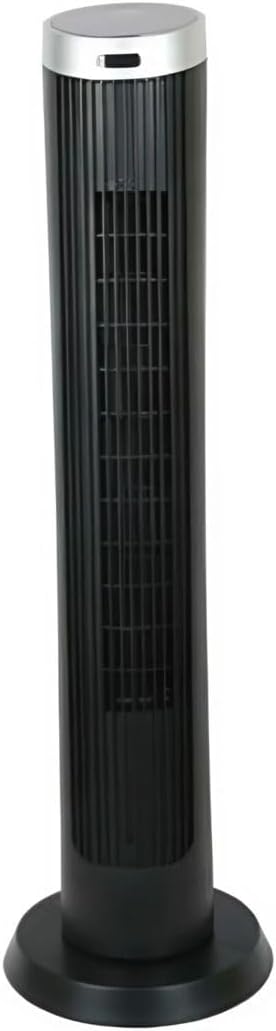
Figura 2.1: Davanti view of the Altus AL 40 TFB Tower Air Cooler. This image shows the tall, slender black body of the fan with its air outlet grille and a stable round base.
Componenti:
- Pannello di controllo: Located on the top of the unit for easy access to all functions.
- Griglia di uscita dell'aria: Vertical grille on the front for air dispersion.
- Base: Stable round base for secure placement.
- Cavo di alimentazione: Situato nella parte posteriore dell'unità.

Figura 2.2: Dettagliato view of the control panel on top of the Altus AL 40 TFB Tower Air Cooler. The panel features a digital display showing '28' and several push buttons for various functions.
3. Impostazione
Follow these steps to set up your Altus AL 40 TFB Tower Air Cooler:
- Disimballare: Carefully remove the fan from its packaging. Retain the packaging for future storage or transport.
- Montaggio base (se necessario): Some models may require minor base assembly. If your unit's base is detached, align the base sections and secure them according to the diagrams in the packaging. Ensure it is firmly attached.
- Posizionamento: Place the fan on a firm, level surface. Ensure there is adequate space around the fan for proper airflow, at least 30 cm (12 inches) from walls or furniture. This appliance is designed for indoor use only.
- Collegamento elettrico: Plug the power cord into a standard electrical outlet. Ensure the outlet meets the voltage requisiti specificati sull'etichetta del prodotto.
4. Istruzioni per l'uso
Your Altus AL 40 TFB Tower Air Cooler is equipped with user-friendly push-button controls on the top panel.
Funzioni del pannello di controllo:
- Pulsante di accensione (⏻): Press once to turn the fan ON, press again to turn it OFF.
- Pulsante di velocità (💨): Press repeatedly to cycle through the 3 available fan speeds: Low, Medium, and High. The current speed setting may be indicated on the digital display.
- Pulsante Modalità (M): If available, press to select different operating modes (e.g., Normal, Natural, Sleep). Refer to the digital display for the active mode.
- Pulsante di oscillazione (↔): Press to activate or deactivate the oscillation function, which allows the fan to rotate from side to side to distribute air over a wider area.
- Pulsante Timer (🕒): If available, press to set an automatic shut-off timer. Each press typically increases the timer duration by a set increment (e.g., 1 hour).
Funzionamento generale:
- Collegare il ventilatore a una presa di corrente adeguata.
- Premi il pulsante di accensione (⏻) to turn on the fan.
- Select your desired fan speed using the Speed Button (💨).
- Activate oscillation if desired by pressing the Oscillation Button (↔).
- To turn off the fan, press the Power Button (⏻) Ancora.
5. Manutenzione
Regular maintenance ensures optimal performance and extends the lifespan of your Altus AL 40 TFB Tower Air Cooler.
Pulizia:
- Prima di pulire il ventilatore, staccare sempre la spina.
- Pulizia esterna: Pulire le superfici esterne del ventilatore con un panno morbido eamp panno. Non utilizzare detergenti abrasivi, cere o lucidanti poiché potrebbero danneggiare la finitura.
- Griglie di ingresso/uscita dell'aria: Use a vacuum cleaner with a brush attachment to gently remove dust and debris from the air inlet and outlet grilles. Do not attempt to disassemble the fan for cleaning.
- Assicurarsi che la ventola sia completamente asciutta prima di ricollegarla e rimetterla in funzione.
Magazzinaggio:
Quando non viene utilizzato per lunghi periodi, conservare il ventilatore in un luogo fresco e asciutto. Si consiglia di conservarlo nella confezione originale per proteggerlo da polvere e danni.
6. Risoluzione Dei Problemi
If you encounter any issues with your Altus AL 40 TFB Tower Air Cooler, please refer to the following common problems and solutions:
- La ventola non si accende:
- Verificare che il cavo di alimentazione sia collegato saldamente a una presa elettrica funzionante.
- Ensure the power button on the control panel has been pressed.
- Verify that the household circuit breaker or fuse has not tripped.
- Flusso d'aria debole:
- Check if the fan speed is set to a higher setting.
- Ensure the air inlet and outlet grilles are not blocked by dust or obstructions. Clean them if necessary.
- Rumore insolito:
- Assicurarsi che il ventilatore sia posizionato su una superficie stabile e piana.
- Check for any foreign objects that might have fallen into the fan grilles.
- Se il rumore persiste, interrompere l'uso e contattare l'assistenza clienti.
If the problem cannot be resolved using the above steps, please contact Altus customer support.
7. Specifiche
Detailed technical specifications for the Altus AL 40 TFB Tower Air Cooler:
| Caratteristica | Specificazione |
|---|---|
| Marca | Altus |
| Nome del modello | AL 40 TFB |
| Colore | Nero |
| Progettazione di ventilatori elettrici | Floor Fan (Tower Type) |
| Fonte di alimentazione | Elettrico con cavo |
| Dimensioni del prodotto (P x L x A) | 29P x 29L x 101A cm |
| Tipo di montaggio | Montaggio a pavimento |
| Tipo di finitura | Dipinto |
| Uso interno/esterno | Al chiuso |
| Metodo di controllo | Premere il pulsante |
| Numero di livelli di potenza | 3 |
| Senza fili | NO |
8. Garanzia e supporto
Altus provides comprehensive support for its products. For any assistance or warranty-related inquiries, please contact our customer service.

Figura 8.1: Altus customer service and warranty information. The image displays the Altus logo, a message about service availability, and a contact number for support.
Our services are always available for your Altus products. You can benefit from our door-to-door service by calling our support line for any assistance you may need.
Arçelik Service Warranty: For products under warranty, our home product pickup service is provided free of charge.
Customer Support Line: 0850 210 0 888
Please have your product model number (AL 40 TFB) and purchase details ready when contacting support.