
1. Introduzione e oltreview
Welcome to your new DigiLand 10.1-inch Android Tablet MID1050. This manual provides essential information for setting up, operating, and maintaining your device. The tablet features a 10.1-inch display, an Octa-core processor, 6GB RAM, 32GB internal storage (expandable), and runs on Android 15. Please read this manual thoroughly to ensure proper use and to maximize your tablet's potential.
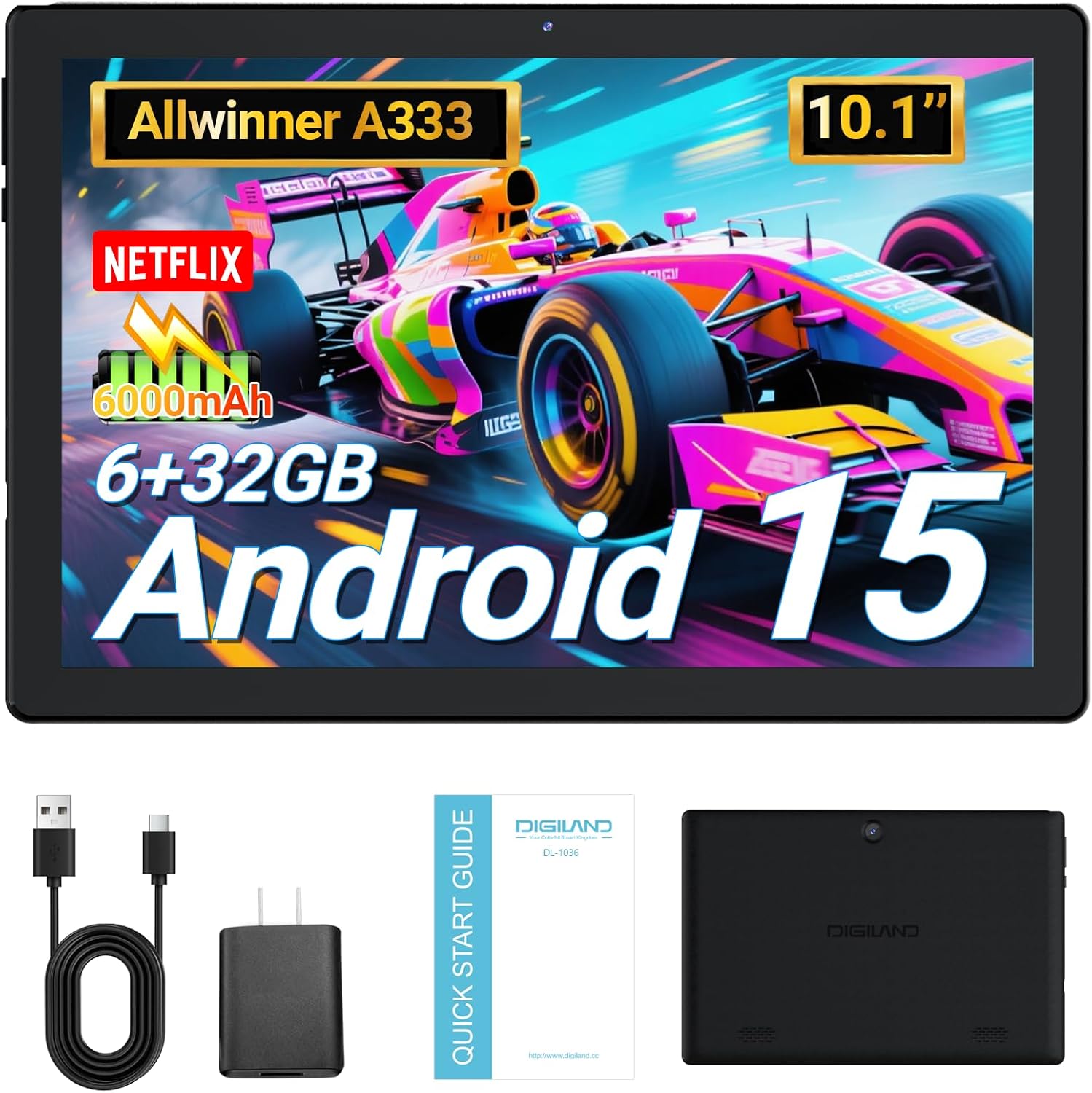
Image: DigiLand 10.1-inch Android Tablet MID1050.
2. Caratteristiche del prodotto
- Ultimo sistema Android 15: Experience enhanced compatibility, faster response times, and smoother operation. The tablet is GMS certified and comes with Google Play pre-installed, supporting popular social applications.
- Alte prestazioni: Equipped with a high-performance Octa-core CPU, 6GB RAM (expandable to 3+3GB), and 32GB ROM. Storage can be expanded up to 1TB using an SD card.
- Design multifunzionale: Features a 5MP rear camera and a 2MP front camera. Includes Bluetooth 5.0, built-in GPS, 5G WiFi, FM radio, dual-speakers, and a 3.5mm headphone jack.
- Schermo HD da 10.1 pollici: Enjoy a clear and vibrant visual experience with an 800x1280 IPS display. The 6000mAh rechargeable battery provides 8-10 hours of mixed use.

Immagine: Oltreview of DigiLand Android Tablet features.
3. Cosa c'è nella scatola
Upon unboxing your DigiLand tablet, please ensure all the following items are present:
- 1 x DigiLand 10.1-inch Android Tablet
- 1 cavo USB
- 1 x 5V/1A Power Adapter (US regulations)
- 1 x Manuale utente (questo documento)
- 1 x Scheda di garanzia
- 1 x Children's Silicone Case
4. Guida all'installazione
4.1 Ricarica del tablet
Before first use, fully charge your tablet. Connect the provided USB cable to the tablet's Type-C port and the power adapter. Plug the adapter into a standard electrical outlet. The battery indicator on the screen will show charging status.
4.2 Accensione/Spegnimento
- Per accendere: Press and hold the Power button (located on the side) until the DigiLand logo appears.
- Per spegnere: Tenere premuto il pulsante di accensione, quindi selezionare "Spegni" dalle opzioni sullo schermo.
4.3 Configurazione iniziale
Alla prima accensione, segui le istruzioni sullo schermo per configurare il tablet:
- Seleziona la lingua preferita.
- Connettersi a una rete Wi-Fi.
- Accedi con il tuo account Google o creane uno nuovo.
- Review e accettare i termini e le condizioni.
- Imposta il blocco schermo (PIN, sequenza o password).
4.4 Inserimento di una scheda MicroSD
To expand storage, locate the MicroSD card slot on the side of the tablet. Gently insert the MicroSD card (up to 1TB supported) into the slot until it clicks into place. Ensure the card is oriented correctly.

Image: Diagram showing the location of ports and buttons on the DigiLand Android Tablet.
5. Istruzioni per l'uso
5.1 Navigazione di base
The tablet uses a multi-touch display. Common gestures include:
- Rubinetto: Seleziona un elemento o apri un'app.
- Scorri: Scorrere le schermate o gli elenchi.
- Pizzico: Ingrandisci o rimpicciolisci le immagini e web pagine.
- Premere a lungo: Accedi ai menu contestuali o sposta le icone.
5.2 Connessione al Wi-Fi
Per connettersi a Internet:
- Vai a Impostazioni > Rete e Internet > Wifi.
- Attiva/disattiva Wi-Fi On.
- Seleziona la rete desiderata dall'elenco.
- Inserisci la password se richiesta, quindi tocca Collegare.
5.3 Associazione Bluetooth
Per connettersi ai dispositivi Bluetooth:
- Vai a Impostazioni > Dispositivi connessi > Bluetooth.
- Attiva Bluetooth On.
- Assicurati che il tuo dispositivo Bluetooth sia in modalità di associazione.
- Select your device from the 'Available devices' list and follow any on-screen instructions to complete pairing.
5.4 Utilizzo della fotocamera
Il tablet è dotato di una fotocamera frontale da 2 MP e di una posteriore da 5 MP.
- Aprire il Telecamera app dalla schermata iniziale o dal cassetto delle applicazioni.
- Tocca il pulsante di scatto per scattare una foto.
- Passa dalla fotocamera anteriore a quella posteriore tramite l'icona della fotocamera.
- Selezionare la modalità video per registrare video.

Image: Capturing moments with the tablet's cameras.
5.5 Gestione delle app
Download and manage applications:
- Installa app: Aprire il Negozio Google Play app, cerca l'app desiderata e tocca Installare.
- Disinstallare le app: Long-press an app icon on the home screen or app drawer, then drag it to 'Uninstall' or go to Impostazioni > Applicazioni > select the app > Disinstallare.

Image: The tablet's screen showing various applications.
5.6 Multitasking a schermo diviso
The tablet supports split-screen mode for multitasking:
- Apri la prima app che vuoi usare.
- Scorri verso l'alto dalla parte inferiore dello schermo e tieni premuto per accedere alle app recenti.
- Tap the app icon at the top of the first app's card, then select 'Split screen'.
- Scegli la seconda app dalle app recenti o dal cassetto delle app per riempire l'altra metà dello schermo.

Image: Tablet displaying two applications simultaneously in split-screen mode.
5.7 Video Playback Demonstration
Watch this video for a demonstration of the tablet's functions and video playback capabilities.
Video: Android 15 Tablet Product Function Demonstration by GuYi-USA. This video showcases the tablet's interface and media playback.
6. Manutenzione
6.1 Pulizia del tablet
Use a soft, lint-free cloth to clean the screen and body of the tablet. Avoid using abrasive cleaners, alcohol, or harsh chemicals, as these can damage the screen and finish.
6.2 Cura della batteria
- Evitare di esporre la compressa a temperature estreme (calde o fredde).
- Caricare la batteria regolarmente, ma evitare di lasciarla completamente carica o completamente scarica per periodi prolungati.
- Utilizzare solo il caricabatterie fornito o un caricabatterie compatibile certificato.
6.3 Aggiornamenti software
Regularly check for and install software updates to ensure your tablet has the latest features, security patches, and optimal performance. Go to Impostazioni > Sistema > Aggiornamento del sistema.
6.4 Gestione dell'archiviazione
Per mantenere prestazioni ottimali, gestisci periodicamente la memoria del tuo tablet:
- Disinstallare le app non utilizzate.
- Cancella le cache delle app (Impostazioni > Applicazioni > seleziona app > Archiviazione e cache > Cancella cache).
- Trasferisci grandi quantità files (photos, videos) to cloud storage or an external MicroSD card.
7. Risoluzione Dei Problemi
Se riscontri problemi con il tuo tablet, fai riferimento ai seguenti problemi comuni e alle relative soluzioni:
| Problema | Soluzione |
|---|---|
| Il tablet non si accende | Ensure the battery is sufficiently charged. Connect the tablet to the charger for at least 30 minutes before attempting to power on again. |
| Problemi di connessione Wi-Fi | Check if your Wi-Fi router is working correctly. Restart both the router and the tablet. Forget the network in tablet settings and reconnect. |
| Le app si bloccano o si bloccano | Clear the app's cache (Settings > Apps > [App Name] > Storage & cache > Clear cache). If the problem persists, try uninstalling and reinstalling the app. |
| Prestazioni lente | Chiudere le applicazioni in background non necessarie. Liberare spazio di archiviazione eliminando le vecchie fileo disinstallando le app non utilizzate. Riavviare il tablet. |
| Lo schermo non risponde | Perform a forced restart by holding the Power button for about 10-15 seconds until the tablet restarts. |
8. Specifiche
Key technical specifications for the DigiLand 10.1-inch Android Tablet MID1050:
| Caratteristica | Dettaglio |
|---|---|
| Numero di modello | MID1050 |
| Sistema operativo | Androide 15 |
| Dimensioni dello schermo | 10.1 pollici |
| Risoluzione massima dello schermo | Schermo IPS 800x1280 |
| Processore | Octa-core (A133P) |
| Memoria RAM | 6 GB |
| Memoria interna | 32 GB (espandibile fino a 1 TB tramite scheda TF) |
| Fotocamera frontale | 2MP |
| Telecamera posteriore | 5MP |
| Capacità della batteria | 6000mAh (Approx. 8-10 hours mixed use) |
| Connettività wireless | 5G WiFi (802.11g) |
| Bluetooth | 5.0 |
| Dimensioni (LxWxH) | 10.1 x 5.5 x 0.3 pollici |
| Peso dell'articolo | 2.01 libbre |
9. Garanzia e supporto
9.1 Garanzia del prodotto
The DigiLand 10.1-inch Android Tablet MID1050 comes with a one-year warranty from the date of purchase. This warranty covers manufacturing defects and ensures the product meets quality standards.
9.2 Assistenza clienti
For any quality problems, technical assistance, or warranty claims, please contact our customer service team. You can reach us via your Amazon Purchase Record. We are committed to ensuring customer satisfaction and providing the best possible service.