
1. Introduzione
The MeesMeek Traffic Light Visual Timer is designed to assist with time management through visual and auditory cues. It features a traffic light display that changes color as time progresses, an LCD screen for precise time display, and adjustable volume with multiple alert options. This timer is suitable for various environments including classrooms, homes, and offices, and can be particularly beneficial for individuals who benefit from visual time tracking.
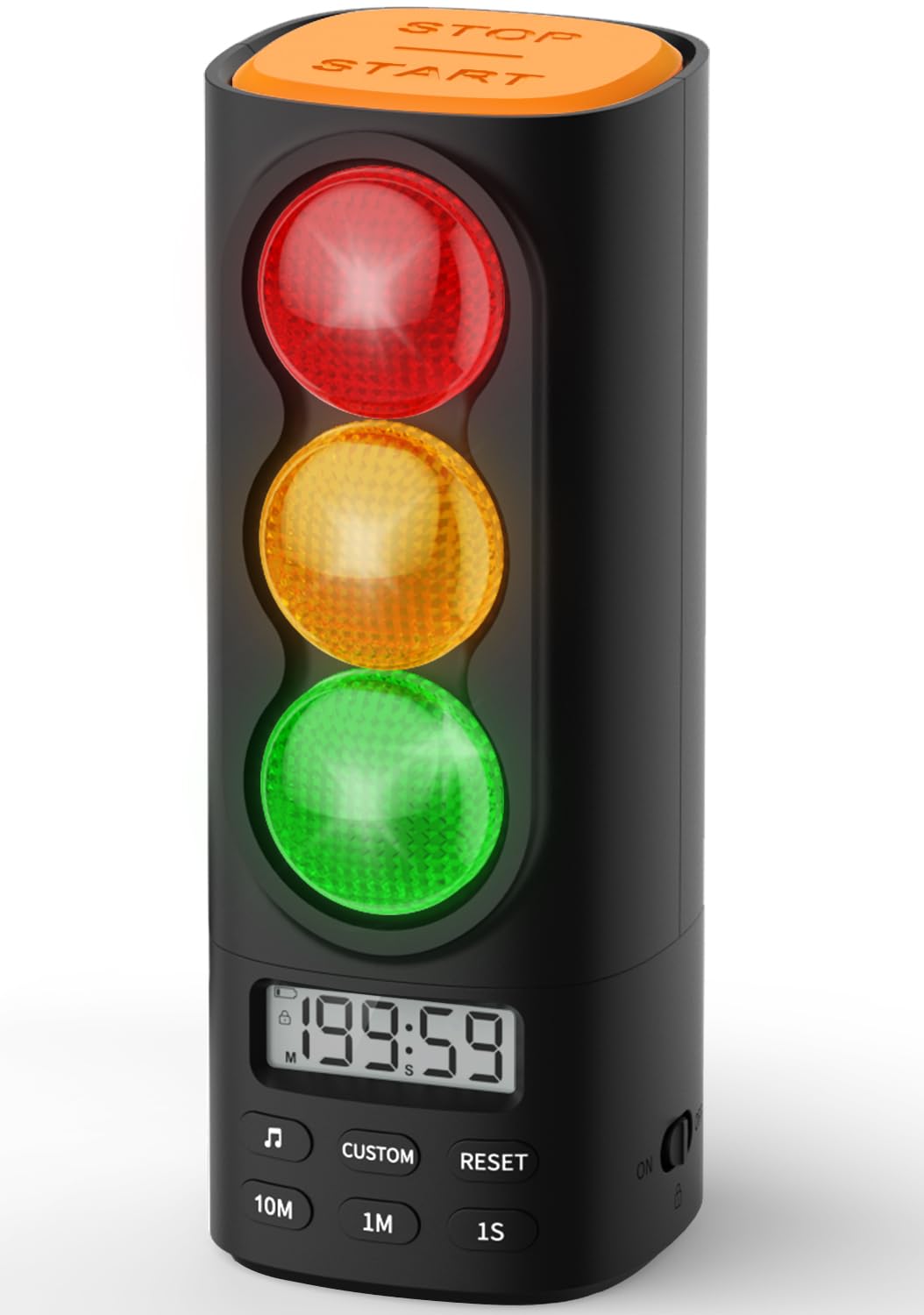
Image 1.1: The MeesMeek Traffic Light Visual Timer in black.
Key features include a countdown/count-up function up to 199 minutes and 59 seconds, a child safety lock, and a memory function that saves previous settings. The device is USB-C rechargeable for convenience and portability.
2. Contenuto della confezione
Si prega di verificare che tutti gli articoli siano presenti nel pacco:
- MeesMeek Traffic Light Visual Timer (Model 6236)
- Cavo di ricarica USB-C
- Adattatore di alimentazione
- Manuale di istruzioni (questo documento)
3. Prodotto finitoview
Familiarize yourself with the various parts and controls of your MeesMeek Visual Timer.

Image 3.1: Labeled diagram of the timer's buttons and ports.
- Stop/Start Button: Located at the top, used to begin or pause the timer.
- Luce rossa: Indicates time is up.
- Luce gialla: Indicates the last 30 seconds of the countdown (default setting).
- Luce verde: Indicates the timer is active.
- Schermo LCD: Shows current time, countdown/count-up, and other indicators.
- Pulsante musica: Selects alert tones.
- Pulsante personalizzato: For setting custom yellow light duration (refer to manual for details).
- Pulsante di reset: Clears current timer settings.
- 10M / 1M / 1S Buttons: Used to increase time by 10 minutes, 1 minute, or 1 second respectively when setting the timer.
- Cursore del volume: Located on the side for stepless volume adjustment.
- ON/OFF/Child Lock Switch: Located on the side to power on/off and activate child lock.
- Porta di ingresso USB-C: Per caricare il dispositivo.
4. Impostazione
4.1 Carica iniziale
Before first use, fully charge the timer. Connect the provided USB-C cable to the timer's USB-C input port and the power adapter, then plug it into a wall outlet. The red charging indicator will show the charging status. A full charge takes approximately 4.5 hours and provides up to 36 hours of runtime.

Image 4.1: The timer connected to its USB-C charger.
4.2 Accensione/Spegnimento
Locate the ON/OFF switch on the side of the timer. Slide the switch to the 'ON' position to power on the device. To power off, slide the switch to the 'OFF' position.
5. Istruzioni per l'uso
5.1 Impostazione del timer (modalità conto alla rovescia)
- Assicurarsi che il timer sia acceso.
- Use the '10M', '1M', and '1S' buttons to set the desired countdown time. The maximum time is 199 minutes and 59 seconds.
- Press the 'Stop/Start' button on top to begin the countdown. The green light will illuminate.
- During the countdown, the green light will remain on. For the last 30 seconds (default), the yellow light will illuminate. When the time reaches zero, the red light will illuminate, and the selected alarm will sound.
- To pause the timer, press the 'Stop/Start' button again. Press it once more to resume.
- To reset the timer, press the 'Reset' button.

Image 5.1: Pressing the Stop/Start button to control the timer.
5.2 Count-Up Mode (Stopwatch)
To use the timer as a stopwatch, ensure the timer is reset to 00:00. Press the 'Stop/Start' button to begin counting up. The green light will illuminate. Press 'Stop/Start' again to pause, and 'Reset' to clear.
5.3 Adjusting Volume and Alert Tones
Use the volume slider on the side of the device to adjust the alarm volume. Slide it to the left for lower volume or mute, and to the right for higher volume. Press the 'Music' button to cycle through the 4 available alert options (gentle beep, chime, buzzer, melody).

Image 5.2: Location of the volume slider and child lock switch.
5.4 Funzione blocco bambini
To prevent unintended adjustments, slide the ON/OFF switch to the 'Child Lock' position (indicated by a lock icon). This will disable all buttons on the timer. To unlock, slide the switch back to the 'ON' position.
5.5 Funzione di memoria
The timer automatically saves the last set countdown duration and alert tone. This allows for quick reuse of common settings without needing to reprogram them each time.
5.6 Customizing Yellow Light Duration
The factory default for the yellow light duration is 30 seconds. To customize this: Press and hold the 'Music' button for 3 seconds. Then, use the '10M', '1M', or '1S' buttons to adjust the desired yellow light pre-alarm time. Refer to the instruction manual for more detailed steps.
6. Video dimostrativo del prodotto
Watch this official product video for a visual guide on the timer's features and operation.
Video 6.1: A 44-second video demonstrating the MeesMeek Traffic Light Visual Timer's functions, including setting time, traffic light changes, and sound alerts.
7. Manutenzione
7.1 Pulizia
Per pulire il timer, strofinarlo con un panno morbido e asciutto. Non utilizzare detergenti abrasivi né immergere il dispositivo in acqua.
7.2 Cura della batteria
The timer contains a rechargeable battery. For optimal battery life, avoid fully discharging the battery frequently. If storing the device for an extended period, charge it to approximately 50% before storage and recharge every few months.
8. Risoluzione Dei Problemi
| Problema | Possibile causa | Soluzione |
|---|---|---|
| Timer does not power on. | La batteria è scarica. | Charge the timer using the provided USB-C cable and adapter. |
| I pulsanti non rispondono. | Il blocco bambini è attivato. | Slide the ON/OFF switch to the 'ON' position to deactivate child lock. |
| No sound from alarm. | Volume is set to mute or very low. | Adjust the volume slider on the side of the timer. |
| Yellow light duration is incorrect. | Custom setting was changed. | Refer to section 5.6 to reset or adjust the yellow light duration. |
9. Specifiche

Image 9.1: Dimensions of the MeesMeek Traffic Light Visual Timer.
- Numero modello: 6236
- Colore: Nero
- Materiale: Acrilonitrile Butadiene Stirene (ABS)
- Dimensioni del prodotto: 2.9"P x 2.6"L x 6.8"A (circa 7.4 cm P x 6.6 cm L x 17.3 cm A)
- Peso dell'articolo: 12 once (circa 340 grammi)
- Batteria: 1 C battery (included, rechargeable)
- Tempo di ricarica: Circa 4.5 ore
- Durata: Fino a 36 ore con una singola carica
- Max Timer Duration: 199 minuti 59 secondi
- Opzioni di avviso: 4 (gentle beep, chime, buzzer, melody)
10. Garanzia e supporto
For warranty information or technical support, please refer to the contact details provided with your purchase or visit the official MeesMeek webluogo. Conserva la ricevuta di acquisto per eventuali richieste di garanzia.