
1. Introduzione
Thank you for choosing the Hikity 8 Core 4G+64G Android 15 Car Radio. This device is designed to enhance your driving experience with advanced features such as wireless CarPlay, Android Auto, GPS navigation, Bluetooth 5.0, DSP sound processing, and FM/RDS radio. This manual provides detailed instructions for installation, operation, maintenance, and troubleshooting to ensure optimal performance and longevity of your car radio.
This car radio is specifically compatible with Nissan Juke J15 models from 2010-2019 and Infiniti ESQ models from 2011-2017. Its plug-and-play design simplifies installation by utilizing an adaptation cable, eliminating the need for complex automotive cable modifications.
2. Informazioni sulla sicurezza
- Installazione professionale consigliata: For safety and proper functionality, professional installation is highly recommended.
- Disconnessione dell'alimentazione: Always disconnect the vehicle's battery before attempting any installation or wiring.
- Cablaggio: Ensure all wiring connections are secure and correctly matched to avoid short circuits or damage.
- Sicurezza di guida: Non utilizzare funzioni complesse o guardare video che potrebbero distrarti durante la guida. Dai sempre priorità alla sicurezza stradale.
- Temperatura: Evitare di esporre il dispositivo a temperature estreme o alla luce solare diretta per periodi prolungati.
- Pulizia: Per pulire lo schermo e l'unità, utilizzare un panno morbido e asciutto. Evitare detergenti abrasivi o solventi.
3. Contenuto della confezione
Si prega di verificare che tutti gli articoli elencati di seguito siano inclusi nel pacchetto:
- 1 x Unità autoradio
- 1 x cavo di alimentazione
- 1 antenna GPS
- 1 x Power Cable for Rear Camera
- 1 x Cavo RCA
- 2 x Cavi USB
- 1 x Microfono
- 1 set di strumenti di installazione
- 1 telecamera posteriore AHD
- 1 decoder Canbus
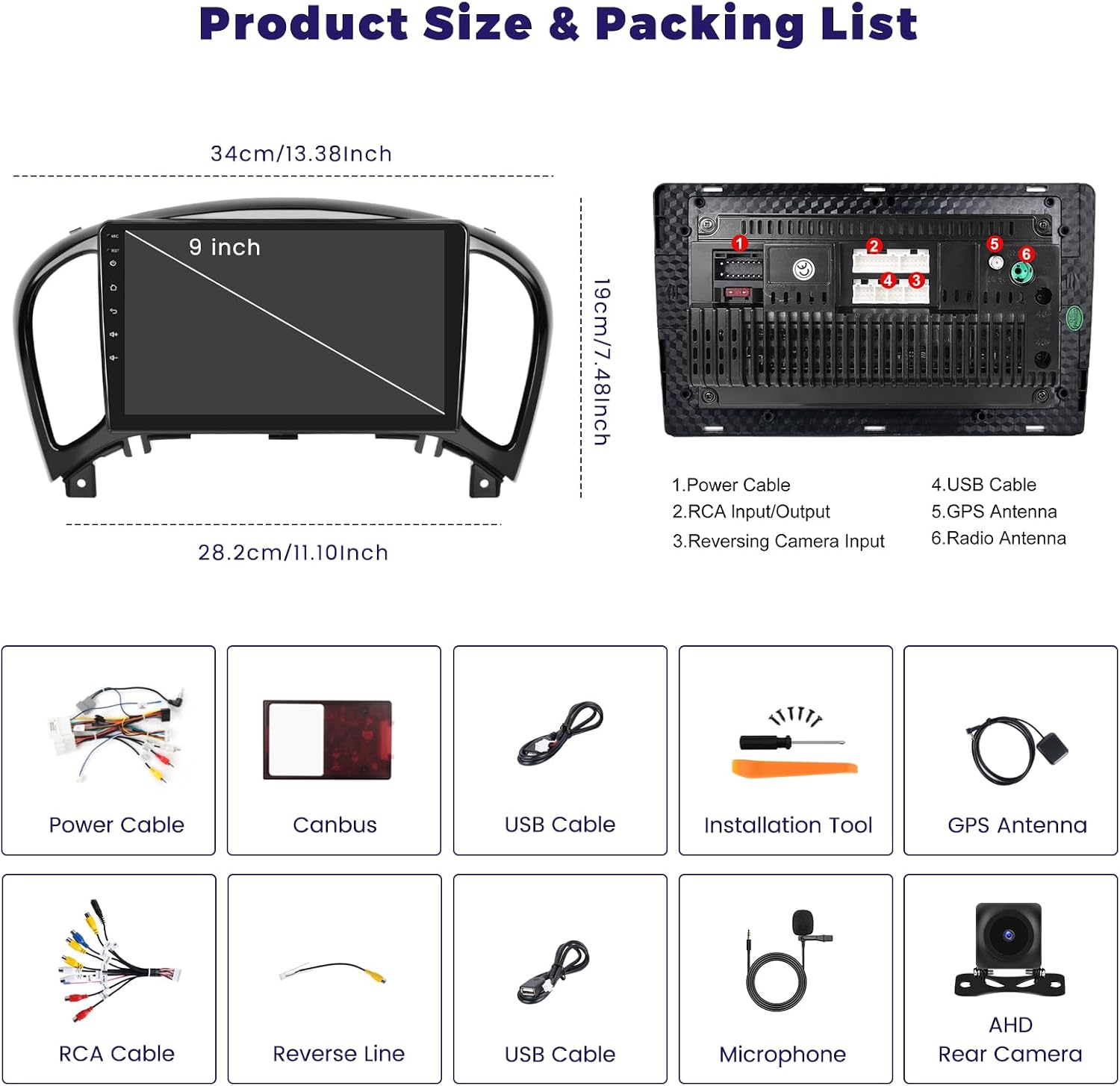
Image: Product dimensions and a visual representation of the included accessories, including power cable, Canbus, USB cables, installation tool, GPS antenna, RCA cable, reverse line, microphone, and AHD rear camera.

Image: Detailed diagram showing the car radio unit with numbered ports (1. Power Cable, 2. RCA Input/Output, 3. Reversing Camera Input, 4. USB Cable, 5. GPS Antenna, 6. Radio Antenna) and a list of included accessories.
4. Configurazione e installazione
4.1 Compatibilità del veicolo
This car radio is designed for a direct fit in Nissan Juke J15 (2010-2019) and Infiniti ESQ (2011-2017) models. The plug-and-play design ensures seamless integration with your vehicle's existing wiring harness using the provided adaptation cable.

Image: Visual comparison showing the car radio installed in a compatible Nissan Juke/Infiniti ESQ dashboard (left) and examples of incompatible dashboards (right), indicating which original car radio types can be replaced.
4.2 Collegamenti di cablaggio
Follow the wiring diagram carefully. Ensure all cables are securely connected to their corresponding ports.
4.2.1 Collegamento del decoder CANBUS
Connect the CANBUS decoder before powering on the unit. After installation, navigate to Apps > Setting > Factory Set Up (Password: 1234) > CAN settings. Select the correct brand, model, and year of your vehicle to ensure proper communication between the car radio and your vehicle's systems.

Image: Instructions for connecting the CANBUS decoder and configuring steering wheel controls. It shows the CANBUS connection and a screen interface for learning steering wheel button functions.
4.2.2 AHD Backup Camera Wiring
La telecamera di backup AHD inclusa richiede un cablaggio specifico:
- Collegare il cavo rosso (1) to the reversing light's positive (+) terminal.
- Collegare il cavo nero (2) to the vehicle's ground (GND).
To enable or disable guidelines, navigate to Car Info > About > Custom Set > turn on/off "show dynamic trackline" and "show static trackline".

Image: Diagram illustrating the wiring for the AHD backup camera, showing connections to the reversing light and ground, along with visual representations of 170° wide angle, night vision, waterproof, and HD features.
5. Istruzioni per l'uso
5.1 Sistema finitoview
The Hikity car radio features an 8-core processor, 4GB RAM, and 64GB ROM, providing faster startup and improved performance for a seamless user experience. It runs on the latest Android 15 system.
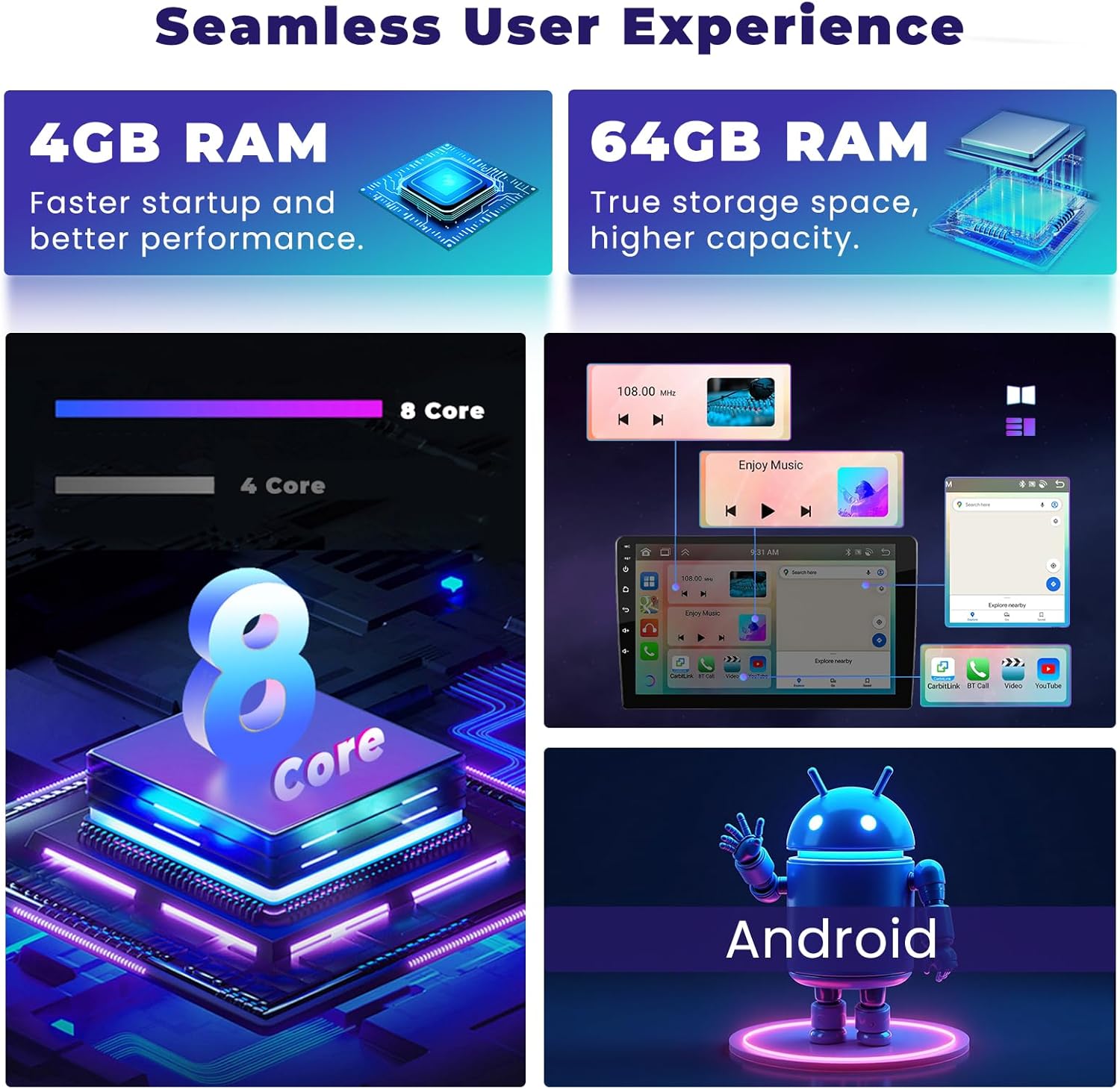
Image: Highlights the internal specifications of the car radio, including 4GB RAM for faster startup, 64GB ROM for true storage capacity, an 8-core processor, and the Android operating system interface.
5.2 Display e interfaccia
The unit features a 9-inch IPS touchscreen with a resolution of 1280x720 pixels, offering vivid images and a 178° viewing angle. You can customize your interface with 19 wallpaper options and 59 UI desktop themes.
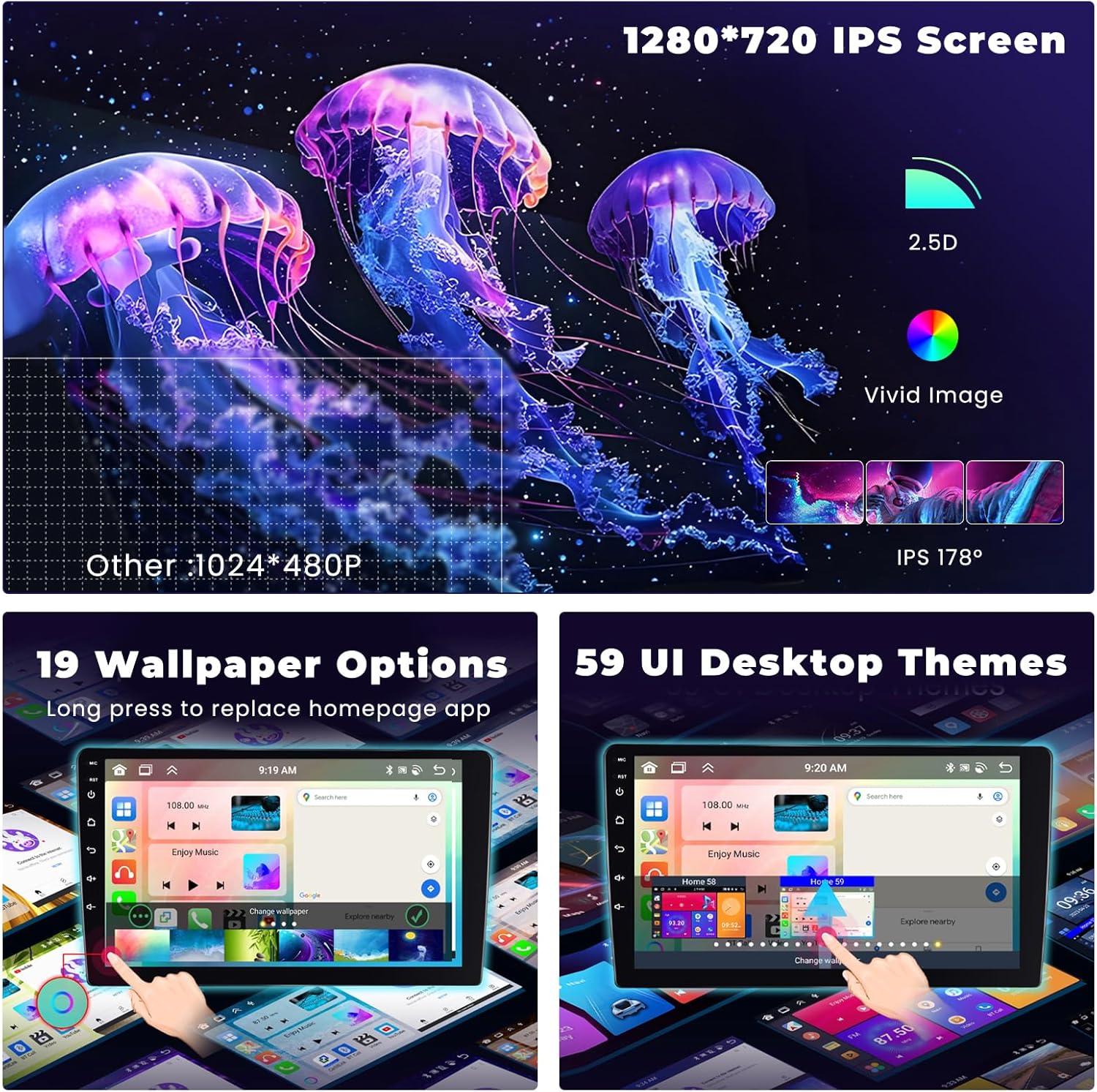
Image: Demonstrates the 1280x720 IPS screen quality, 2.5D curved glass, vivid image display, and 178° IPS viewing angle. It also shows examples of 19 wallpaper options and 59 UI desktop themes.
5.3 CarPlay wireless e Android Auto
Connect your smartphone wirelessly via CarPlay (for iOS) or Android Auto (for Android devices). This allows you to access navigation, make hands-free calls, play music, and use various apps directly from the car radio screen. Activate Siri or Google Assistant for voice control.

Image: Shows the interface for Wireless/Wired CarPlay & Android Auto, displaying features like CarPlay Map, Hands-free Calling, Online Music, and various compatible apps. It also details USB and BT connection options for both iOS CarPlay and Android Auto.
5.4 Navigazione GPS e Wi-Fi
The car radio includes an integrated GPS receiver supporting both online and offline maps. You can download worldwide offline maps for free. With Wi-Fi connectivity, access online maps, download apps from the Play Store, and browse the internet.

Image: Illustrates GPS accurate positioning with online/offline map capabilities, voice control features for hands-free operation, a three-split screen function allowing multiple applications on one page, and WiFi connection for online access.
5.5 Bluetooth 5.0, DSP & FM/RDS Radio
- Bluetooth 5.0: Enjoy hands-free calling, phonebook download, and music streaming.
- DSP (processore audio digitale): The integrated DSP with 32 bands allows you to customize audio settings to your preference, adapting to various music styles.
- Radio FM/RDS: High-quality FM/RDS audio receiver for clear radio reception.

Image: Displays the 32EQ DSP function with tuning software for frequency adjustment (AE, 36-band equalization, 10-band equalization). Also shows the Bluetooth 5.0 interface for calls and music, and the FM/RDS radio interface.
5.6 Controllo del volante (SWC)
The unit supports your vehicle's steering wheel control functions. This allows for quick and safe adjustment of music tracks, volume, and other settings without taking your hands off the wheel. Refer to the CANBUS setup section (4.2.1) for configuration.
6. Manutenzione
- Pulizia dello schermo: Utilizzare un panno morbido e privo di lanugine per pulire delicatamente il touchscreen. Per le macchie ostinate, strofinare leggermenteampPulisci il panno con acqua o un detergente per schermi. Evita prodotti chimici aggressivi.
- Aggiornamenti software: Periodically check for software updates provided by Hikity to ensure optimal performance, security, and access to new features. Follow the instructions provided with the update package.
- Cura generale: Mantenere l'unità libera da polvere e detriti. Assicurare un'adeguata ventilazione attorno all'unità per evitare il surriscaldamento.
7. Risoluzione Dei Problemi
If you encounter issues with your Hikity car radio, please refer to the following common problems and solutions:
| Problema | Possibile causa | Soluzione |
|---|---|---|
| Nessun potere | Cablaggio errato, fusibile bruciato, problema alla batteria del veicolo. | Controllare i collegamenti dei cavi di alimentazione. Ispezionare i fusibili del veicolo. Assicurarsi che la batteria sia carica. |
| Nessun suono | Problemi di cablaggio degli altoparlanti, volume troppo basso, impostazioni di uscita audio errate. | Verify speaker connections. Increase volume. Check audio settings (e.g., balance, fader, DSP). |
| GPS non funzionante/impreciso | GPS antenna not connected or poorly positioned, outdated maps, no internet connection for online maps. | Assicurarsi che l'antenna GPS sia collegata saldamente e posizionata in un luogo libero view of the sky. Update maps. Check Wi-Fi/data connection. |
| Problemi di accoppiamento Bluetooth | Bluetooth not enabled on device or car radio, device not in pairing mode, interference. | Enable Bluetooth on both devices. Put phone in pairing mode. Restart both devices. Clear previous pairings. |
| CarPlay/Android Auto Disconnection (e.g., after phone update) | Software incompatibility after phone OS update, cable issue (for wired connection), app cache. | Per la modalità wireless: Forget the car radio from your phone's Bluetooth/Wi-Fi settings and re-pair. Clear cache of CarPlay/Android Auto app on your phone. Check for car radio firmware updates. For wired: Try a different USB cable. Ensure phone OS is compatible with the car radio's CarPlay/Android Auto version. |
| Telecamera di backup non visualizzata | Incorrect wiring, camera malfunction, incorrect settings. | Verify camera power and video signal connections. Check if the camera input is enabled in settings. Ensure the car is in reverse gear. |
Se il problema persiste dopo aver provato queste soluzioni, contattare l'assistenza clienti Hikity per ulteriore assistenza.
8. Specifiche
| Caratteristica | Specificazione |
|---|---|
| Marca | Stravagante |
| Numero di modello | A7455A3453H1MI2-EU20 |
| Sistema operativo | Androide 15 |
| Processore | 8 Nucleo |
| Memoria RAM | 4 GB |
| ROM | 64 GB |
| Dimensioni dello schermo | 9 pollici |
| Tipo di schermo | Schermo tattile IPS |
| Risoluzione | 1280x720 |
| Tecnologia di connettività | Bluetooth 5.0, Ethernet, FM RDS, USB, Wi-Fi |
| Caratteristiche speciali | Wireless CarPlay, Wireless Android Auto, Built-in DSP EQ, GPS Navigation, Backup Camera Support |
| Dispositivi compatibili | Amplifier, Headphones, Speaker, Smartphone, Tablet |
| Modalità di uscita audio | Stereo |
| Canali audio surround | 4.0 o 4.1 |
| Codifica video | MKV / RMVB / AVI / MP4 / MDV |
| Potenza di uscita | 45 Watt (per canale) |
| Watt totaletage Uscita | 180 Watt |
| Internet Applications | Blockbuster, Browser, Netflix, Pandora, iTunes (via Play Store) |
| Metodo di controllo | Tocco |
| Formato multimediale digitale | AVI, WAV, WMA |
| Paese di origine | Cina |
9. Garanzia e supporto
9.1 Informazioni sulla garanzia
Questa autoradio Hikity è dotata di un Garanzia di 12 mesi dalla data di acquisto. La presente garanzia copre difetti di fabbricazione e malfunzionamenti in condizioni di normale utilizzo.
9.2 Assistenza clienti
Hikity provides lifetime online assistance for all inquiries. Our support team aims to respond within 24 hours.
If you have any questions or require technical assistance, please contact us:
- E-mail: hikityservices@163.com
- Online Inquiry: You can also reach out through the seller's page on Amazon.

Image: Customer service interface showing two steps for support: initial inquiry and direct messaging with a professional representative, along with the email address for contact.