
1. Prodotto finitoview
The Camtro M6 is a battery-powered wireless outdoor security camera designed for reliable surveillance. It features 1080p video resolution, color night vision, two-way audio, and smart AI motion detection to enhance your home security. This manual provides detailed instructions for setup, operation, and maintenance.

Figure 1.1: Camtro M6 Outdoor Security Camera with key features highlighted.

Figura 1.2: Oltreview of Camtro M6 camera features.
2. Contenuto della confezione
Si prega di controllare la confezione per verificare la presenza dei seguenti elementi:
- Telecamera di sicurezza per esterni Camtro M6
- Kit viti di montaggio
- Manuale di istruzioni (questo documento)
3. Impostazione
3.1 Carica iniziale
Before first use, fully charge the camera using a standard 5V USB charger (not included). The charging indicator light will turn solid when charging and off when fully charged. A full charge typically takes several hours.
3.2 Installazione dell'app e creazione dell'account
- Download the official Camtro app from your smartphone's app store (iOS or Android).
- Apri l'app e segui le istruzioni sullo schermo per creare un nuovo account utente.
3.3 Associazione del dispositivo e connessione Wi-Fi
- Ensure your smartphone is connected to a 2.4GHz Wi-Fi network. The Camtro M6 camera only supports 2.4GHz Wi-Fi.
- In the Camtro app, tap 'Add Device' or the '+' icon.
- Select the Camtro M6 camera model from the list.
- Seguire le istruzioni dell'app per mettere la telecamera in modalità di associazione (solitamente premendo il pulsante di reset).
- Scan the QR code displayed on your phone with the camera lens, or follow alternative pairing methods provided by the app.
- Una volta effettuata la connessione, assegna un nome alla tua telecamera e completa la procedura di configurazione.
3.4 Montaggio della telecamera
The Camtro M6 camera is designed for wall mounting. Choose a location that provides the desired viewangolo di inclinazione e si trova nel raggio di azione della rete Wi-Fi a 2.4 GHz.
- Mark the desired drill holes on the wall using the mounting bracket as a template.
- Praticare dei fori pilota e, se necessario, inserire i tasselli a muro.
- Fissare la staffa di montaggio alla parete utilizzando le viti fornite.
- Fissare la telecamera alla staffa di montaggio e regolare l'angolazione secondo necessità.
4. Utilizzo della fotocamera
4.1 Vivere View
Open the Camtro app and select your camera to access the live video feed. You can monitor your property in real-time from anywhere with an internet connection.
4.2 Audio bidirezionale
La telecamera è dotata di microfono e altoparlante integrati per la comunicazione bidirezionale.
- Mentre in diretta view, tocca l'icona del microfono nell'app.
- Speak into your smartphone to transmit audio through the camera's speaker.
- Rilascia l'icona del microfono per ascoltare attraverso il microfono della telecamera.

Figure 4.1: Using the two-way audio feature to communicate.

Figure 4.2: Two-way talk functionality for interactive communication.
4.3 Rilevamento intelligente del movimento tramite intelligenza artificiale
The Camtro M6 camera utilizes AI to distinguish between human movement and other objects, reducing false alerts.
- Abilita il rilevamento del movimento nelle impostazioni dell'app.
- Adjust sensitivity levels to optimize detection for your environment.
- Receive instant notifications on your smartphone when human motion is detected.

Figure 4.3: AI Human Detection distinguishing between a person and an object.

Figure 4.4: AI Human Detection accurately identifying human activity.
4.4 Visione notturna a colori
The camera provides clear color video even in low-light conditions, offering enhanced detail compared to traditional black and white night vision.
- Color night vision activates automatically in low light.
- Ensure the camera's night vision settings are enabled in the app.
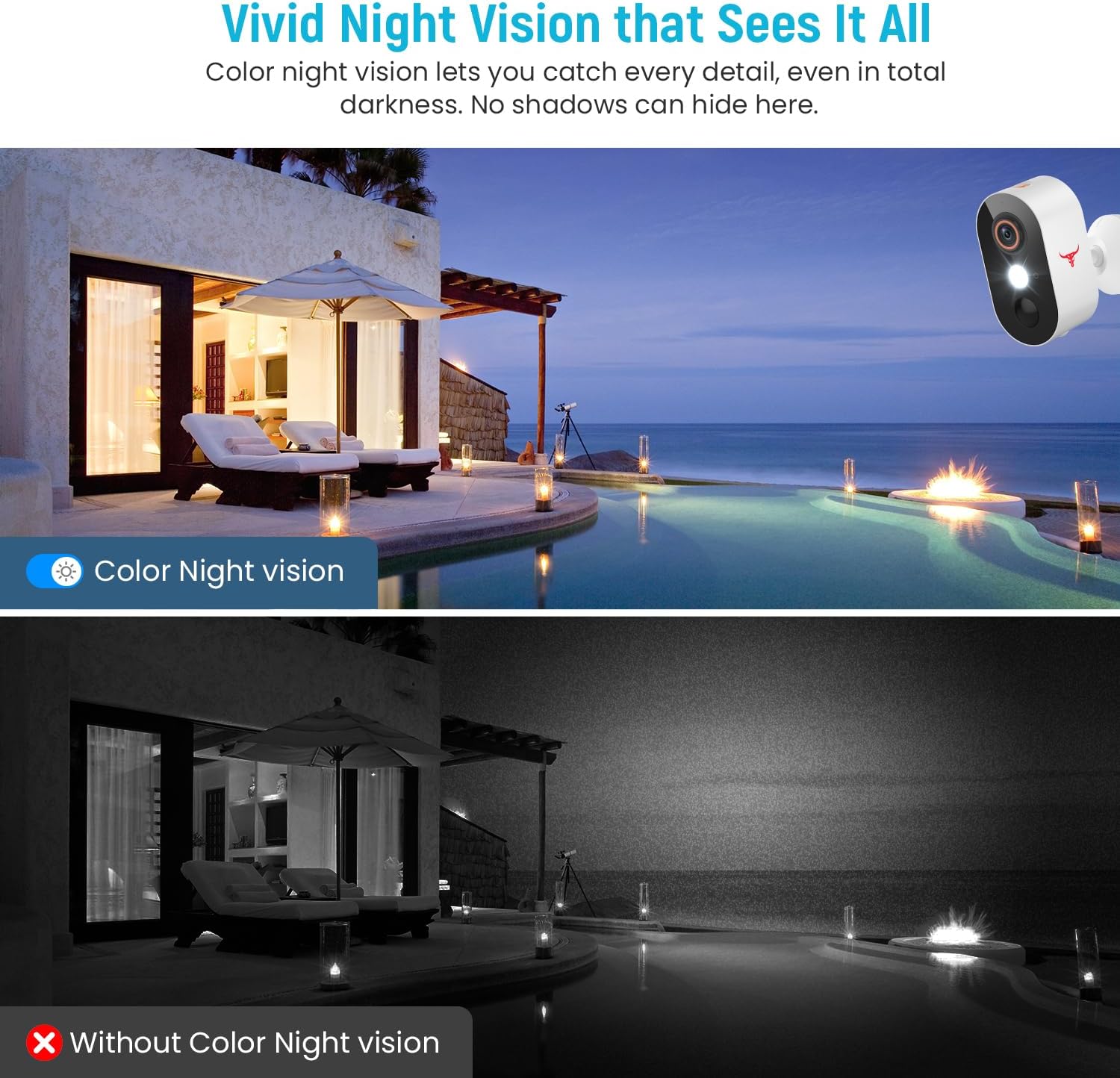
Figure 4.5: Comparison of Color Night Vision versus standard night vision.

Figure 4.6: Visual demonstration of Color Night Vision capability.
4.5 Archiviazione cloud
The Camtro M6 supports cloud storage for recording and reviewsto guardando il video footage. Cloud storage is sold separately and requires a subscription.
- Access recorded videos and playback history through the Camtro app.
- Manage your cloud storage subscription within the app or through the Camtro websito.

Figure 4.7: Cloud Storage functionality for video recording and access.

Figure 4.8: Cloud storage capturing and storing important events.
5. Manutenzione
5.1 Ricarica della batteria
The Camtro M6 is battery-powered. When the battery level is low, you will receive a notification via the app. Remove the camera from its mount and charge it using a standard 5V USB charger. Battery life varies based on usage and environmental factors.
5.2 Pulizia della fotocamera
Per garantire prestazioni ottimali, pulire periodicamente l'obiettivo e l'alloggiamento della fotocamera. Utilizzare un panno morbido eamp panno per rimuovere polvere e sporco. Evitare l'uso di prodotti chimici aggressivi o materiali abrasivi che potrebbero danneggiare la lente o la finitura.
5.3 Resistenza alle intemperie
The Camtro M6 camera is designed for outdoor use and is resistant to various weather conditions, operating effectively in temperatures from 14°F to 140°F (-10°C to 60°C).

Figure 5.1: Camtro M6 camera demonstrating weather resistance.
6. Risoluzione Dei Problemi
- La fotocamera non si connette al Wi-Fi: Ensure your Wi-Fi network is 2.4GHz. Check Wi-Fi signal strength at the camera's location. Restart your router and the camera, then attempt pairing again.
- Frequenti falsi avvisi di movimento: Adjust the motion detection sensitivity settings in the app. Ensure AI Human Detection is enabled to filter out non-human movements.
- Scarsa qualità video: Controlla la velocità della tua connessione Wi-Fi. Assicurati che l'obiettivo della fotocamera sia pulito e libero da ostruzioni.
- La batteria si scarica rapidamente: High activity areas or frequent live view access can reduce battery life. Ensure the camera is fully charged. Consider reducing motion detection sensitivity if alerts are excessive.
- Problemi audio bidirezionali: Ensure your phone's microphone and speaker are functioning correctly. Check the app's audio settings and your phone's volume.
7. Specifiche
| Caratteristica | Specificazione |
|---|---|
| Nome del modello | M6 (1080p Wi-Fi Security Camera) |
| Uso interno/esterno | All'aperto |
| Risoluzione di acquisizione video | Formato: 1080p |
| Tecnologia di connettività | Wireless (solo Wi-Fi a 2.4 GHz) |
| Fonte di alimentazione | Alimentato a batteria (2 batterie non standard incluse) |
| Caratteristica speciale | Motion Sensor, Color Night Vision, 2-Way Audio, AI Human Detection |
| Dispositivi compatibili | Smartphone (Android, iOS) |
| Tipo di montaggio | Montaggio a parete |
| Dimensioni del prodotto (L x P x A) | 2.8 x 1.7 x 3.4 pollici |
| Peso dell'articolo | 6.6 once |
| Temperatura di esercizio | Da 14°F a 140°F (da -10°C a 60°C) |
| Produttore | Shenzhen Puge Electronics Co., Ltd |
8. Garanzia e supporto
Camtro products are designed for reliability and performance. For warranty information, technical support, or service inquiries, please refer to the warranty card included with your product or visit the official Camtro website. You can also contact customer support through the Camtro app.