
1. Prodotto finitoview
The LongPlus 4K PoE Security Camera System, Model LP8MC84B2, provides advanced surveillance capabilities for both home and business environments. This system includes 4K (8MP) cameras, a Network Video Recorder (NVR) with a pre-installed 2TB Hard Disk Drive (HDD), and utilizes H.265+ video compression for efficient storage. Key features include 24/7 recording, spotlight color night vision, and clear video streaming. The Power over Ethernet (PoE) design simplifies installation by providing both power and data through a single Ethernet cable.

Image: LongPlus 4K PoE Security Camera System with NVR and four bullet cameras.
2. Cosa c'è nella scatola
Si prega di verificare che tutti gli articoli elencati di seguito siano inclusi nel pacchetto:
- 1 x 8CH NVR with 48/1.875V Adaptor
- 4 telecamere PoE 4K
- Mouse 1 x USB
- 1 cavo Cat1 da 5 m
- 1 cavo HDMI da 1 m
- 4 cavi Cat18 da 5 m
- 2 x Extra Connectors
- 4 confezioni di viti e altri accessori
- 1 x Guida rapida
3. Istruzioni per l'installazione
Follow these steps to set up your LongPlus 4K PoE Security Camera System:
- Collegare l'NVR a un monitor: Use the provided HDMI or VGA cable to connect the NVR to a compatible monitor.
- Power On the NVR: Connect the NVR to a power source using the provided power adapter and turn on the NVR power switch.
- Connetti alla rete: Connect an Ethernet cable from the NVR's LAN port to your router's LAN port for internet access.
- Collega le telecamere: Connect each PoE camera to any available PoE camera port on the NVR using the provided Ethernet cables. The cameras will receive both power and data through these cables.
- Collegare il mouse USB: Plug the USB mouse into a USB port on the NVR for system navigation.
- Configurazione iniziale: Follow the on-screen prompts on your monitor to complete the initial setup, including setting a password and configuring network settings.
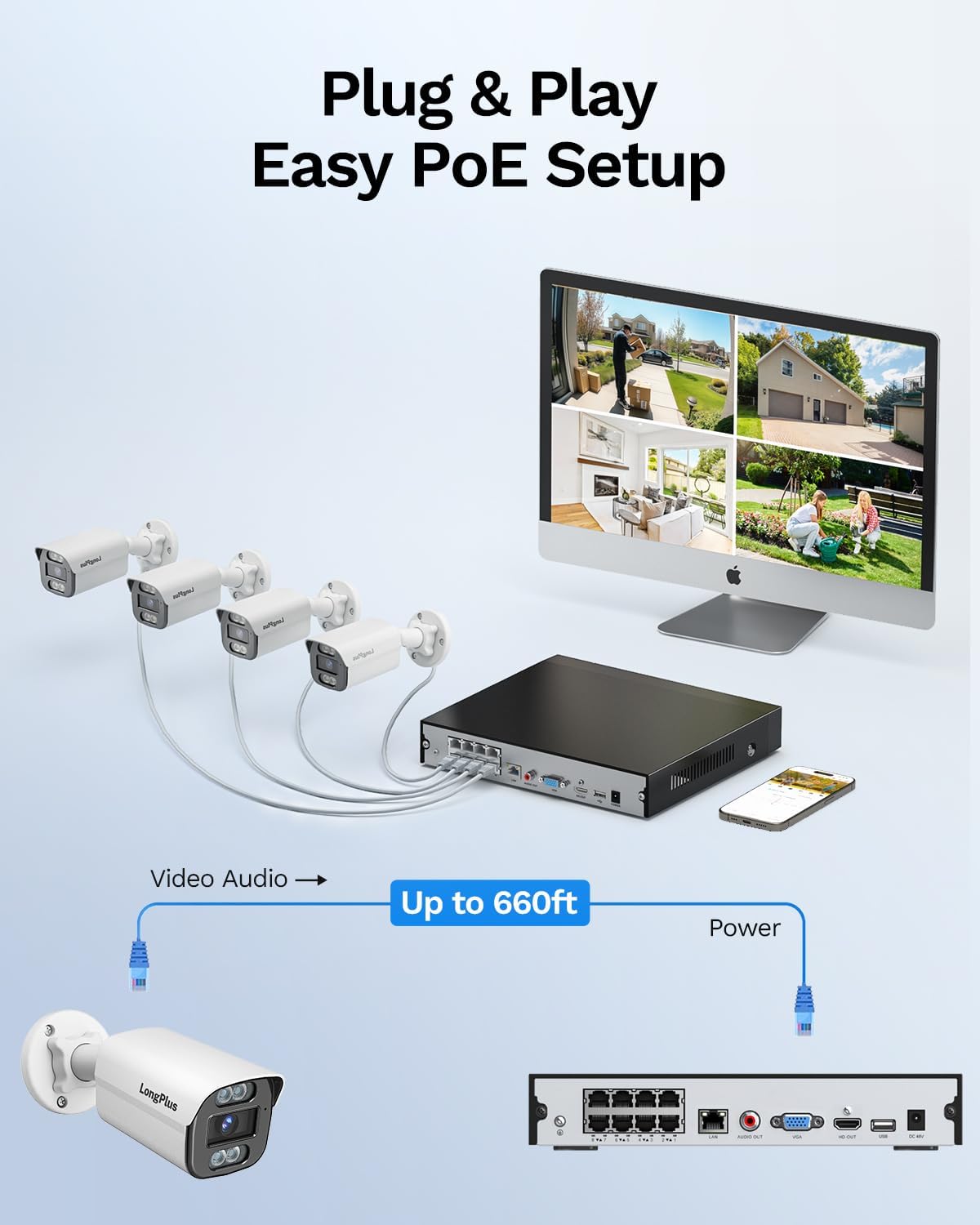
Image: Simplified PoE setup showing NVR, cameras, and monitor connections.
Video: LongPlus 8MP 16CH NVR Security System Unboxing & Setup Guide. This video demonstrates the unboxing process and step-by-step setup of the NVR and cameras.
4. Istruzioni per l'uso
4.1. 4K UHD and Wide View Angolo
The system captures video in crystal-clear 4K (3840x2160) resolution, providing enhanced detail and clarity. The cameras feature a 132° wide view angle, offering broader coverage and minimizing blind spots in your surveillance area.

Image: Demonstration of 4K UHD video quality, highlighting clear details day and night.

Image: Comparison illustrating the 132° wide view angle of LongPlus cameras.
4.2. AI Motion Detection and Activity Zones
The smart PoE cameras utilize AI object detection to accurately identify humans and vehicles, reducing false alarms. You can define specific activity zones within the camera's field of view to focus detection on critical areas and ignore motion in irrelevant regions. Privacy masks can also be set to exclude certain areas from recording.

Image: Smart AI detection identifying persons and vehicles, triggering alerts.
4.3. Triple Night Vision Modes
The system offers three night vision modes to suit various lighting conditions:
- Visione notturna IR: Visione infrarossa standard in bianco e nero.
- Visione notturna a colori: Provides full-color footage in low-light conditions, allowing for better identification of details up to 100ft/30m.
- Visione notturna intelligente: Automatically switches between IR and color modes based on detected activity.
4.4. Audio and Strobe Light Alarm / Two-way Audio
When motion is detected, the cameras can automatically trigger an audio alarm and red & blue strobe lights to deter intruders. The built-in two-way audio feature allows for real-time communication through the camera, enabling you to speak to visitors or warn off unwanted individuals.

Image: Two-way audio functionality with integrated strobe light alarm.
4.5. Flexible Storage and Playback
The NVR includes a 2TB HDD for 24/7 continuous recording, expandable up to 10TB. H.265+ compression technology significantly reduces file sizes, saving storage space without compromising video quality. Bank-level encrypted cloud storage is also available as an option. The Longvision APP/Client allows for easy playback of recorded footage, with events highlighted on the timeline for quick review.

Image: Interface demonstrating 24/7 recording and smart playback features.

Image: Explanation of H.265+ compression for efficient storage.
4.6. Accesso remoto e condivisione
Accedi a foo dal vivotage and recorded videos remotely via the Longvision app, compatible with iOS, Mac, Windows, and Android devices. The system supports up to 32 users, allowing you to share access with family members or colleagues.

Image: Remote access to live camera feeds via the Longvision app.
Video: LongPlus 4Channel PoE Security Camera System Overview. This video showcases the system's features including PoE setup, app monitoring, 4K UHD, night vision, motion detection, and alarm functions.
5. Manutenzione
Per garantire prestazioni ottimali e longevità del sistema di sicurezza, si consiglia una manutenzione regolare:
- Pulisci le lenti della fotocamera: Pulire periodicamente le lenti della fotocamera con un panno morbido eamp panno per rimuovere polvere e macchie che potrebbero compromettere la nitidezza dell'immagine.
- Controllare le connessioni: Ensure all cable connections (power, Ethernet, video) are secure and free from damage.
- Aggiornamenti del firmware: Regularly check for and install firmware updates for the NVR and cameras to benefit from new features and security enhancements.
- Review registrazioni: Periodicamente riview registrato footage to ensure the system is capturing events as expected.
- Posizionamento NVR: Assicurarsi che l'NVR sia posizionato in un'area ben ventilata per evitare il surriscaldamento.
6. Risoluzione Dei Problemi
If you encounter issues with your LongPlus security system, consider the following common troubleshooting steps:
- Nessuna visualizzazione video:
- Verify all power and video cables are securely connected.
- Assicurarsi che il monitor sia impostato sulla sorgente di ingresso corretta (HDMI/VGA).
- Riavviare l'NVR.
- Il rilevamento del movimento non funziona:
- Check motion detection settings in the NVR interface or app.
- Ensure activity zones are correctly configured and not excluding desired areas.
- Regola le impostazioni di sensibilità.
- Problemi di accesso remoto:
- Verificare che l'NVR sia connesso a Internet.
- Check network settings on the NVR and your router.
- Ensure the Longvision app is updated to the latest version.
- Scarsa qualità dell'immagine:
- Pulisci l'obiettivo della fotocamera.
- Controllare eventuali ostruzioni nel campo di ripresa della telecamera view.
- Assicurare un'illuminazione sufficiente per prestazioni ottimali nella visione notturna.
7. Specifiche
| Caratteristica | Dettaglio |
|---|---|
| Marca | Lungo Plus |
| Tecnologia di connettività | Cablato |
| Risoluzione di acquisizione video | 3840x2160, 4K |
| Caratteristiche speciali | High Efficiency Video Coding, Red & Blue Flashing Lights, Easy to Install, Waterproof, Vehicle Detection, Adjustable, Motion Sensor, Siren Alarm/Flexible Storage (Local Storage/Cloud Storage), Smart Playback, Vehicle/Person/Animal Detection |
| Numero di canali | 8 |
| Capacità di archiviazione della memoria | 2 TB (espandibile fino a 10 TB) |
| Colore | Bianco |
| Fonte di alimentazione | Elettrico con cavo |
| Dimensioni dell'articolo L x P x A | 13.29 x 10.23 x 9.4 pollici |
| Compatibilità del sistema operativo | Android, Mac OS, Windows, iOS |
| Usi consigliati | Indoor, Outdoor, Surveillance |
| Dispositivi compatibili | Cameras, Laptops, Personal Computers, Smartphones |
| Altre caratteristiche della fotocamera | Anteriore posteriore |
| Tecnologia a bassa luminosità | Visione notturna |
| Gamma di visione notturna | 100 piedi |
| Frequenza dei fotogrammi | 30 |
| Modalità di registrazione | Registrazione attivata dal movimento (impostazione predefinita); registrazione programmata, registrazione 24 ore su 7, XNUMX giorni su XNUMX |
| Porte USB totali | 2 |
| Interfaccia Hardware | Ethernet, HDMI, USB, VGA |
| Tipo di lente | Grandangolo |
| Ingresso video | VGA, USB, Ethernet, HDMI |
| Viewangolo di ing | 132 gradi |
| Produttore | LongPlus Direct |
| Peso dell'articolo | 13.26 libbre |
| Data prima disponibilità | 12 giugno 2025 |
8. Garanzia e supporto
LongPlus provides a Garanzia di 2 anno for this product, ensuring coverage against manufacturing defects. Additionally, lifetime technical support is available to assist with any inquiries or operational issues you may encounter. For support, please contact LongPlus customer service.